
lefant LT1 Manuel utilisateur

User manual
FCC ID:2AZ2R-LT1
Lefant LT1 Mopping Robot
FCC ID:2AZ2R-J2

1
Congratulations on the purchase of your Lefant ROBOTS!
We hope it brings you satisfaction. We trust your purchase will keep your home clean and provide you a high-quality life.
Should you encounter situations that have not been properly addressed in this User Manual, please contact our Customer Service Center, we will solve your
specific problem.For more information, please visit the Lefant ROBOTICS official website: www.lefant.com or send email to [email protected].
The Company reserves the right to make technological and/or design changes to this product for continuous improvement.

2
IMPORTANT SAFETY INSTRUCTIONS
WARNING: Read all safety warnings and instructions. Failure to follow the warnings and instructions may result in electric shock, fire or serious injury.
READ ALL INSTRUCTIONS BEFORE USING THIS APPLIANCE.
1. The robot must be used in accordance with the directions in this User
Manual. Our company cannot be held liable or responsible for any
damages or injuries caused by improper use.
2. Do not allow to be used as a toy. Close attention is necessary when
used by or near children.x.
Do not allow children to sit on the vacuum.
3. Clear the area to be cleaned. Remove power cords and small objects
from the floor that could entangle the Robot. Tuck rug fringe under the rug
base, and lift items such as curtains and table cloths off the floor.
4. If there is a drop off in the cleaning area due to a step or stairs, you
should operate the Robot to ensure that it can detect the step necessary
to place a physical barrier at the edge to keep the unit from falling. Make
sure the physical barrier is not a trip hazard.
5. Only use as described in this manual. Only use attachments recom-
mended or sold by the manufacturer.
6. Please make sure your power supply voltage matches the base station.
7. Do not handle or plug appliance with wet hands.
8. Non-rechargeable batteries are prohibited.
9. Do not use without dust bin and/or filters in place.
10. Do not operate the robot in an area where there are lit candles or
fragile objects on the floor to be cleaned.
11. Do not use and store in extremely hot or cold environments (below
-5°C /23°F or above 40°C/104°F). Please charge the robot in temperature
above 0°C/32°F and below 40°C/104°F. Follow all charging instructions
and do not charge the battery pack or appliance outside
of the temperature range specified in the instructions. Charging improperly
or at temperatures outside of the specified range may damage the battery
and increase the risk of fire.
12. Keep hair, loose clothing, fingers, and all parts of body away from any
openings and moving parts.
13. Do not operate the robot in a room where an infant or child is sleeping.
14. For INDOOR use ONLY. Do not use the robot in outdoor, commercial or
industrial environments. Do not use Appliance on wet surfaces or surfaces
with standing water.
15. Do not allow the robot to pick up large objects like stones, large pieces
of paper or any item that may clog the robot.
16. Do not use the robot to pick up flammable or combustible materials
such as gasoline, printer or copier toner, or use in areas where they may be
present.
17. Do not use the robot to pick up anything that is burning or smoking, such
as cigarettes, matches, hot ashes, or anything that could cause a fire.
18. Do not put any object into openings. Do not use with any opening
blocked; keep free of dust, lint, hair, and anything that may reduce air flow.
19. Take care not to damage the power cord. Do not pull on or carry the
robot or the base station by the power cord, use the power cord as a
handle, close a door on the power cord, or pull power cord around sharp
edges or corners. Do not run the robot over the power cord.Keep power
cord away from hot surfaces. Do not unplug by pulling on cord, To unplug,
grasp the plug, not the cord.
20. If the power cord is damaged, it must be replaced by the manufacturer
or its service agent in order to avoid a hazard.
For Household use only
When using an electrical appliance, basic precautions should always be followed, including the following:

3
21. Do not use the base station if it is damaged.
22. Do not use the robot or the base station if it is not working properly,
has been dropped, damaged, left outdoors, or come in contact with water.
It must be repaired by the manufacturer or its service agent in order to
avoid a hazard.
23. Turn OFF the power switch before cleaning or maintaining the robot. Turn
off all controls
24. The plug must be removed from the receptacle before cleaning or
maintaining the base station.
25. Remove the robot from the base station, and turn OFF the power
switch to the Appliance before removing the battery for disposal of the
robot.
26. The battery must be removed and discarded according to local laws
and regulations before disposal of the robot.
27. Please dispose of used batteries according to local laws and regula-
tions.
28. Do not incinerate the robot even if it is severely damaged. The batteries
can explode in a fire.
29. When not using the base station for a long period of time, please
unplug it.
30. Prevent unintentional starting. Ensure the switch is in the off position
before connecting to battery pack, picking up or carrying the appliance.
Carrying the robot with your finger on the switch or energizing the robot that
have the switch on invites accidents.
31. When battery pack is not in use, keep it away from other metal objects,
like paper clips, coins,keys, nails, screws,ect, that can make a connection
from one terminal to another. Shorting the battery terminals together may
cause burns or a fire.
32. Under abusive conditions, liquid may be ejected from the battery; avoid
contact. If contact accidentally occurs, flush with water. If liquid contacts
eyes, additionally seek medical help. Liquid ejected from the battery may
cause irritation or burns.
33. Do not use a battery pack that is damaged or modified. Damaged or
modified batteries may exhibit unpredictable behavior resulting in fire,
explosion or risk of injury.
34. Do not expose a battery pack or appliance to fire or excessive tempera-
ture. Exposure to fire or temperature above 130°C/265°F may cause
explosion.
35. Have servicing performed by a qualified repair person using only
identical replacement parts.
36. Do not modify or attempt to repair the robot or the battery pack (as
applicable) except as indicated in the instructions.
37. Do not operate the robot in a room that has lit candles on furniture that
the vacuum may accidentally hit or bump into.
38. Recharge only with the charger specified by the manufacturer. A
charger that is suitable for one type of battery pack may create a risk of
fire when used with another battery pack.
39. Use the robot only with specifically designated battery packs. Use of any
other battery packs may create a risk of injury and fire.
40. The robot contains batteries that are only replaceable by skilled
persons. To replace the robot's battery, please contact Customer Service.
41. If the robot is not going to be used for a long time, fully charge the robot,
power it OFF, and unplug the base station.
4
Keep this product away from heat sources. It is recommended that the product is stored in a sealed container at 0-30°C in a dry and cool place. Keep this
product out of the reach of children and pets. Do not allow this product to come into contact with eyes or skin. In case of accidental contact with the eyes,
rinse slowly and gently with plenty of water for at least 15 minutes, for contact lens wearers remove contact lenses for the first 5 minutes and continue to
rinse eyes. If skin contact occurs, wash off with warm, soapy water. If symptoms persist after these actions, seek medical attention. Do not inhale or
consume this product. If this product is inhaled, move to fresh air. If this product is ingested, rinse your mouth or drink plenty of water. If discomfort persists
after doing so, seek medical attention immediately. Do not add other liquids to this product to prevent it from interfering with the normal use of the machine.
A small amount of suspended matter in the cleaner is normal and should be used with confidence.
Cleaner Precautions
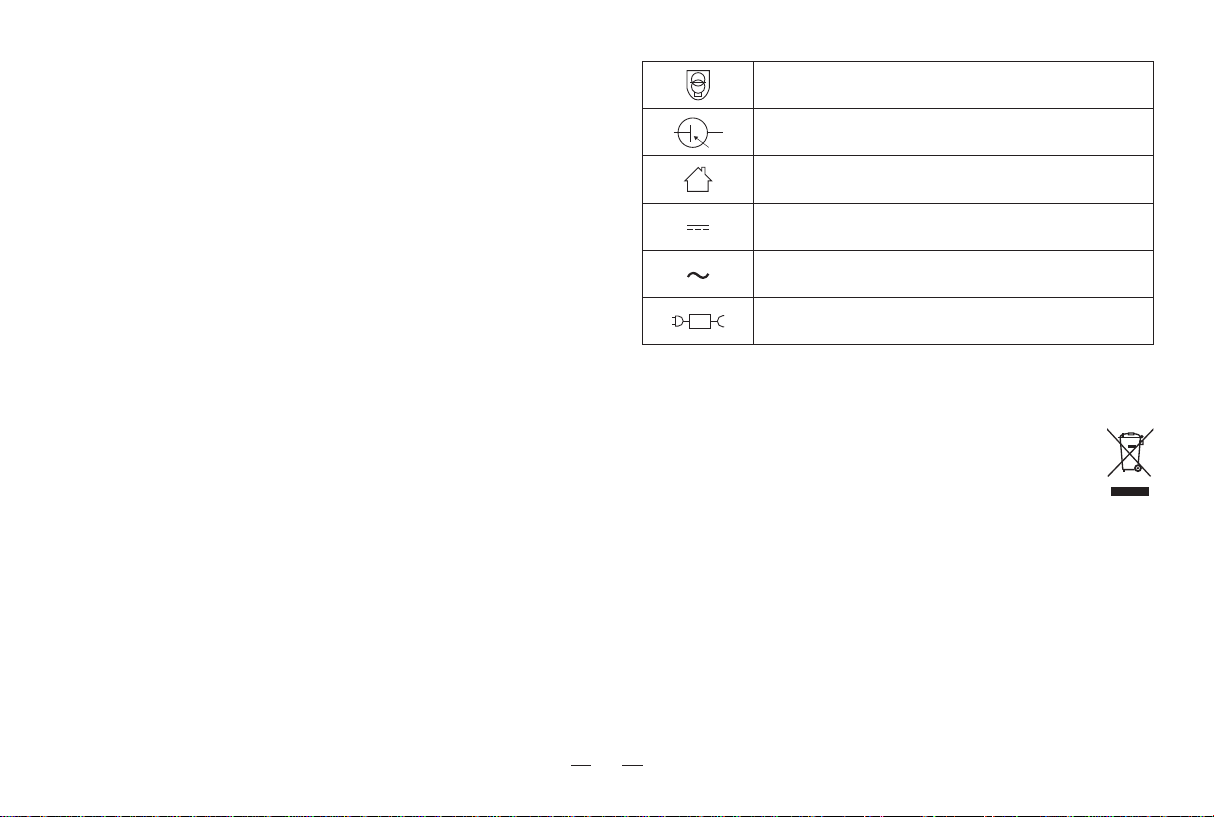
SAVE THESE INSTRUCTIONS Short-circuit-proof safety isolating transformer
Switch mode power supply
For indoor use only
Direct current
Alternating current
detachable supply unit
S
This marking indicates that this product should not be disposed of with other household waste throughout the EU. To prevent possible harm to the
environment or human health from uncontrolled waste disposal, recycle it responsibly to promote the sustainable reuse of material resources. To
recycle your used device, please use the return and collection systems or contact the retailer where the product was purchased. They can safely
recycle this product.
Correct Disposal of this Product
To satisfy RF exposure requirements, a separation distance of 20 cm or more
should be maintained between this device and persons during device operation.
To ensure compliance, operations at closer than this distance is not recom-
mended. The antenna used for this transmitter must not be co-located in
conjunction with any other antenna or transmitter.

5
Federal Communications Commission (FCC) Interference Statement
This device complies with Part 15 of the FCC Rules.
Operation is subject to the following two conditions:
(1) This device may not cause harmful interference,
and (2) this device must accept any interference received, including
interference that may cause undesired operation.
FCC Caution:
Any changes or modifications not expressly approved by the party
responsible for compliance could void the user 5s authority to operate this
equipment.
RF exposure warning
This equipment complies with FCC radiation exposure limits set forth for
an uncontrolled environment.This equipment must be installed and
operated in accordance with provided instructions and the antenna(s)
used for this transmitter must be installed antenna(s) used for this
transmitter must be installed to provide a separation distance of at least
20 cm from all persons and must not be collocated or operating in
conjunction with any other antenna or transmitter.
This equipment has been tested and found to comply with the limits for a
Class B digital device, pursuant to Part 15 of the FCC Rules.
These limits are designed to provide reasonable protection against harmful
interference in a residential installation. This equipment generate, uses and
can radiate radio frequency energy and, if not installed and used in
accordance with the instructions, may cause harmful interference to radio
communications.
However, there is no guarantee that interference will not occur in a
particular installation. If this equipment does cause harmful interference to
radio or television reception, which can be determined by turning the
equipment off and on, the user is encouraged to try to correct the interfer-
ence by one of the following measures:
• Reorient or relocate the receiving antenna.
• Increase the separation between the equipment and receiver.
• Connect the equipment into an outlet on a circuit different from that to
which the receiver is connected.
• Consult the dealer or an experienced radio/TV technician for help.

6
Contents
1. Product introduction 7
1.1 Packing list
1.2 Part name
····················································
2. Preparation 11
2.1 Assemble and charge
2.2 Using environment preparation
····················································
4. Abnormal symptoms
4.1 Troubleshooting
22
····················································
5. Technical parameters 24
····················································
3. Using the product 13
3.1 How to use the robot buttons
3.2 How to use the station buttons
3.3 Mopping
3.4 App download and configuration
3.5 Maintenance frequency
3.6 Maintenance
····················································

7
1. Product introduction / 1.1 Packing list
*The picture of the manual is for reference only. The appearance should be subject to the actual manual.
Robot
Mop bracket Cleaner
Self-cleaning station
Water tankPower cable Mop
User manual
User manual
Lefant LT1 Mopping Robot
8
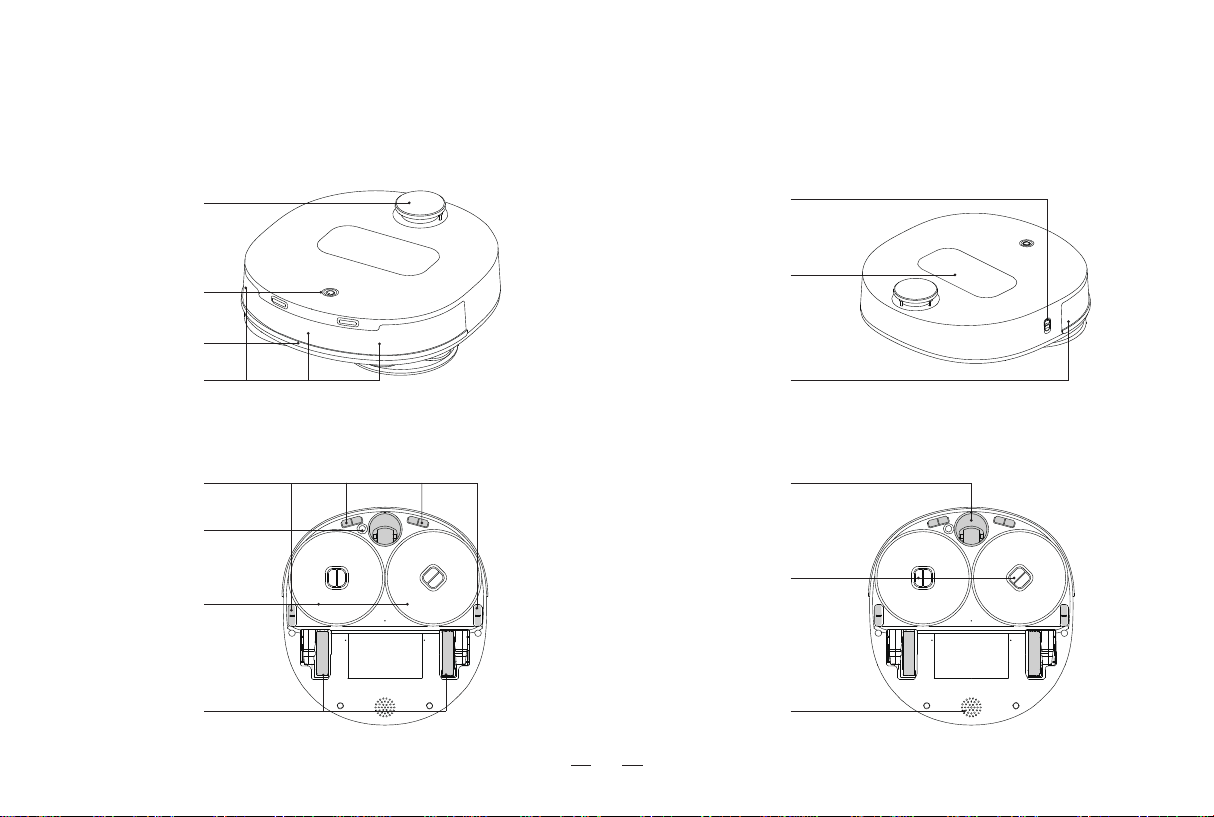
1. Product introduction / 1.2 Part Name
Side view
Bottom view
Front view
dToF Laser
Navigation Sensor
Start/pause button
Line laser sensors Line laser sensors
Bumper
Water tank
Power Switch
Green at the bottom of the switch is on,
Red at the bottom of the switch is off.
Drive Wheel
Anti-falling sensor
Mop
Ultrasonic sensors
Universal Wheel
Speaker
Mop bracket

9
1. Product introduction / 1.2 Part Name
Back to wash button
Start/pause button
Mode switch button
Display Screen
Charging electrode
Water intake
Power Socket
Cleaning tray
sewage tank
Tank handle
Clean water tank
Self-cleaning station
Table des matières


