
LaserLiner LaserRange-Master Gi7 Pro Manuel utilisateur

LaserRange-Master Gi7 Pro
Laser
515 nm
360°
ANGLE
FUNCTION
04
14
24
34
44
DE
EN
NL
DA
FR
ES
IT
PL
FI
PT
SV
NO
TR
RU
UK
CS
ET
RO
BG
EL

02
Laser
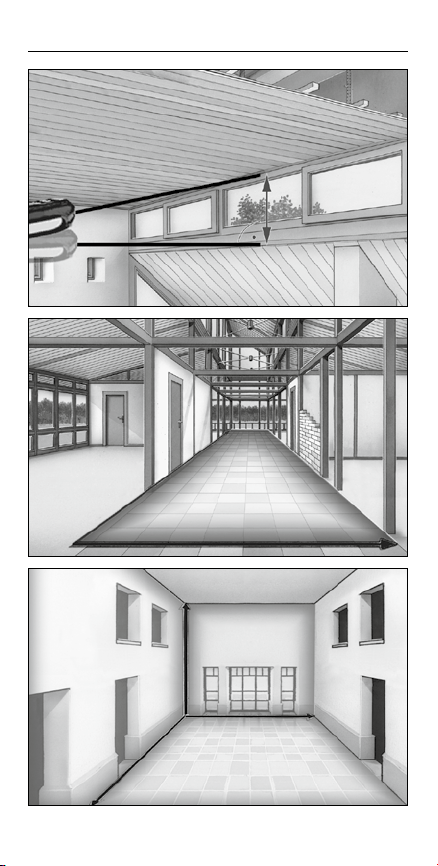
LaserRange-Master Gi7 Pro
03
x· y =m2
x
y
xy
z
x· y· z= m3

14
Laser radiation!
Do not stare into the beam!
Class 2 laser
< 1 mW · 515 nm
EN 60825-1:2014
Safety instructions
Using class 2 lasers
– The device must only be used in accordance with its intended
purpose and within the scope of the specications.
– The following persons may use the device only when they are either
supervised by a person who is responsible for their safety or have
received instruction from this person on how to use the device:
– Persons with restricted physical, sensory or mental abilities
– Persons with no knowledge and/or experience in the use of the device
– Children (under the age of 14)
– The device and its accessories are not toys.
– Modications or changes to the device are not permitted,
this will otherwise invalidate the approval and safety specications.
–
Do not expose the device to mechanical stress, extreme temperatures,
moisture or signicant vibration.
– The device must no longer be used if one or more of its functions fail
or the battery charge is weak.
– Please ensure compliance with the safety regulations set out by local
and national authorities with regard to the correct and proper use of
the device.
General safety instructions
Laser distance meter – with green DLD laser technology
– Functions: distances, area, volume, continuous measurement,
angle function 1 + 2 + 3, digital bubble level and tilt sensor calibration,
addition / subtraction of lengths, areas, volumes
– 360° inclination sensor for determining the horizontal and
vertical distance
– Bluetooth®* interface to transfer the measured data
Function / Application
Completely read through the operating instructions, the
„Warranty and Additional Information“ booklet as well
as the latest information under the internet link at the end
of these instructions. Follow the instructions they contain.
This document must be kept in a safe place and if the laser
device is passed on, this document must be passed on with it.
!
EN
– Attention: Do not look into the direct or reected beam.
– Do not point the laser beam towards persons.
– If a person‘s eyes are exposed to class 2 laser radiation, they should shut
their eyes and immediately move away from the beam.

LaserRange-Master Gi7 Pro
15
Safety instructions
Dealing with RF radiation
– The measuring device is equipped with a wireless interface.
– The measuring device complies with electromagnetic compatibility
and wireless radiation regulations and limits in accordance with the
RED 2014/53/EU.
– Umarex GmbH & Co. KG hereby declares that the LaserRange-Master
Gi7 Pro
radio equipment complies with the essential requirements and
other provisions of the European Radio Equipment Directive 2014/53/EU
(RED). The EU Declaration of Conformity can be found in its entirety at
the following address: http://laserliner.com/info?an=AHE
– The measuring device complies with electromagnetic compatibility
regulations and limits in accordance with the EMC Directive 2014/30/EU
which is covered by the Radio Equipment Directive 2014/53/EU.
– Local operating restrictions – for example, in hospitals, aircraft, petrol
stations or in the vicinity of people with pacemakers – may apply.
Electronic devices can potentially cause hazards or interference or be
subject to hazards or interference.
– The measuring accuracy may be affected when working close
to high voltages or high electromagnetic alternating elds.
Safety instructions
Dealing with electromagnetic radiation
– Tampering with (making changes to) the laser device is not permitted.
– Under no circumstances should optical instruments
(magnifying glass, microscope, binoculars)
EN
Approx. 6 times brighter than a typical red laser with
630 - 660 nm
Laser modules in DLD design stand for high line quality
as well as a clean and clear and therefore
easily visible
line image. Unlike previous generations
they are more
temperature-stable and energy efcient.
Furthermore, the human eye has a higher sensitivity to
the wave range of the green laser than the red laser,
for example. This makes the green laser diode appear
much brighter than the red one.
Green lasers, especially in the DLD design, thus offer
advantages with regards to how visible the laser line
is under unfavourable conditions.
Green laser technology
16
g
b
f
a
k
j
e
di
h
c
l
o
r
m
p
s
n
q
t
u v
1.
2.
3.
4.
5.
6.
* The Bluetooth®word mark and the logo are registered trademarks of Bluetooth SIG Inc.
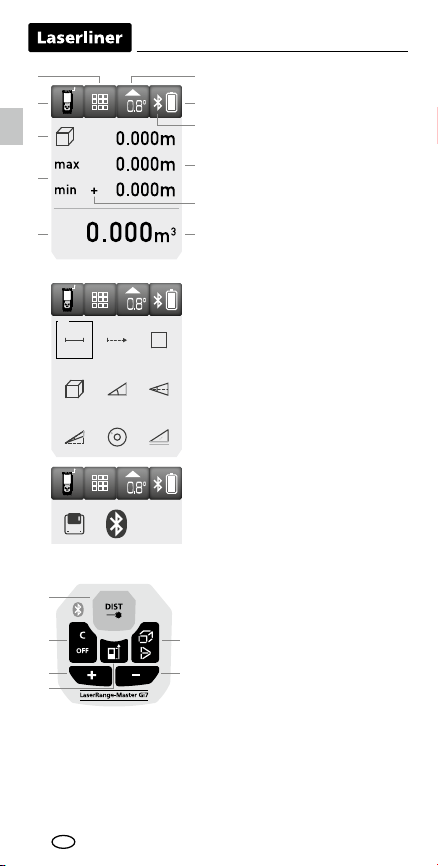
KEYPAD:
1. ON / measure
2. Delete last measurement
values / OFF
3. Addition of lengths, areas,
volumes / view saved
measurements
4. Measurement point (reference)
rear / front; unit m / inch / ft
5. Length / min/max continuous
measurement / area / volume /
angle function 1 + 2 + 3 /
digital bubble level / tilt sensor
calibration / memory /
Bluetooth®* function
6. Subtraction of lengths,
areas, volumes / view saved
measurements
DISPLAY:
aFunction display
bMeasurement point (reference)
rear / front
cDisplay min./max. continuous
measurement / area / volume /
angle function 1 + 2 + 3
d
Min/max continuous measurement
eMeasurement values /
measurement results /
malfunction / service required
fSlope angle device
gBattery symbol
hBluetooth®* function activated
iIntermediate values /
min/max values
jAddition / subtraction of lengths,
areas, volumes
kUnit m / inch / ft
lLength measurement
mMin/max continuous
measurement
nArea measurement
oVolume measurement
pAngle function 1
qAngle function 2
rAngle function 3
sDigital bubble level
tTilt sensor calibration
uMemory
vBluetooth®* function
EN

LaserRange-Master Gi7 Pro
17
3 sec
1x
1x
1 sec
2x 3x
3 sec
1x
1x 1 sec
1x
1x 1 sec
1x
1 sec
2x 3x
Length measurement:
Device on Laser on Measure
Length
(device on)
To select functions:
Length / min/max continuous measurement / area / volume / angle
function 1 + 2 + 3 / digital bubble level / tilt sensor calibration /
memory / Bluetooth®* function
Change measurement point (reference):
Rear (device on) Front
Delete the last
measured value:
Change unit
of measure:
m / inch / ft
Switch on, measure and switch off:
Device on Laser on Measure Device off
EN
Inserting batteries
Open the battery compart-
ment and insert batteries
(2 x typ AA) according to
the symbols. Be sure to
pay attention to polarity.
–
+
–
+

18
1x
2x1x
2x1x
1x 1x
+ –
or
Addition and subtraction of lengths:
Length Laser on +/- Laser on Result
(Device on) etc.
1x 1x
+ –
or
Area calculation:
Area Laser 1. measure- Laser 2. measure- +/-
on ment on ment
1x 2x 4x3x
Area measurement:
Area Laser on 1. measure- Laser on 2. measure-
ment ment
Result
etc.
1x 2x 4x3x
1x 2x 4x3x
Laser on Laser onetc.
The LC display shows the max value, the min value and the current value.
Stop
Measurement starts
automatically
Min/max continuous measurement:
Min/max
EN
LaserRange-Master Gi7 Pro
19
1x 2x 6x4x3x 5x
1x 2x 6x4x3x 5x
1x 2x 6x4x3x 5x
1x 1x
+ –
or
etc.
Result
etc.
Results
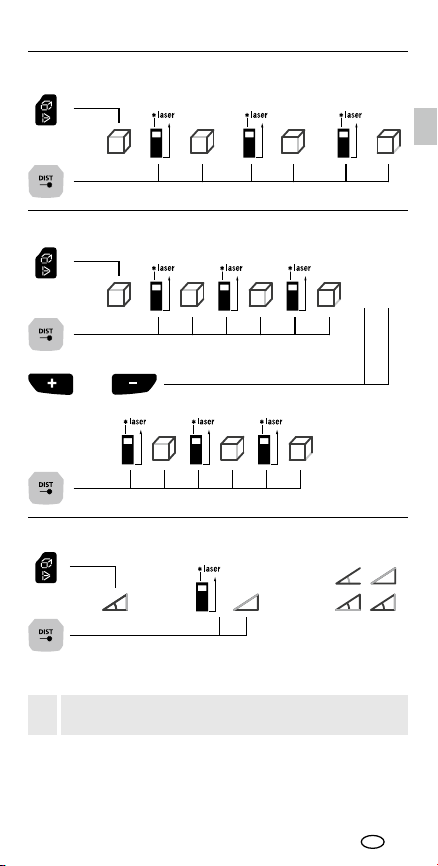
The measurement results are determined automatically by the 360°
inclination sensor.
The back of the device can be used as a reference surface
for measuring angles.
!
Angle function 1:
Angle function 1 Measurement
Volume calculation:
Volume 1. volume +/-
Volume measurement:
Volume 1. measurement 2. measurement 3. measurement
EN

20
1x 2x 3x 4x
1x 2x 3x 4x
01 … 50
The device has 50 storage locations.
Memory function:
To calibrate the tilt sensor follow the instructions on the display.
Tilt sensor calibration:
The digital bubble level is used to horizontally align the measuring device.
Digital bubble level:
Angle function 3:
Angle 1. measurement 2. measurement
function 3
The back of the device can be used as a reference surface
for measuring angles.
!
The back of the device can be used as a reference surface
for measuring angles.
!
Results
The measurement results are determined automatically by the 360°
inclination sensor.
The measurement results are determined automatically by the 360°
inclination sensor.
Results
Angle function 2:
Angle 1. measurement 2. measurement
function 2
EN
Autres manuels pour LaserRange-Master Gi7 Pro
1
Table des matières
Autres manuels LaserLiner Accessoires


