Kvaser Leaf Pro HS v2 Manuel utilisateur

Kvaser Leaf Pro HS v2 User’s Guide
Copyright 2015-2017 Kvaser AB, Mölndal, Sweden
http://www.kvaser.com
Printed Friday 5th May, 2017
We believe that the information contained herein was accurate in all respects at the time of printing.
Kvaser AB cannot, however, assume any responsibility for errors or omissions in this text. Also note
that the information in this document is subject to change without notice and should not be construed
as a commitment by Kvaser AB.

Kvaser Leaf Pro HS v2 User’s Guide 2 (23)
(This page is intentionally left blank.)
Kvaser AB, Mölndal, Sweden — www.kvaser.com

Kvaser Leaf Pro HS v2 User’s Guide 3 (23)
Contents
1 About this manual 4
2 Introduction 5
2.1 Welcome to Kvaser Leaf Pro HS v2 . . . . . . . . . . . . . . . . . . 5
2.2 Major features . . . . . . . . . . . . . . . . . . . . . . . . . . . . . . 6
2.3 Interface . . . . . . . . . . . . . . . . . . . . . . . . . . . . . . . . . 6
2.4 The t programming language . . . . . . . . . . . . . . . . . . . . . . 7
2.5 Restrictions in t functionality . . . . . . . . . . . . . . . . . . . . . . 7
2.6 Additional software and documentation . . . . . . . . . . . . . . . . 8
3 Kvaser Leaf Pro HS v2 hardware 9
3.1 Hardware installation . . . . . . . . . . . . . . . . . . . . . . . . . . 9
3.2 USB connector . . . . . . . . . . . . . . . . . . . . . . . . . . . . . 9
3.3 CAN channels . . . . . . . . . . . . . . . . . . . . . . . . . . . . . . 10
3.4 Power supply . . . . . . . . . . . . . . . . . . . . . . . . . . . . . . 10
3.5 LED Indicators . . . . . . . . . . . . . . . . . . . . . . . . . . . . . . 11
3.6 Troubleshooting . . . . . . . . . . . . . . . . . . . . . . . . . . . . . 11
4 Appendices 12
4.1 Definitions of LED states and colors . . . . . . . . . . . . . . . . . . 12
4.2 Start and stop of t programs . . . . . . . . . . . . . . . . . . . . . . 14
4.3 Technical data . . . . . . . . . . . . . . . . . . . . . . . . . . . . . . 15
4.4 CAN connectors . . . . . . . . . . . . . . . . . . . . . . . . . . . . . 15
4.5 CAN bus termination . . . . . . . . . . . . . . . . . . . . . . . . . . 16
4.6 Updating the firmware . . . . . . . . . . . . . . . . . . . . . . . . . . 17
4.7 Kvaser MagiSync . . . . . . . . . . . . . . . . . . . . . . . . . . . . 17
5 Disposal and Recycling Information 19
6 Legal acknowledgements 20
6.1 Usage warning . . . . . . . . . . . . . . . . . . . . . . . . . . . . . . 20
6.2 EC Regulatory Compliance . . . . . . . . . . . . . . . . . . . . . . . 21
6.3 Patents, Copyrights and Trademarks . . . . . . . . . . . . . . . . . . 21
7 Document Revision History 23
Kvaser AB, Mölndal, Sweden — www.kvaser.com

Kvaser Leaf Pro HS v2 User’s Guide 4 (23)
1 About this manual
This manual is intended for Kvaser Leaf Pro HS v2 users. This document contains
a description of the hardware’s properties and general instructions for connecting
the device to a computer.
Kvaser AB, Mölndal, Sweden — www.kvaser.com

Kvaser Leaf Pro HS v2 User’s Guide 5 (23)
2 Introduction
This section will describe the functions and features of the Kvaser Leaf Pro HS v2.
2.1 Welcome to Kvaser Leaf Pro HS v2
Figure 1: Kvaser Leaf Pro HS v2
Kvaser Leaf Pro HS v2 is a small, yet advanced, portable single channel CAN to
USB real time interface that handles transmission and reception of standard and
extended CAN messages on the CAN bus with a high time stamp precision. The
Kvaser Leaf Pro HS v2 is compatible with applications that use Kvaser‘s CANlib.
This guide applies to Kvaser Leaf Pro HS v2 devices listed in Table 1 on Page 6.
Kvaser AB, Mölndal, Sweden — www.kvaser.com

Kvaser Leaf Pro HS v2 User’s Guide 6 (23)
Device Product Number (EAN)
Kvaser Leaf Pro HS v2 73-30130-00843-4
Kvaser Leaf Pro HS v2 OBDII 73-30130-00849-6
Table 1: Kvaser Leaf Pro HS v2 devices and their product numbers.
Throughout this document, we use the name Kvaser Leaf Pro HS v2 to mean any
one of the different Kvaser Leaf Pro HS v2 products listed in Table 1, unless
otherwise noted.
2.2 Major features
•USB CAN interface with Kvaser tprogrammability.
•Supports CAN FD, up to 8 Mbit/s (with proper physical layer).
•Quick and easy plug-and-play installation.
•Supports both 11-bit (CAN 2.0A) and 29-bit (CAN 2.0B active) identifiers.
•Power is taken from the USB bus.
•100% compatible with applications written for other Kvaser CAN hardware
with Kvaser CANlib.
•High-speed CAN connection (compliant with ISO 11898-2), up to 1 Mbit/s.
•Fully compatible with J1939, CANopen, NMEA 2000 R
and DeviceNet.
•Kvaser MagiSync – automatic time synchronization (see Section 4.7, Kvaser
MagiSync, on Page 17 for more details).
•Auto response buffers, to send messages on a defined event.
•Auto transmit buffers, to send messages on a defined interval.
•Simultaneous operation of multiple devices.
2.3 Interface
Kvaser Leaf Pro HS v2 provides a CAN bus interface through a standard USB
interface.
Kvaser AB, Mölndal, Sweden — www.kvaser.com

Kvaser Leaf Pro HS v2 User’s Guide 7 (23)
2.4 The t programming language
The Kvaser t programming language is event oriented and modeled after C. It can
be used to customize the behavior of the Kvaser Leaf Pro HS v2 and other Kvaser
t capable devices.
A t program is invoked via hooks, which are entry points that are executed at the
occurrence of certain events. These events can be, for example, the arrival of
specific CAN messages or a timer expiration.
Like any Kvaser CAN interface, the Kvaser Leaf Pro HS v2 can be used via CANlib
on a PC. The addition of t programs running directly on the Kvaser Leaf Pro HS v2
makes it possible to react much quicker to CAN bus events (for example to speed
up file transfer protocols or to simulate missing hardware).
For more information, see the Kvaser t Programming Language guide that can be
downloaded at www.kvaser.com/download.
2.5 Restrictions in t functionality
The Kvaser Leaf Pro HS v2 is an interface and as such does not contain real-time
clock (RTC), logger or SD card functionality. This means that the t functionality
listed in Table 2 is not available on Kvaser Leaf Pro HS v2 as of version 3.2 of the t
language compiler.
Group Function name
Predefined File I/O Functions
fileOpen
fileClose
fileGets
fileReadBlock
filePuts
fileWriteBlock
fileSeek
fileDelete
Predefined XML Functions
xmlOpen
xmlClose
xmlGet
Predefined t Program Related Functions
scriptLoad
Predefined Logger Related Functions
filterDropMessage
loggerStatus
loggerStart
loggerStop
Other Predefined Functions
timeGetDate
Table 2: Functionality in the t language (v3.2) that is not supported by Kvaser Leaf
Pro HS v2.
Kvaser AB, Mölndal, Sweden — www.kvaser.com
Kvaser Leaf Pro HS v2 User’s Guide 8 (23)
2.6 Additional software and documentation
The Kvaser CANlib SDK includes everything you need in order to develop software
for Kvaser CAN hardware. The SDK contains full documentation and many sample
programs, written in C, C++, C#, Delphi, Python and Visual Basic. All Kvaser CAN
interface hardware share a common software API. Programs written for one device
type will run without modification on other device types.
The latest versions of documentation, software and drivers can be downloaded for
free at www.kvaser.com/download.
Kvaser AB, Mölndal, Sweden — www.kvaser.com

Kvaser Leaf Pro HS v2 User’s Guide 9 (23)
3 Kvaser Leaf Pro HS v2 hardware
In this section you can read more about the CAN channels, power supply and LED
indicators.
3.1 Hardware installation
The Kvaser Leaf Pro HS v2 may be inserted in any free USB socket on the host
computer. You do not need to switch the power off before inserting or removing the
device.
For the Kvaser Leaf Pro HS v2 to communicate with the host computer, the correct
version of the Kvaser driver and firmware must be installed. The firmware is
downloaded and installed directly on the Kvaser Leaf Pro HS v2 and the driver is
installed on the host computer. The latest version of the driver and firmware can be
downloaded from www.kvaser.com/download.
The driver is installed by running the file
kvaser_drivers_setup.exe
.
For information on how to upgrade the firmware, see Section 4.6, Updating the
firmware, on Page 17.
3.2 USB connector
The Kvaser Leaf Pro HS v2 has a standard USB type “A” connector.
Figure 2: A standard USB type “A” connector.
Connect the device to your computer using any high quality USB 2.0 certified
cable. The maximum USB cable length is 5 m (∼16 ft). If you need a longer cable,
Kvaser AB, Mölndal, Sweden — www.kvaser.com

Kvaser Leaf Pro HS v2 User’s Guide 10 (23)
you can use USB hubs or USB extension cables with a built-in hub. By chaining up
to 5 hubs, you can achieve an effective cable length of up to 25 m (∼82 ft).
As USB cables become longer they are more sensitive to EMI,
because they make a longer antenna that can pick up more
noise. These issues can be mitigated by using higher quality
cables with better shielding. Thicker cables tend to be better than
thin ones, and braided shielding tends to be more reliable than
only foil. Furthermore, longer cables may introduce signal
degradation and timing issues that, if necessary, can be mitigated
using shorter cable segments combined with hubs that amplify
the signal and handle delays on a per-cable basis.
3.3 CAN channels
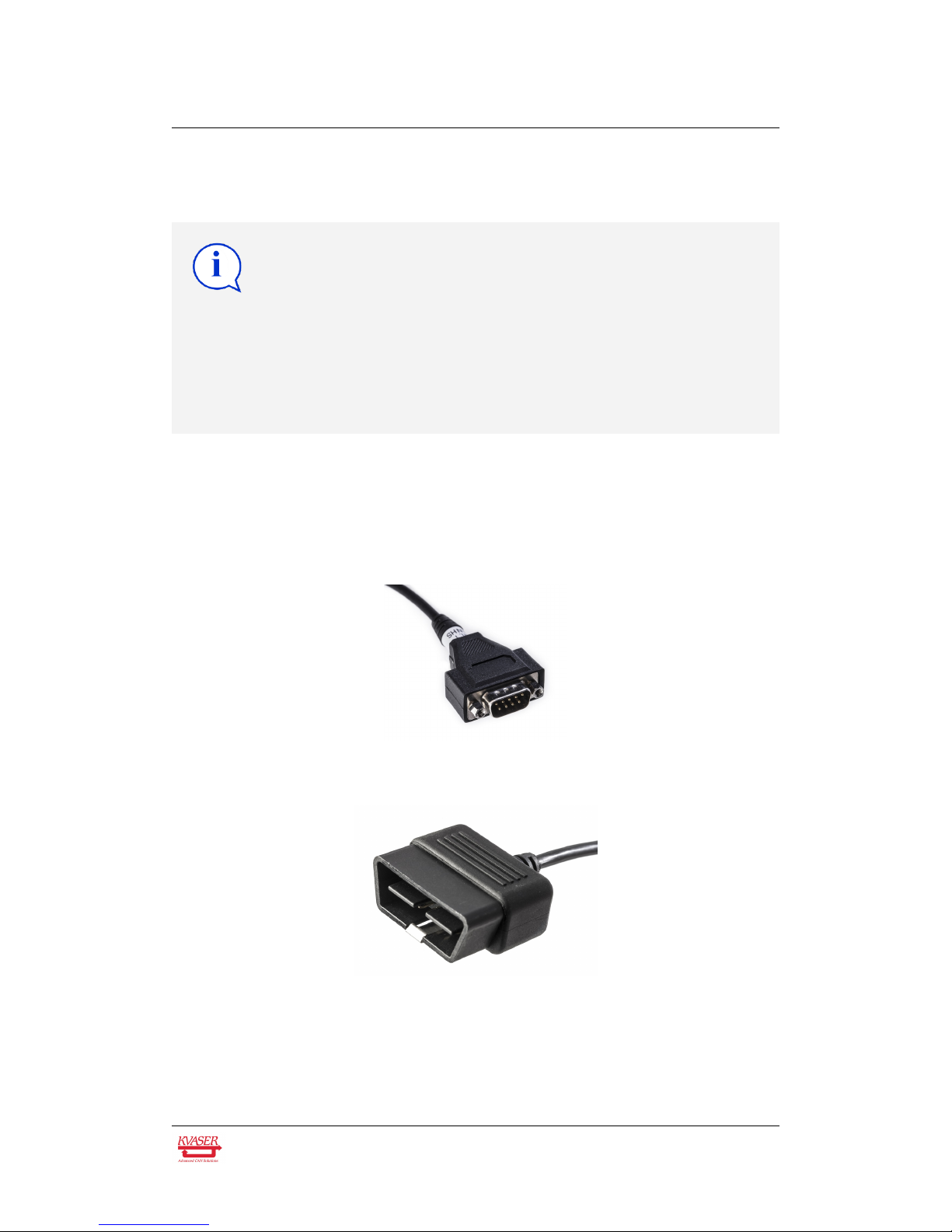
The Kvaser Leaf Pro HS v2 has one CAN Hi-Speed channel in a CAN connector
depending on the model. Either a 9-pin D-SUB or a 16-pin OBDII connector is
used. See Section 4.4, CAN connectors, on Page 15 for details about the pinout.
Figure 3: 9-pin D-SUB CAN connector
Figure 4: OBDII CAN connector
3.4 Power supply
The Kvaser Leaf Pro HS v2 is powered from the USB port.
Kvaser AB, Mölndal, Sweden — www.kvaser.com
Table des matières
Autres manuels Kvaser Interface USB
Manuels Interface USB populaires d'autres marques

PASCO
PASCO SCIENCEWORKSHOP 750 Manuel utilisateur

Phonic
Phonic FIREFLY 302 USB Manuel utilisateur

OHAUS
OHAUS Scout STX Series Manuel utilisateur

Denon
Denon DN-HC4500 - DJ Mixer USB Controller Manuel utilisateur

Lutron Electronics
Lutron Electronics Stanza SZ-CI-USB-CPN5138 Manuel utilisateur

Paradox
Paradox PMC5-TI00 Manuel utilisateur

Thorsis Technologies
Thorsis Technologies isDNet USB Manuel utilisateur

Thorsis Technologies
Thorsis Technologies isHRT USB Manuel utilisateur

microHAM
microHAM DigiKeyer Manuel utilisateur

Apogee
Apogee Jam X Manuel utilisateur

RigExpert
RigExpert TI-3000 Manuel utilisateur

microHAM
microHAM USB Interface II Manuel utilisateur