
Konig Security SEC-DVR200 Manuel utilisateur

SEC-DVR200
4CH HARDDISK RECORDER
MANUAL
MODE D’EMPLOI
MANUALE
HASZNÁLATI ÚTMUTATÓ
BRUKSANVISNING
ANLEITUNG
GEBRUIKSAANWIJZING
MANUAL DE USO
KÄYTTÖOHJE
NÁVOD K POUŽITÍ
English Deutsch Français Nederlands Italiano Español Magyar Suomi Svenska Česky

Česky Svenska Suomi Magyar Español Italiano Nederlands Français Deutsch English
2
Installing harddisk:
1. Remove the cover by unscrewing the 4 screws at the bottom of the recorder.
2. Connect the power cord and data cable to harddisk. Use supplied screws to fix the
harddisk to the chassis the recorder.
3. Replace the cover.

English Deutsch Français Nederlands Italiano Español Magyar Suomi Svenska Česky
3
Connections:
1. Connect the video output of the recorder to the input of a monitor or TV.
2. Connect the cameras to the video input of the recorder.
3. Connect the AC/DC adapter to the 12V connection of the recorder.
Operation:
1. After connecting the AC/DC
adapter the recorder turns on
automatically. The recorder will
boot-up and detect installed
harddisk. Monitor will show Master
and Slave harddisk information.
Refer to harddisk manual for
configuration of harddisk.
(Master or Slave)
2. After HDD checking the following
screen appears.
System information:
Upper left ratio of harddisk space
used.
Middle channel name
(CH1 ~ CH4)
Bottom right function status,
date and time
HDD Checking………..
e
used.
10%

Česky Svenska Suomi Magyar Español Italiano Nederlands Français Deutsch English
4
Recorder setup:
Press " Menu" into setup menu, use "Up" and "Down" to select item, press "
Select” to modify setting and " Menu" to confirm and exit.
MAIN MENU
CAMERA SELECT 1234
RECORD SELECT 1234
RECORD MODE EACH
RECORD FRAMERATE 25
VIDEO QUALITY NORMAL
RECORD SCHEDULE
SUB MENU
HARD DISK SETUP
MOTION SETUP
RESTORE FACTORY DEFAULT
PRESS
᧤
UP
᧨
DOWN
᧥
. THEN(SELECT)
PRESS(MENU) TO EXIT
English Deutsch Français Nederlands Italiano Español Magyar Suomi Svenska Česky
5
Overview menu:
Camera Select
Record Select
Record Mode
Record Frame Rate
Video Quality
Record Schedule
Sub Menu
Hard Drive Setup
Motion Setup
Restore Factory Default
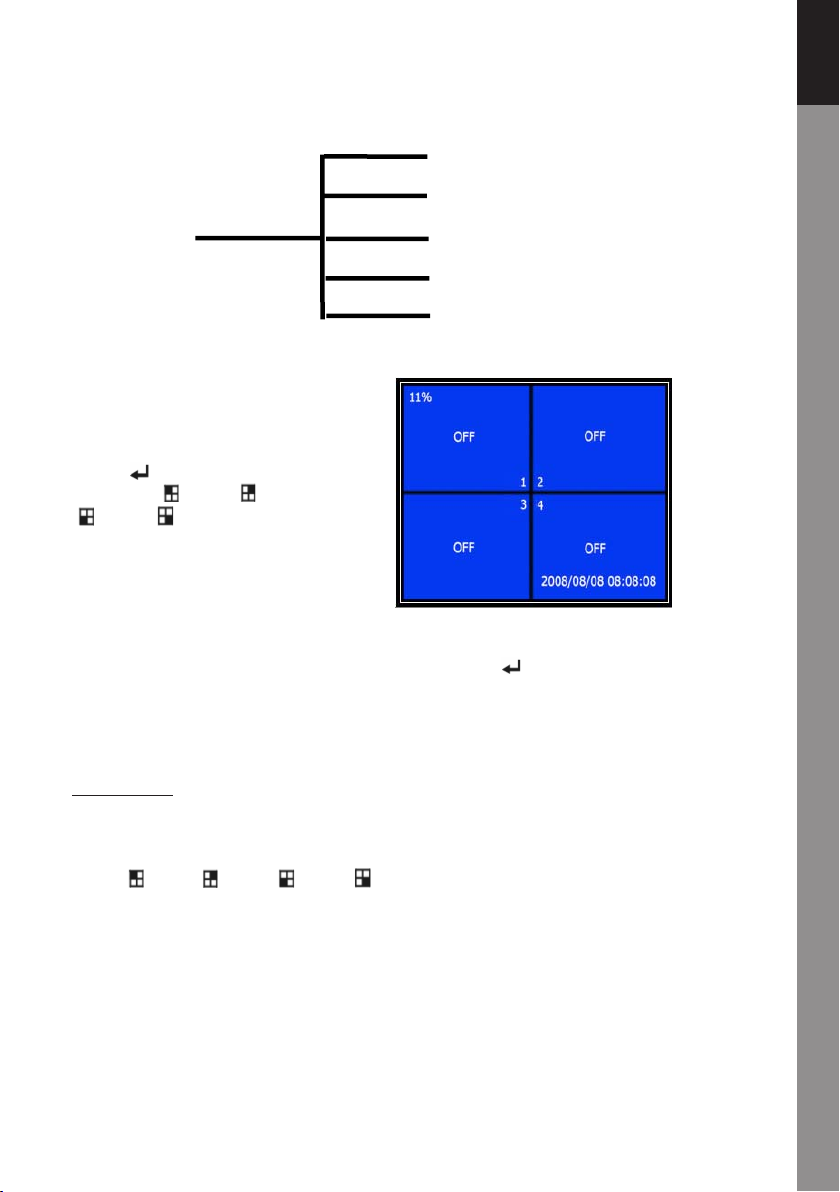
Camera select:
The recorder can display 4 cameras
in one picture (Quad Mode).
Configure which camera to display:
Press " Select" to modify setting
and press " CH1", " CH2",
"CH3", " CH4" to set each
channel separately. If no channel
is open, the recorder will
display "OFF".
Record select:
Select which camera(s) need to be recorded. Press " Select" until desired selection
is established.
Record mode:
There are two methods of recording
Each Mode
Record each channel separately, therefore it’s possible to enlarge single channel to full
screen display. For example, turn off record function of CH-1 and CH-2 and then the
recorder only record CH3 and CH4.
Press " CH1", " CH2", " CH3", " CH4" to choose channel to display when playback
after recording.
Auto Record
Password Setup
Password Change
Picture Setup
Time Setup

Česky Svenska Suomi Magyar Español Italiano Nederlands Français Deutsch English
6
In this mode, when the recorder is in watching or recording mode, press "QUAD" button
over 3 seconds to make each channel video enlarge to full screen and then display in
quad mode in sequence again and again. The recorder will not change its status until
a key is pressed.
Quad Mode
Record all 4 channel video in quad mode. Therefore it’s not possible to enlarge single
channel to full screen. The use each mode during quad mode is not possible.
Record frame rate:
Record frame rate will affect the movement of object. More frames means more smooth
movement but needs more space on the hard disk.
System default value is 25 fps, that means system will record 25 frame per second. The
recorder can set to 25, 12, 8, 6, 4, 3, 2, 1 frames per second.
Video quality:
There are three levels of record quality, High, Normal and Low. Higher quality takes
more harddisk space. Record frame rate, record quality and will affect total record time
of the recorder.
Estimate record time based on 120GB HDD in Quad Mode per hour
Format Quality Frame Rate 25 12 6 1
PAL
HIGH 20 70 146 291 1748
NORMAL 15 93 194 388 2330
LOW 12 117 243 485 2913
Record schedule:
The recorder can be set to recording by time schedule or by motion detection.

English Deutsch Français Nederlands Italiano Español Magyar Suomi Svenska Česky
7
"-" = No record
"T" = Continue (system default)
"A" = Motion triggered
Up = Move the cursor
Down = Move the cursor
Select = Select method
RECORD SCHEDULE
᧺
TTTAAATTTTTTAAAATT
᧸
│││ ││││││
0 3 6 9 12 15 18 21 24
PRESS
᧤
UP
᧨
DOWN
᧥
. THEN(SELECT)
PRESS(MENU) TO EXIT
Sub menu/auto record:
"ON": the recorder will start to record automatically if the recorder has not been operated
in five minutes.
"OFF": the recorder will not record until the „RECORD” button is pressed.
Sub menu/password setup:
When password set is to "ON", stop recording or enter menu will need password input.
When password is set to "OFF", all functions are direct available.

Česky Svenska Suomi Magyar Español Italiano Nederlands Français Deutsch English
8
Sub menu/password change:
System default password: press six times " CH1" button.
All keys can be used as password key except " Menu" key, which is used for
confirming and exit.
CURRENT PASSWORD :……
NEW PASSWORD :……
CONFIRM PASSWORD :……
Sub menu/picture setup:
Set every channel with the
desired settings
HUE: 0-99
SATURATION: 0-99
CONTRAST: 0-99
BRIGHTNESS: 0-99
Button function:
Up/Down: move the cursor
FWD: reduce value
CH1-CH4, QUAD: select channel
Menu: exit

English Deutsch Français Nederlands Italiano Español Magyar Suomi Svenska Česky
9
Sub menu/time setup:
Press Up and Down to move the cursor and press Select to modify. Press
Menu to save and exit.
Hard drive set-up:

Česky Svenska Suomi Magyar Español Italiano Nederlands Français Deutsch English
10
OVERWRITE ENABLED:
YES, continues recording and overwrite previous recording when hard disk is full.
NO, the recording session stops when hard disk is full.
HDD SIZE:
It shows the size of the primary hard disk installed in the recorder.
HDD USED:
It shows the space used on the first hard disk drive for recording and the percent of the
used hard disk.
HDD FORMAT:
Format the hard disk will erase all the data recorded on the hard disk.
Note: when using the hard disk for the first time in the recorder, please use this function
to format the HDD.
Motion setup:
Table des matières
Langues :
Manuels Instrument de mesure populaires d'autres marques


Endress+Hauser
Endress+Hauser Proline Promag 50 Caractéristiques techniques

Siemens
Siemens SITRANS F Coriolis FCT030 Manuel de la liste des pièces

KLINGER
KLINGER CMF V Series Manuel utilisateur

EXFO
EXFO FTB-2 Manuel d'exploitation et d'entretien

Keysight
Keysight M8290A Manuel utilisateur

ADTEK
ADTEK MW-5 Manuel utilisateur