
Kleverness Klever Hub Manuel utilisateur

HUB
Quick
Installation
GUIDE
HUB
Please follow the instructions carefully
The Klever Hub is designed for interior and residential
use only, and should not be exposed to liquids or wet
conditions
Do not place other objects on top of the Klever Hub
WARNING

WHAT’S INSIDE THE BOX
TECHNICAL REQUIREMENTS
INSTALL YOUR KLEVER HUB
HOW TO USE THE KLEVER HUB WITH THE APP
SAFETY AND REGULATORY GUIDE
1
2
3
4
5
USER MANUAL
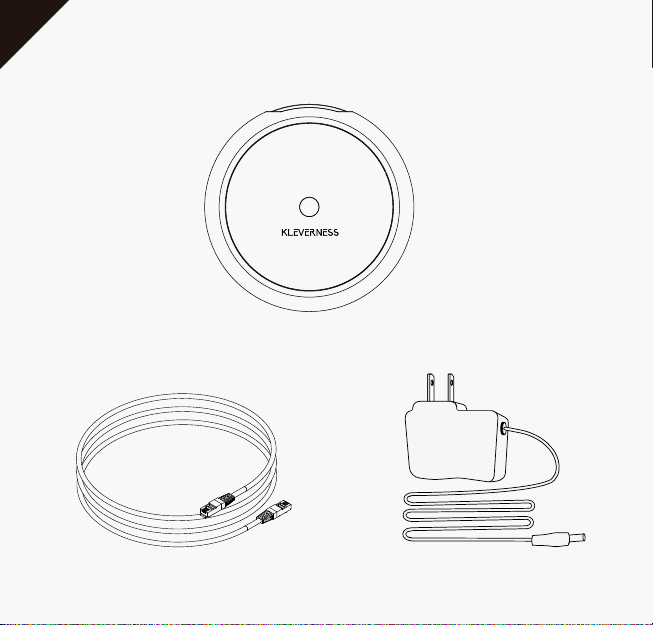
WHAT’S INSIDE THE BOX
Klever Hub
Ethernet cable Power supply
1

TECHNICAL REQUIREMENTS
The Klever Hub is the brain of the Kleverness System and works in
connection with the other Klever Products you install throughout
your home
The Ethernet cable must be connected to a WiFi router with a
working internet connection
Set the Mood
3-Gang and 3-Way
Switches
Control Lights and
Appliances
Wireless Control Using
Voice Assistant
Smartphone Control
From Anywhere
2

INSTALL YOUR KLEVER HUB
Connect one end of the ethernet cable to the Klever Hub and the
other end to your WiFi router
Connect the corresponding end of the power supply to a power
outlet and the other end to the power port on the back of the
Klever Hub
If the connection is successful, the LED light will turn blue after 30
seconds
Blue: Klever Hub is correctly connected
LED indicators:
3
The Klever Hub cannot connect to the Kleverness
server. Please check your internet connection
Physical error on the Klever Hub. Please contact our
customer service via email (hello@kleverness.com)
so that we may provide the best solution
There was an error when installing the Klever Hub
Please enter the App and follow the corresponding
instructions
Klever Hub is undergoing a software update. Please
wait and do not disconnect the device
Constant red:
Flashing red:
Purple:
Turquoise:

HOW TO USE THE KLEVER HUB WITH THE APP
You can control your other Klever products from your
smartphone through the Kleverness App (available on the App
Store or Google Play)
or with your favorite voice assistant.
You will be able to take advantage of smart functions throughout
your home. Optimize and reduce your energy consumption, use
routines to adapt your home’s lighting to your everyday life, set
zones to perform various actions with a single button, or activate
vacation mode to increase your home’s security when you're away
4

5
SAFETY AND REGULATORY GUIDE FOR THE KLEVER HUB
CONTAINED IN THIS BOX (THE “PRODUCT”)
This booklet provides important safety, regulatory, and warranty information that you
should read before you start using this device. An online version of this document can
be found on www.kleverness.com.
Health and Safety Information
Basic safety: To avoid damaging the Product, its accessories or any connected devices,
appliances or products, and to reduce the risk of personal injury, discomfort, property
damage or other potential hazards, follow the instructions and precautions set forth
below and those found at the Kleverness App.
Handle the Product with care. You may damage the Product if you disassem-
ble, drop, bend, burn, crush or puncture your Product. Using a damaged
Product may cause overheating or injury, and can cause fire, electric shock,
injury, or damage to you, the Product or other property.
Don’t expose the Product to liquids, which can cause a short circuit and/or
result in the Product overheating. Using the Product when moisture is present,
can cause fire, electric shock, injury, or damage to you, the Product or other
property. If the Product gets wet, do not attempt to dry it using an external
heat source.
Using damaged wires, cables, power adapters or accessories, or using your
device when moisture is present, can cause a fire, electric shock, injury, or
damage to the device or other property. When using the Product, make sure
the power adapter is plugged into a nearby socket and is easily accessible.

6
The Product is intended for use with its original accessories, connectors and
power adaptors. Only use the Product with the included accessories,
connectors, power adapter and cable. Failure to use compatible accessories
can cause fire, electric shock, injury, or damage to you, the Product and other
property.
Service and Support
For online help and support, visit www.kleverness.com
Regulatory Information
Additional regulatory and environmental information can be found at
www.kleverness.com
Manufacturer address:
340 S Lemon Avenue #2291, Walnut, CA, 91789 USA

7
FCC Compliance Statement Compliance Notice
This equipment has been tested and found to comply with the limits for a Class B
digital device, pursuant to part 15 of the FCC Rules. These limits are designed to
provide reasonable protection against harmful interference in a residential installa-
tion. This equipment generates, uses and can radiate radio frequency energy and, if
not installed and used in accordance with the instructions, may cause harmful
interference to radio communications. However, there is no guarantee that interferen-
ce will not occur in a particular installation. If this equipment does cause harmful
interference to radio or television reception, which can be determined by turning the
equipment off and on, the user is encouraged to try to correct the interference by one
or more of the following measures:
Reorient or relocate the receiving antenna.
Increase the separation between the equipment and receiver.
Connect the equipment into an outlet on a circuit different from that to which
the receiver is connected.
Consult the dealer or an experienced radio/TV technician for help.
Contains FCC ID: 2AD66-915
This device complies with part 15 of FCC rules. Operation is subject to the following
two conditions:
This device may not cause harmful interference.
This device must accept any interference received, including interference that
may cause undesired operation.
1.
2.
Table des matières
Langues :


