
Kirk Z-3020 Manuel utilisateur

Handset Z-3020 for KIRK dect-z Systems 1500 and 500
User’s Guide
KIRK telecom A/S,
Langmarksvej 34,
DK-8700 Horsens,
Tel. +45 7560 2850,
Fax +45 7560 2851,
www.kirktelecom.dk
1404-6900-HD . ED1, R&T 75 50 26 66
Kirk Z-3020 håndsæt 14046900 25/10/00 14:56 Side 1

Congratulations on your new KIRK Z-3020 handset
The handset KIRK Z-3020 will provide you with the greatest possible degree of flexibility and mobility due to high
battery capacity, practical weight, size and design.
Contents:
1. Construction ................................................................4
1.1 The display ............................................................5
2. Battery installation........................................................6
3. Charging ......................................................................7
4. Key functions ...............................................................9
5. Turning the handset ON/OFF ....................................11
6. Making a call..............................................................12
6.1 Receiving a call....................................................14
6.2 During conversation ............................................15
6.2.1 Volume regulation.......................................15
6.2.2 Microphone mute........................................15
6.2.3 Transfer call................................................15
7. Settings......................................................................16
8. Menu structure...........................................................17
3
8.1Profile set up.........................................................18
8.2 Profile functions...................................................20
8.3 Menu subscripton and login.................................21
8.3.1 Create subscription ....................................22
8.3.2 Login...........................................................23
8.3.3 Remove subscription..................................23
8.4 Battery capacity....................................................24
8.5 Redial...................................................................24
8.6 Book.....................................................................26
9. Shortcuts...................................................................28
10. Information................................................................29
10.1 Error tree............................................................29
10.2 Error information ................................................30
10.3 Warranty.............................................................30
10.4 Technical information..........................................31
Kirk Z-3020 håndsæt 14046900 25/10/00 14:56 Side 2

1. Construction 4
5
Key for internal calls
(not used on KIRK dect-z system 1500)
Keyboard LOCK
(Menu*)
MENU key
Volume up/down
Display
Recall key
(MAIL key)
SILENT (Menu#) ON/OFF HOOK key-
also used as turn ON key CONFIRMATION key -
MUTE microphone.
MUTE ringer when ringing.
Long key press turns OFF.
Right arrow key, save number.
Telephone book from standby
text
Left arrow key, Redial number
from standby
LED
1.1 The display
The KIRK Z-3020 handset is delivered with a 7-segment display architecture, making the telephone significantly
more competitive when emphasising on device functionality and not on presentation texts.
In a 7-segment display a few characters can be difficult to recognise, but in this User’s Guide all displays are
depicted exactly as they are in the telephone display, enabling the user to get quickly accustomed to the use of the
telephone.
Kirk Z-3020 håndsæt 14046900 25/10/00 14:56 Side 3
3. Charging
It takes approximately 3 1/2 hours to charge the handset from fully discharged to its full capacity. Place the handset
in the charger and the display will show the charging status.
When the battery is fully charged, all eight zeroes are displayed.
For correct charging the room temperature has to be between 0°C and 25°C and the handset must therefore not
be placed in direct sunshine. The battery has a built-in heat sensor which will stop the charging if the battery tem-
perature is too high (ref.: 2.4).
6
7
OOOO ----
2. Battery installation
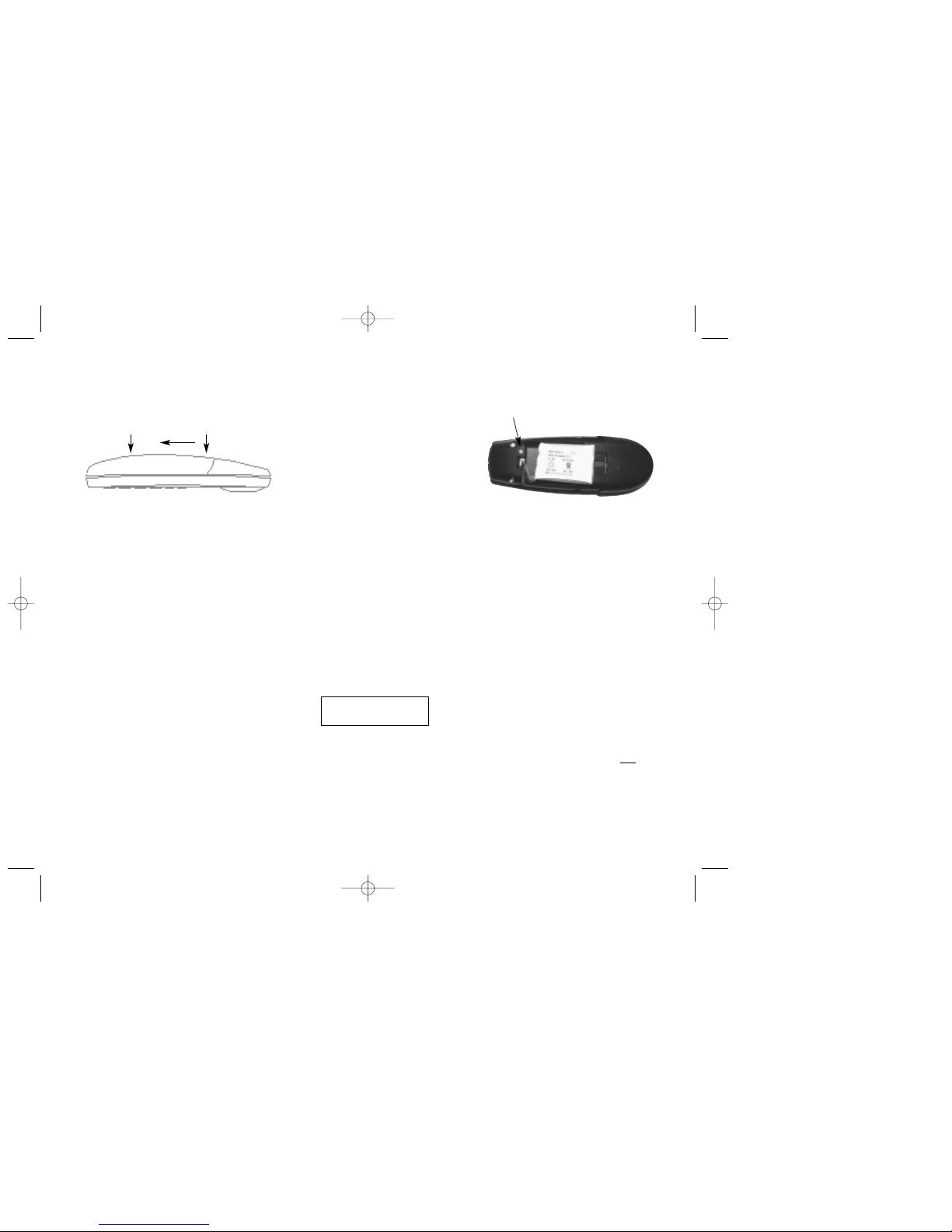
Before using the telephone you must connect the battery to the connector in the battery box.
1. Push the back cover 5 mm towards the bottom of the handset using your thumbs.
2. Lift off back cover.
3. If the battery is not already installed, place battery plug in the
slot in the battery box.
4. Insert battery with the label readable, due to correct placement
of temperature sensor in battery pack.
Place the battery plug in the slot
with red wire closest to the mark *
(Only showed on the above figure)
Assemble the back cover and place the
handset into the charger.
Kirk Z-3020 håndsæt 14046900 25/10/00 14:57 Side 4

It is necessary to recharge the battery when the battery icon is flashing, or if the handset can not be turned on. The
LED flashes at a low frequency while charging and lights constantly when the charging is finished and the display
goes back to normal mode.
If the battery is fully discharged, it will take a moment before charging starts.
8
9
4. Key Functions
The handset has 21 keys:
Two keys are placed at the right side for volume control. Press upper or lower key to change the volume. Each
key-press turns volume one step up/down.
“MENU” - Accesses the menu structure or exits the menu structure. (Escape or »NO«)
“ < “, “REDIAL” - Menu: left. From standby text: Redial number.
“ > “, “BOOK” - Menu: right. Store number in telephone book.
From standby text: Telephone book read.
“ ” , ”MUTE” - Confirmation (»YES«) or jump to next level in the menu. In off hook: Mute ringer.
Long key press turns the handset OFF.
Kirk Z-3020 håndsæt 14046900 25/10/00 14:57 Side 5

10
11
“INT” - If residential systems: Internal calls off hook, and internal recall if already offhook.
(not used on KIRK dect-z Systems 500 and 1500)
“R” - If offhook: Recall.
“ ” - On hook/off hook and turn ON.
“*” - * (Change from pulse to DTMF on KIRK CCFP), Long = pause (-), extra long: change
from pulse to DTMF (a “t” appears in the display, GAP standard).
“0-9” - Digits. In book: finds incoded numbers.
# - No function
5. Turning the handset ON/OFF
ON: Press -key for 1/2 second.
When the handset is turned on the symbol is shown in the lower left corner of the display, if the handset is
subscribed to a system. (For subscription, see 8.3.1).
OFF: Press the “” (MUTE) key for 3 seconds.
Kirk Z-3020 håndsæt 14046900 25/10/00 14:57 Side 6

12
13
6. Making a call
For making or receiving calls the handset has to be subscribed to a system ( is shown in the display).
(See chap. 8.3.1).
Press the -key, the -icon in the display will flash until connection is established.
Dial the number.
Pre-dial:
Press the number to dial (long press on »*« will make a pause (-), if necessary). If there is further questions please
contact the system administrator.
Press the -key, the -icon will flash until the connection is established.
Telephone book:
Press the > -key (BOOK-key) to enter the telephone book.
Search for the number either by using the < -key or the > -key or key 0-9.
Press the -key, the -icon will turn on when the connection is established.
Redial:
Press the < -key (REDIAL-key) to see the redial number.
Press the -key, for calling the redial number.
Using the handset in residential systems: (not in a KIRK dect-z System 1500 or 500).
Internal call post-dial:
Press the INT-key, the -icon in the display will be shown.
Dial the number of another handset on the base station, the -icon will flash until the connection is established.
Internal call pre-dial: (not in a KIRK dect-z System 1500 or 500).
Dial the number of another handset connected to the same base station or system.
Press the INT-key, the -icon will flash until the connection is established.
Kirk Z-3020 håndsæt 14046900 25/10/00 14:57 Side 7

6.1. Receiving calls
When receiving a call, it is answered by pressing the -key.
During ringing the LED flashes fast, and the display shows the number that is calling. If there is no caller ID the
display shows “ringing”.
The LED will flash slowly if an unanswered call has arrived.
It is possible to mute the ringer tone without answering the call. Press MUTE () and the ringer tone is muted. The
mute icon will be displayed.
6.2 During conversation
6.2.1 Volume regulation:
Use the two keys placed at the right side of the handset for volume control.
6.2.2 Microphone mute:
Press the -key (MUTE-key) and the mute icon will flash.
Press the -key (MUTE-key) to enable the microphone again.
6.2.3 Transferring the call to another handset:
Press R, and dial new number.
Press the -key and the call is transferred to the other handset.
14
15
Kirk Z-3020 håndsæt 14046900 25/10/00 14:57 Side 8

7. Settings
The handset has two profiles (setups). A user-defined mode, and a mode where all sounds are disabled (key click
and ringer tone). Pressing “MENU” followed by # will place the handset in the silent mode (display will show ).
Press MENU and # again for disabling the silent mode.
16
17
8. Menu structure
Pressing the MENU-key, enters or exits the menu structure. The MENU-key may also be used as “ESCAPE” or
“NO” if you want to leave the menu without making any changes, or you accidently entered into a faulty menu
level.
Pressing the -key, jumps to a lower level in the menu. When the lowest menu level is reached, it will store the
setting and jump to a higher level. The -key has to be used if a “YES” is wanted.
Kirk Z-3020 håndsæt 14046900 25/10/00 14:57 Side 9

8.1 Profile Setup
In the following you will find a description on how to set up your profile. To enter the profile setup menu
press “MENU” followed by “”. Press “” when you find the setting you wish to change or check upon.
Change the setting according to your needs, confirm with “” and you automatically go to the next setting. Press
”MENU” to finalize profile setup.
18
19
Profile set up (fig)
Kirk Z-3020 håndsæt 14046900 25/10/00 14:58 Side 10
Table des matières
Autres manuels Kirk Combiné


