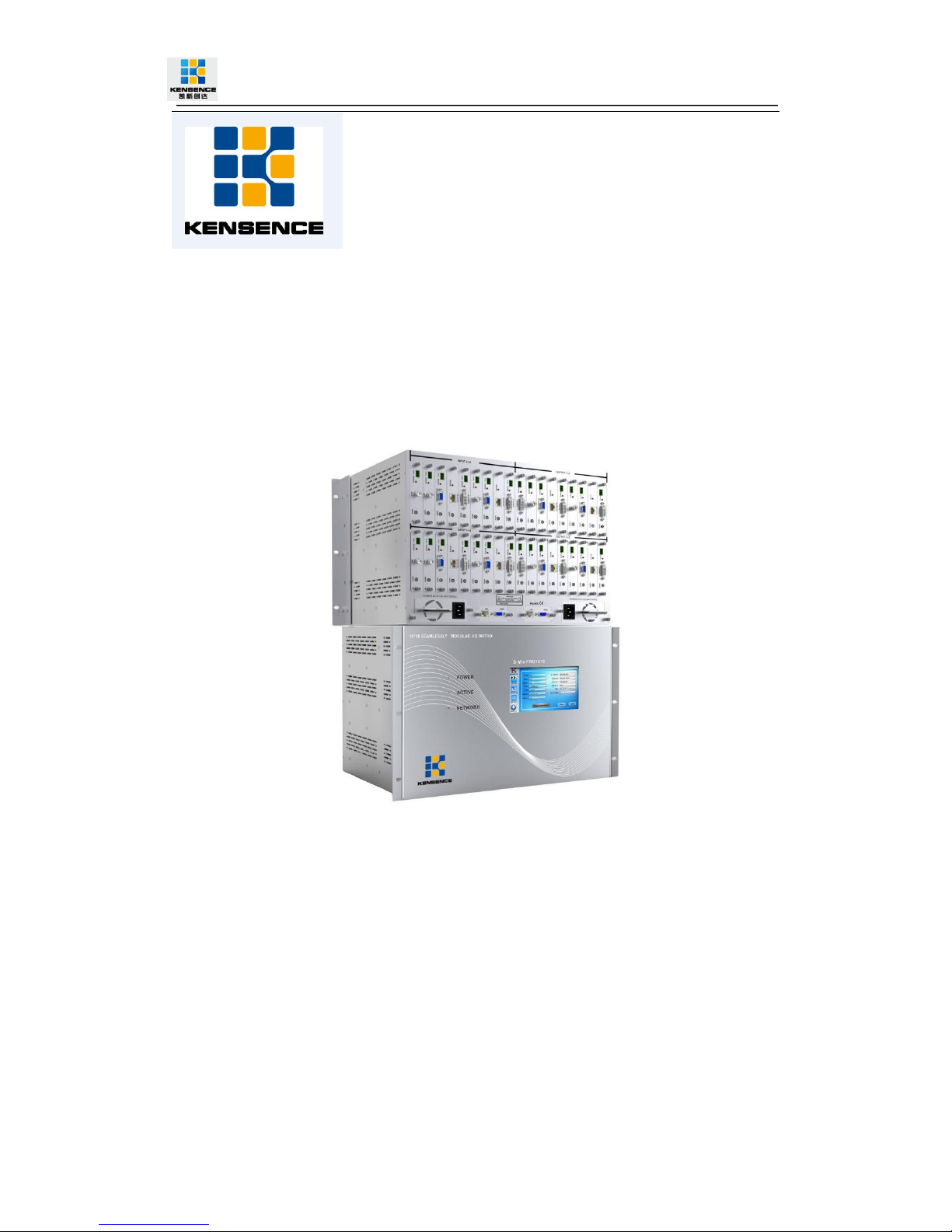
Kensence S-Mix-Pro 80*80 Manuel utilisateur

S-Mix-Pro 9*9/18*18/40*40/80*80
Professional Modular Matrix Switcher
Operation manual
Shenzhen Avctime Technology Co.,Ltd
Version:V1.01.01
2015-12

Contents
S-Mix-Pro 9*9/18*18/40*40/80*80.................................................................................................1
1.Introduction.....................................................................................................................................4
2. Product Features..........................................................................................................................4
3. Connection and operation.......................................................................................................... 5
4. Standard configuration................................................................................................................6
5.Specification...................................................................................................................................7
6.Description of operation and function........................................................................................9
6.1 Description of front panel................................................................................................. 9
6.2 Touch screen control instructions..................................................................................11
6.3 PC control software operation instructions................................................................. 16
6.4 Video switching operation.............................................................................................. 18
6.5 Operation of control, resolution, name change etc. of input / output cards.......... 19
6.6 Scene save operation.....................................................................................................20
6.7 Scene load........................................................................................................................21
6.8 External serial port command sending........................................................................ 22
7.Communication protocol and control instruction code......................................................... 23
Examples of some codes......................................................................................................23
8.Version and manufacture information..................................................................................... 24

3
To protect the device and operating personnel from electrostatic discharge, you need to
check and ensure that the device is grounding good before the device is powered on.
Please observe the following when you install, use, maintain this equipment.
Make sure the device ground connection.
Please use single-phase three wire system AC 220V power supply, and ensure all
transmission system is grounding good.
To protect operating personnel and the device ,please turn off all power supplies and
pull the plug before moving the device or doing some specific works witch need to be
done when the electricity is turned off . Please turn off the main power switch on rainy
days or when not in use for a long time.
Please do not put anything upon the cables, or tread the cables .
To avoid damaging the device , please turn off power supply before plugging cable into
the device or pulling cable from device. The damage caused by plugging/ pulling cables
without turning off power supply is outside the scope of the warranty.
The power of the device gives out heat when it works, so it’s necessary to keep the
work environment ventilated to protect the device from the damage caused by
overtemperature.
Do not place the device in very cold or very hot places. Do not sprinkle any corrosive
chemicals or liquid on or around the device.
To avoid accident or any further damage ,non-professionals please do not dismantle or
maintain the device without permission.
Do not sprinkle any corrosive chemicals or liquid on or around the device.
Safety Reminder

4
1.Introduction
S-Mix-Pro series is a kind of professional enhanced HD modular matrix. The plug-in
design can realize the flexible configuration of various signal. Supports common video
signal input, such as HDMI, DVI, VGA, YPBPR, DP, CVBS, 3G/HD/SD-SDI, IP streaming
media, etc., supports powerful audio embedding and demultiplexing function. This series
matrix integrated control signal (RS232/IP) transmission and control functions, support
system state input/output signal intelligent monitoring, intelligent signal automatic backup,
dual control backup, dual power backup.
2.Product Features
Modular structure design--single and dual card design is flexible for configuration of
signal type for input and output channels
support CVBS, YPbPr, VGA, HDMI, DVI, audio, 3GSDI, HDBaseT, fiber signal and
H.323, SIP protocol, seamless connect to Distributed Network Matrix System, IP
surveillance system;
Each card support RS-232 control through transmitting signal, which can realize the
centralized control of the peripheral equipment;
support fast seamless switching technology
Support intelligent EDID switching technology and HDCP management
Every channel support color, brightness, resolution, scaling and other image
adjustment
Support Deep Color 48/36/30/24-bit,YUV4:2:2/4:4:4
Each output channel can fix output by 16 kinds of common resolutions;
Supports TCP, UDP, IP, HTTP, NTP, RTP, IGMP, RTSP, RTCP network protocol;
Support H.264 Baseline, Main High, support Profile encoding, advanced video
preprocessing algorithm MBAFF
Supports fiber transmission technology, the maximum transmission distance is 80
kilometers
Support intelligent video port backup;
Support POC function (HDBaseT);
Support equipment temperature monitoring, video port state monitoring;
Support software testing and adjusting function of input / output port ;
Support touch screen control and double RS-232, double TCP/IP control;
The front panel 7 inch high-definition color touch screen can show real-time state
feedback;
Adopt the design of double power supply, support 7*24 hours of uninterrupted
operation;

5
3.Connection and operation
Note: do not operate on the matrix within 2 minutes of the start of the matrix!!!
1.Connect signal source such as blu-ray player、game controller、A/V receiver、cables、
satellite receiver etc. to the HDMI input port of the matrix.
2.Connect the output port of the matrix to HD display or HD projector with HDMI input
port.Notice:It’s better to use High-Speed HDMI Cable when the transmission distance is
too long.
3.Firstly power on the signal source,then the matrix(with power supply),finally devices
connected to the output port .
4.Plug in power to each device in the same order .
5.If all devices are connected properly,every display device should display the specified
signal to make sure the devices are normal.If one of the displays failed to receive signal
correctly,enter the menu of display,adjust the resolution from MIN to MAX until the signal
is displayed normally.A 24 Hz vertical refresh rate may work better than 60 Hz or higher.
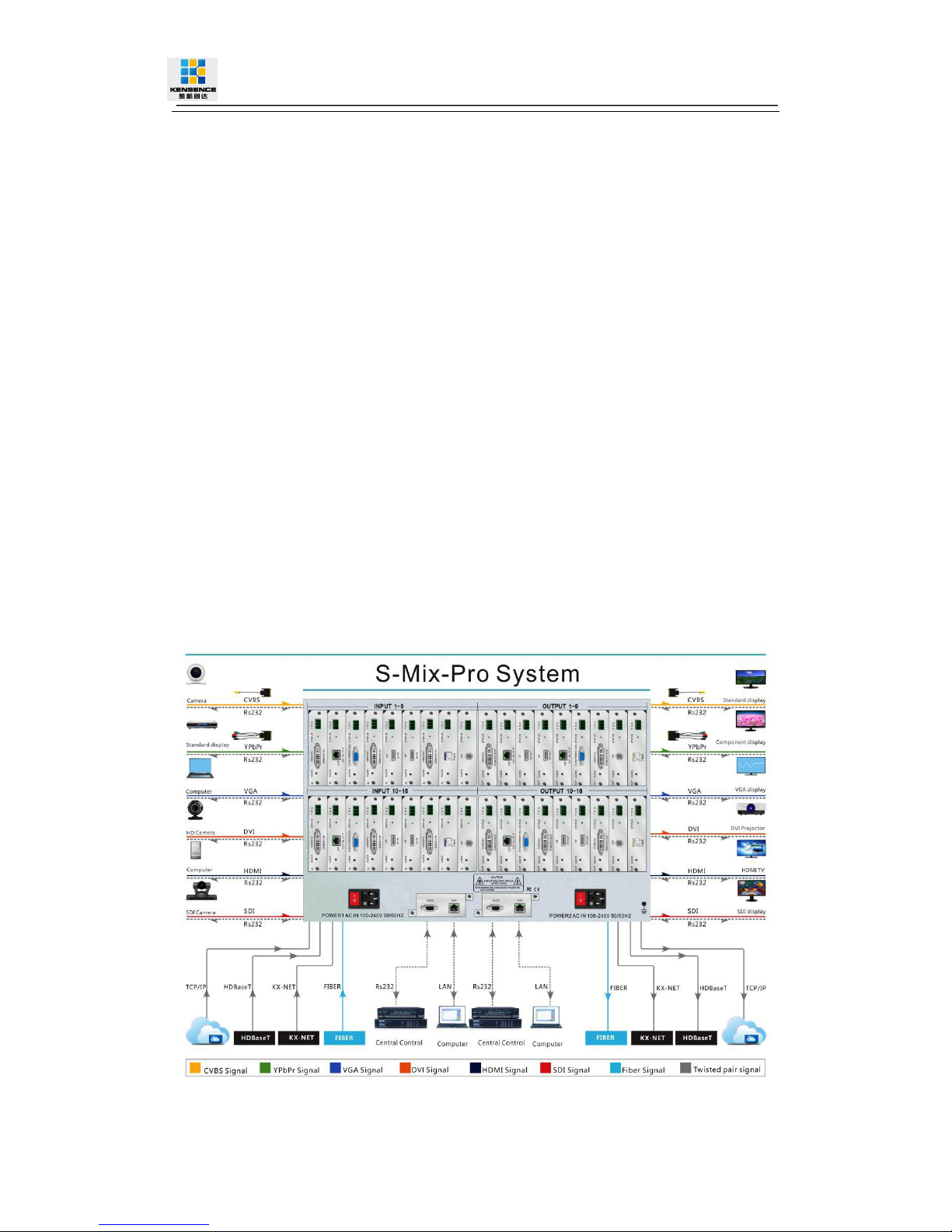
The following diagram is S-Mix-Pro matrix switching system application:

6
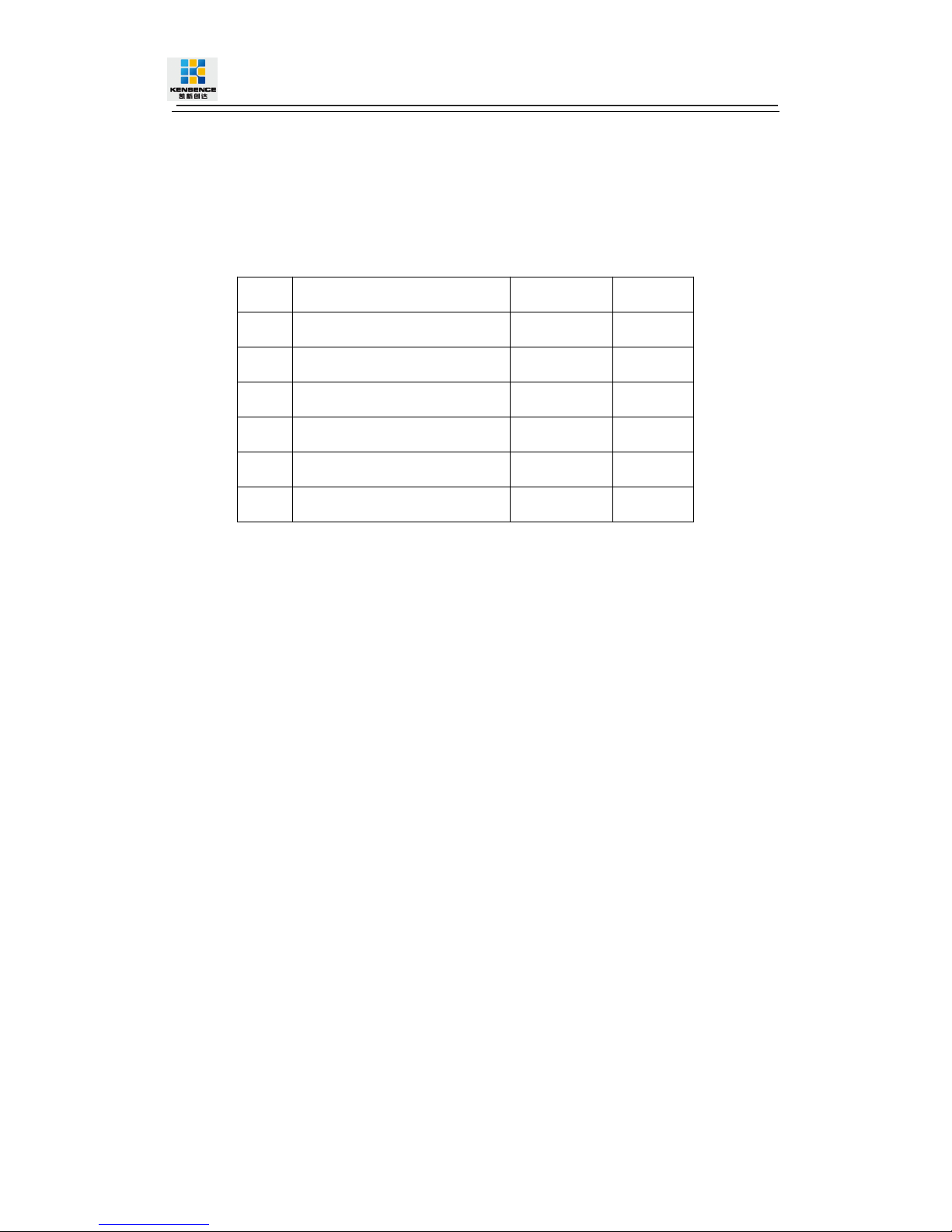
4.Standard configuration
Please check the outer package before using this product. Please contact us
if the product is faulted or not intact. We will sincerely serve you according to
relevant provisions.
NO.
Name
Quantity
Unit
1
S-Mix-Pro Matrix Host
1
pcs
2
Dryer 50g
1
pcs
3
AC power adapter
2
pcs
4
Certification
1
pcs
5
Warranty card
1
pcs
6
User manual
1
pcs

7
5.Specification
Model
S-Mix-Pro 9x9
S-Mix-Pro 18x18
S-Mix-Pro 40x40
S-Mix-Pro 80x80
Description
9 ways enhanced
HD modular matrix
18 ways enhanced
HD modular matrix
40 ways enhanced
HD modular matrix
80 ways enhanced
HD modular matrix
Input/Output
9/9
18/18
40/20
80/40
Input / output
mode
Support CVBS、YPbPr、VGA、HDMI、DVI、AUDIO、3GSDI、HDBaseT、Fiber、IPstreaming
media
Bandwidth
10.2 Gbps
Serial control
protocol
RS-232 (Baud rate: 115200 data bits: 8 stop bit:1: no parity)
Serial port
connector
9 pin D-sub(DE9F) jack 3=TX 2=RX 5=GND
Network
control
protocol
TCP/IP
Network
connector
RJ45 connector 10/100Base-T Ethernet
Color Space
Supports RGB444, YUV444, YUV422 color space, supports x.v.Color extended gamut
standard
Transmission
Distance
HDBaseT technology transmitting 70M-100M (CATS6), H.264 technology transmitting
more than 160 meters (CATS6), 2-80 km (single core single mode fiber); 30 meters (digital
cable)
Electrostatic
protection
Human body discharge mode: 8kV (air gap discharge) + 4kV (contact discharge)
Input voltage
100VAC~260VAC,50/60 Hz

8
Operating
temperature
0ºC~40ºC
Storage
Temperature
−20ºC~60ºC

9
6.Description of operation and function
6.1 Description of front panel
Figure 6.1.1 S-MIX-PRO99 front panel
Figure 6.1.2 S-MIX-PRO-99 rear panel

10
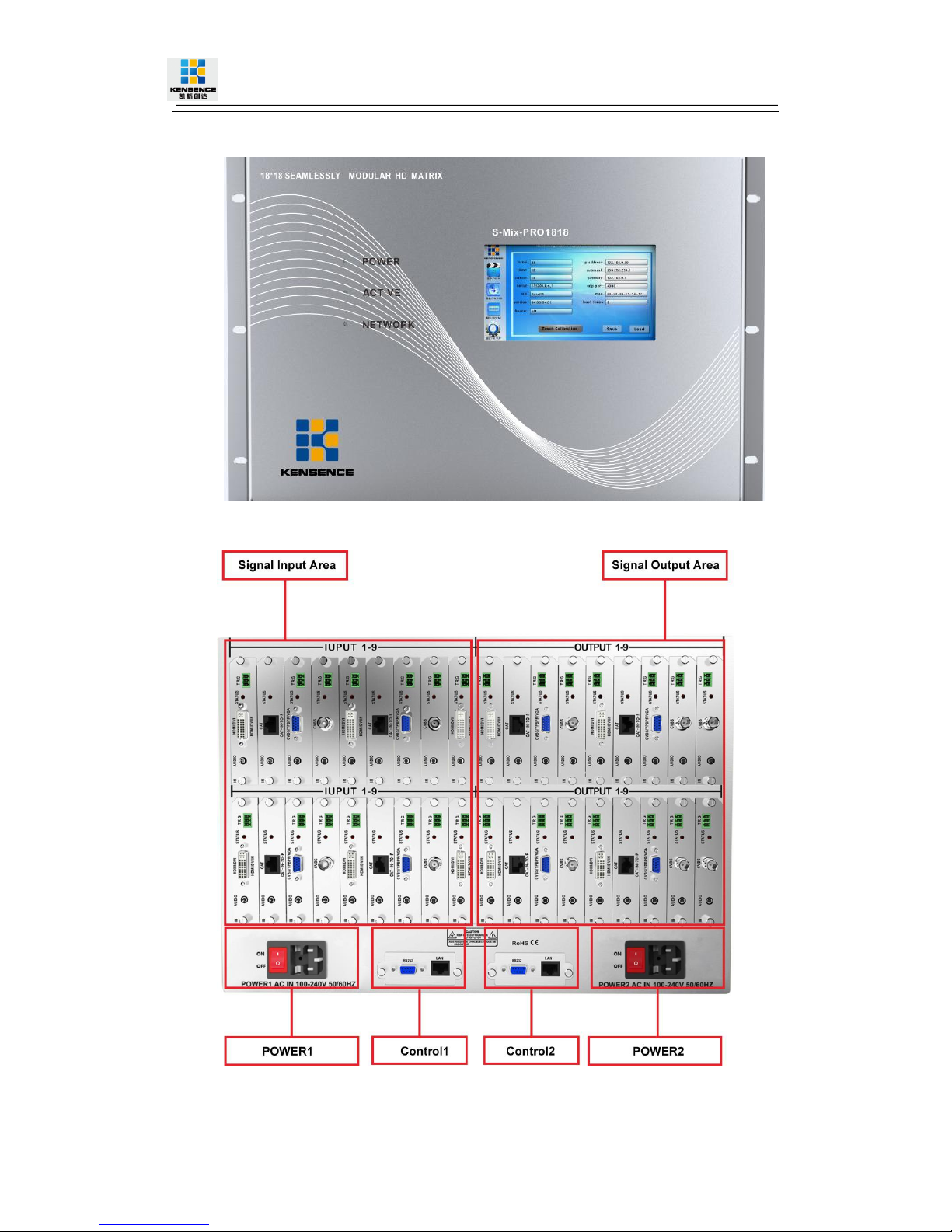
Figure 6.1.3 S-MIX-PRO-1818 front panel
Figure 6.1.4 S-MIX-PRO-1818 rear panel
Ce manuel convient aux modèles suivants
3
Table des matières