
Inductosense WAND Manuel utilisateur

Document: 1.04.04 Rev6
Document: 1.04.04 Rev6
WAND Data Collector
User Manual

Document: 1.04.04 Rev6
Disclaimer
ThisproductsuppliedbyInductosenseLtd.InductosenseLtddoesnotwarrantthatit
issuitedtoallenvironmentsandapplications.InductosenseLtdmakesnowarrantyor
representation,eitherimpliedorexpressed,withrespecttothequality,performance,
merchantability, or tness for a particular purpose.
InductosenseLtdhasmadeeveryeorttoensurethismanualisaccurateanddisclaims
liabilityforanyinaccuraciesoromissionsthatmayhaveoccurred.Informationinthis
manualissubject to change without noticeanddoesnotrepresentacommitment
onthepartofInductosenseLtd.InductosenseLtdassumesnoresponsibilityforany
inaccuracies that may be contained in this manual and makes no commitment to
updateorkeepcurrenttheinformationinthismanual,andreservestherighttomake
improvements to this manual at any time without notice. If you nd information in
this manual that is incorrect, misleading, or incomplete, we would appreciate your
comments and suggestions.
No part of this document can be reproduced, transferred, distributed or stored in
any format without prior permission of Inductosense Ltd.
PleasecontactInductosenseLtdifyouhaveanyqueriesregardingthismanualorthe
product.
Inductosense Ltd.
UnitDX, St.Phillips Central, Albert Road, Bristol, U.K.

Document: 1.04.04 Rev6
How to use this manual
The WAND Data Collector (referred to as WAND from this point forward) manu-
al has been laid out to reect the menu bar that appears on the WAND screen.
This booklet includes:
Introduction to WAND Page 4
Description of Key Features Page 4
Powering up Page 5
Measure Measure
Settings
Device
Settings History
Page 7
How to take
thickness
measurements
Page 10
Conguring the
WAND for a
measurement
Page 12
Conguring
WAND for use
Page 14
Retrieving stored
data
Other instruction manuals in the WAND series:
WAND IDM Software Manual
WAND TMS - Sensor Installation Manual
Document: 1.04.04 Rev6
Introduction
TheWANDisusedtoactivatetheInductosenseThicknessMonitoringSensors(TMS)
in order to take ultrasonic thickness measurements from structures. The WAND
powersandsubsequentlyacquiresthethicknessdatafromtheinstalledsensors.The
TMS sensors can be installed on thickness/corrosion monitoring locations (CMLs/
TMLs). Measurements from the TMS sensors are displayed on the WAND’s screen
andcanalsobeanalysedusingtheInductosenseDataManagement(IDM)software.
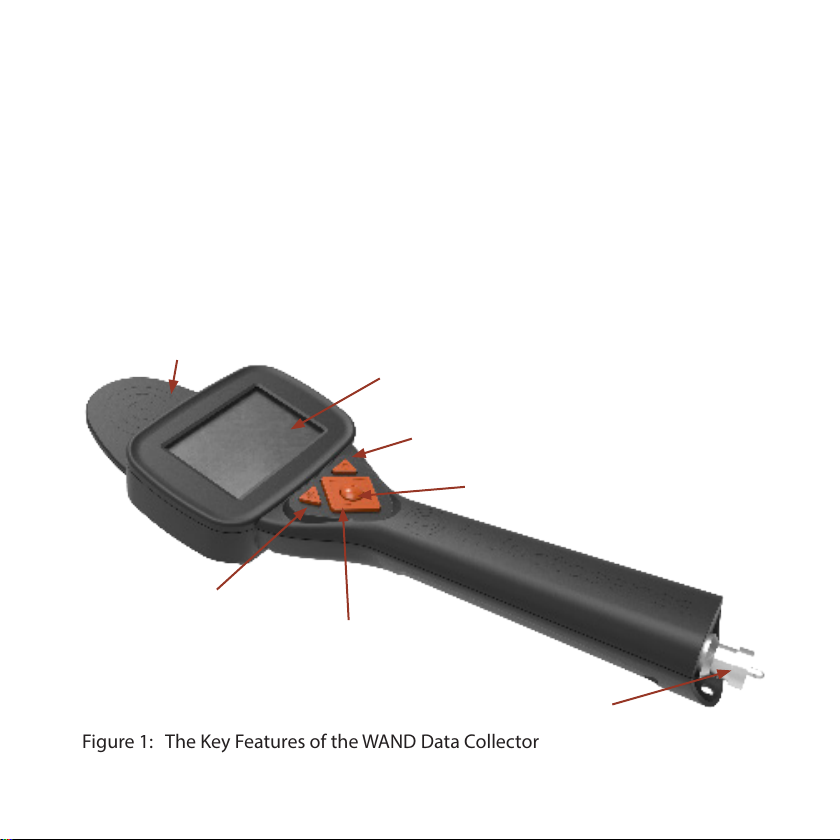
Description of Key Features
Figure 1: The Key Features of the WAND Data Collector
Transmission Coil Screen
Scan Button
On/Off Button
Enter Button
Navigation Button
Data & Power Connector

Document: 1.04.04 Rev6
Powering-up the WAND
To switch the WAND on press the ON/OFF button. Once the WAND is turned
on, a user sign-in page will be displayed. A user can sign-in to the device by either
scanning a user RFID card or by entering a PIN Number against a specied user
name.
• When using an RFID card, simply hold the card under the WAND and
depress the scan button.
• With a USER ID and PASSWORD, press the enter button to reveal a list of
recorded users..
• Navigate to the appropriate user using the navigation buttons and select by
pressing the ENTER button.
• Navigate to the PIN eld and press the Enter Button
• Enterthe4-digitPINnumberbyscollingthroughtthenumbers(upanddown
buttons) and move to the next number using the left and right buttons.
• Once the PIN has been entered press the enter button
• If the PIN number entered is succesful the screen will change to the
MEASUREMENT screen
Figure 2: The Sign-in Screen
• If the PIN number is incorrect
an ‘Error’ message will appear.
• Clear the error message by
pressing the enter button and
retry the PIN.
Document: 1.04.04 Rev6
Start using the WAND
Prior to initial use of the WAND, it is recommended to check and conrm the
MEASUREMENT and the DEVICE SETTINGS. The settings are accesed via the Menu
Bar.
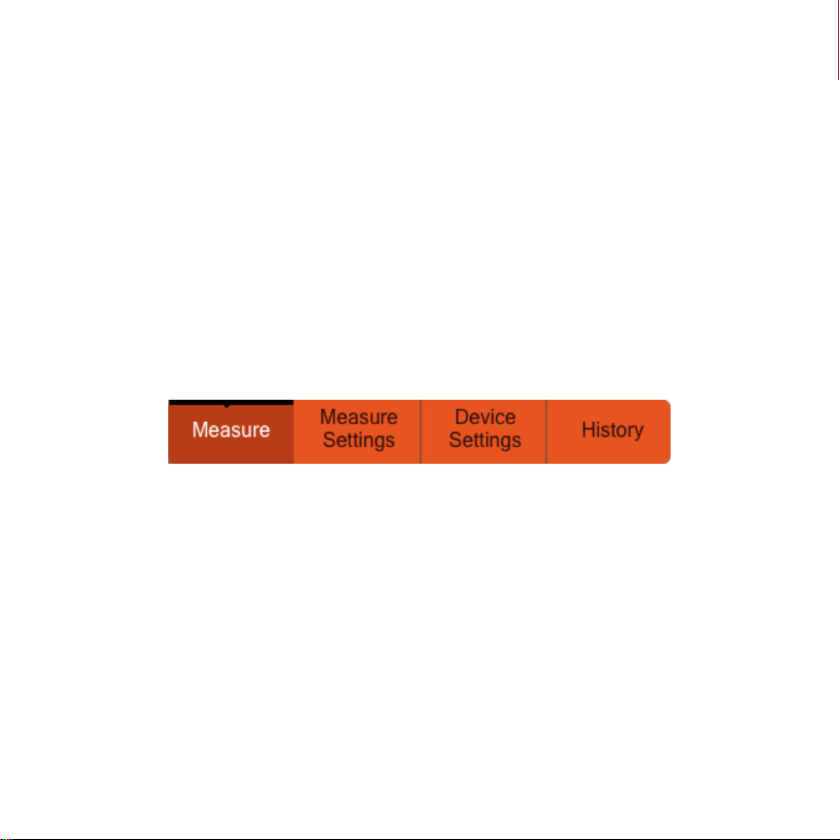
To open the Menu Bar, press the UP navigation button.
The LEFT and RIGHT arrows can be used to move between the four measurement
options (see Figure 3 below) and the Enter button will select the required option.
To exit the menu press the scan button
Figure3:ThedevicenavigationMenucanbeopenedusingtheUP
button from any screen after login is completed successfully.

Document: 1.04.04 Rev6
Measure Measure
Settings
Device
Settings History
Figure 4: The Measurement Screen
The Measurement Screen (Figure 4 below) is used to display the ultrasonic A-scan,
the location of the TMS sensor and the the velocity of ultrasound in the material
and the calculated thickness.
Tip:
Whenthe scan buttonisdepresseda reducedultrasonicA-scanisdisplayedalong-
sideabar showingthesignaltonoise ratio. Thisfeatureis designed toenable users
to achieve optimal alignment of the WAND to the TMS sensor.
When the scan button is released the full ultrasonic signal is shown on the screen
along with location from the RFID. This signal is the average of the scans taken
while the scan button was held down (if Averaging is ENABLED) or the last reading
(is Averaging is DISABLED). For more on Averaging, see Measurement Settings.

Document: 1.04.04 Rev6
Acquiring measurements using the WAND and Assigning
RFIDs to TMS Sensors in the eld
STEP ONE
Place theWAND above the RFID, press the Scan button. If the RFID has been detected, the
locationindicatordisplaystheRFIDtag(“RFID/N/A”if theRFIDhasnotbeenassigned,“RFID
/nameof location”if it hasbeen). Otherwise,thelocation indicatorwilldisplay“N/A”only. In
that case, release the button, reposition the probe and press the button again.
STEP TWO
OncetheRFIDisacquired,keepthescanbuttonpresseddown.Forthebestsignal,thetrans-
missioncoilontheprobeshouldbepositionedabovethesensor.Theultrasonicsignalshould
appearin themeasurementwindow,andthe colourbar onto the right of the scan showing
signaltonoiseratioshouldbehigh.Oncetheprobeisinapositioninwhichthesignalappears,
and the signal intensity is high, release the scan button. If the message“too close”appears,
increase the distance from the probe to the sensor slightly.
STEP THREE
Savethemeasurementby pressing theenter button. If the RFID has alreadybeen assigned,
you will see a save conrmation message. Press the enter button again to go back to the
measure screen. If the sensor history has been ENABLED (See MEASUREMENT SETTINGS)
you will automatically see a screen showing a list of that sensor’s previous measurements
STEP FOUR
If the RFIDhas notbeen assignedpreviously(inthe IDMsoftware,and then importedtothe
probe, or directly in the eld), a window will open to assign it in the eld.
Thewindowallowstheusertodenethematerial,calibrationvalue(manualUTreading),and
locationnameassociatedwith theRFID. Thesettingsareselectedusingupand downon the

Document: 1.04.04 Rev6
navigation pad and the enter button.
STEP FIVE
Select a standard material in the list or enter a new custom material velocity.
STEP SIX
Ifavailable,enterthereferencemanualUTmeasurementintheCal.Valuesetting(Pressenter
to set the Cal.Value setting, then use up and down to change digits, left and right to cycle
through the digits, press enter when done). This value cannot be set to 0. If there is no
reference value, set to another value and make a note of this. It can be changed later in the
IDM software.
STEP SEVEN
Enteralocationname.ThiscanbechangedlaterintheIDMsoftwareifmistakesaremade,or
if location names are simplied due to the input method.
STEP EIGHT
Once the settings for the RFID have been set, press the left navigation button to nish the
RFID assignment and save the measurement.
SubsequentmeasurementstakenbytheWANDwillassociatealldatafromtheTMSsensoto
this RFID.

Document: 1.04.04 Rev6
Measure Measure
Settings
Device
Settings History
Figure 5: Measure settings screen
The ‘Measure Settings’ menu options allows users to dene the measurement
parameters against which the thickness measurements will be recorded in the
WAND.
Figure 5 is a screenshot of this menu option and displays the criteria that can be
congured. ItshouldbenotedthatMaterialandPeakDetctioncanalsobeapplied
inretrospecttotheindividual(andgroupsof )measurementsoncetheyhavebeen
uploaded to the IDM software.
Use the UP and DOWN buttons to navigate between the criteria and the ENTER
button to select. Within each criteria, use the UP and DOWN buttons to navigate
between the options and the ENTER button to select.
Press the scan button to return to the measurement screen.
Table des matières


