
IncogniTeam IncognIt.Home Manuel utilisateur


IncognIt.Home. Contents:
Warranty, terms and conditions of use
Technical characteristics and supply package
Outside
Indicators’ value
Getting started, сonnecting
Quick Setup
Step 1. Password
Step 2. Internet
Step 3. Wi-Fi
Step 4. VPN
Step 5. Auto-update
VPN user member area“My.IncognIt”
1. Access to “My.IncognIt”
2. Connection to the VPN service IncogniTime
Warnings
Contact

IncognIt.Home
Warranty, terms and conditions of use
Warranty terms
★ IncogniTeamwillremainliablefornonconformity
ofaproducttotheagreedtechnicalcharacteristics,
aswellasforincompletenessoftheequipment
orfunctionalitylossfortwoyearsfromthedelivery
oftheproducttoyou.Youareentitledtosubmitaclaim
toIncogniTeam,ifaproductpurchasedfromthewebstore
haveashortage,defectorlackofconformitythatexisted
alreadyatthemomentofdeliveryoftheproduct.
★ YouhavetoinformIncogniTeamofanylackofconformity,
defectorfunctionalitylossnolaterthanintwomonths
afterbecomingawareofthese.IncogniTeamwillreply
toyourclaimwithin15daysviae-mail.
★ Warrantyliabilityisnotapplicabletotheproducts
thathavebeenopened,modifiedorrepairedbythird-party
organizations,showsignsofmechanicaldamage
ormoisturetraces,ortoproductswithdamaged
ormissingserialnumbers.
Using IncogniTime service
★ IncogniTeamprovidesthefunctionsoftheIncogniTime
serviceasis.ThatmeansthatIncogniTeamdoesnot
providewarrantiesofanykind,eitherexpressorimplied,
includingbutnotlimitedtowarrantiesofmerchantability
andfitnessforaparticularpurpose.
★ Youassumefullresponsibilityforanylossthatresults
fromyouruseoftheIncogniTimeservice.IncogniTeam
won’tbeliableforanyindirect,punitive,special,
orconsequentialdamagesunderanycircumstances,
evenifthey’rebasedonnegligenceorIncogniTeam
havebeenadvisedofthepossibilityofthosedamages.
★ RoutermanufacturerIncognIt,itssoftwaredevelopers
andtheownersoftheusedVPNserversarenotliable
fortheactivityoftheusersontheInternet.
Theuserisliableforanyactivityafteraccessing
theInternetthroughIncognIttechnology
anditsconsequences,accordingtothelocallaws
oftheiractuallocationandthelocation
oftheVPNserversused.

IncognIt.Home
Technical characteristics and supply package
IncognIt.HomeisaWi-Firouter-anonymizerthathelps
establishaprivateandsecureconnectionofyourhomenetwork
totheInternetviaadedicatedortelephoneline.
Options of Internet connectivity:
★ ADSL2+/VDSL(telephoneline);
★ Ethernet(PPoE,IPoE,L2TP/PPTP);
★ 3G/4G/LTE(withUSB-modem).
Ports:
★ 1xADSL/VDSL(WAN);
★ 1xEthernet1Gbit/s(WAN);
★ 4xLAN1Gbit/s;
★ 2xUSB2.0.
.
Power:
★ AC220V/AC110Vdependingonthecountry.
Wi-Fi:
★ 802.11b/g/n/ac;
★ concurrentdual-band2.4/5GHz;
★ upto300+867Mbit/s.
Supply Package:
★ Router;
★ PowerAdapter(Europeanplug);
★ PatchcordRJ-45;
★ PatchcordRJ-11;
★ VPNconnectionpackfor3months(IncogniTime3);
★ Flash-cardwithrouterquicksetupguide.
IncognIt.Home
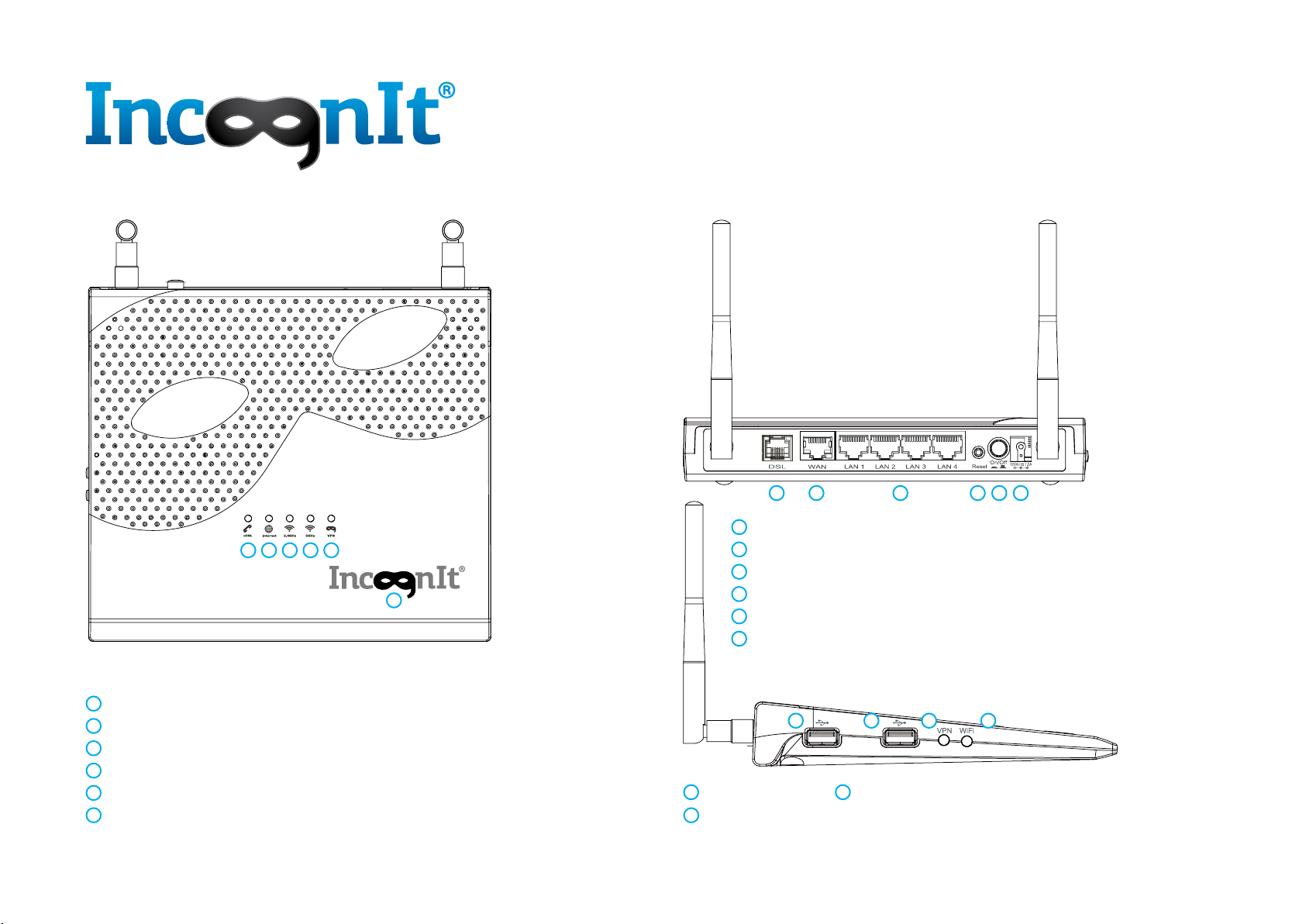
Outside
–Power/Softwareupdateindicator;
–DSLindicator;
–Internetconnectionindicator;
–2.4GHzWi-Fifunctionindicator;
–5GHzWi-Fifunctionindicator;
–VPNfunctionindicator.
1
123456
2
3
4
5
6
–powerjack;
–on/offbutton;
–restartbutton;
–LANports(yellow)withindicators;
–EthernetWANport(blue)withindicator;
–ADSL/VDSLport(gray).
1
2
3
4
5
6
–USBports;
1–Wi-Fion/offbutton;
2
–VPNon/offbutton.
3
1
23456
1 1 23
IncognIt.Home
Indicators’ value
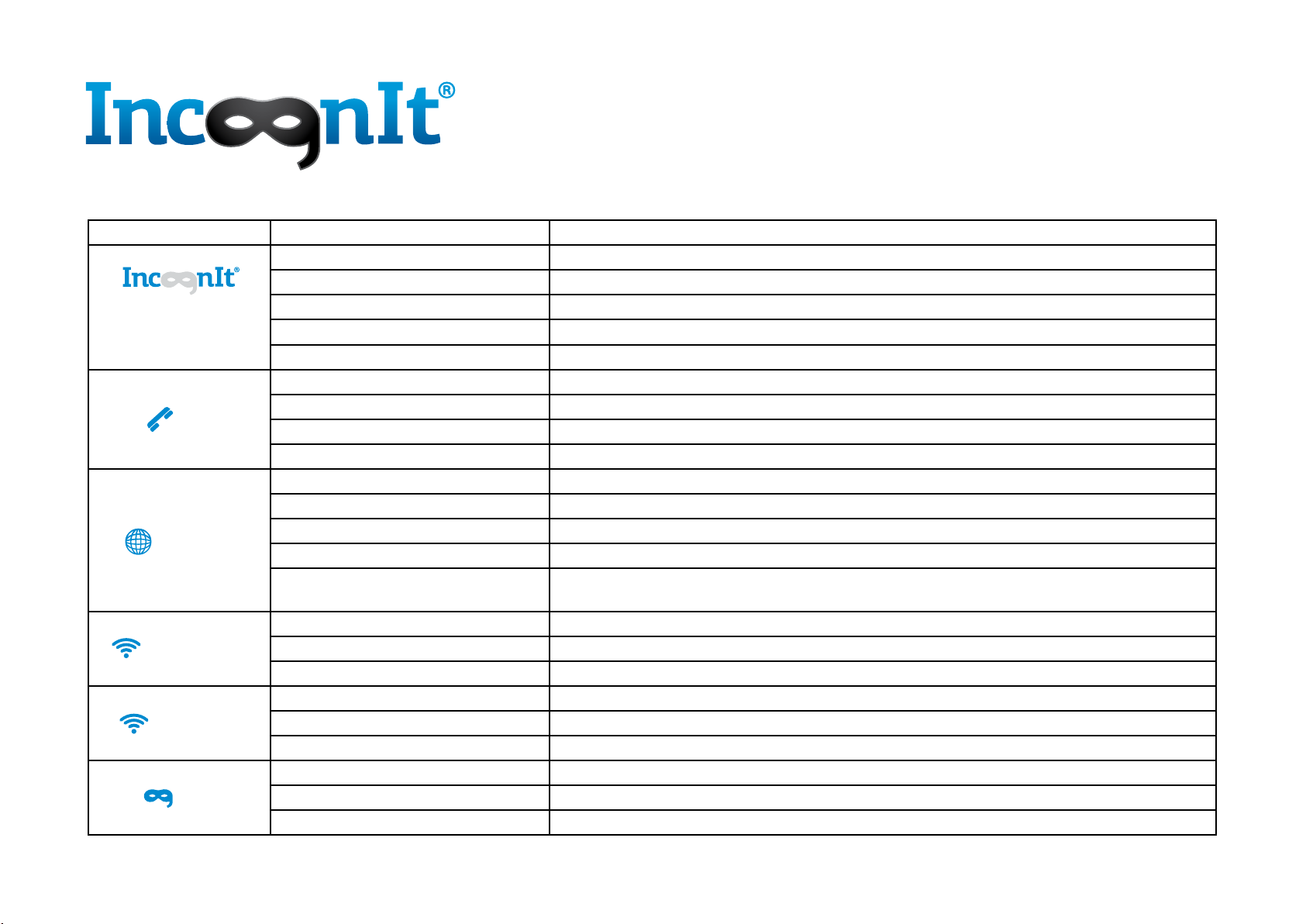
Indicator State Description
Power
White-graylighton Routerison
Lightoff Routerisoff
Slowwhite-graylightblinking Routerisloading
Fastwhite-graylightblinking Softwareupdate
Redlighton Fatalerror,auto-startinrecoverymode
DSL
Bluelighton ADSL/VDSLisconnected
Lightoff ADSL/VDSLisnotconnected
Slowbluelightblinking Searchingforlinesignal
Fastbluelightblinking TryingtoestablishaDSL-connection
Internet
Bluelighton Internetisconnected
Lightoff Internetisnotconnected
Fastbluelightblinking Datatransfer
Fastredlightblinking Datatransferthroughbackup3G/4G/LTEconnection
Redlighton Theconnectionissetup,butnoaccesstoInternetisavailable–thebackup3G/4G/LTE
connectionisbeingused
Wi-Fi2.4GHz
Slowbluelightblinking Wi-Finetworkison
Lightoff Wi-Finetworkisoff
Fastbluelightblinking Datatransfer
Wi-Fi5GHz
Slowbluelightblinking Wi-Finetworkison
Lightoff Wi-Finetworkisoff
Fastbluelightblinking Datatransfer
VPN
Bluelighton VPNisconnected
Slowbluelightblinking VPNisconnecting
Lightoff VPNisnotconnected
IncognIt.Home
Getting started, сonnecting
Getting started
★ Routershouldbeinstalledonaneven,stablesurface.
Itcanbealsofixedtothewall.
★ Placetherouterashighaspossible,farfrommetallic
structures,directsunlightandheatsources.
★ Inordertoavoidtheinterference,don’tplacetherouter
nexttootherantennasandtransmitters,electric
transformers,motors,microwavesandotherequipment.
Therecanbealsosomeinterferencefromotherdevices
using2.4GHzfrequency,cordlessphonesandBluetooth
devices.
★ Forbetterwireless-networkcoverageplacetherouter
inthemiddleoftheroom.
★ TheEthernet-cablelengthfornetworkdeviceconnection
shouldnotexceed330feet(100meters).
★ InordertocomplywithFCCradiofrequencyguidelines,
theroutershouldbeplacedandfunctionatleast
at7.8inch(20centimeters)frompeople.
★ Useonlysuppliedantennasandpowerunit.
Connecting
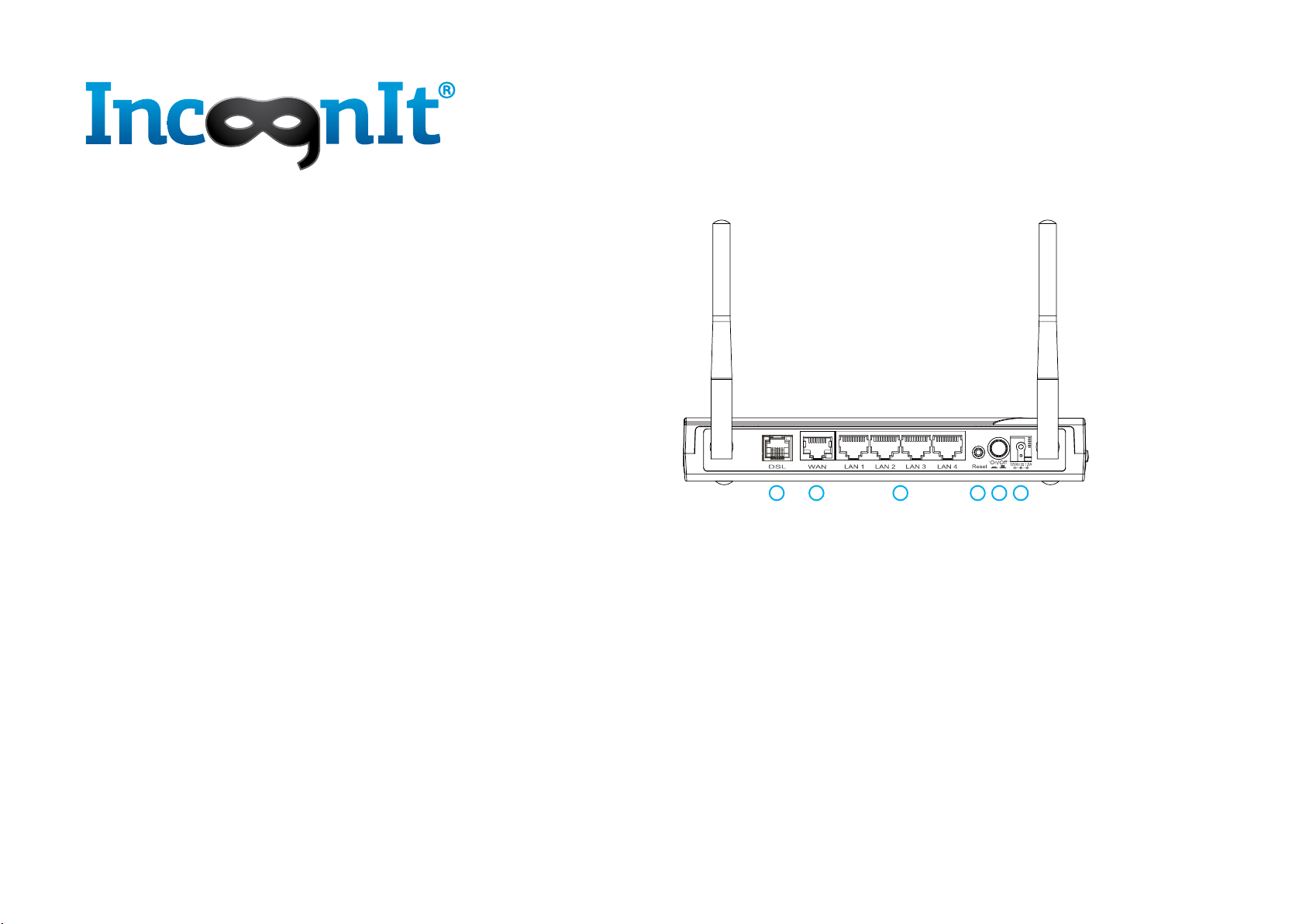
1. PlugtheEthernet-cableintotheWANport(5)
ortelephonecableintotheADSL/VDSLport(6).
2. Ifneeded,plugthelocalnetworkEthernet-cable
intoLANports(4).
3. Plugthepowercableintotherouter(1).
PlugthepoweradapterintotheACsocket.
4. Turnontherouterusingthepowerbutton(2).
123456

IncognIt.Home
Quick Setup
Duringthefirstsetupoftherouteritisrecommendedtouse
cable-connection.Todoso,connectyourPCtotherouter’sLAN-
portusingthesuppliedpatch-cord.
Inordertousethewirelessconnectionduringthefirstsetupof
therouter,connecttothedefaultWi-Finetwork.You’llfindthe
setupontheflash-cardand/oronthestickerontherouterbody.
1. Openyourbrowserandtypehttp://router.incognit.net
orrouterIP-address172.16.254.254intheaddressline.
Defaultloginandpasswordarerouter/incognit.
You’llbewelcomedtotheIncognItRouterQuick Setup
Wizard.
2. Chooseyourlanguageandpress“Next”.Inordertochoose
thelanguageoftherouter’swebinterfacelater,press
“Skip”.
Ifnootherlanguageisselected,thewebinterfacewilluse
thebrowserlanguagebydefault.
3. Whenyouopen“QuickSetupWizard”thenexttime,
the“Skip”buttonwillallowyoutokeeppreviouslysaved
settingswithoutchanges.
123

IncognIt.Home
Quick Setup. Step 1. Password
1. Forsecuritypurposesitisrecommendedtochange
thedefaultpasswordoftherouter’swebinterface.
(Defaultloginandpasswordareprovidedontheflash-card
and/oronthestickerontherouterbody.)
Createandenteranewpassword,thenconfirmit.
2. Pressthe“Next”button.
Inordertochangethepasswordlater,press“Skip”.
3. Whenyouopen“QuickSetupWizard”thenexttime,
the“Skip”buttonwillallowyoutokeeppreviouslysaved
settingswithoutchanges.

IncognIt.Home
Quick Setup. Step 2. Internet
1. Ifyouhaven’tdonesobefore,plugtheInternetcableinto
therouter-Ethernet-cableintotheWANport(5)
ortelephonecableintotheADSL/VDSLport(6).
2. Pressthe“Next”button.
InordertosetuptheInternet-connectionlater,press“Skip”.
Table des matières
Langues :


