ILEC SN10 User Manual SN10 Flight Pages – Competition Mode
3.1 Task Page
Use the task page to plan a task before the flight, or
during the flight if you want to change the task or
see the remaining distance or estimated-time-to-
finish (ETF).
On the task page, you select the start point, the
turnpoints, and the finish point of your task. As you
select points with the VALUE knob, you will see they
are sorted in alphabetic order. If you have points whose names begin with numbers,
these numbered points appear after all points whose names begin with alphabetic
characters, and are sorted in correct numeric order. Press HELP for a turnpoint’s
detailed description from the database.
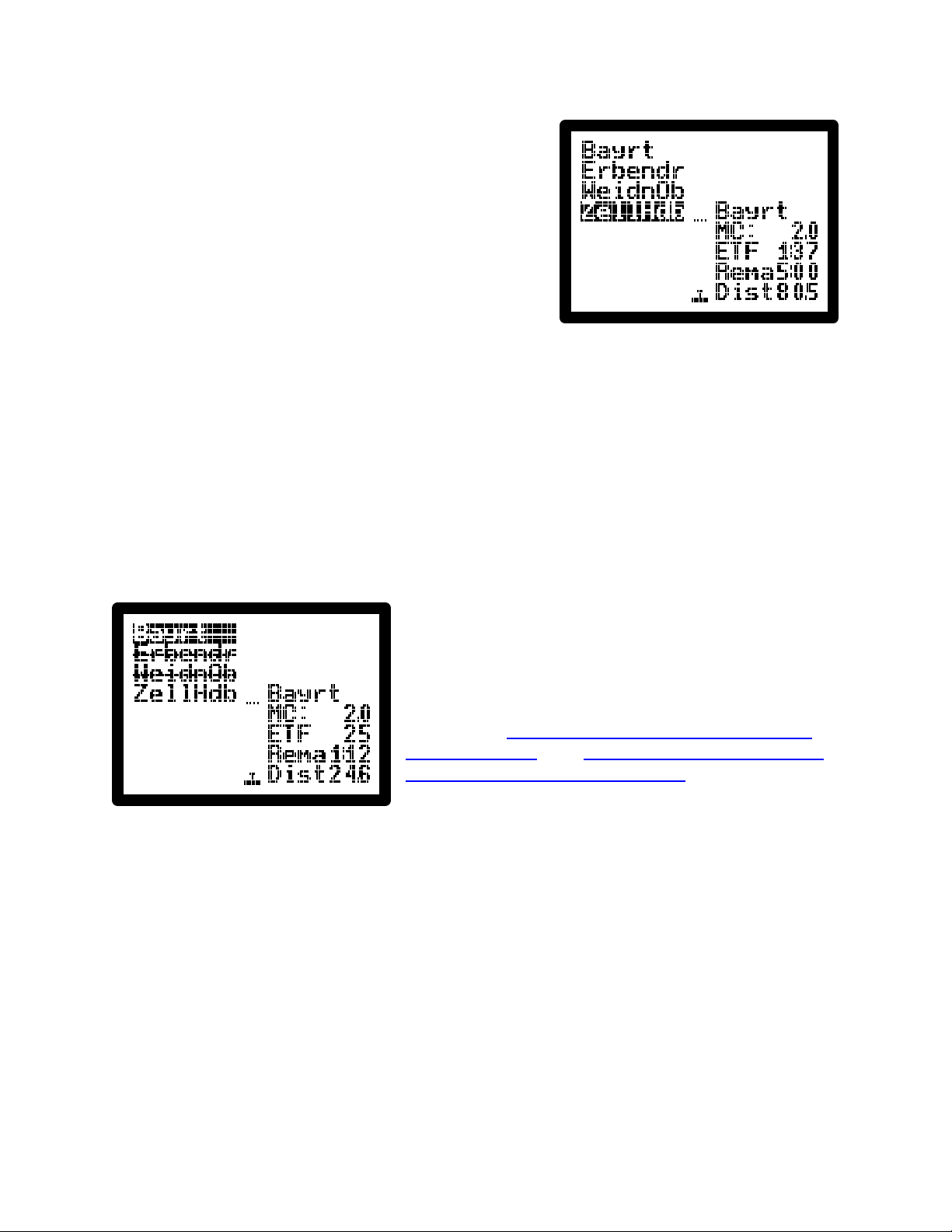
Read the task page left column top-to-bottom, then right column top-to-bottom. The start
point is at the top left (Bayreuth), followed by up to 10 turnpoints (Erbendorf, Weiden,
then Zell Haidberg), and finally the finish point (again Bayreuth). At MacCready 2 (MC),
the estimated time to finish the task (ETF) is 1 hour and 37 minutes. At the lower right is
the total task distance of 80.5 miles. “Rema” gives time remaining for a time-limited
task.
When you start, the start point is automatically
crossed off (a line is drawn through the name).
As you fly the task, each turnpoint you achieve is
automatically crossed off; the picture at left shows
you during a task from Weiden heading to Zell.
Finally, when you finish the task, the finish point is
crossed off. See the Competition Rules option for
automatic starts, and see the Flight Recorder page
for automatic turnpoint notification.
During the flight, the SN10 will continually display
both distance and time to complete the task. For fixed tasks, you may never use the
task page in flight. For tasks determined during flight, you can add additional turnpoints,
or change those turnpoints you haven’t yet reached. To help plan time-limited tasks, the
remaining time counts down after the start, so you can compare your remaining time
against the estimated time to finish the task (ETF).
In the middle of the task page is a glideslope indicator. When the glider symbol rises
above the dotted line, you are above the calculated final glide altitude. The glideslope
indicator is also displayed on the status page.
The ETF is based on MacCready theory. In conditions with streeting or where you can
climb flying straight, you should beat this estimate. ETF takes into account your current
water ballast, bugs, and the effect of wind on remaining legs. Try switching to the status
page, change the water or bugs, then switch back to the task page to see the revised
Software Version 2.21 Manual Revised 17-May-2001 Page 4 of 80