
ILE MULTITEX3 Manuel utilisateur
NOTES OF OPERATION OF THE TOOL
MULTITEX3
13/06/11 Pag. 1
This document is property of I.L.E. Multitex3

Indice generale
Main unit ............................................................................................................................................5
More detai s on 'initia page' and Count re ated functions..................................................................6
Other on Initia Page and Optic Scanner functions............................................................................ 7
Function of 'Precision stop'.................................................................................................................9
Function of data output on seria port RS232...................................................................................10
Detai ed instructions ........................................................................................................................ 12
Foreman Password ..........................................................................................................................15
Safety maximum speed check.......................................................................................................... 16
Instruction for insta ation.................................................................................................................17
Instructions for the assemb age of the optic head.............................................................................20
Instructions for assemb y of magnetic sensor...................................................................................21
Instructions for regu ation of instrument ......................................................................................... 22
Exp anation of error messages..........................................................................................................23
Adapter Contex to Para e ................................................................................................................24
13/06/11 Pag. 2
This document is property of I.L.E. Multitex3

Introduction
The instrument Mu titex3 is used on circu ar knitting machines for two main purposes:
1. Count the Piece ro s and perform some tasks re ated to the machine contro
2. Check the fabric qua ity and perform tasks re ated to qua ity assurance
This two main purpose group together severa functions as exposed be ow :
COUNTING:
•Piece turns count-down with speed measurement and time to end computation
•It measures the yarns absorbed by the feeders (LFA function) .
•It checks that the yarns consumption match the reference va ue +- a owed to erance and stop
machine in case of out-of-range.
•It notices the times of workmanship of the machine.
•Precision stop of the position of the ro produced with adjustab e de ay.
•Data output on seria port RS232.
QUALITY:
•Check of fabric qua ity using one or two infrared optic scanners
•Each optic scanner check a ength of 60mm or 80mm, for up to 160mm each turn
•Separated section for Ho es and for broken meshes
•Stop for reached imit of ho es, arge ho es and broken meshes
•Memorize data about fau t founds
•programmab e stop de ay to p ace the fau t in a preferred position
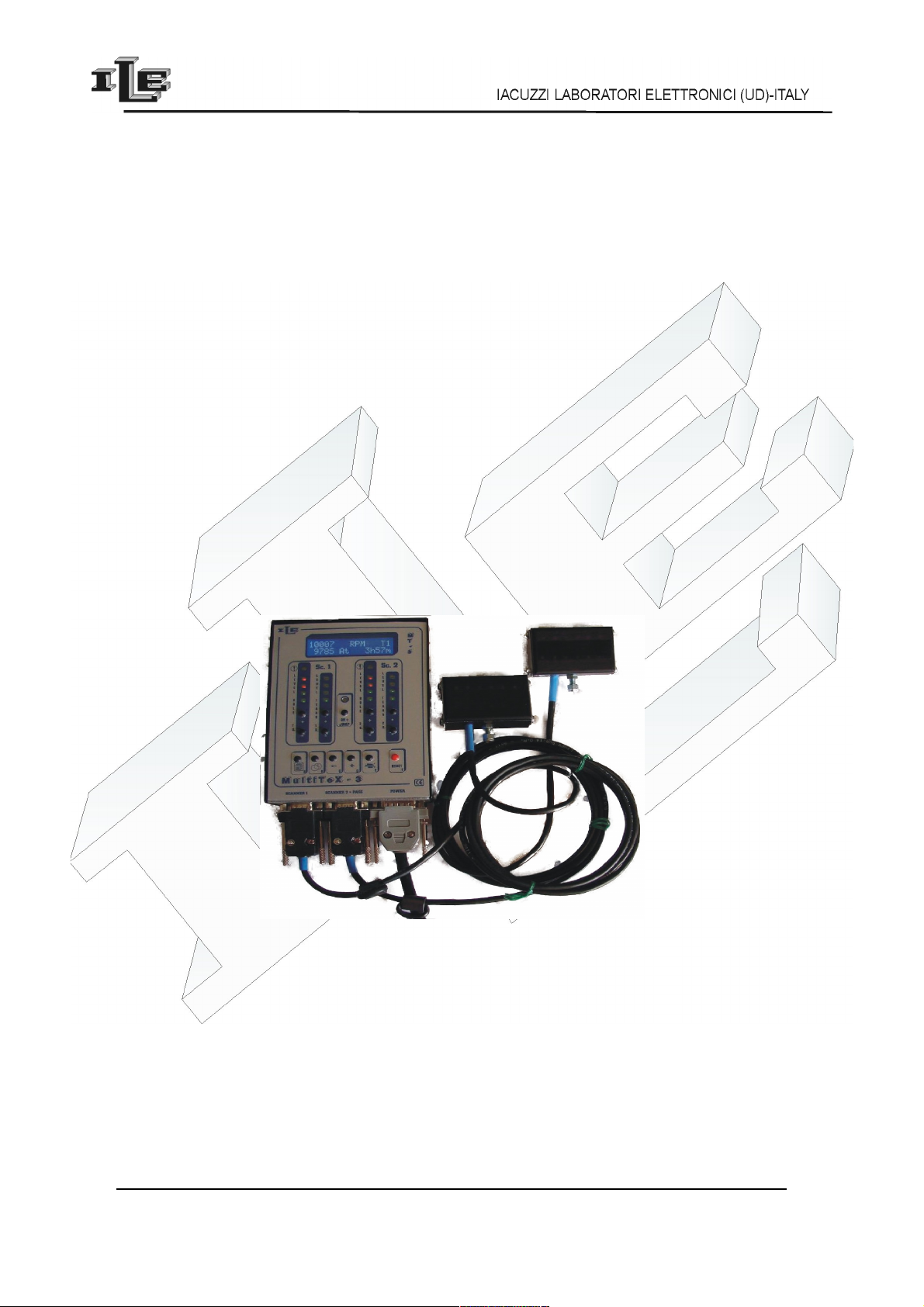
The device is composed of:
•Main unit (contro er) with keyboard, disp ay and ight bars for the signa from optic scanner.
•One or two optic scanner /optic heads for the fabric check, in different shapes so to cover from
60mm to 160mm of produced fabric per turn/ oop
•Coup e Magnet - magnetic Sensor to notice the turns of the oom.
•Up to 5 sensors for LFA function composed by Coup es Magnet - Sensory magnetic to measure the
yarns consumption from the feeders.
In other words this is a sum of a ready know devices FM10 and Contex8 .
13/06/11 Pag. 3
This document is property of I.L.E. Multitex3

Some technical characteri tic
•Power supply voltage 24VAC.
•Power consumption 4W.
•Service Output 2A 250V.
•A secret code can protect set up and data .
•Work on loom speeds from 10 to 70 turns per minute.
•Languages Italian, English, Francaise.
13/06/11 Pag. 4
This document is property of I.L.E. Multitex3

Main unit
The messages on the disp ay change according to the state of operation and the se ected page.
Message shown after power-on , without pressing any key, is ca ed 'initia page' and it ooks ike the
fo owing examp e:
1 0 0 0 0 R P M T 1
9 0 0 0 0 h 0 0 m
Other information are exposed in the fo owing detai ed description of the pages.
The principal functions of the keys are the followings:
•Key 'A' 'Page' , at the eft , is used to show the next page on disp ay .
•Key 'B' , is used to change the working shift T1,T2...T5 .
•Key 'C' '←' used to enter data on as described ater.
•Key '+' used to enter data on as described ater.
•Key ' ' 'E' 'Production', is used to show pages re ated with LFA function of yarns
consumption measure.
•Key 'Reset' restore the instrument to norma state after a stop, or c ear data or other functions as
described ater.
•Key 'JUMP' used to enab e the jump of the discarded need e, shown by the ye ow ight
•The Coup es of key '+' and '-' put on the right are used to adjust the sensibi ity of the re ated ight
bar , one for Ho es sensibi ity and one for Broken Meshes sensibi ity , for each optic
scanner.
13/06/11 Pag. 5
This document is property of I.L.E. Multitex3
Turns planned
total for piece
Actual
speed
Active
turn
Turns left to end
of piece
Time left to end
of piece

More detail on 'initial page' and Count related function
As mentioned above , the message shown after power-on , without pressing any key, is ca ed 'initia
page' and it ooks ike the fo owing examp e:
1 0 0 0 0 R P M T 1
9 0 0 0 0 h 0 0 m
In this page there are the information more used :
•the number of turns p anned for the piece, shown to the eft top, in this examp e 10000.
•the remaining number of turns for the piece, shown under to the eft, in this examp e 9000.
•the assigned working shift, shown the right top, in this examp e T1.
•the actua speed, shown in the center top, in this examp e 'RPM'
•the estimated time to end the piece at current speed ,shown at right bottom, in this examp e
0h00m.
This page is used for the device as a counter: write here the number of turns of the piece ; then the
counter decreases the number of turns at every effected turn, stopping the machine when the number
reaches Zero.
To write the number of turns to act this way:
1. To press for a ong time the key 'Reset' unti a digit f ashes..
2. Pressing the key '+' this digit is increased.
3. Pressing the key '←' it shift to another digit
4. When the wanted number is seen press the key 'Reset', the number se ected is oaded in the
counter.
Pressing for a ong time the key et appears the symbo '%'. This points out that the percentage
contro on the consumption LFA is enab ed. To disab e it press for a ong time sti it the key ' '.
Then disp ay show the writing 'At' in the inferior ine when the device receives in input the specia signa
of 'activity'; this informs that the machine is turning. It is required that this signa is present to the device
when the machine turns, and on y when it turns.
There is a so a '*' in the upper ine of the disp ay when the instrument receive signa from the magnetic
sensor. The Key 'Shift' changes the working shift to the next of T1, T2, T3, T4, T5.
13/06/11 Pag. 6
This document is property of I.L.E. Multitex3

Other on Initial Page and Optic Scanner function
As mentioned above , the message shown after power-on , without pressing any key, is ca ed 'initia
page' .
Initia page can show sensibi ity va ues for the optic scanner. Just press key '+' or '-' of the ight bars and
the va ues for the optic scanner wi appear for few seconds . Then the disp ay wi return to counter .
As mentioned before the instrument check fabric fau ts using one or two optic scanners and show on
re ated ight bar the signa received from the scanner ; two ight bars for each scanner, whereas the eft
bar show signa for ho es and the right bar show signa for the broken meshes.
When signa reach red ights the machine is stopped with appropriate messages on the disp ay. Stop can
be de ayed or conditioned from settings in appropriate sections.
When the machine is stopped the cause is exp ained from message and ights:
•the error of reaching the p anned number of sma ho es cause the f ash of first three eds at eft of the
too (2 greens and a red)
•the error of presence of a big ho e cause the ighting of a the five eds on the eft (2 greens and 3
red)
•the error of 'tears' or dropped stitches cause the ighting of a 4 eds on the right (2 greens and 2 red)
•error of sensibi ity too high for broken meshes/tears through ighting of a 4 the eds of eft.
Once that the error has been detected and the machine stopped, the emp oyee can remove it and reset the
too through the pressure of the key ‘Reset '. Then he can proceed to the restart the machine.
There is a so the JUMP key to enab e or disab e the jump of the discarded need e.
When the jump is enab ed the ye ow ight is on and this immediate y imp icates the skip of the contro
of the zones of fabric fo owing to the magnetic sensor . If the ye ow ight is out then the who e fabric is
checked.
In some software version the position of the discarded need e is automatica y detected and it is not
required to be p aced at the magnetic sensor . Anyway it is important that the Jump is enab ed on y if the
discarded need e rea y exist on the fabric.
13/06/11 Pag. 7
This document is property of I.L.E. Multitex3

Function of mea ure of the ab orbed yarn (LFA)
This function counts the meters of yarns furnished by the feeders in a turn of the machine. The number shown in
the specia page is updated every 5 turns of the machine and the maximum shown number is 99 meters and 99
centimeters. The '*' that appears in the disp ay points out that the corresponding magnetic sensor is active.
The too reads up to 5 feeders of which the first 4 are suitab e for feeders type MPF20 or MPF10 or MPF-L; the
ast visua ized feeder 'P5' is predisposed for the feeder 'MER-2' or 'MER-3' used for the Lycra se ectab e by the
dip-switch 4 ocated inside the instrument case:
•set 'OFF' the dip-switch 4 to configure the feeder input P5 for type MER-2
•set 'ON' the dip-switch 4 to configure the feeder input P5 for type MER-3
At power-on the processor read the dip switch configuration and show on disp ay the writing 'L2' if configured for
MER-2 type, or otherwise show 'L3' if configured for MER-3 type.
You can choose among two ways to see the quantity of absorbed yarns:
1) in the c assica visua ization the disp ay show absorbed meters and centimeters for a turn of the oom , where
the maximum shown number is 9999 centimeters which is 99 meters and 99 centimeters.
When this visua ization is used, near to the number there is a 'Cm' or 'In' to point out the unity of measure, it
depends on the choice of use centimeters or inches.
2) in the so-ca ed 'advanced visua ization' or 'for 100 need es' it is showed the yarns absorbed for 100 need es ,
where the maximum shown number is 9990 centimeters or 99 meters and 90 centimeters. The shown number
often contains a decima , for instance 7,5 centimeters for 100 need es.
When this visua ization is used, c ose to the number there are 'Cm/K' or 'In/K' based on the unity of measure
choose between centimeters or inches. In other words, the measured consumption is divided by the hundreds of
need es and then shown on the disp ay.
To choose between c assica visua ization or “for 100 need es” there is a specia page ca ed 'Need es Number '
used to write/point out the number of need es present in the machine. Such number of 4 digits can be zero, in such
case the c assica visua ization is used. If instead such number is among 100 and 9999 the page 'LFA' show the
“for 100 need es” or advanced visua ization.
A number of need es sma er then 100 is considered as 0.
A a rule of thumb the device i ent with a number of needle equal to zero o it u e the cla ical
vi ualization.
The instrument can memorize the measured va ue as a reference va ue , and then check that the consumption
doesn't change too much from such reference va ue; the va ue of reference and the a owed to erance can be
p anned through the specia pages re ative to the LFA function.
Reference and To erance contro is enab ed at the fo owings conditions:
•P anned to erance is greater of 0%; note that there is a specific to erance for each trace from P1 to P5.
•In the initia page to erance has been enab ed pressing for a ong time the key ; in this case there is the
symbo '%.
•The va ue of reference is different from '0.'
The contro of the to erance is performed on the average of 5 turns and it attends some turns to the starting.
13/06/11 Pag. 8
This document is property of I.L.E. Multitex3

Function of 'Preci ion top'
The coup e 'magnetic sensor and magnet' for turns have to be insta ed ; it is used by the counter to count
the deve oped turns and then stop the machine in the precise point in which the magnet coincides with
the sensor.
At the end of the ast turn the stop can be further de ayed as p anned in the specia page '10' “AT PIECE
END”
13/06/11 Pag. 9
This document is property of I.L.E. Multitex3

Function of data output on erial port RS232
The co ected data are put on seria port RS232 every second, updated at the time of the send. The
format is readab e on termina ASCII set for 19200,n,8,1, no f ow contro . The string of data appear as
the under ying examp e:
“%S- 352- 352- 352- 352- 950-Cm-0000-NNNN-NNNNNN-T5- 143-39.5-10000- 9758”
The fie ds are separate from the character '-. Here to fo ow one detai ed exposure of the fie ds and their
meaning:
Data Char
number
Value Progre ive
index
Comment
beginning 1 % 0
march (activity) 1 A , S 1 A= activity,S = Stop
- 1 2
LFA1 4 0...9999 3
- 1 7
LFA2 4 0...9999 8
- 1 12
LFA3 4 0...9999 13
- 1 17
LFA4 4 0...9999 18
- 1 22
LFA5 4 0...9999 23
- 1 27
Unit of measure 2 In, Cm 28
- 1 30
Need e number 4 0...9999 31
- 1 35
Stop LFA 1 N, L 36 N = norma L= Stop for LFA
Stop Piece 1 N, P 37 N = norma P= Stop for Piece
Stop Scanner 1 N,T 38 N = norma T= Stop for Ho es or
Broken meshes
Stop genera 1 N,A 39 N = norma A= Stop for other cause
- 1 40
AUX1 1 N, 1 41 N = ow 1= high, active
AUX2 1 N, 2 42
AUX3 1 N, 3 43
AUX4 1 N, 4 44
AUX5 1 N, 5 45
AUX6 1 N, 6 46
- 1 47
Working shift 2 T1,T2,T3,T4,T 48
13/06/11 Pag. 10
This document is property of I.L.E. Multitex3
Table des matières
Autres manuels ILE Outils


