
Ignite SA 2100 Manuel utilisateur

SA 2100
Quick Start Guide

All LEDs turn o after 10 seconds when no device is connected. The Power LED is the only LED
that operates while the SA 2100 is operating on battery power.
Primary
Antenna Signal
Strength
Ethernet Power/I/O Secondary
Antenna
Reset
USB WAN
Wi-Fi Power
getting started
Cellular antenna connector RFI (primary)
Micro USB port
Shutdown or restart button
Ethernet port
8 Pin IO connector (includes power)
Cellular antenna connector RF2
Green Power Normal operation
Green Wi-Fi Wi-Fi enabled/trac
Green WAN LTE
Blue 4G/3G
Orange 2G
Green Signal Signal strength
*SA 2100 Rear View *SA 2100 Front View

device setup
SETTING UP THE SA 2100
The SA 2100 comes with the SIM installed and activated. To set up the device:
1. Connect the battery by removing the battery compartment lid and plugging
the white battery connector into the white jack. Route the battery cable
around the retainer and replace the lid.
2. Connect the cellular antennas to the RF1 and RF2 connectors.
3. Connect the power cable to the I/O connector on the SA 2100 and the power
supply. Connect the power supply to a wall outlet.
4. Connect the Ethernet cable between the SA 2100 and either the host device
(if the SA 2100 is your primary connection) or to a WAN Ethernet port on an
existing router or firewall (if the SA 2100 is used for failover).
Connecting via Wi-Fi:
To connect the device via Wi-Fi, connect to the SA 2100 using the SSID and Wi-Fi
password printed on the label on the bottom of the device. The default SSID is in the
format SA2100-XXXX. Navigate to 192.168.1.1 or http://my.sa2100/.
Contact Ignite support to determine if connecting via Wi-Fi is viable for your application.
Green Power Normal operation
Green Wi-Fi Wi-Fi enabled/trac
Green WAN LTE
Blue 4G/3G
Orange 2G
Green Signal Signal strength
*SA 2100 Front View

customize settings
USING THE SA 2100 WEB INTERFACE TO CUSTOMIZE SETTINGS
You can access and customize your SA 2100 settings from the SA 2100 Web Interface.
To customize your SA 2100 settings:
1. Browse to http://my.sa2100/ or 192.168.1.1 on any connected device to access the
SA2100 Web Interface Home page.
2. Click Sign In.
3. Enter your Admin Password in the Password field and click Sign In. The default
Admin password is admin.
4. Select Settings from the menu to access hotspot, device, mobile, and advanced
settings options.
For more information about the SA 2100 remote management capabilities,
visit ignite.novatelwireless.com.

SA2100 configuration
CONFIGURING THE SA 2100
The SA 2100 can be configured as the primary or failover connection. You can optimize
the device settings for your application using the SA 2100 Web Interface as described
in “Customize Settings.”
Using the SA 2100 as a failover connection:
The SA 2100 can be configured to perform Network Address Translation
(NAT) or to operate in IP Passthrough mode. If the SA2100 is configured for IP
Passthrough mode, the WAN IP address assigned to the SA 2100 and all traffic
is passed directly through to the connected device attached on the Ethernet
port, such as another router.
The default configuration is NAT. If you are unsure if you need IP Passthrough,
we recommend using the default NAT configuration. IP Passthrough is most
useful in applications where a site-to-site VPN tunnel is required.
Configuring the SA 2100 for Wi-Fi:
The SA 2100 can optionally provide Wi-Fi access. For tablet based Point of Sale
solutions you may elect to simply configure the tablets to connect to the Wi-Fi
network via the SSID and Wi-Fi password printed on the SA 2100 label.

device features
SA 2100 PRODUCT FEATURES
• 3G/4G/LTE cellular service
• Connect up to 10 Wi-Fi devices
• Ethernet connectivity
• Crossroads online monitoring utility: ignite.novatelwireless/crossroads
• Cellular antenna ports
• GPS
• Business continuity with backup battery
• Advanced security features
For more information about the SA 2100 features, visit ignite.novatelwireless.com.
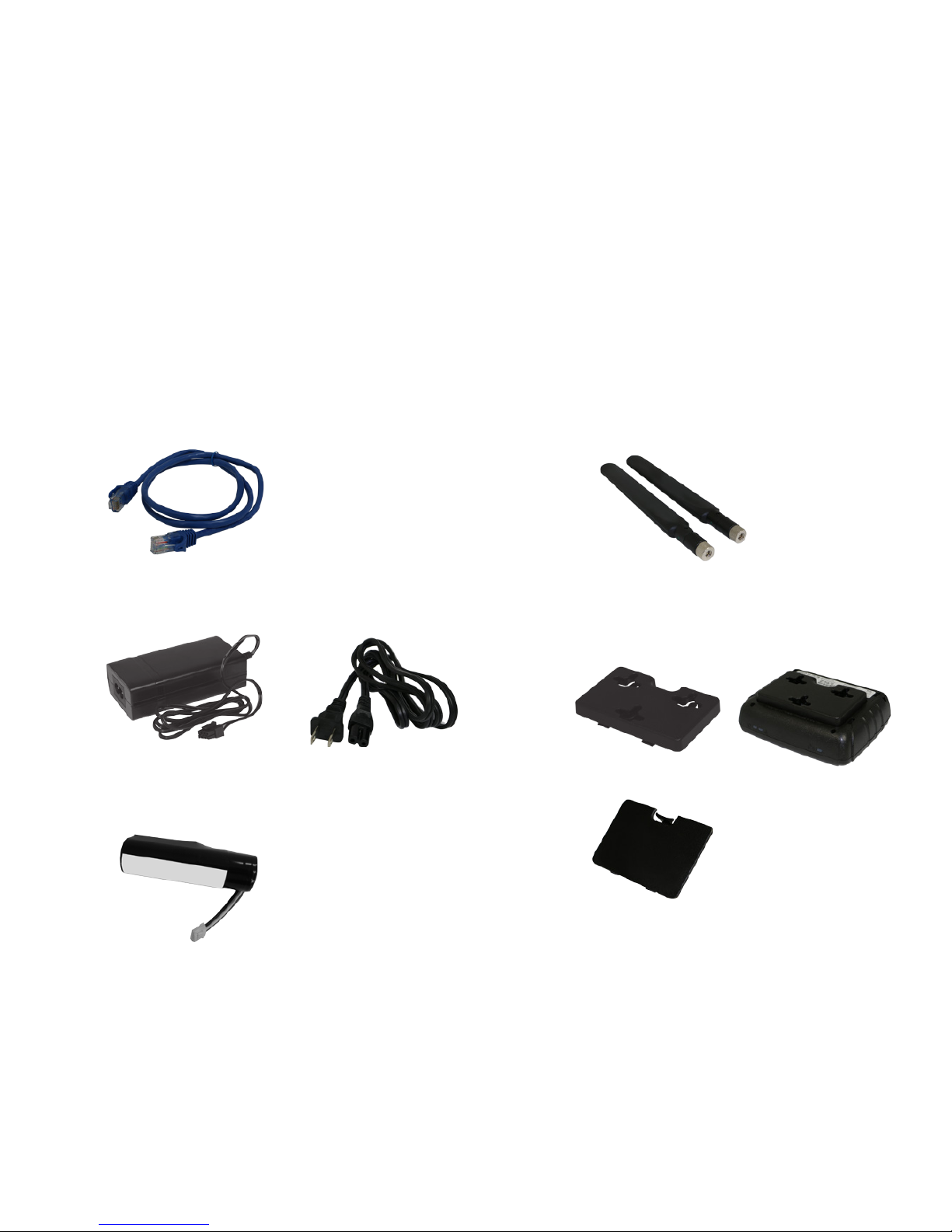
SA 2100 ACCESSORIES
• Ethernet cable
device accessoriesdevice features
SA 2100 PRODUCT FEATURES
• 3G/4G/LTE cellular service
• Connect up to 10 Wi-Fi devices
• Ethernet connectivity
• Crossroads online monitoring utility: ignite.novatelwireless/crossroads
• Cellular antenna ports
• GPS
• Business continuity with backup battery
• Advanced security features • Power supply and AC cable
• Backup battery
• Wall mounting bracket
• (2) External cellular antennas
(bracket) (attached)
(inside unit, not connected as shipped)
(installed in place of stock battery cover)
(stock battery cover, included,
not installed)

CUSTOMER SUPPORT
For more information contact support at 844-517-8710.
© 2016 Novatel Wireless, Inc. All rights reserved. Complying with all copyright laws is the responsibility
of the user. Without limiting the rights under copyright, no part of this document may be reproduced,
stored in or introduced into a retrieval system, or transmitted in any form or by any means (electronic,
mechanical, photocopying, recording or otherwise), or for any purpose without the express written
permission of Novatel Wireless, Inc.
Novatel Wireless and Ignite are trademarks or registered trademarks of Novatel Wireless, Inc. in the
United States.
FW9199B
customer support
• Wall mounting bracket
(installed in place of stock battery cover)
Table des matières


