
Idea 33-928 Manuel utilisateur

1
FiberMASTERTM
Fiber Optic Testing Kit
Instruction Manual
#33-928
Introduction
The IDEAL FiberMASTERTM ber optic testing kit allows
the user to measure absolute power and calculate the
loss of ber optic links at several wavelengths. Absolute
power measurements are helpful when trouble shooting
equipment that may not be operating properly. The dB
calibration feature allows the operator to set a reference
level to the light source and directly read the loss of ber optic
links without needing to manually calculate the values.
The unique form factor allows the light source to be docked neatly within the
power meter. This makes the kit compact for easy storage while still allowing
full operation of both the source and meter.
Product Features
850, 1300/1310, 1490 and 1550 wavelength measurement capability on •
power meter
850nm light source (33-928 kit)•
Power measurement in dBm and mW, loss display in dB•
Power meter auto power off•
Operates on standard AAA batteries, three in each unit•
Includes universal adapter for power meter and ST, SC and FC adapters •
for light source
Includes rugged carrying pouch, multimode SC jumpers and calibration •
coupler

2
ADVICE AND PRECAUTIONS
Warning:
Do not look inside the optical ber port when the FiberMASTER is • operating. The emissions can be dangerous and cause permanent
damage to your vision.
To prevent damage to the lens, do not insert items other than optical • connectors into the port of the FiberMASTER.
Do not look into the ber if it is connected to an active device. The • wavelength of the light transmitted by the equipment is invisible to the
human eye and may cause permanent vision damage.
Always assume that a ber optic cable is connected to an active device • that is emitting dangerous, invisible light.
General Operation
FiberMASTER operates in two basic modes; absolute power measurement and
relative power measurement.
Absolute power measurement is the measure of the strength of the light
energy coming into the power meter. This mode is indicated by the dBm
(decibel milliwatt) or mW (milliwatt) annunciators in the LCD display. This
mode is helpful when measuring the output of an optical device to determine
if it is operating within its specications. For example, most ber optic
network devices specify their typical output power in dBm. By connecting the
FiberMASTER power meter to the output of a network device the direct power
can be instantly measured to isolate a faulty transmitter.
Relative power measurements are used to calculate the difference in power
between two measurements. This mode is indicated by the dB annunciator
in the LCD panel. This mode is used mostly by installers when measuring
ber optic cabling from end-to-end to determine the link loss of the system.
To use this mode, the power meter must rst be connected to a stable light
source then that power level in stored in the meter’s memory. Then future
measurements are compared to the stored reference value and the difference
is calculated and displayed as dB.

3
Power Meter Display and Functions
Wavelength measurement annunciator.1.
Numeric display for power and loss measurements. 2.
Also displays “null” when power is below detection
level.
Decibel toggle button. Press to change between power 3.
measurement mode (dBm) and loss calculation mode
(dB). Changing to dB mode automatically stores the cur-
rent input level as the reference for loss calculations.
Power button.4.
Unit of measure annunciator, displays either dBm, dB or 5.
mW.
Wavelength select and dB/mW toggle button. Press and release to change 6.
wavelength between 850/1310/1490/1550nm. Press and hold for 2 sec-
onds then release to toggle between dBm and mW modes.
1
2
3
4
5
6

4
Light Source Indicators and Functions
Power LED. Lights green when light source is active.1.
Power button.2.
Low Battery LED. Blinks red when battery is low. At 3.
3.6V unit will power off after 10 minutes. At 3.3V unit will
power off after 5 seconds.
1
2
3
The power output of the light source will vary slightly during the rst ve
minutes of operation as it warms to operating temperature. To ensure best
measurement accuracy, allow the light source to operate for ve minutes
before calibrating the meter or making measurements.
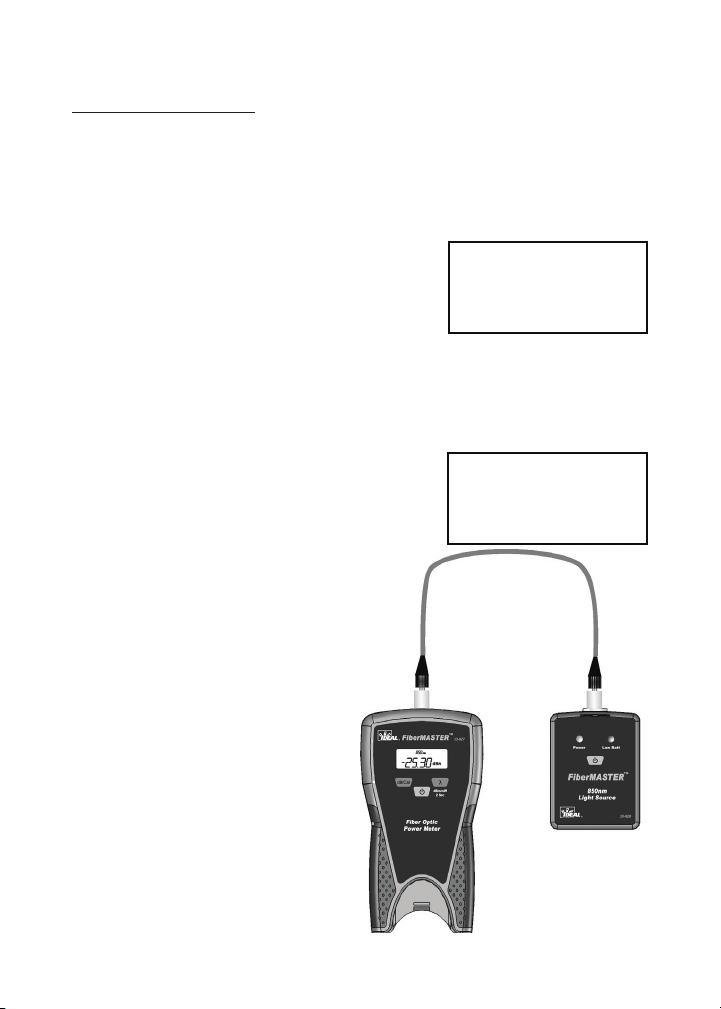
5
Basic Operation
Measuring Optical Power
Important: When the power meter is rst turned on it self-calibrates
to a “no light” condition which is necessary for accurate measure-
ments. THE DUST COVER MUST REMAIN ON THE POWER ME-
TER PORT WHEN IT IS FIRST TURNED ON.
null
dBm
850nm
With the dust cap on the power meter, press 1.
the power button. The meter will display ‘null’,
indicating that it is ready to measure and
is currently receiving no power. Press the
wavelength ‘λ’ button to change to the desired
wavelength. Select 850nm if using the IDEAL
33-926 light source.
Remove the dust cap and connect the meter 2.
to a cable to begin taking measurements. The
default measurement mode is dBm and can
be changed to mW by holding the ‘λ’ button for
2 seconds then releasing.
In addition to using a separate light source, the
power meter can measure the output from any
optical switch, media converter or other device
as long as its wavelength is within one of the
operating windows of the 33-927 power meter.
25.30
dBm
850nm
-

6
Measuring Cabling Loss
Loss measurements are performed to certify a cabling link meets certain
criteria for attenuation. Loss (dB) can be manually calculated by subtracting
the power (dBm) through the cabling under test from the power (dBm) of the
light source when connected directly to the meter. To make this process easier
FiberMASTER includes a calibration function that stores the light source power
level and compares it to future readings and directly displays loss in dB on the
LCD panel.
With the dust cap on the power meter, press 1.
the power button. The meter will display ‘null’,
indicating that it is ready to measure and
is currently receiving no power. Press the
wavelength ‘λ’ button to change to the desired
wavelength. Select 850nm if using the IDEAL
#33-926 light source.
Remove the dust cap and connect the 2.
reference jumpers between the power meter
and light source. The meter will display the
current power dBm from the light source.
Press the ‘dB/Cal’ button on the power meter 3.
to store the current value into memory. The
display will now indicate 0.00dB.
Remove the coupler from the two reference 4.
jumpers, connect to the cabling under test and
begin making measurements. The display will
indicate the attenuation (dB) compared to the
initial calibration power (dBm).
See diagrams on the following page.
Do not disconnect the reference jumper from the
light source after calibrating the test set. Doing so
will cause inaccuracies and requires recalibration.
null
dBm
850nm
6.20
dBm
850nm
-
0.00
dB
850nm
-

7
Calibration Procedure Diagrams
The following diagrams supplement steps 1-4 on the previous page.
null
dBm
850nm
Afx the black dust cap
to the input of the power
meter. Clear dust caps
allow ambient light to pass
and cannot be used. Turn on the power meter and
wait for ‘null’ to be displayed on the LCD. The meter is
now ready to use.
Connect known good reference jumpers between the light source and power
meter. In this example two jumpers are used in conjunction with a coupler.
This conguration allows the jumpers to be connected directly to a patch panel
when making measurements. A single jumper can also be used as long as it is
not disconnected from the light source after the calibration process.
The LCD will display the
current power level at
the power meter input.
Typical values for the
33-926 light sources are
-6 to -7dBm. Levels low-
er than this (ex -15dBm)
indicate excessive
loss in the reference
jumpers. New jumpers
should be used.
6.20
dBm
850nm
-

8
Press the ‘dB/Cal’ button to
store the reference value. The
LCD will display ‘0.00dB’.
The meter is now measuring
loss.
Repeated pressing of the ‘dB/
Cal’ button again will change
between the dBm power
measurement mode and dB
loss measurement mode.
Each time the meter enters
the dB mode it stores the
current power level as a new reference level. Once the calibration value is set,
do not toggle out of the dB mode. Otherwise it will be necessary to perform the
calibration step again.
The meter does not store a separate reference value for each wavelength.
When changing wavelengths repeat the jumper reference procedure.
3.00
dB
850nm
-
0.00
dB
850nm
-
Disconnect the two
reference jumpers and
connect to the cabling
under test. The meter will
display the total loss of all
components between the
two reference jumpers.

9
Reference Information
dB vs. Power Table
dB % of Power % of Power
Loss Remaining Lost
1 79.00% 21.00%
2 63.00% 37.00%
3 50.00% 50.00%
4 40.00% 60.00%
5 32.00% 68.00%
6 25.00% 75.00%
7 20.00% 80.00%
8 16.00% 84.00%
9 12.00% 88.00%
10 10.00% 90.00%
11 8.00% 92.00%
12 6.30% 93.70%
13 5.00% 95.00%
14 4.00% 96.00%
15 3.20% 96.80%
16 2.50% 97.50%
17 2.00% 98.00%
18 1.60% 98.40%
19 1.30% 98.70%
20 1.00% 99.00%
25 0.30% 99.70%
30 0.10% 99.90%
40 0.01% 99.99%
50 0.001% 99.90%
Maintenance
Clean the case with a damp cloth, do not use detergents. Clean the optical
ports with lint free tissues and swabs designed for ber optic components and
use 99% pure isopropyl alcohol and de-ionized water. Do not blow into the
optical ports.
Service and replacement parts
This unit has no user serviceable parts. To obtain service call Technical Sup-
port at 800-854-2708 or 858-627-0100.

10
Power Meter Specications
Wavelength 850, 1300/1310, 1490, 1550nm
Detector InGaAs
Measurement Range -60 to +3dBm
Accuracy ±5%
Display Resolution .01
Connector Universal 2.5mm w/ FC adapter
Power Supply AAA Alkaline Battery x 3
Operating Time 360 hours
Operating Temp -10 to +60°C
Storage Temp -25 to +70°C
Light Source Specications
Wavelength 850nm LED
Output Power -6 to -7 dBm Typical
Stability .05dB after 15min, 0.1dB over 8 hrs
Connector 2.5mm w/ ST, SC, FC adapters
Power Supply AAA Alkaline Battery x 3
Operating Time 40 hours
Operating Temp -10 to +60°C
Storage Temp -25 to +70°C
Limited Warranty
This instrument is warranted to the original purchaser against defects in material or
workmanship for one year from the date of purchase. During this warranty period,
IDEAL INDUSTRIES, INC. will, at its option, replace or repair the defective unit,
subject to the verication of the defect or malfunction. This warranty does not apply to
malfunctions resulting from abuse, neglect, accident, unauthorized repair, alteration or
unreasonable use of the instrument.
Any implied warranties arising out of the sale of an IDEAL product, including but not
limited to implied warranties of merchantability and tness for a particular purpose,
are limited to the above. The manufacturer shall not be liable for loss of use of the
instrument or other incidental or consequential damages, expenses or economic loss,
or for any claim or claims for such damage, expenses or economic loss.
State laws vary, so the above limitations or exclusions may not apply to you. This war-
ranty gives you specic legal rights, and you may also have other rights, which may
vary from state to state.
Warranty limited solely to repair or replacement; no warranty or merchantability, t-
ness for a particular purpose or consequential damages.
Table des matières
Langues :
Manuels Instrument de mesure populaires d'autres marques


Endress+Hauser
Endress+Hauser Proline Promag 50 Caractéristiques techniques

Siemens
Siemens SITRANS F Coriolis FCT030 Manuel de la liste des pièces

KLINGER
KLINGER CMF V Series Manuel utilisateur

EXFO
EXFO FTB-2 Manuel d'exploitation et d'entretien

Keysight
Keysight M8290A Manuel utilisateur

ADTEK
ADTEK MW-5 Manuel utilisateur