
ICT PSY1 Manuel utilisateur


Contents
System Requirements ....................................................................................... 4
Charging the PSY1 Internal Battery................................................................... 5
Connecting a Power Supply to the Instrument............................................. 6
Connecting Power Directly via Solar Panel ................................................... 7
Connecting Power Directly via CH24 Power Supply ..................................... 8
Cleaning the Psychrometer Chamber ............................................................... 9
Installing ICT Combined Instrument Software and USB Driver....................... 10
Turning the Instrument On ............................................................................. 11
Connecting to the Instrument......................................................................... 12
Connect via MCC Mini................................................................................. 13
Setting Measurement Parameters.................................................................. 14
Configuration .............................................................................................. 15
Cooling Time and Waiting Time .............................................................. 15
Chamber Heating .................................................................................... 16
Calibration................................................................................................... 16
Diagnostics .................................................................................................. 17
Reverse Peltier (Warming)...................................................................... 17
SD Card Logging Options............................................................................. 18
View Options............................................................................................... 18
PSY Logger Mounting and Sensor Installation ................................................ 19
Selecting a Site ............................................................................................ 19
Preparing a Site........................................................................................... 21
Sealing the Exposed Site ............................................................................. 22
Downloading Data........................................................................................... 23
Introduction
The PSY1 Stem Psychrometer is a powerful tool integrating all the ambient
environmental parameters acting upon the plant, such as solar radiation,
temperature, humidity, wind speed and water availability, into a single
continuously measurable variable.
Stem water potential directly reflects the energy required to access water, an
indication of the stress the plant is undergoing.
Note: This manual should be used in conjunction with the instructional
videos on the ICT YouTube channel:
https://www.youtube.com/c/ICTinternational
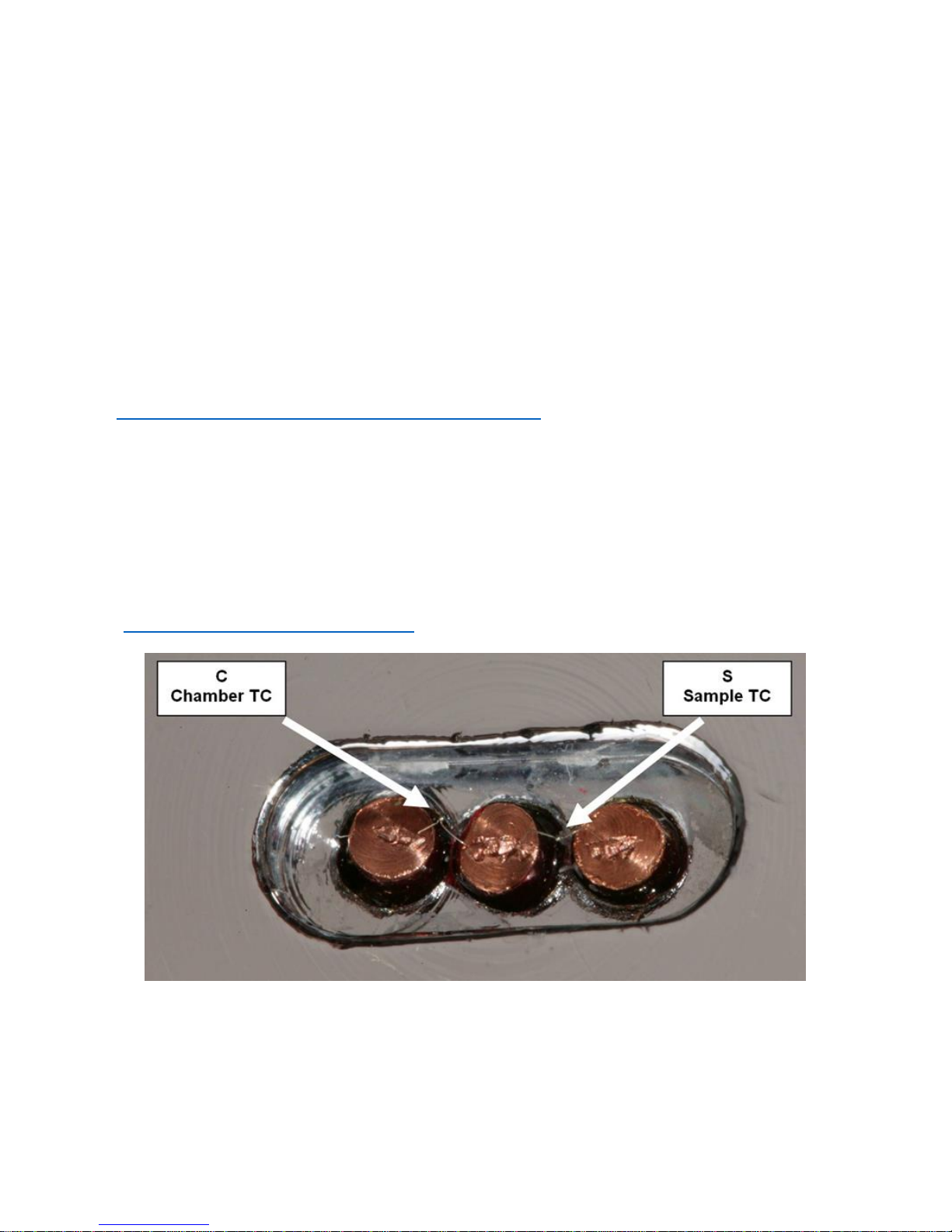
Note: The psychrometer thermocouples are made from 25 µm
Chromel/Constantan wire, you will require a microscope to view the
thermocouples. You cannot see them or manipulate their position with the
naked eye. The thermocouples can easily be broken if handled incorrectly.
Please watch the video Adjusting the Thermocouples
(https://youtu.be/kNsZnSYDBPE) before removing the chamber lid.
Photo: 25 µm Chromel/Constantan thermocouples viewed under a dissection
microscope at 20x magnification.

System Requirements
The ICT Combined Instrument Software does not require a powerful
computer.
Minimum Recommended System Specifications:
Intel Atom 1.66 GHz and 1GB RAM or higher.
Software:
The ICT Combined Instrument Software is compatible with the following
operating systems:
a) Windows 7
b) Windows 8 & 8.1
c) Windows 10
d) Mac OS X
Screen Resolution
ICT Combined Instrument Software works best on computers with a screen
resolution of 1366 x 768 or larger.

Charging the PSY1 Internal Battery
The PSY1 is a self-contained instrument that incorporates a lithium polymer
battery. Before using the instrument, this battery should be charged. To
choose from a range of charging options, see Connecting a Power Supply to
the Instrument (Pages 6 to 8).
An external power supply should be connected to the PSY1 in the field.
The unique power bus-plug design was developed by ICT International to
simplify the electrical wiring process. It minimises the need for custom tools
in the field, requiring only that the outer cable sheath be stripped back to
expose the copper wire.
As shown on Page 6, no other tools are required, with all necessary
components and fixings fully incorporated into the instrument design.
Retaining straps ensure the power bus-plugs do not separate from the
instrument when removed during wiring preparation and connection of
external power.

Connecting a Power Supply to the Instrument
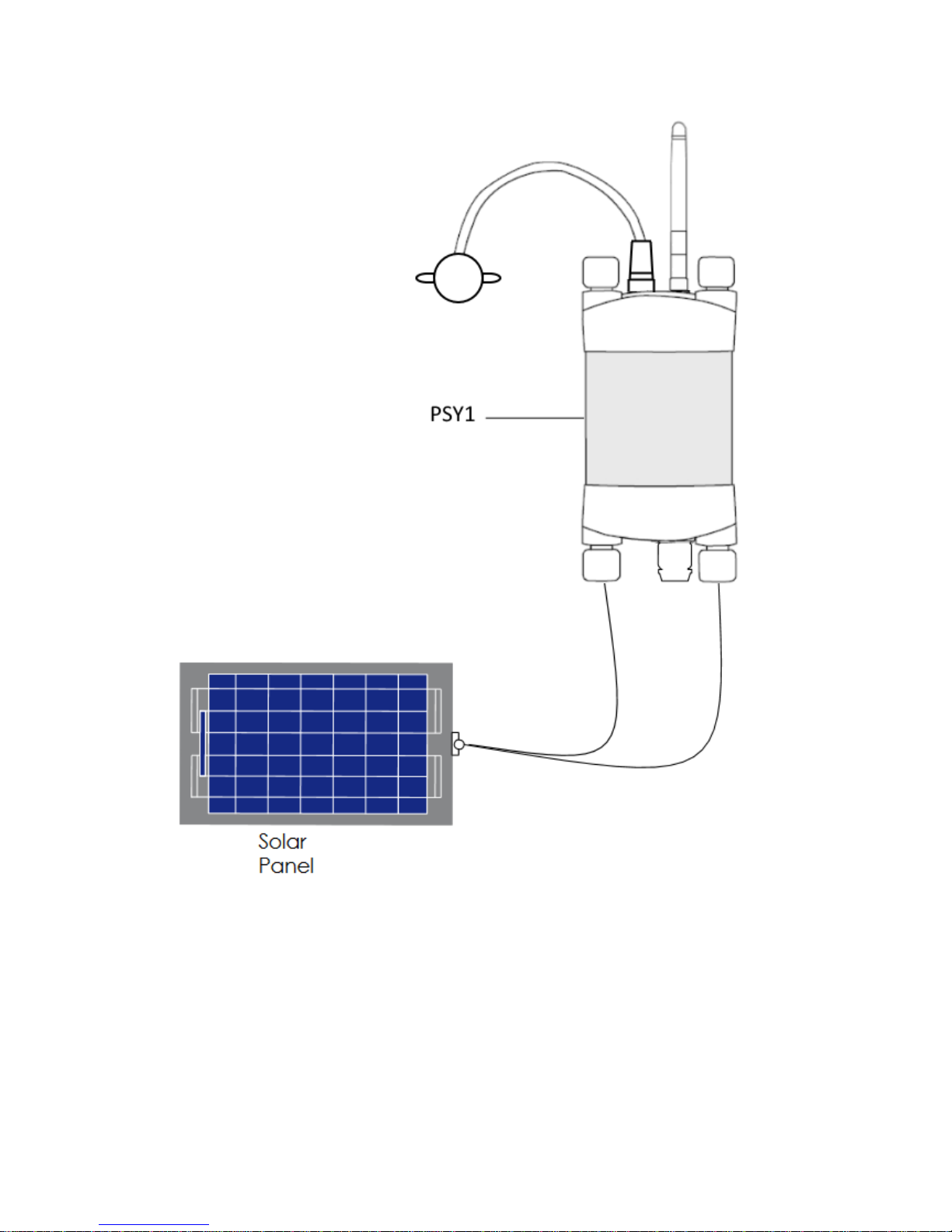
Connecting Power Directly via Solar Panel
Note: The PSY1 is non-polarised.

Connecting Power Directly via CH24 Power Supply
Note: The PSY1 is non-polarised
Note: Continuous connection of an external battery or constant power
supply (for days to months at a time) is not recommended as this can shorten
the life of the internal battery. ICT International recommend using a solar
panel directly connected (with no external battery backup in parallel)
wherever possible; or a timer switch to turn off external power for 8-12
hours daily to simulate a solar panel during the day and night.

Cleaning the Psychrometer Chamber
The Stem Psychrometer consists of two very small welded thermocouples
made of very fine 25µm wire.
This makes the sensor very sensitive for measuring water potential, but
equally sensitive to dirt and mild oxidation. It is recommended that before
starting any measurements you clean the thermocouples. The cleaning
process involved using an organic solvent such as chloroform, or electronics
contact cleaner.
Watch the Video: https://www.youtube.com/watch?v=sUe2leJzxE0

Installing ICT Combined Instrument Software and USB
Driver
Insert the supplied USB drive and run Autorun.exe.
Select Software (a) then choose ICT Combined Instrument Software (b).
Follow the on-screen prompts until the finished installation screen appears.
To install the USB driver, choose USB Driver (c) and then wait for the
installation to complete.
(b)
(a) (c)
Alternatively, the individual installers (Windows and Mac) are available in the
Instrument Software folder on the USB drive.
The most recent versions of all ICT software are available from:
http://www.ictinternational.com/support/software/
Autres manuels pour PSY1
1
Table des matières
Autres manuels ICT Instrument de mesure



Manuels Instrument de mesure populaires d'autres marques


Endress+Hauser
Endress+Hauser Proline Promag 50 Caractéristiques techniques

Siemens
Siemens SITRANS F Coriolis FCT030 Manuel de la liste des pièces

KLINGER
KLINGER CMF V Series Manuel utilisateur

EXFO
EXFO FTB-2 Manuel d'exploitation et d'entretien

Keysight
Keysight M8290A Manuel utilisateur

ADTEK
ADTEK MW-5 Manuel utilisateur