
HQ P.SUP.EU40W Manuel utilisateur

P.SUP.EU40W
MANUAL (p. 2)
HQ 12 -24 V 40 W UNIVERSAL ADAPTER
MODE D’EMPLOI (p. 5)
ADAPTATEUR UNIVERSEL DE HAUTE
QUALITé 12-24 V 40 W
MANUALE (p. 8)
ALIMENTATORE UNIVERSALE
HQ 12 - 24 V 40 W
BRUKSANVISNING (s. 15)
HQ 12-24 V 40 W UNIVERSALADAPTER
MANUAL DE UTILIZARE (p. 18)
ADAPTOR UNIVERSAL HQ 12-24 V 40 W
BRUGERVEJLEDNING (p. 22)
HQ 12-24 V 40 W UNIVERSEL ADAPTER
HASZNÁLATI ÚTMUTATÓ (o. 12.)
HQ 12 -24 V 40 W UNIVERZÁLIS
ADAPTER
KÄYTTÖOHJE (s. 13)
HQ 12-24 V 40 W YLEISKÄYTTÖINEN
VIRTALÄHDE
ANLEITUNG (s. 3)
HQ 12-24 V 40-W- UNIVERSALNETZTEIL
GEBRUIKSAANWIJZING (p. 7)
HQ 12-24 V 40 W UNIVERSELE ADAPTER
MANUAL DE USO (p. 10)
ADAPTADOR UNIVERSAL
HQ12-24 V 40 W
NÁVOD K POUŽITÍ (s. 17)
HQ 12-24 V, 40 W UNIVERZÁLNÍ NAPÁJECÍ
ADAPTéR
ΕΓΧΕΙΡΙΔΙΟ XPHΣHΣ (σελ. 20)
HQ 12-24 V 40 W UNIVERSAL
ΤΡΟΦΟΔΟΤΙΚΟ
VEILEDNING (σελ. 24)
HQ 12 -24 V 40 W UNIVERSALADAPTER

2
ENGLISH
Specications Power Adapter
• Input voltage: 100-240 V AC, 50/60 Hz
• Output voltage: 12/13/14/15/16/17/18/18.5/19/19.5/20/21/22/23/24 V (DC)
• Output power: Max. 40 W
• Protection: short circuit protection, overload protection
• Efciency: > 87%
• Dimensions: 45x28x95 mm
Power Up Your Notebook
1. Connect your notebook (or any other appliance that works within the offered output
voltage and output power range) with this power supply by connecting the supplied
detachable adaptor plug.
2. Determine the proper connector size. Check the polarity of your device and plug the power
tip into the socket of the power supply.
Center is negative
Center is positive
cen
3. Set the DC voltage selector to the desired voltage position. Before you connect your
notebook computer nd the required voltage setting on your original AC adaptor or in the
computer’s user manual (PLEASE NOTE THAT AN INCORRECT VOLTAGE SETTING
MAY DAMAGE YOUR NOTEBOOK. IF YOU ARE UNSURE, DO NOT TRY TO CONNECT
IT TO YOUR COMPUTER BUT CONSULT YOUR LOCAL DEALER!!!).
Voltage selector
4. Make sure that the total connected load does not exceed the rated output current of the
power supply.

3
Voltage output (V) 12 13 14 15 16 17 18 18.5
Max. output current (A) 2.5 2.4 2.3 2.2 2.1 2.0 1.95 1.93
Voltage output (V) 19 19.5 20 21 22 23 24
Max. output current (A) 1.9 1.88 1.85 1.8 1.75 1.7 1.65
5. Connect the power cord to the power supply rst and then insert the AC plug into your wall
socket. The LED indicator will light up.
6. Switch on your computer.
Safety precautions:
RISK OF ELECTRIC SHOCK
DO NOT OPEN
CAUTION
To reduce risk of electric shock, this product should ONLY be
opened by an authorized technician when service is required.
Disconnect the product from mains and other equipment if a
problem should occur. Do not expose the product to water or moisture.
Maintenance:
Clean only with a dry cloth. Do not use cleaning solvents or abrasives.
Warranty:
No guarantee or liability can be accepted for any changes and modications of the product or
damage caused due to incorrect use of this product.
General:
Designs and specications are subject to change without notice.
All logos brands and product names are trademarks or registered trademarks of their
respective holders and are hereby recognized as such.
Keep this manual for future reference.
Attention:
This product is marked with this symbol. It means that used electrical and electronic
products should not be mixed with general household waste. There is a separate
collections system for these products.
DEUTSCH
Spezikationen Netzteil
• Eingangsspannung: 100-240 V AC, 50/60 Hz
• Ausgangsspannung: 12/13/14/15/16/17/18/18,5/19/19,5/20/21/22/23/24 V (DC)
• Ausgangsleistung: Max. 40 W
• Schutz: Kurzschluss, Überlastung
• Efzienz: > 87%
• Abmessungen: 45x28x95 mm
Spannungsversorgung für Notebook
1. Schließen Sie Ihr Notebook (oder jedes andere Gerät, welches mit der verfügbaren
Ausgangsspannung und Leistung arbeitet) über das mitgelieferte Netzteil an.
2. Bestimmen Sie den korrekten DC Anschlussstecker. Überprüfen Sie die Polarität Ihres Geräts
und schließen Sie den DC Anschlussstecker an der Ausgangsbuchse des Netzteils an.

4
innen -
innen +
cen
3. Stellen Sie mit dem DC Spannungswahlstecker die gewünschte Spannung ein. Vor dem
Anschluss Ihres Notebooks nden Sie die benötigte Spannungseinstellung auf Ihrem
Originalnetzteil oder in der Bedienungsanleitung des Computers (BITTE BEACHTEN SIE,
DASS EINE FALSCHE SPANNUNGSEINSTELLUNG IHR NOTEBOOK BESCHÄDIGEN
KANN. IM ZWEIFEL NEHMEN SIE DEN ANSCHLUSS AN IHREM COMPUTER ERST
NACH RÜCKSPRACHE MIT IHREM FACHHÄNDLER VOR!).
Spannungswahlstecker
4. Achten Sie darauf, dass die angeschlossene Last den Nenn-Ausgangsstrom des Netzteils
nicht übersteigt.
Ausgangsspannung (V) 12 13 14 15 16 17 18 18,5
Max. Ausgangsstrom (A) 2,5 2,4 2,3 2,2 2,1 2,0 1,95 1,93
Ausgangsspannung (V) 19 19,5 20 21 22 23 24
Max. Ausgangsstrom (A) 1,9 1,88 1,85 1,8 1,75 1,7 1,65
5. Schließen Sie das Netzkabel erst am Netzteil an, dann stecken Sie den Netzstecker in die
Steckdose. Die LED-Anzeige leuchtet auf.
6. Schalten Sie Ihren Computer ein.
Sicherheitsvorkehrungen:
Um das Risiko eines elektrischen Schlags zu verringern, sollte dieses
Produkt AUSSCHLIESSLICH von einem autorisierten Techniker geöffnet
werden. Bei Problemen trennen Sie das Gerät bitte von der Spannungsversorgung und von
anderen Geräten ab. Stellen Sie sicher, dass das Gerät nicht mit Wasser oder Feuchtigkeit in
Berührung kommt.
Wartung:
Nur mit einem trockenen Tuch säubern. Keine Reinigungs- oder Scheuermittel verwenden.
STROMSCHLAGGEFAHR
NICHT ÖFFNEN
VORSICHT

5
Garantie:
Es kann keine Garantie oder Haftung für irgendwelche Änderungen oder Modikationen des
Produkts oder für Schäden übernommen werden, die aufgrund einer nicht ordnungsgemäßen
Anwendung des Produkts entstanden sind.
Allgemeines:
Design und technische Daten können ohne vorherige Ankündigung geändert werden.
Alle Logos, Marken und Produktnamen sind Marken oder eingetragene Marken ihrer
jeweiligen Eigentümer und werden hiermit als solche anerkannt.
Bitte bewahren Sie Bedienungsanleitung und Verpackung für spätere Verwendung auf.
Achtung:
Dieses Produkt ist mit diesem Symbol gekennzeichnet. Es bedeutet, dass die
ausgedienten elektrischen und elektronischen Produkte nicht mit dem allgemeinen
Haushaltsmüll entsorgt werden dürfen. Für diese Produkte stehen gesonderte
Sammelsysteme zur Verfügung.
FRANÇAIS
Spécications de l’adaptateur de courant
• Tension d’entrée : 100-240 V CA, 50/60 Hz
• Tension de sortie : 12/13/14/15/16/17/18/18.5/19/19.5/20/21/22/23/24 V (CC)
• Puissance de sortie : 40 W maximale
• Protection : Protection contre les courts-circuits, protection contre la surcharge
• Rendement : > 87%
• Dimensions : 45 x 28 x 95 mm
Alimenter votre ordinateur portable
1. Connectez votre ordinateur portable (ou tout autre appareil compatible avec la tension
de sortie et la puissance de cette unité) à cette alimentation en raccordant la che de
l’adaptateur amovible fourni.
2. Déterminez la taille de connecteur adaptée. Vériez la polarité de l’équipement puis
raccordez l’embout d’alimentation au collecteur de l’alimentation.
Centre est négatif
Centre est positif
cen
3. Positionnez le commutateur de sélection de tension CC sur la position de votre choix.
Avant de raccorder votre ordinateur portable, lisez la tension requise sur le manuel

6
d’utilisation de votre ordinateur ou de l’adaptateur de courant CA (sélectionner une tension
inappropriée peut endommager votre ordinateur portable). En cas de doute, ne tentez
jamais de raccorder cet adaptateur, consultez plutôt votre revendeur !!!).
Sélecteur de
tension
4. Assurez-vous que le total de la charge connectée n’excède pas la puissance nominale de
l’alimentation.
Tension (V) 12 13 14 15 16 17 18 18.5
Intensité maximale (A) 2.5 2.4 2.3 2.2 2.1 2.0 1.95 1.93
Tension (V) 19 19.5 20 21 22 23 24
Intensité maximale (A) 1.9 1.88 1.85 1.8 1.75 1.7 1.65
5. Raccordez d’abord le cordon d’alimentation à la source d’alimentation puis raccordez la
che CA à votre prise de courant. Le témoin LED s’allume.
6. Allumez votre ordinateur.
Consignes de sécurité :
Pour réduire le risque de choc électrique, ce produit ne doit être ouvert
que par un technicien qualié si une réparation s’impose. Débranchez
l’appareil et les autres équipements du secteur s’il y a un problème. Ne pas exposer l’appareil
à l’eau ni à l’humidité.
Entretien :
Ne nettoyez l’appareil qu’avec un chiffon sec. N’utilisez pas de solvants ou de produits abrasifs.
Garantie :
Aucune garantie ou responsabilité ne sera acceptée en cas de modication et/ou de transformation
du produit ou en cas de dommages provoqués par une utilisation incorrecte de l’appareil.
Généralités :
Le design et les caractéristiques techniques sont sujets à modication sans notication préalable.
Tous les logos de marques et noms de produits sont des marques déposées ou immatriculées dont
leurs détenteurs sont les propriétaires et sont donc reconnues comme telles dans ce documents.
Conservez ce manuel et l’emballage pour toute référence ultérieure.
Attention :
Ce symbole gure sur l’appareil. Il signie que les produits électriques et électroniques
ne doivent pas être jetés avec les déchets domestiques. Le système de collecte est
différent pour ce genre de produits.
RISQUE DE CHOC ELECTRIQUE
NE PAS OUVRIR
ATTENTION

7
NEDERLANDS
Specicaties Stroomadapter
• Ingangsvoltage: 100-240 V AC, 50/60 Hz
• Uitgangsvoltage: 12/13/14/15/16/17/18/18,5/19/19,5/20/21/22/23/24 V (DC)
• Uitgangsvermogen: Max. 40 W
• Beveiliging: beveiliging tegen kortsluiting en overbelasting
• Rendement: > 87%
• Afmetingen: 45x28x95 mm
Uw Notebook van Stroom Voorzien
1. Sluit uw notebook (of een willekeurig ander apparaat dat binnen het gespeciceerde
bereik van de ingang –en uitgangsspanning werkt) aan op deze voeding door de
inbegrepen, afneembare adapterstekker te verbinden.
2. Bepaal de juiste stekkergrootte. Controleer de polariteit van uw apparaat en steek de
voedingstip in de voedingsaansluiting.
Center is negatief
Center is positief
cen
3. Stel de DC spanningsschakelaar in op de gewenste spanningsstand. Voordat u uw
notebook aansluit, dient u de vereiste spanningsinstelling te controleren op uw originele
AC adapter of in de gebruikshandleiding van de computer (WIJ WIJZEN U EROP DAT
EEN INCORRECTE SPANNINGSINSTELLING UW NOTEBOOK KAN BESCHADIGEN.
IN GEVAL VAN TWIJFEL, PROBEER DEZE ADAPTER NOOIT AAN TE SLUITEN, MAAR
RAADPLEEG UW LOKALE DEALER!!!).
Spanningsschakelaar
4. Zorg ervoor dat de totaal aangesloten belasting nooit de nominale uitgangsstroom van de
voeding overschrijdt.

8
Uitgangsspanning (V) 12 13 14 15 16 17 18 18,5
Max uitgangsstroom (A) 2,5 2,4 2,3 2,2 2,1 2,0 1,95 1,93
Uitgangsspanning (V) 19 19,5 20 21 22 23 24
Max uitgangsstroom (A) 1,9 1,88 1,85 1,8 1,75 1,7 1,65
5. Sluit de voedingskabel eerst aan op de voeding en steek vervolgens de AC stekker in uw
stopcontact. De LED indicator zal oplichten.
6. Schakel uw computer in.
Veiligheidsvoorzorgsmaatregelen:
Om het risico op elektrische schokken te voorkomen mag dit product
ALLEEN worden geopend door een erkende technicus wanneer er
onderhoud nodig is. Koppel het product los van de elektrische voeding en van andere
apparatuur als zich problemen voordoen. Stel het product niet bloot aan water of vocht.
Onderhoud:
Uitsluitend reinigen met een droge doek. Gebruik geen reinigingsmiddelen of schuurmiddelen.
Garantie:
Voor wijzigingen en veranderingen aan het product of schade veroorzaakt door een verkeerd
gebruik van dit product, kan geen aansprakelijkheid worden geaccepteerd. Tevens vervalt
daardoor de garantie.
Algemeen:
Wijziging van ontwerp en specicaties zonder voorafgaande mededeling onder voorbehoud.
Alle logo’s, merken en productnamen zijn handelsmerken of geregistreerde handelsmerken
van de respectievelijke eigenaren en worden hierbij als zodanig erkend.
Bewaar deze gebruiksaanwijzing voor latere raadpleging.
Let op:
Dit product is voorzien van dit symbool. Dit symbool geeft aan dat afgedankte
elektrische en elektronische producten niet met het gewone huisafval verwijderd
mogen worden. Voor dit soort producten zijn er speciale inzamelingspunten.
ITALIANO
Speciche dell’alimentatore
• Voltaggio in entrata: 100-240 V AC, 50/60 Hz
• Voltaggio in uscita: 12/13/14/15/16/17/18/18.5/19/19.5/20/21/22/23/24 V (DC)
• Potenza in uscita: Max. 40 W
• Protezioni: Protezione da corto circuito, protezione da sovraccarico
• Efcienza: > 87%
• Dimensioni: 45x28x95 mm
Accendere il vostro portatile
1. Collegate il computer portatile (o qualunque altro apparecchio che possa funzionare con il
voltaggio e la gamma di potenza in uscita fornite dalla macchina) con questo alimentatore
collegando lo spinotto rimovibile dell’alimentatore.
GEVAAR VOOR
ELEKTRISCHE SCHOK
NIET OPENEN
LET OP:

9
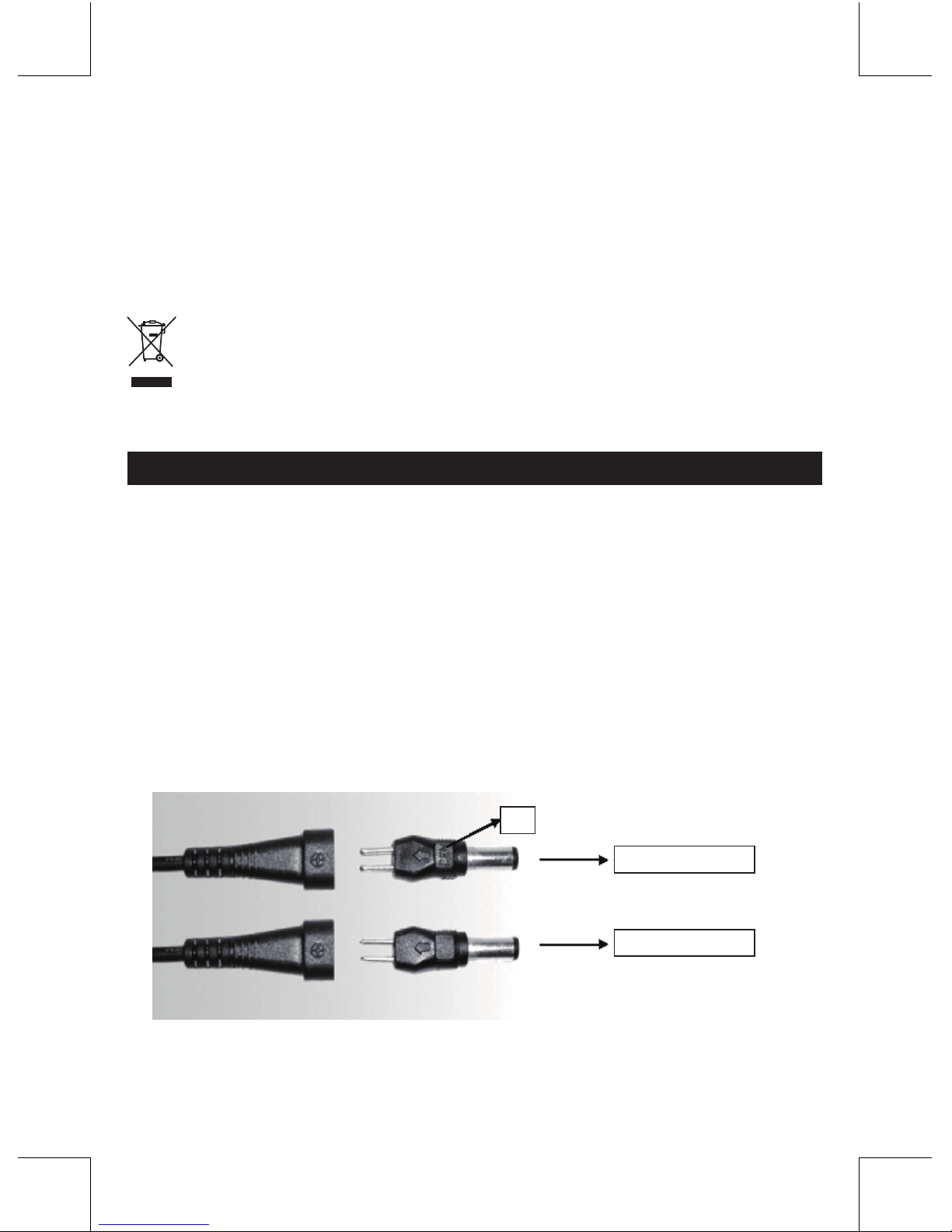
2. Determinate la dimensione corretta del connettore. Controllate la polarità del vostro
dispositivo e inserite lo spinotto nella presa dell’alimentatore.
Il centro è negativo
Il centro è positivo
Centro
3. Spostate il selettore del voltaggio DC nella posizione desiderata. Prima di collegare il
portatile, controllate il voltaggio richiesto sull’alimentatore AC originale o nel manuale
utente. (ATTENZIONE: UN VOLTAGGIO ERRATO PUÒ DANNEGGIARE IL VOSTRO
PORTATILE. SE NON SIETE SICURI, NON COLLEGATE L’ALIMENTATORE E
CONSULTATE IL VOSTRO RIVENDITORE DI FIDUCIA!!!).
Selezionatore di voltaggio
4. Assicuratevi che il carico totale connesso non ecceda la corrente in uscita dell’alimentatore.
Voltaggio in uscita (V) 12 13 14 15 16 17 18 18.5
Corrente massima in uscita (A) 2.5 2.4 2.3 2.2 2.1 2.0 1.95 1.93
Voltaggio in uscita (V) 19 19.5 20 21 22 23 24
Corrente massima in uscita (A) 1.9 1.88 1.85 1.8 1.75 1.7 1.65
5. Collegate per prima cosa il cavo di alimentazione all’alimentatore e quindi inserite la spina
AC alla presa a muro. L’indicatore LED si accenderà.
6. Accendete il vostro computer.
Precauzioni di sicurezza:
Per ridurre il rischio di shock elettrico, questo prodotto dovrebbe essere
aperto SOLO da un tecnico autorizzato quando è necessario ripararlo.
Scollegare il prodotto dall’alimentazione e da altri apparecchi se dovesse esserci un
problema. Non esporre il prodotto ad acqua o umidità.
Manutenzione:
Pulire solo con un panno asciutto. Non utilizzare solventi detergenti o abrasivi.
Garanzia:
RISCHIO DI SCOSSE ELETTRICHE
NON APRIRE
ATTENZIONE
10
Non sarà accettata alcuna garanzia o responsabilità in relazione a cambiamenti e modiche
del prodotto o a danni determinati dall’uso non corretto del prodotto stesso.
Generalità:
Il design e le caratteristiche tecniche sono soggetti a modica senza necessità di preavviso.
Tutti i marchi a logo e i nomi di prodotto sono marchi commerciali o registrati dei rispettivi
titolari e sono riconosciuti come tali in questo documento.
Tenere questo manuale e la confezione per riferimento futuro.
Attenzione:
Il prodotto è contrassegnato con questo simbolo, con il quale si indica che i prodotti
elettrici ed elettronici non devono essere gettati insieme ai riuti domestici. Per questi
prodotti esiste un sistema di raccolta differenziata.
ESPAÑOL
Especicaciones del adaptador de alimentación
• Tensión de entrada: 100-240 VCA, 50/60 Hz
• Tensión de salida: 12/13/14/15/16/17/18/18.5/19/19.5/20/21/22/23/24 V (CC)
• Potencia de salida: Máx. 40 W
• Protección: protección contra cortocircuitos y sobrecargas
• Eciencia: > 87%
• Dimensiones: 45x28x95 mm
Alimentación de su computadora portátil
1. Conecte su computadora portátil (o cualquier otro equipo que trabaje dentro de los rangos
de tensión de salida y de potencia ofrecidos) a esta fuente de alimentación instalando el
enchufe adaptador desmontable suministrado.
2. Determine el tamaño apropiado del conector. Verique la polaridad de su dispositivo y
enchufe la punta de alimentación en el receptáculo de alimentación.
Centro negativo
Centro positivo
cen
3. Coloque el selector de tensión de CC en la posición de la tensión deseada. Antes
de conectar su computadora portátil busque el valor de la tensión requerida en su
adaptador de CA original o en el manual de usuario de la computadora (TENGA
PRESENTE QUE UNA SELECCIÓN INCORRECTA DE LA TENSIÓN PUEDE DAÑAR
Table des matières
Langues :
Autres manuels HQ Adaptateur


