
Helmholz Profinet 700-850-4PS01 Manuel utilisateur

www.helmholz.com
Quick Start Guide PROFINET-Switch 4/8/16-port
Version
7en
as of FW 1.08

Quick Start Guide PROFINET-Switch 4/8/16-port2
Contents
1. Safety instructions 3
2. Introduction 4
3. Preparing the PROFINET-Switch 5
4. Planning of the GSDML les 6
5. Setting the port properties 7
6. Topology detection 7
7. Assign the PROFINET-Switch a name 8
8. Media Redundancy Protocol (MRP) 9
9. Diagnosis and conguration via the web interface 10
10. Switch diagnosis and settings 12
11. Port mirroring 12
12. Statistics 13
13. Agents 14
14. SNMP 15
15. Setting the time 16
16. Resetting to factory settings 17
17. Firmware update 17
18. LED status information 18
19. Button functions 18
20. Technical data 19
:z-beipack-106
Quick Start Guide PROFINET-Switch 4/8/16-port 3
1. Safety instructions
Target audience
This description is only intended for trained personnel qualied in control and auto-
mation engineering who are familiar with the applicable national standards.
For installation, commissioning, and operation of the components, compliance with the
instructions and explanations in this operating manual is essential. The specialist person-
nel is to ensure that the application or the use of the products described fullls all safety
requirements, including all applicable laws, regulations, provisions, and standards.
Intended use
The device has a protection rating of IP 20 (open type) and must be installed in an elec-
trical operating room or a control box/cabinet in order to protect it against environmen-
tal inuences. To prevent unauthorized operation, the doors of control boxes/cabinets
must be closed and possibly locked during operation.
The consequences of improper use may include personal injury to the user or third par-
ties, as well as property damage to the control system, the product, or the environment.
Use the device only as intended!
Operation
Successful and safe operation of the device requires proper transport, storage, setup,
assembly, installation, commissioning, operation, and maintenance.
Operate the device only in awless condition. The permissible operating conditions and
performance limits (technical data) must be adhered to.
Retrots, changes, or modications to the device are strictly forbidden.

Quick Start Guide PROFINET-Switch 4/8/16-port4
2. Introduction
This Quick Start Guide explains the basic settings for the initial commissioning of PROFI-
NET-Switches for use in a PROFINET project.
You can nd further information in the manual. You can nd this under www.helmholz.de
or scan the QR code directly.
P1 — P4:
For PROFINET devices
or other
Ethernet devices
Voltage supply Operation LEDs (see page 18)
FCN:
Function
button
RST:
Reset button
P1 — P8:
For PROFINET devices
or other
Ethernet devices
Voltage supply Operation LEDs (see page 18)
P1 — P16:
For PROFINET devices
or other
Ethernet devices
Voltage supply Operation LEDs (see page 18)
FCN:
Function
button
RST:
Reset button
FCN:
Function
button
RST:
Reset button
PROFINET-Switch
4-port, managed
PROFINET-Switch
8-port, managed
PROFINET-Switch
16-port, managed
SCAN
QR CODE
TO GET
MANUAL
Quick Start Guide PROFINET-Switch 4/8/16-port 5
3. Preparing the PROFINET-Switch
3.1 Connection
The PROFINET-Switch must be supplied with 24 V DC at the wide range input
18 – 30 V DC via the provided connector plug.
The RJ45 sockets “P1 – P4” (4-port switch), “P1 – P8” (8-port switch) and
“P1 – P16” (16-port switch) serve the connection of the network participants
(PROFINET or Ethernet).
PROFINET-Switch
4-port, managed
PROFINET-Switch
8-port, managed
PROFINET-Switch
16-port, managed
SCAN
QR CODE
TO GET
GSDML
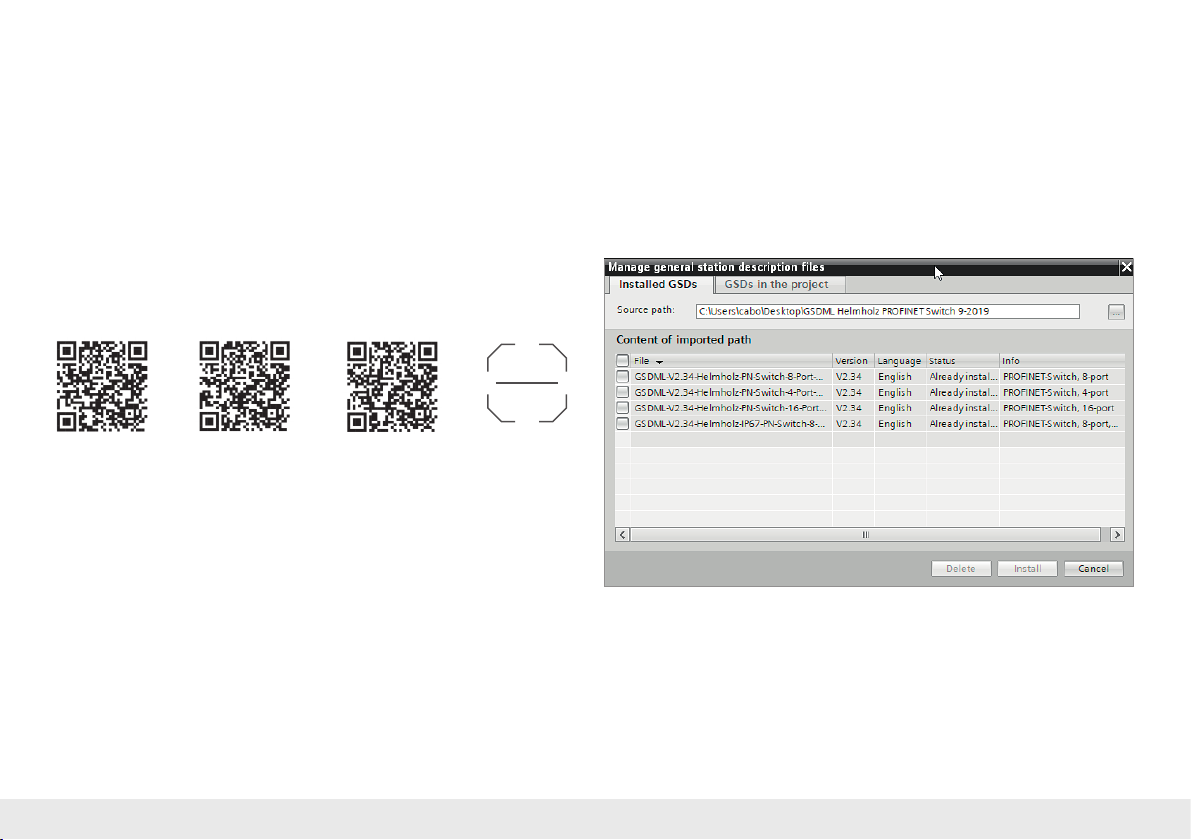
3.2 Install GSDML le
Please download t
he GSDML le
under www.helmholz.de or
scan the QR code.
P1 — P8:
For PROFINET devices
or other
Ethernet devices
Note: The housing of the PROFINET-Switch is not grounded. Please connect the functional
grounding connection (FG) of the PROFINET-Switch correctly with the reference potential.

Quick Start Guide PROFINET-Switch 4/8/16-port6
4. Planning of the GSDML les
Following installation, the PROFINET-Switch can be found in the hardware catalog
under
“Other eld devices
g
PROFINET IO
g
Network Components
g Helmholz GmbH & Co.
KG g
Helmholz PN switch”. Add the “PROFINET-Switch, 4-port”, “PROFINET-Switch
8-port” of “PROFINET-Switch, 16-port” device to the project and connect it with your
PROFINET network.
By calling up the object properties, you must assign the PROFINET-Switch a unique
PROFINET name and check the IP address for plausibility in the project.
Important: The real device must later be assigned the same name as in the project.
See also Chapter 6.

Quick Start Guide PROFINET-Switch 4/8/16-port 7
5. Setting the port properties
Each port of the PROFINET-Switch can be individually congured.
Transfer medium/duplex:
“Activate” The port can be switched off here. This option
is recommended when the port shouldn’t be
used. Unauthorized trespass into the network is
prevented.
Transmission rate
“Automatic”
The port synchronizes itself automatically with
the communication partner (auto-negotiation).
“TP 100 Mbps”,
Transmission rate full duplex
Fixed specication of the transmission rate.
This option is recommended when connecting
PROFINET IO devices.
Monitor Send a diagnosis by Link Down
Enable autonegotiation Automatic recognition of the transmission speed
and the cable type (cross or patch cable)
6. Topology detection
The PROFINET-Switch supports the mechanisms for neighborhood detection (LLDP).
With this function it is possible to detect the topology of a PROFINET network, or to
specify it for purposes of checking for the correct structuring by the conguration.
If the topology was prescribed in the conguration, neighboring devices can also be
assigned the PROFINET name in the event of the replacement of a device.
This makes the recognition and testing of the network topology and the “device
exchange in operation” of connected PROFINET participants possible.

Quick Start Guide PROFINET-Switch 4/8/16-port8
7. Assign the PROFINET-Switch a name
When the conguration of the PROFINET-Switch has been completed in the hardware
congurator of the engineering tool, it can be loaded into the PLC.
In order that the PROFINET-Switch can be found by the PROFINET controller, the
PROFINET device name must be assigned to the PROFINET-Switch. To this purpose,
use the function “Assign device name”, which you can access in the Online menu
with the right mouse button when the PROFINET-Switch is activated.
With the “Update list” button, the network can be browsed for PROFINET partici-
pants. The PROFINET device name can be assigned to the device with “Assign name”.
The clear identication of the PROFINET-Switch is ensured here by the MAC address
of the device. The MAC address of the device can be found on the device front of the
PROFINET-Switch.
The Helmholz IPSet tool, which can be downloaded at no charge from the Helmholz
website, can also be used to set the PROFINET name.
If the DP/PN Coupler has been assigned the correct name, it is recognized by the PLC
and congured. If conguration has taken place correctly, the PROFINET “BF” LED
should be off.
If conguration has also taken place correctly on the PROFIBUS side, the PROFIBUS
“BF” LED should also be off. When both network sides have been congured appro-
priately (number and size of the IO areas agree), the “SF” LEDs on both sides should
also be out on both sides and data transmission be underway.
SCAN
QR CODE
TO GET
IPSET
PROFINET-Switch
16-port, managed
PROFINET-Switch
8-port, managed
PROFINET-Switch
4-port, managed

Quick Start Guide PROFINET-Switch 4/8/16-port 9
8. Media Redundancy Protocol (MRP)
The PROFINET-Switch supports the optional media redundancy protocol (MRP) as
MRP client. MRP enables ring wiring, which also makes operation of the PROFINET
network possible in the event of the failure of a cable or of a participant.
There must be at least one MRP master (e.g. the CPU) in an MRP ring. All other
participants of the ring are then MRP clients.
In order to assign the PROFINET-Switch to an MRP ring, the “Client” media redundan-
cy role must be set for the “Media redundancy” option under “Properties/General”.
Important: If ring wiring is produced without the MRP roles being congured for all
devices involved, this can result in functional disruptions of the PROFINET network!

Quick Start Guide PROFINET-Switch 4/8/16-port10
9. Diagnosis and conguration via the web interface
The web interface is also accessible under the IP address assigned to the PROFINET-Switch in the PROFINET network.
When the web interface is rst called up, the password of the “admin” user is the serial number of the device. The serial number is indicated on the right housing side part
(e.g. “50001234”). It is absolutely necessary to assign a new password following the rst login:
Autres manuels pour Profinet 700-850-4PS01
3
Ce manuel convient aux modèles suivants
2
Table des matières
Autres manuels Helmholz Changer

Helmholz
Helmholz 700-857-8PS01 Manuel utilisateur

Helmholz
Helmholz Profinet 700-850-4PS01 Manuel utilisateur

Helmholz
Helmholz FLEXtra PROFINET-Switch FO Manuel utilisateur

Helmholz
Helmholz FLEXtra Manuel utilisateur

Helmholz
Helmholz Profinet 700-850-4PS01 Manuel utilisateur

Helmholz
Helmholz Profinet 700-850-4PS01 Manuel utilisateur

Helmholz
Helmholz 700-856-12F41 Manuel utilisateur

Helmholz
Helmholz 700-857-8PS01 Manuel utilisateur

Helmholz
Helmholz 700-841-16S01 Manuel utilisateur


