
HeatMat Programmable Thermostat Manuel utilisateur

Programmable Thermostat
USER MANUAL
BR929A09
R
A
B
C
F
E
D
G
Buttons
N
M
L
K
H
I
J
A: B: C: D:
E: F: G:
Pin button
adjust of
clock
On/off Reset to
factory
setting
Adjustment
down
OK -
accept
Adjustment
up
Display
H: I: J: K:
L: M: N:
Clock
function
Manual
mode
Time and
temperature
Day number
Heating on %
Monitoring
of switch-on
time
4-event symbol
1. Getting started
Introduction
The thermostat is capable of switching on your heating system at pre determined times on different days of the week. It is possible to set 4 periods
called events each day with different temperatures. From the factory, a default schedule is programmed suitable for most installations. Unless you change these
settings the thermostat will operate to this default program.
Working with lower temperatures during times that the room is unoccupied could lower your energy costs without reducing the comfort. The thermostat has an
adaptive function that automatically changes the start time of a heating period so that the desired temperature is reached at the time that you set. After 5
days the adaptive function has learned when the heating must be switched on.
The thermostat has a pin button marked R, allowing you to reset the thermostat to factory settings. These are listed at the end of this manual with space for
you to record your own weekly schedule.
The display is backlit when operating the buttons. The heating element is switched off when the light is on in the display.
The heating system can be switched off on the built-in interrupter. The Microprocessor taking care of the time will still be supplied with power whereby time
and day will be maintained. When the heating is required and the thermostat is switched on, it will continue the 4-event programme based on present time
and day.
Setting the thermostat into operation
☞
☞
☞
1-7
°C
Press the UP ( ) or DOWN ( ) buttons to select
the correct time and press OK button ( ).
Then press the UP ( ) or DOWN ( ) button to
select the correct day and press OK ( ) button.
Then press the UP ( ) or DOWN ( ) button to
select the requested temperature in manual mode
and press OK ( ) button.
First time power is connected the clock and day will be flashing and must be set. If you need to adjust
the time of the thermostat at a later date, insert a pin into the hole for setting of time and day and
press for 3 seconds. Adjustment must be made for summer and winter time.
Wake
Night
Out
Home
Display symbols
57479B 11/06 - (BJ)
1
• To activate the 4 event clock mode press the OK ()button once.
• The temperature set in room temp - This can be changed to floor sensor only
if the programmer is outside the room, in a cupboard or in a warm room.
See: 4. Advanced Optional Settings, APP
2. Daily use of the thermostat
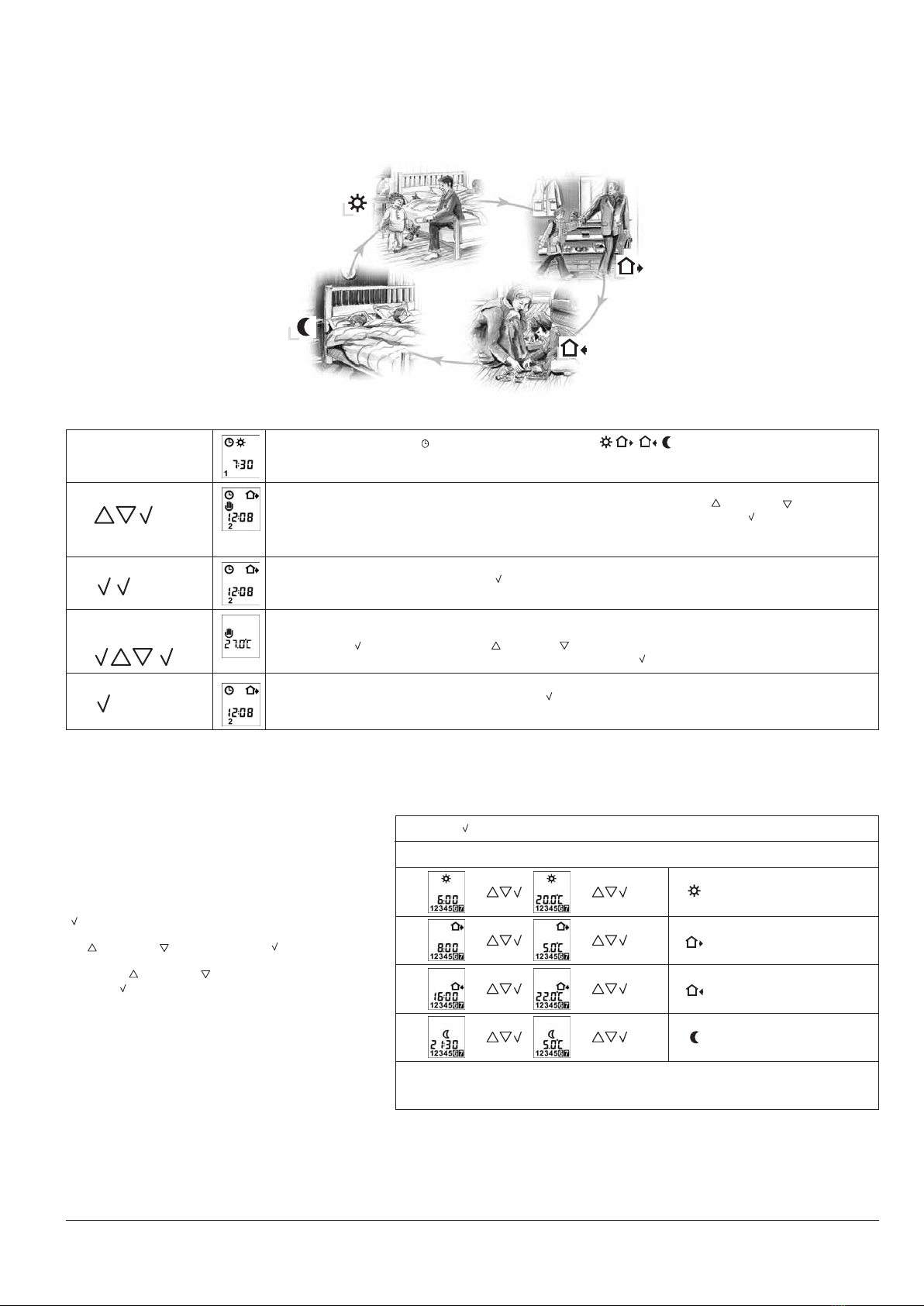
4-event clock mode
The day has been split into 4 events describing a typical day. When the thermostat is in 4-event mode it will automatically adjust the temperature according to the
required temperature to the required time. These settings are valid for the weekdays 1-7 (Monday to Sunday), which are shown on the display. Depending on the
program chosen, the settings can be made for one single day or identical settings for all 7 days..
4-event clock mode: The clock function symbol ( ) and one of the 4-event symbols ( ) will be indicated.
Programming see 3.
Comfort mode:
☞
☞
Manual mode:
☞
☞
Temporary override
To temporarily override the temperature in the 4-event schedule program, press the UP ()
or DOWN ()
button once, to
show the temperature, and press again to increase or decrease the temperature. Press the OK ( ) button. The override
will operate until the next programmed event when the unit will resume the automatic programme.
Cancel comfort mode
To cancel the override state, press the OK ( ) button twice.
Permanent override:
During holidays, the scheduled 4-event program can be overridden.
Press the OK ( ) button, and then the UP ( ) or DOWN ( ) button until the override temperature is set.
The unit will now operate to this temperature permanently. Press the OK ( ) button.
Cancel manual mode
To cancel the permanent override state press the OK ( ) button once, and the unit will resume automatic function.
☞
☞
☞
☞
☞
☞
☞
☞
Press OK ( ) button for 3 secs. to begin programming
: Time and temperature
: Time and temperature
: Time and temperature
: Time and temperature
Day 1 - 7
If program 7:0 has been chosen it is possible to program the 4 event settings individually
for each day of the week.
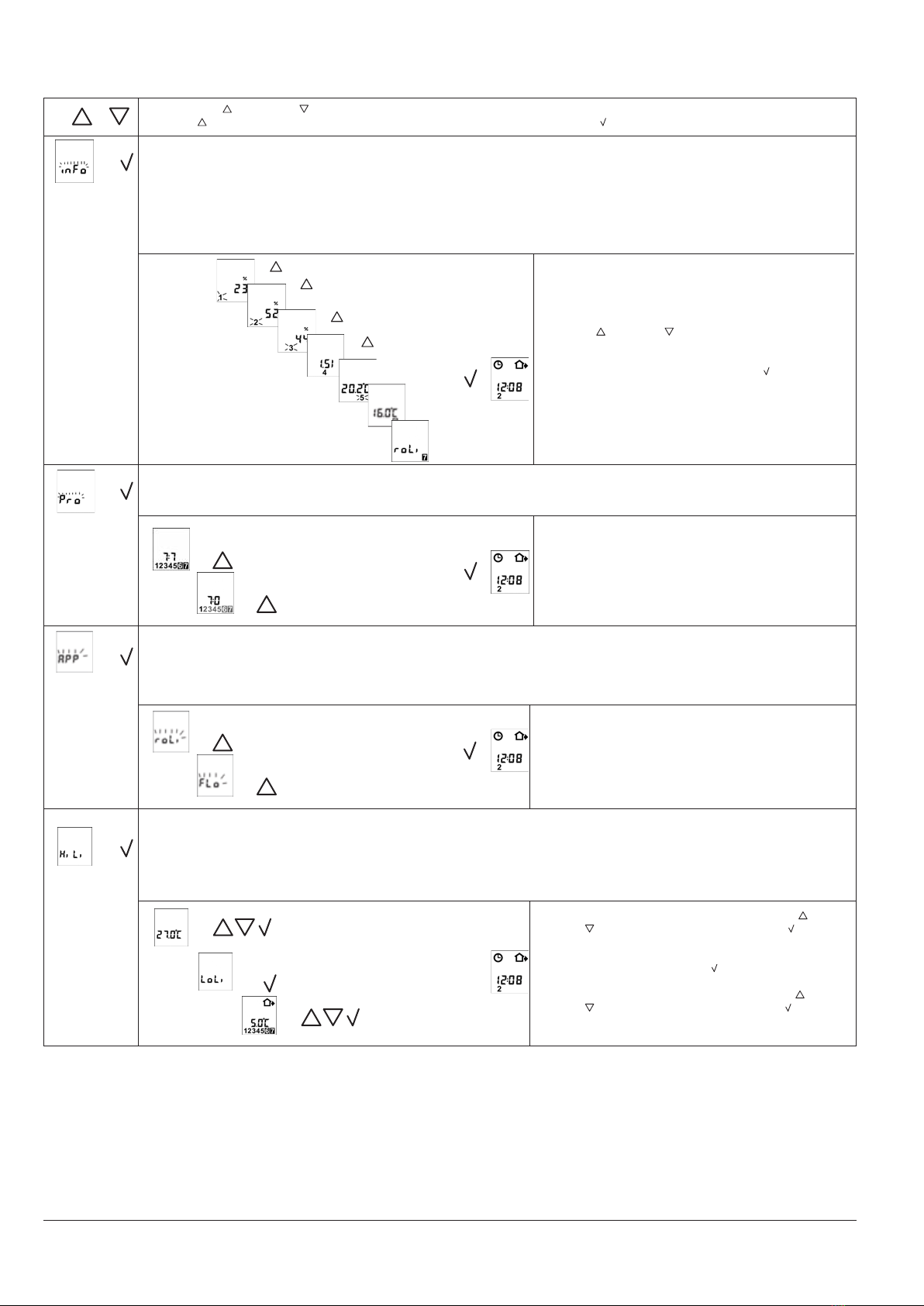
3. Programming
4-event time and temperature
For each event, the start time and required temperature
must be set.
For example, in the morning you wish the heating to start
at 07:00 and the temperature to rise to 25˚C. Press OK
( ) button for 3 seconds and the start time is displayed.
Change this to 07:00 with the
UP ( ) or DOWN ( ) button. Press OK ( ) to confirm.
The temperature is now displayed. Change this to 25˚C
with the UP ( ) or DOWN ( ) button.
Press OK ( ) button to confirm. This action can now
be repeated for the second event.
These settings are valid for the weekdays 1-7 (Monday to
Sunday), which are shown on the display. Depending on
the program chosen, the settings can be made for one
single day or common settings for all 7 days.
The temperature can be set within the range of +5 to
+27°C * when first switched on.
* This can be increased up to a maximum of +45°C
(under tiles only)
See : 4. Advanced Optional Settings, HiLi.
Your thermostat is now programmed to your desired
settings. Should you wish to use any further options
please read on.
2
Monitoring of energy consumption
The thermostat calculates average time it has been switched on allowing you to monitor your energy consumption.
In the thermostat you can read out:. Total switch-on time in percentage in the latest 2 days, 30 days or 365 days.
Calculation of operational costs per day: (switch-on time:100) x kW x kWh-price x 24 h per day
Example: Read-out: 30 % in the latest 365 days
Size of heating system: 1.2 kW (ask the installer)
Cost of power: 5 p/ kWh
Calculation: (30:100) x 1.2 kW x 5 p / kWh x 24 h = 0.4 £ per day
4. Advanced Optional Settings (Only use if directed in previous sections)
4-event sequence
The actual sequence is blinking: Day 1-7 (7:7). To change the selection press the UP button until day 1-7 is blinking individually (7:0). Select the
wanted program by clicking OK.
☞✚
☞
7:7 4-events which are common for all 7 days
7:0 4-events for each of the 7 days
☞
2 days
30 days
365 days
Software version
Regulation sensor
Limit sensor (if used)
}
}
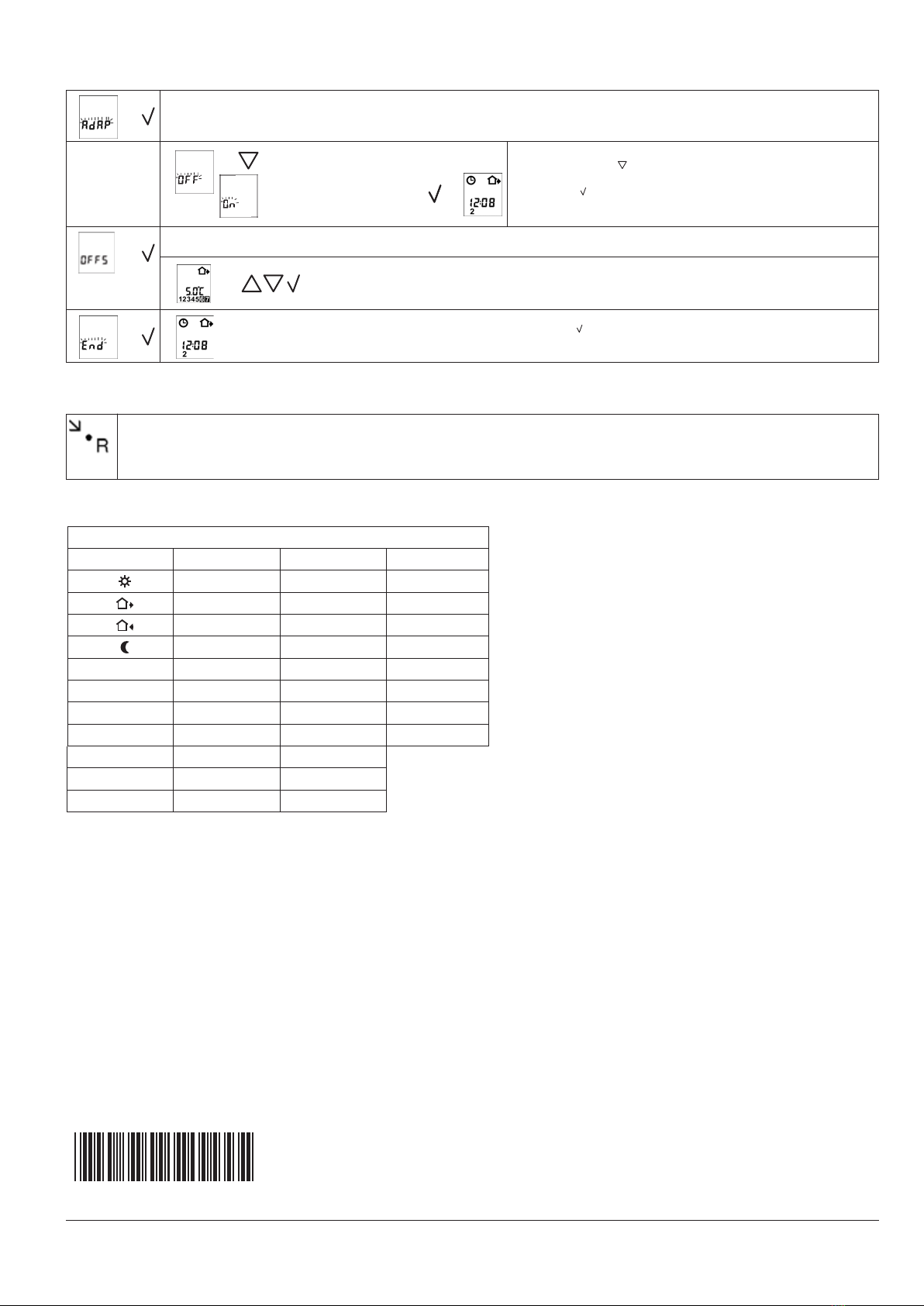
Press both UP ( ) and DOWN ( ) buttons together for 3 seconds. INFO is displayed.
Press UP ( ) button until you reach the desired sub menu. Select the sub menu with the OK ( ) button.
Press UP ( ) or DOWN ( ) button to show the different
readouts.
No changes can be made here. Use the OK ( ) button to
end.
Selection of type. As standard the thermostat controls the temperature within the room and use the externally temperature sensor as limit
sensor avoiding to high or to low temperatures in the floor, select (roLi).
roLi Room temperature control with floor limitation sensor
FLo Floor temperature control
☞
☞
☞
3
Max and min allowed temperature of the floor surface
Max limitation is used for safety to prevent high floor temperatures. For example wooden floor constructions which should not be allowed to
exceed a maximum of 27°C. The value can be set from 5°C up to 55°C.
Low limitation is used where the temperature of the floor is required never to fall below the minimum set temperature. Example in kitchens
or bathrooms with tiles. The value can be set from 5°C up to 30°C. Remember the max limit temperature must be set higher than the min
limit temperature.
☞
☞
☞
Maximum allowed temperature setting. Use the UP ( ) or
DOWN ( ) button to increase or reduce, and OK ( ) button
to accept.
Next is displayed LoLi. Press OK ( ) button to continue.
Minimum allowed temperature setting. Use the UP ( ) or
DOWN ( ) button to increase or reduce and OK ( ) button
to accept.
☞
Function selection
}
☞
☞
Press the pin button in 3 seconds and the thermostat returns to factory settings. Time and day is also reset and must be set according to "Setting the thermostat into
operation".
5. Reset to factory setting
4-event time and temperature
Day 7-0
06:00
Time Temperature
08:00
16:00
21:30
Limit sensor temp.
7:7
24 H / ˚C
OFF
4-event sequence
Scale
Adaptive control
20˚C
5˚C
22˚C
5˚C
27˚C/5˚C
6. Failure codes
E0 = Internal failure, replace thermostat
E1 = Built-in sensor short-circuit or disconnected, replace thermostat
E2 = External sensor short-circuit or disconnected
Heat Mat Limited
8, Ashwyn Business Centre
Marchants Way, Burgess Hill
West Sussex RH15 8QY
Tel: 01444 247020
Fax: 01444 247121
Factory settings
Adaptive function: This function enables the thermostat to calculate when it needs to switch ON so that the required temperature is reached
at the set time. With a start time of 07:00 therefore, the thermostat may switch ON as early as 06:00 so that the desired temperature of 25˚C is
achieved by 07:00. Without this function set, the thermostat will start to heat at the time you set.
}
☞
Press the DOWN ( ) button to switch between on and off.
Press OK ( ) button to confirm.
Press OK ( ) button to end programming and to return to scheduled
programme.
☞
☞
☞
4. Continued
4
Offset. A correction of the control temperature can be made assuring influences from the installation are eliminated.
The correction can be set from -5°C to +5°C.
☞
57479B
Table des matières
Autres manuels HeatMat Thermostat


Manuels Thermostat populaires d'autres marques

EWELLY
EWELLY EW-181 Manuel utilisateur

Prolon
Prolon T1100 Instructions d'installation

Computherm
Computherm Q20 Manuel utilisateur

Heatmiser
Heatmiser neoStat Manuel utilisateur

Aube Technologies
Aube Technologies TH111GFCI-NP 240 VCA Manuel utilisateur

Mars
Mars HEAT CONTROLLER IR Wireless Thermostat Manuel utilisateur


