
Hawkeye Mfg FIREFLY 4K Split Cam V3.0 Manuel utilisateur

1
www.CNfpv.com
Hawkeye Firefly 4K 50FPS Split Cam
4K 50/30FPS,1080P 120, 2.7K 60
Low late cy TV output
HDMI output
WDR
Distortio correctio
Video repair
RC trigger to capture
Ver 3.0

2
www.CNfpv.com
Co te ts
Safety Guidelines:.............................................................................................................3
Features :...........................................................................................................................4
Buttons:................................................................................................................................8
Video Settings:.....................................................................................................................8
Photo Settings:.....................................................................................................................9
System Settings:.................................................................................................................1
Triggers:.............................................................................................................................11
Record videos:....................................................................................................................12
Transferring Files:..............................................................................................................12
Update Firmware:..............................................................................................................12

3
www.CNfpv.com
Safety Guidelines:
Please read the i structio ma ual carefully before usi g the camera for the first
time. Please check the latest version manual on our we site.
1.It’s a high-precisio product, do ot drop or crash it.
2.Do ot expose the camera to stro g mag etic objects, such as mag ets or
electrical motors. Avoid exposi g the product to stro g radio waves. Stro g mag etic
fields may cause the products breakdow or image/audio damage.
3.Never leave the products exposed to high temperatures a d direct su light.
4.I case of overheati g, smoke,or u pleasa t smell, u plug your device immediately
to preve t fire hazard.
5.Keep the product out of childre ’s reach. Power cable may cause childre
accide tal suffocatio or electric shock.
6.Keep the device i cool, dry a d dust-free places.
7.Please do ot throw the product or it’s battery to the garbage, fi d a specific
recycli g place for it.

4
www.CNfpv.com
Features :
USB HDMI
Trigger 1
Trigger 2
Battery voltage measure
Video
GND-
Power+
Key port
Power/OK , Mode button
Red, Blue LED
SD card holder
Power/video Cable Converting Mount SD Protection Cover Key board
(22 to 28mm)

5
www.CNfpv.com
SD Protection Cover:
LED indicator:
LED
4K 50FPS Red + Blue
2.7K 60FPS Red
1080P 60FPS Blue
4K 30FPS off
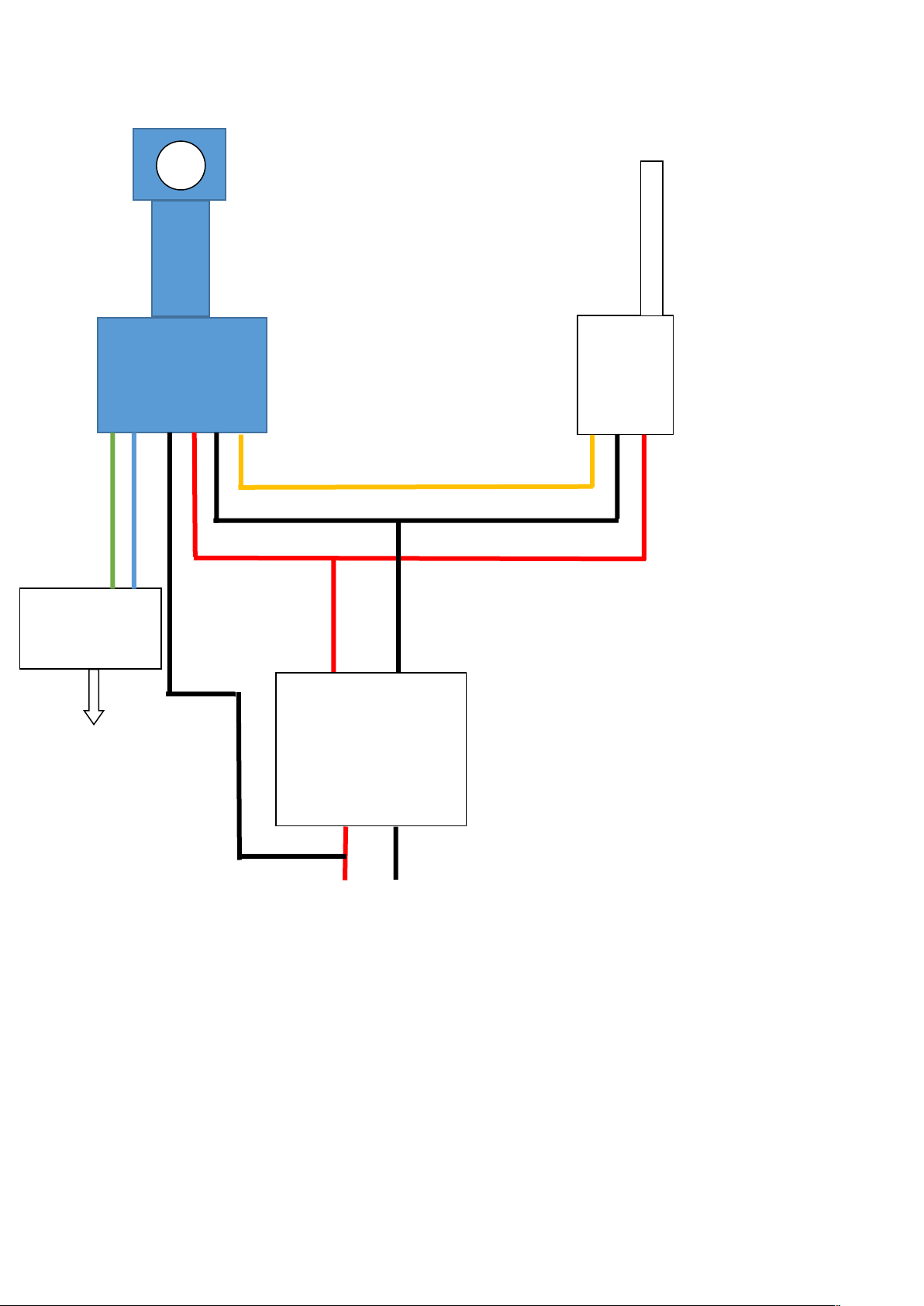
Wires:
Red: 7-24V DC input +
Black: GND
Yellow: Video Out
White: Battery detect (MAX 24v)
Blue: Video trigger
Green: Photo trigger
Note: Never connect video/trigger port to power+!!!

6
www.CNfpv.com
7
www.CNfpv.com
Hawkeye 4K
Split
5.8G
TX
12V
12V Output
POWER BOARD
Battery i (2S-6S)
+ -
+12V GND
Hawkeye Remote
co trol Board
To 3 ways
PWM Receiver
White Cable Red Cable: Power+
Black Cable: GND
Yellow Cable: Video
White Cable: Battery Detect
Blue/Gree Cable: Trigger
Note: Power output, 12V 1A at
least!
Or it CAN’T Power ON.
To Battery

8
www.CNfpv.com
Performance and Specifications:
Resolutio s 4K 50FPS(4:3)
4K 30FPS/
1080P 120/60FPS/
2.7K 60/30FPS/
720P 240/60FPS
AV output PAL/NTSC
PAL has lower late cy!
Micro SD card U1 Sa disk recomme d
SD card supported 8-128G
Size 38 ×38 MM
30.5×30.5 M4 holes
Weight 19g
File format *.MP4/H.265/H.264
Le s F/2.8 ,7 glasses
A gle Diago al 170 degrees
Voltage 7-25V
Curre t 900mA
Button s:
Name Fu ctio s Descriptio
Power/
OK Butto
Power ON/OFF;
Start/Stop Recordi g
Press O ce to power o ;
Press o ce to start/stop recordi g after
power o .
Mode Butto Toggle betwee Press a d hold for 2 seco ds to toggle
differe t resolutio s.
Video Settings :
Resolution:4K 50(4:3),4K 30、2.7K 60、 2.7K 30(4:3)、 2K 60、2K 30fps、1080P
120、1080p 60fps、1080p 30fps、720p 240、720P 60fps、720P 30fps. Note: High
frame rates make the TV output more smooth! We advice to use >=50fps for
FPV!
Loop recording:Off、3、5、10 mi utes. Whe the SD card is full, video will be auto
loop recordi g. Whe the SD card is full, video will be auto loop recordi g. The oldest
file will be deleted first.
WDR:Off、O . WDR effect will be O /Off. Note: When this function is turned on,
the image will not ecome dark even toward the sun. The image would not
looks so clear if this function is ON sometimes. As a FPV cam, this function
should e turned ON.

9
www.CNfpv.com
Exposure: +2.0、+5/3、+4/3、+1.0、+2/3、+1/3、0、-1/3、-2/3、-1.0、-4/3、-5/3、-
2.0.Note:Higher value for brighter image. If you wa t brighter image, set this value
higher. If the image is over exposure, set the value smaller.
Record Audio:Off、O .
Date Stamp:off、O . Set the date time stamps o the video.
EIS:Off、O . Gyro Image stabilizatio . Whe this fu ctio is tur ed ON, the TV
output will be delayed.
Time-lapse record:Off、0.05、0.1、0.5、1、3、5、10,30、60sec.Note: Time-lapse is a
video recordi g mode that captures video at a very low frame rate: arou d o e to two
frames per seco d, although this depe ds o the le gth of the recordi g. Whe
played back, time-lapse video is almost the opposite of slow motio . Higher value for
shorter video. There’s o voice i this mode.
Slow Motion:Off,1080P 120.Slow motio (commo ly abbreviated as slo-mo or
slow-mo) is a effect i film-maki g whereby time appears to be slowed dow .
Auto Recording:Off、O .Note: The camera will turn on and record
automatically without pressing utton.When you stop recording, you need to
press the record utton. When the power is suddenly cut off or the stop
recording utton is not pressed, the file will e damaged. You need to use the
key oard to enter the play ack mode. When you play ack the damaged file,
the file will e repaired automatically.
Codec:H.254、H.265.H.265 has better compressio efficie cy. Perhaps some
players ca ’t play the files. We recomme d usi g kmplayer player.
Snapshot in recording:Off、5、10、30sec. Video + photo mode.
Photo Settings :
Resolution:20M、16M、12M、10M、8M、5M.
Self Timer:2、5、10 sec.
Quality:Fi e,Normal,Eco omy.
Burst photo:Burst 3,Burst30.
Sharpness:Stro g、Normal、Soft.
Contrast:High、Medium、Low.
Anti-shaking:Off、O .

1
www.CNfpv.com
Quick Review:Off、2、5 sec.
Date Stamp:Off、Date、Date&time. Set the day time o the image
Exposure: +2.0、+5/3、+4/3、+1.0、+2/3、+1/3、0、-1/3、-2/3、-1.0、-4/3、-5/3、-2.0.
Metering:Average、Ce ter-weighted、Spot.
Long exposure:Off、0.5、1、2、5、10、30、60sec.usi g a lo g-duratio shutter speed
to sharply capture the statio ary eleme ts of images while blurri g, smeari g, or
obscuri g the movi g eleme ts. Lo g-exposure photography captures o e eleme t
that co ve tio al photography does ot: a exte ded period of time.
Note: If you turn on long exposure during the day time, it may cause the image
e overexposed.
System Settings :
Date time setting. Set daytime.
Auto power off:Off、1、2、3、5、10mi utes.The camera will tur off whe there’s o
operatio .
Beep sound:Off、O 。Set the beep sou d o /off.
Language:Muti la guages.
Frequency:50、60HZ. Light freque cy i door. When the video flickers indoor,
change this setting.
TV mode:PAL、NTSC. NTSC is 30fps, PAL is 25fps. NTSC is smoother than
PAL.
HDMI out:1080P 30、720P 60. Whe co ect the Micro HDMI cable to a TV, the
camera will switch to HDMI automatically.
HDMI Forced Output:Off, O . Forced HDMI sig al output, TV output will e
disa le! This is for HD Transimitter.
OSD Mode:Off、O . OSD o TV output.OSD o TV output. To disable the OSD,
tur this Off.
Table des matières
Autres manuels Hawkeye Mfg Appareil photo numérique


