GROM Audio GROM-MST3 PLUS Manuel

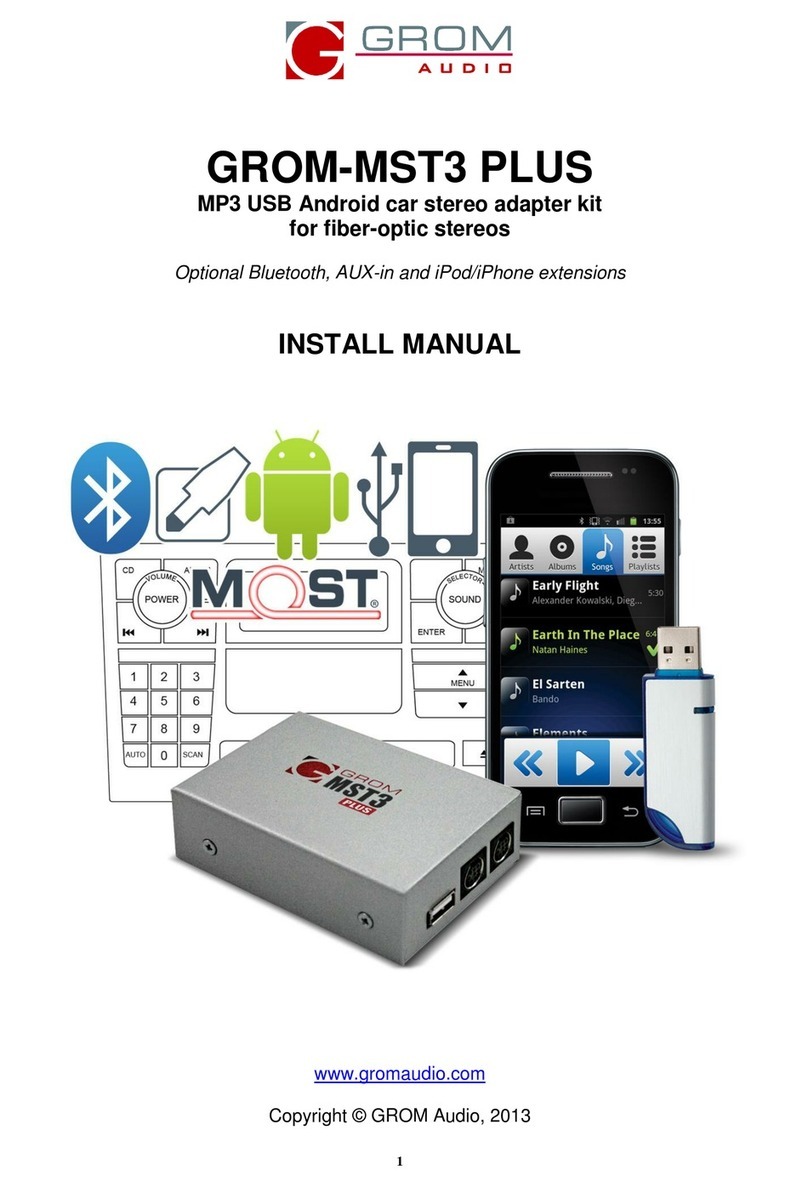
GROM-MST3 PLUS
MP3 USB Android car stereo adapter kit
for fiber-optic stereos
Optional Bluetooth, AUX-in and iPod/iPhone extensions
INSTALL MANUAL
www.gromaudio.com
Copyright © GROM Audio, 2013

TABLE O CONTENTS
Chapter 1 – Introduction
1.1 Subj ct p.3
1.2 Functionality Highlights p.3
1.3 Main F atur s in USB and Android® phon Mod p.3
1.4 Main F atur s in iPod®/iPhon ® Mod p.3
1.5 Blu tooth Hands Fr and Wir l ss, AUX-IN p.3
1.6 Pr cautions p.4
1.7 Disclaim r p.4
1.8 Compl t n ss and conn ction of s t p.4
Chapter 2 – General Installation
2.1 Programming th car for GROM-MST3 PLUS p.5
2.2 Und rstanding how th fib r-optics works p.5
2.3 Tools n d d p.6
2.4 El ctrical and optical installation p.6
2.4.1 CD chang r is pr s nt and activat d p.6
2.4.2 CD chang r is not pr s nt or activat d p.8
2.4.3 Important notic for BMW own r’s p.11
2.4.4 Important notic for Volvo own r’s p.11
Chapter 3 – Testing the operation, simple usage guide
3.1 EXT1-EXT2 ports, Acc ssori s cabl conn ction p.12
3.2 Mod s l ction p.12
3.2.1 Mod s l ction for BMW- non iDriv p.12
3.2.2 Quick USB op ration for BMW- non iDriv p.12
3.2.3 Mod s l ction for M rc d s B nz p.13
3.2.4 Quick USB op ration for M rc d s B nz p.13
3.2.5 Mod s l ction for Volvo S40/60, V50, XC90 07-13 Sing CD p.13
3.2.6 Quick USB op ration for Volvo S40/60, V50 XC90 07-13 Sing CD p.13
3.2. Mod s l ction for Volvo S40/60, V50, XC90 07-13 Sing CD p.13
3.2.8 Quick USB operation for Volvo S40/60, V50 XC90 0 -13 Singe CD p.13
3.2.9 Mod s l ction for Volvo XC90 02-06 p.13
3.2.10 Quick USB op ration for Volvo XC90 02-06 p.14
3.2.11 Mod s l ction for BMW iDriv and Audi MMI p.14
3.2.12 Quick USB op ration for BMW iDriv and Audi MM p.14
3.3 Installation troubl shooting p.14
Chapter 4 – Support p.15
Chapter 5 – Warranty, license and disclaimer p.15
5.1 Warranty p.15
5.2 Lic ns agr m nt and disclaim r p.15
5.3 Grant of Lic ns p.15
5.4 Op ration warning and saf ty instruction p.15
5.5 Oth r provisions p.16
5.6 GROM Audio Compatibility Disclaim r p.16
5.7 Engin /Syst m Nois Disclaim r p.16
2

Chapter 1 - Introduction
1.1 Subject
Thank you for purchasing th GROM-MST3P adapt r. It has b n d sign d to provid ndl ss hours of list ning
pl asur through factory st r os of th v hicl s with fib r-optic MOST Transport t chnology, such as BMW,
M rc d s B nz, Volvo and AUDI. To nsur that your GROM-MST3P int rfac p rforms corr ctly in your v hicl ,
w r comm nd that you r ad this ntir manual b for att mpting to install th GROM int rfac .
1.2 Functionality Highlights
- Easily acc ss your m dia coll ction in your car, including shuffling songs, skipping b tw n tracks, and adjusting
th volum —all with only your factory car st r o h ad unit or multifunction st ring wh l controls.
- List n to your favorit music dir ctly from virtually any USB mass storag d vic , flash stick or portabl hard driv ,
r quiring no d dicat d m dia play r.
- Android® phone (most support d) play, charg and control through USB port via standard USB cabl .
- iPod®/iPhone® play, charg and control via additional IPod cabl (sold s parat ly).
- Bluetooth or AUX-IN int gration. To g t AUX-IN you will n d GROM MiniDin to 3.5mm audio and 5V USB
charging cabl , to g t th Bluetooth hands fr and wir l ss functionality you will n d GROM-BTD Blu tooth
Dongl (both sold s parat ly).
1.3 Main Features in USB or Android Phone Mode
- Ability to list n to songs in car on USB mass storag d vic (such as flash driv ) or Android phon (using fr
AALinQ app from Googl ® Play Stor ).
- Ability to control music from car st r o or st ring wh l buttons.
- Fold rs on th USB driv s ar mapp d to an individual “Disc” button on car st r o’s dashboard. Playlists on
Android phon ar mapp d to discs. Browsing by Album, Artist, G nr is availabl on BMW iDriv st r os.
- Numb r of “discs” limit d to th car st r o (up to 99 on s l ct st r os).
- Last list n d song position within th playlist is r m mb r d and tim position is r stor d upon ignition cycl .
- Android phon is charg d whil in car.
1.4 Main Features in iPod iPhone Mode (with GROM compatible iPod connector cable, which is
sold separately):
- Ability to play, charg and control iPod/iPhon – all using your factory car st r o.
- Playlists on th iPod/iPhon ar mapp d to an individual “Disc” button on car st r o’s dashboard (diff r nt for SAT
mulation – pl as r f r to your installation manual).
- Numb r of “discs” limit d to th car st r o (up to 99 on s l ct st r os)
- Last list n d song position within th playlist is r m mb r d (may not apply to som iPod)
- Last list n d song tim position is r stor d upon ignition cycl (may not apply to som iPod)
1.5 Bluetooth Hands Free and Wireless Audio, AUX-IN Features (with GROM Bluetooth
Dongle or AUX cable, which are sold separately as the optional accessories):
- With hands fr (HFP) you can r c iv th phon calls through th factory car st r o, answ r or r j ct th phon
calls using car st r o or st ring wh l controls, sp ak to th oth r p rson using microphon provid d with GROM
Blu tooth Dongl .
- Wir l ss music play from your phon to th factory car st r o (A2DP), control th music or Pandora® int rn t
radio with th car st r o or st ring wh l buttons (AVRCP).
- AUX-IN 3.5mm audio conn ctor for any audio sourc , and additional 5V charging port.
3

1.6 Precautions
Proper mounting location
S cur ly install th int rfac in a location fr from h at, humidity, moving parts, or dir ct sunlight. B war of hot-air
flow from your v hicl ’s climat control syst m. Th int rfac should b s cur d in a suitabl location, fr of sharp
m tal dg s, using doubl -sid d tap , V lcro, or wir ti s. Th adapt r’s op rating t mp ratur rang is -30°C to
+70°C (-24°F to +158°F)
1.7 Disclaimer
•This product is not affiliat d with any of th OEM manufactur rs
•Modifying th st r o may void any xisting warranty
•Th purchas of this product carri s no warranti s, ith r xpr ss d or impli d
•GROM Audio has confirm d th list d st r o and v hicl application to th b st of our ability. Du to
uncontrollabl factors and various factory options, Grom Audio cannot 100% guarant v ry list d
application. Th s factors includ variabl s such as inconsist nci s within a factory st r o, factory st r o
mod ls unknown to Grom Audio and any partial mod l y ar chang s.
•K p your y s on th road whil driving!
•W ar not liabl for th misus of this product, including improp r installation, damag to th board or
st r o during installation, and th ill gal us of th st r o
1.8 Completeness and connection of set
a) Th GROM audio adapt r s t consists of th GROM-MST3 PLUS main int rfac , on USB cabl , on fib r-optic
conn ctor and P-Tap, and on 2GB USB stick.
1. GROM-MST3P int rfac 2.On USB cabl 3. On fibr -optic POF cabl *
* Th POF cabl is not includ d for Volvo XC90 2002-2006 packag as you will us th xisting CD chang r conn ctor.
igure 1. Package contents
b) Th basic packag do s not includ th optional acc ssori s that you can purchas s parat ly:
GROM compatibl iPod cabl AUX MiniDin 3.5mm USB charg cabl GROM Blu tooth Dongl
igure 2. Optional Accessories (sold separately)
4

Chapter 2 – General Installation
2.1 Programming the car for GROM-MST3 PLUS
BMW non iDrive
- If original CD chang r fitt d and MP3 capability is availabl : no programming is r quir d.
- If original CD chang r fitt d and no MP3 capability is availabl , you will n d to r trofit “KMP3” option with s rvic
comput r
- If original CD chang r not fitt d or M-ASK us d: install GROM-MST3P and r trofit “CDC” option with s rvic
comput r.
BMW with iDrive
- If original CD chang r fitt d: no programming is r quir d.
- If original CD chang r not fitt d: install an original BMW CD chang r and r trofit “CD chang r” option t mporarily
with s rvic comput r.
Mercedes and AUDI
G n rally no programming is r quir d but in som cas s ( .g. no d vic was conn ct d onto th optical ring) it is
n d d to nabl a CD chang r with th s rvic comput r.
Volvo
No programming is r quir d. Som cars n d s curity compon nt f atur to b disabl d in ord r for GROM to
work. You will n d to contact your local Volvo d al rship and ask to r mov Volvo s curity compon nt.
2.2 Understanding how the fiber-optics works
Fib r-Optic v hicl s work on a syst m utilizing a puls or puls s of light s nt around a ring of d vic s. Each d vic
sits on a point of th ring which starts and finish s at th sam plac . Each puls will hav a uniqu signal which
can b d liv r d to a sp cific part of th chain via a combination of light puls s.
It’s important wh n installing into th ring of d vic s that:
a) Th ring is not brok n and
b) Th ord r is r tain d aft r th installation.
T sting th syst m is quit simpl . If you r mov on of th dir ctional inputs you should s a pulsing light, if you
don’t s any light you hav ith r th wrong dir ctional ring, or th ring is brok n som wh r .
On th n xt pag is an imag (Pictur 1) of th GROM POF (fib r optic) cabl , which cl arly shows th dir ction of
th ring. Pl as look for th small black arrows on th black conn ctor. On th pictur th y ar in whit .
5

Picture 1 GROM iber Optic Connector
2.3 Tools needed
Car audio dash pan l r moval/trim pry r moval tools, scr wdriv r. Pl as consult your local car audio shop or your
v hicl ’s d al rship for instructions or assistanc as n c ssary. If you ar unsur how to install th int rfac
prop rly, w r comm nd contacting your local car st r o shop for assistanc . Som installation xampl s can b
found at www.gromaudio.com.
2.4 Electrical and Optical Installation
1. Turn off car ngin and r mov k y from ignition.
2. In ord r to install th GROM-MST3 adapt r, th xt rnal CD chang r will hav to b disconn ct d in BMW,
AUDI, M rc d s B nz and Volvo XC90 2002-2006. For Volvo S40/S60/V50 and for Volvo XC90 2007-2003 th
factory CD chang r/CD play r n ds to b l ft in th fib r-optic ring for th install. In all cas s you will not b abl to
us factory CD play r aft r GROM install.
If no CD chang r is pr s nt, th GROM-MST3 will n d to b wir d into th fib r-optic ring on th v hicl .
2.4.1 CD changer is present and activated (Installation into BMW, Audi, Mercedes Benz and
Volvo XC90 2002-2006 cars)
Scheme A. Connection to BMW, Audi, Volvo XC90 2002-2006, Mercedes Benz
when the CD changer is present and activated
6

WARNING: In some instances the power wires on the standard CD changer connector in BMW are in the wrong location
in order to be used with the GROM. The below image (image A) shows the standard BMW connector with the PIN’s in
the correct location.
Image A. Standard BMW CD Changer Connector
If th CD chang r conn ctor pins ar in th wrong positions (not as it is shown on th imag A, you will n d to r -
pin th m so th y will match imag A. First you will n d to r l as th pow r conn ctor block as it is shown on th
imag A. Push up th tab as shown on th imag A with a small scr wdriv r. Pl as r f r to th imag C for th
instructions on how to r mov and r position th PIN.
Image B. How to re-pin CD changer connector
Th CD chang r conn ctor is usually locat d in th trunk or glov box of your car.
7

2.4.2 Installation into BMW, Mercedes and Audi when the CD changer is not present or has not
been activated.
In that sc nario you will n d to wir th GROM unit into th fib r-optic ring. To do that you will n d to r mov 1
(on ) fib r optic wir from your factory wiring. It is normally h ld in with a plastic conn ctor and small push tab.
Car fully r mov th appropriat fib r cabl and r plac with th appropriat GROM fib r cabl . Us provid d
plastic coupl r to conn ct oth r GROM fib r cabl and factory fib r cabl tog th r. Mak sur that th light go s
into th corr ct dir ction, as it is shown on th sch m B b low.
Scheme B. Connection to BMW, Audi or Mercedes Benz
CD changer is not present or has not been activated
If you are installing GROM kit into Volvo XC90 2007-2013, or S40/S60/V50 2004 and up, please refer to the
Scheme C on the next page for the installation and direction of the optical light reference.
8

Scheme C. Connection into Volvo S40/S/60/50 and Volvo XC90 2007+ cars
If you ar conn cting your GROM kit with th GROM-POF (fib r optic) cabl , it will b n c ssary to conn ct th
pow r cabl s with th Posi-Tap clips provid d. Us on posi-tap to conn ct th positiv +12v (color of th wir is
r d) to r sp ctiv PIN/wir th ground (color of th wir is black) to r sp ctiv PIN/wir on th quadlock harn ss
conn ctor.
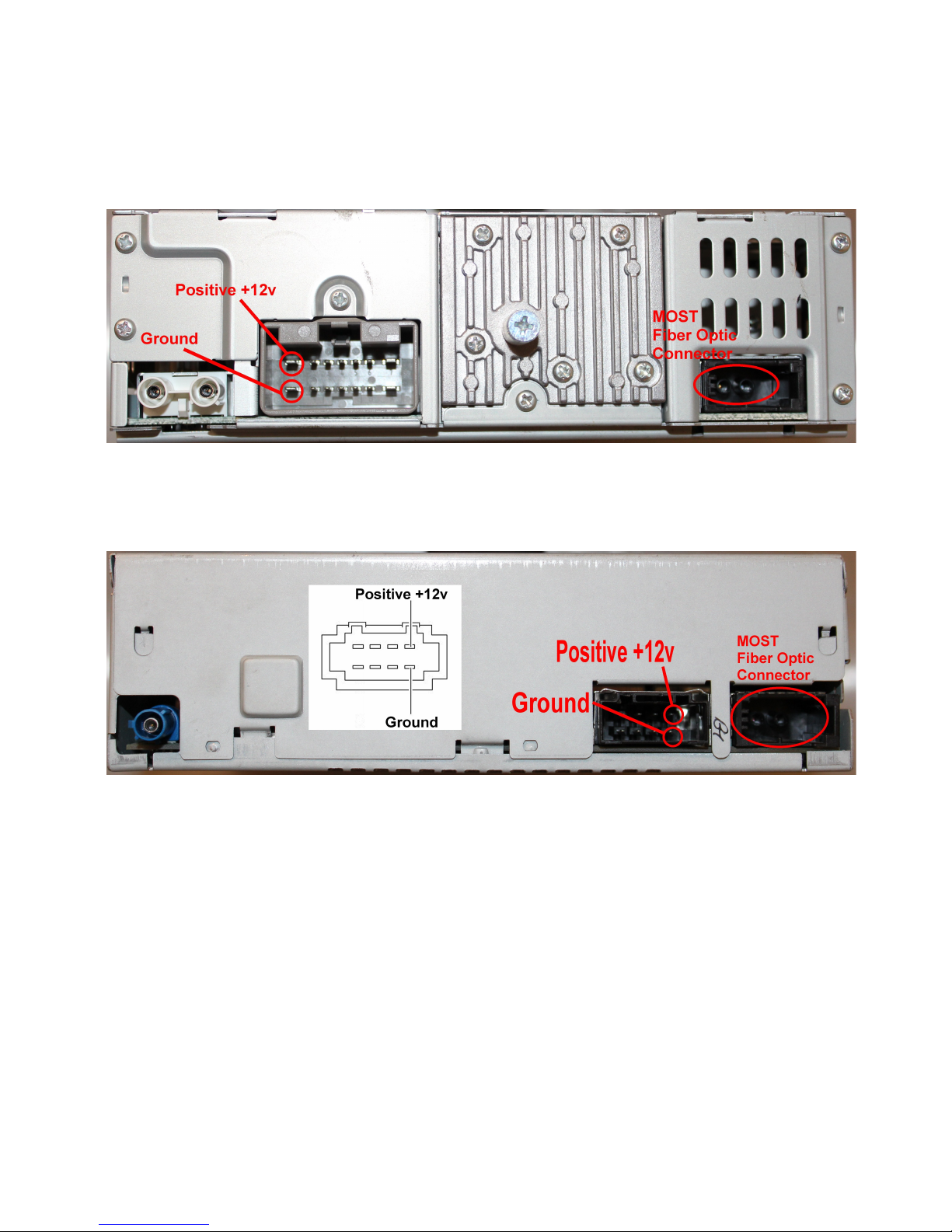
Please refer to the picture below for connection into BMW. Positive +12V connects to PIN/wire 15, Ground
connects to PIN/wire 12 :
Image C. Connection into BMW
9

Please refer to the picture below for connection into Volvo S40/S60/V50/XC90 2007 and up. Positive +12V
connects to PIN/wire 1, Ground connects to PIN/wire 8:
Image D. Connection into Volvo S40/S60/V50/XC90 2007 2013
Please refer to the picture below for connection into Audi and Mercedes Benz. Positive +12V connects to
PIN/wire 4, Ground connects to PIN/wire 8:
Image D. Connection into Audi and Mercedes Benz.
1. Locat appropriat wir s on th car st r o harn ss (r f r to th abov ).
2. Conn ct th wir s using Posi-taps provid d according to th harn ss diagram and th color of th adapt r
wir .
2. Th wir s that com from your st r o ar “HOT” wir s r f rring to th pictur . Don’t forg t to strip th fr
hanging wir s from POF harn ss that cam with your GROM (r d and black color d).
WARNING! NEVER CUT ANY WIRES THAT COME ROM YOUR STEREO!
10
Autres manuels pour GROM-MST3 PLUS
1
Ce manuel convient aux modèles suivants
1
Table des matières
Autres manuels GROM Audio Adaptateur

GROM Audio
GROM Audio GROM-IPD3 Manuel utilisateur

GROM Audio
GROM Audio GROM-MST3 PLUS Manuel utilisateur

GROM Audio
GROM Audio Grom-BT3 Manuel utilisateur

GROM Audio
GROM Audio GROM-USB3 Manuel utilisateur

GROM Audio
GROM Audio GROM-MST4-VOLS6 Manuel utilisateur

GROM Audio
GROM Audio GROM-USB2 MP3 Manuel utilisateur

GROM Audio
GROM Audio GROM-MST4 AUDI MMI 2G Manuel utilisateur

GROM Audio
GROM Audio G-AUX1 Manuel utilisateur

GROM Audio
GROM Audio USB2P Manuel utilisateur

GROM Audio
GROM Audio GROM-USB2i Manuel utilisateur