
Gnet G-ON4 Manuel utilisateur

2CH 4K UHD | FHD HDR DASH CAM
USER MANUAL

IMPORTANT SAFTY
INSTRUCTIONS WARNING
CAUTION FOR MEMORY CARD
PRODUCT FEATURES
PACKAGE COMPONENTS
NAME OF EACH PART
SPECIFICATION
INSTALLATION
01
02
03
04
05
07
08
······················································
································
····················································
··········································
····················································
·······························································
·······························································
01. BEFORE USE
HOW TO USE
MEMORY CARD VIDEO FOLDER
17
27
····································································
······························
02. FUNCTION
BEFORE WI-FI CONNECTION
SMARTPHONE CONNECTION
29
30
·····································
···································
03. APPLICATION
USING |WITHCLOUD}
HOW TO USE ‘WITHCLOUD’
33
34
··················································
········································
04. withCLOUD
QUESTION AND ANSWER
TROUBLE SHOOTING
WARRANTY CARD
44
57
60
···················································
····························································
·····································································
PC VIEWER INSTALLATION
SCREEN GUIDE
39
42
············
······
························
·············
······························
·····················
05. PC VIEWER
CONTENTS

Do not expose the unit to electrical shock or debris.
- This may cause product damage, fire, or electrical shock.
Avoid use with excessive vehicle window tints or special auto glass.
- Images may be blurry or distorted and may cause interference with the reception rate of the GPS.
Do not modify or dismantle the device/ accessories.
- We are not responsible for any damage to the device or vehicle due to user tampering.
Never operate the device or adjust settings while driving.
- Always keep your eyes on the road.
Do not use liquids or chemicals to clean the product or accessories.
- This may cause product damage, fire, or electrical shock.
Please use a non-scratch lens cloth to clean the product and accessories.
- Routinely clean camera lens for best results.
In the absence of the external GPS, the device's date and time may be reset.
- Please always check that the date/ time is correct.
When parked for long periods of time in direct sunlight, a temperature increase
inside the vehicle may result in a memory card corruption and/ or recognition error.
- It is recommended to remove the memory card and store it out of direct sunlight during long periods
of vehicle inactivity.
Avoid high temperature or high humidity environment for normal operation of the
product.
Check the operation of the rear camera(s) periodically before driving.
- Only the front camera will be captured in the event of a malfunction or defect.
© 2022 GNET SYSTEM CO.,LTD. or its subsidiaries All rights reserved. Under the copyright laws, this manual
may not be copied, in whole or in part, without the written consent of GNET SYSTEM CO.,LTD.
GNET SYSTEM CO.,LTD reserves the right to change or improve its products and to make changes in the
content of this manual without obligation to notify any person or organization of such changes or
improvements.
Go to www.gnetsystem.com, www.g-on-the-road.com for current updates and supplemental information
concerning the use of this product. GNET®and the GNET logo, are trademarks of GNET SYSTEM CO.,LTD.
or its subsidiaries, registered in South Korea and other countries. GNET G-ON4™, are trademarks of GNET
SYSTEM CO.,LTD. or its subsidiaries. These trademarks may not be used without the express permission of
GNET. microSD®and the microSD logo are trademarks of SD-3C, LLC. Wi-Fi®is a registered mark of Wi-Fi
Alliance Corporation.
01
01. BEFORE USE IMPORTANT SAFETY
INSTRUCTIONS WARNING

Overtime, memory degradation can occur and should be replaced
periodically.
To prevent incompatibility problems, please use only a genuine GNET
memory card. The GNET memory cards are specifically designed to operate
with our GNET systems and are covered under our warranty program.
When a vehicle accident occurred, it is recommended to remove the
memory card from the device and save the data to a computer
immediately. When the memory card is full, the data will be overwritten,
and the accident data will be lost.
Please be sure to remove the memory card only after the recording LED is
off. Otherwise, if removed too early, video data could be lost or corrupted.
This can also shorten the card’s lifespan.
Please do not interchange / swap the memory cards between other
products. Data may be erased and lost if the memory card is automatically
formatted.
It is recommended that the memory card be formatted at least twice a
month for product and lifespan maintenance. For best results, please use
the official SD Formatter (www.sdcard.org).
GNET System dash cameras can support memory card (SD) capacities
ranging from 8GB to 1TB.
When a new or used memory card is inserted into the device for the first
time, the system will go into standby mode for 3 to 5 minutes. Please do
not attempt to remove the memory card during standby mode or when the
device is formatting the card.
It is possible to format the memory card in the GNET application for Mac
and PC. Please visit the GNET SYSTEM’s website at:
https://www.gnetsystem.com/eng →SUPPORT →DOWNLOAD
02
01. BEFORE USE
CAUTION
FOR MEMORY CARD
SD LOCKS FOR
MEMORY PROTECTION
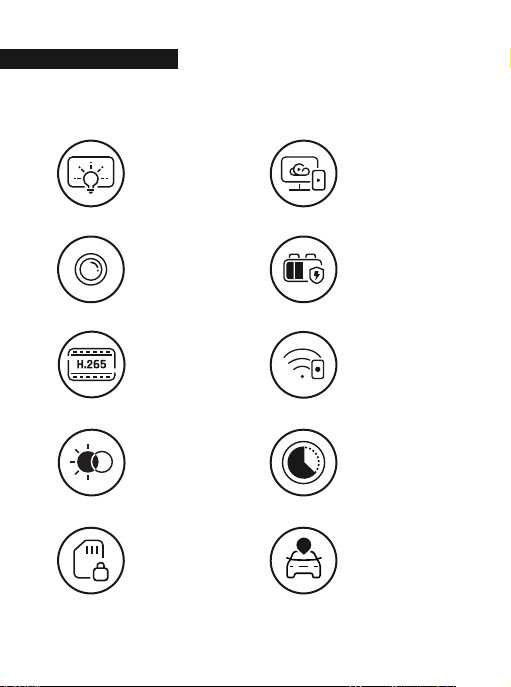
2CH
UHD/FHD
SONY STARVIS
IMAGE SENSOR
H.265 CODEC
REAL HDR
LBP
TIME LAPSE
PARKING
MODE
G-NET
Wi-Fi APP
CLOUD SYSTEM
P
01. BEFORE USE PRODUCT FEATURES
03
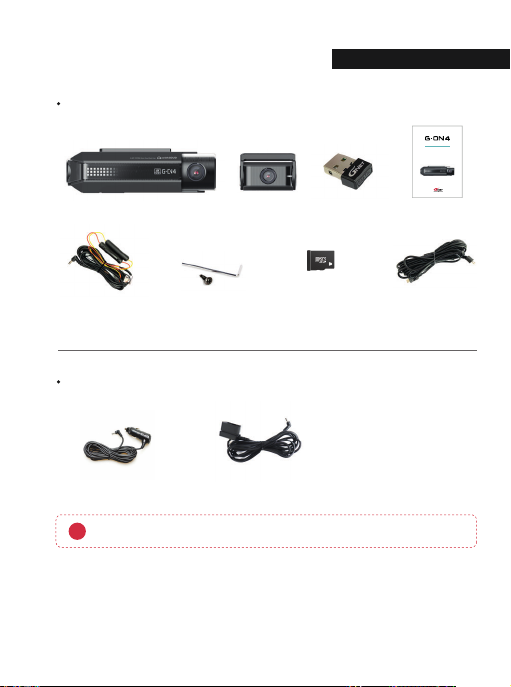
Basic Components (Embedded GPS)
Cigarette lighter and OBD power cables are each sold separately.
ⲼThe size and appearance of the components depicted above may be different from the real components.
ⲼSpecifications and components may be changed without notice for quality assurance.
ⲼWe highly recommend that a GNET Genuine Memory Card be used with all GNET products.
Optional Product
Hardwire kit
Cigarette lighter power cable
Micro SD
memory card
Rear camera
connection cable
Wi-Fi dongle
OBD power cable
Main camera Rear camera
Screw, Wrench
User manual
2CH4K UHD | FHD HDR DASH CAM
USERMANUAL
04
01. BEFORE USE
PACKAGE COMPONENTS

1
13
2
3
910 11 12
4
5
6 7
8
ⴜ
REC LED
ⴝ
Wi-Fi connection button
ⴘ
Front camera lens
ⴙ
Security LED
ⴚ
Front camera bracket
ⴛ
GPS LED
ⴣ
OBD2 connector port
ⴢ
Rear camera connector port
ⴠ
Wi-Fi USB dongle port
ⴟ
Power button
ⴤ
Micro SD card cover
ⴞ
Manual recording button
ⴡ
Power connector port (DC-IN)
Front Camera
01. BEFORE USE NAME OF EACH PART
05

1 4
2
3
ⴘ
Camera lens
ⴙ
Rear cam mount
ⴚ
Rear cam connector port
ⴛ
Status LED
Rear Camera
06
01. BEFORE USE
NAME
O
F EACH PART

Image Sensor
Audio input
Video Compression
Audio Compression
Resolution
Frame Rate
Recording Time
(Approx.)
3G/4G/Router (Optional)
Wi-Fi (Optional)
G-Sensor
Speaker
Embedded GPS
Angle Of View
Viewer
Power
Allowable current
of providing fuse
Operation Temperature
Humidity
Dimension
(WxHxD, mm)
SONY Starvis
Built-in Microphone
H.265
ADPCM
Front : UHD (3840 X 2160), Rear : FHD (1920 X 1080)
All cameras : Max. 30 FPS
32GB : 2hrs / 64GB : 4hrs / 128GB : 8hrs 20mins
256GB : 16hrs 30mins / 512GB : 33hrs / 1TB : 66hrs
Connect to withCLOUD via 3G/ 4G/ Router telecommunication
Connect to GNET Smart phone application via Wi-Fi dongle
Event recording by External Shock
Operation status alarm / Voice guidance
Synched with Google map, Keep track of location and Speed
Front: 150˚, Rear: 140˚
Windows XP/7/8/10, Mac, Support 32Bit / 64Bit,
Synchronizing Google map with PC viewer is supported
over Windows7 and explorer 10 as per Google' s policy.
DC 12V - 24V
3A
-20Ⳅ~ 60Ⳅ
10~95%
Front: 120 X 63 X 32.3
Rear(Including the bracket): 48 X 29 X 38
ⲼSpecifications and components are subject to change without notice for quality assurance.
01. BEFORE USE SPECIFICATIONS
07

How to install Dash cam
1
2
Once the bracket is secure, ensure that the memory card has been inserted.
Proceed to peel the cover from the double sided tape on the bracket.
Assemble the front camera with the provided bracket in the order displayed.
Make sure bracket is hooked correctly. Push and align it until a sound is
heard. (ⴘ,ⴙ).
ⴙⴙ
ⴘ
01. BEFORE USE
INSTALLATION
08
Ce manuel convient aux modèles suivants
1
Table des matières
Autres manuels Gnet Caméra embarquée


