Ghost Controls Ghost Pro Series Instructions d'installation

GHOST PRO SERIES
LDM2 DUAL GATE OPENER KIT INSTALLATION
AND OWNERS MANUAL
Made in China, 04 2021 LDM2IM
©Ghost Controls® 2020
WARNING: This product can expose you to chemicals including lead, which is known to the
State of California to cause cancer. For more information, go to www.P65Warnings.ca.gov
A 12V BATTERY IS REQUIRED TO OPERATE OPENER AND IS NOT INCLUDED!
You must purchase a 12V Automotive or Deep Cycle Marine Battery before installing
or purchase our optional Battery Box Kit (ABBT2) for installing your operator.

CONTACT US:
3166 Hartsfield Rd., Tallahassee, FL 32303
www.ghostcontrols.com
For sales, product information, or to locate a retailer near you:
Call: 850-846-6400
Monday through Friday: 8:00–5:00 EST
For installation assistance and technical support:
Call: 850-898-1411
Monday through Friday: 8:00–5:00 EST
Product information, technical article, and installation videos can be found at:
ghostcontrols.com/pages/technical-support or
ghostcontrols.com/pages/installation-video
2LDM2 DUAL KIT
©Ghost Controls® 2020

CONTENTS
Installation and Owners Manual
Warranty Registration page 5
Operator Specifications page 7
System Safety page 8
System Overview page 11
Installation Planning page 13
Tools Needed page 16
Included Parts page 17
PULLTOOPEN INSTALLATION page 20
Control Box Installation page 25
Battery Installation page 26
Connecting Arm to Control Box page 27
Setup Gate System Controller page 28
Front Mount Gate Bracket Installation page 31
Installing the Positive Stop Plate page 34
Setting the Closed Limit page 35
Powering the System AC page 36
Powering the System Solar page 37
Setting the Auto Close Feature page 38
PUSHTOOPEN INSTALLATION page 40
Control Box Installation page 45
Battery Installation page 46
Connecting Arm to Control Box page 47
Setup Gate System Controller page 48
Front Mount Gate Bracket Installation page 51
Installing the Positive Stop Plate page 54
Setting the Open Limit page 55
Powering the System AC page 56
Powering the System Solar page 57
Setting the Auto Close Feature page 58
Troubleshooting page 60
Connecting Optional Accessories page 62
Manual Gate Operation page 64
Accessories page 65
3
CONTENTS

BEFORE YOU BEGIN:
■This dual opener is for a gate opening of no more the 24 feet wide.
■A 12 volt automotive/marine battery or Ghost Controls ABBT2 Battery Box Kit is required to power the operator.
■Push-To-Open applications (gate that swings away from the property) will require the Ghost Controls push-to-open
bracket kit (AXPO).
■If charging your system with the AC transformer, you will need to purchase a 16 gauge stranded low voltage wire to
connect the transformer to the gate operator control board. Up to 1,000 ft. of wire can be used.
■For installations farther than 1,000 ft. from an AC power source, the Ghost Controls 10 Watt Solar Panel Kit (AXDP) or
30 Watt Solar Panel kit (AX30) can be used to charge the battery. Up to 30 Watts of solar power can be used.
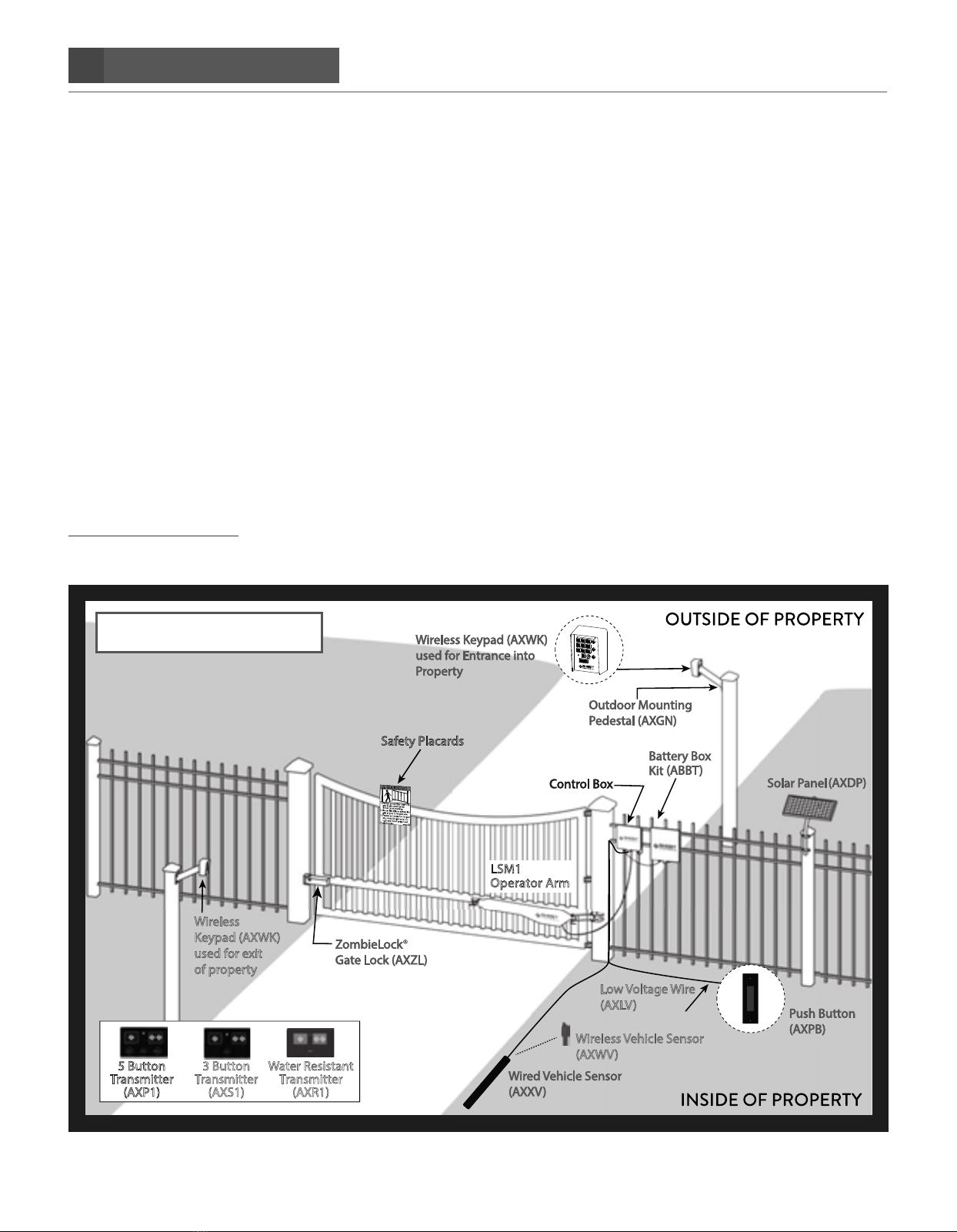
CUSTOMIZING YOUR GATE:
Information on additional accessories shown below can be found on the accessory page 65 or visit
www.ghostcontrols.com
INCLUDED IN LSM1 and LSM2 KITS
ADDITIONAL ACCESSORIES
12V battery required NOT included
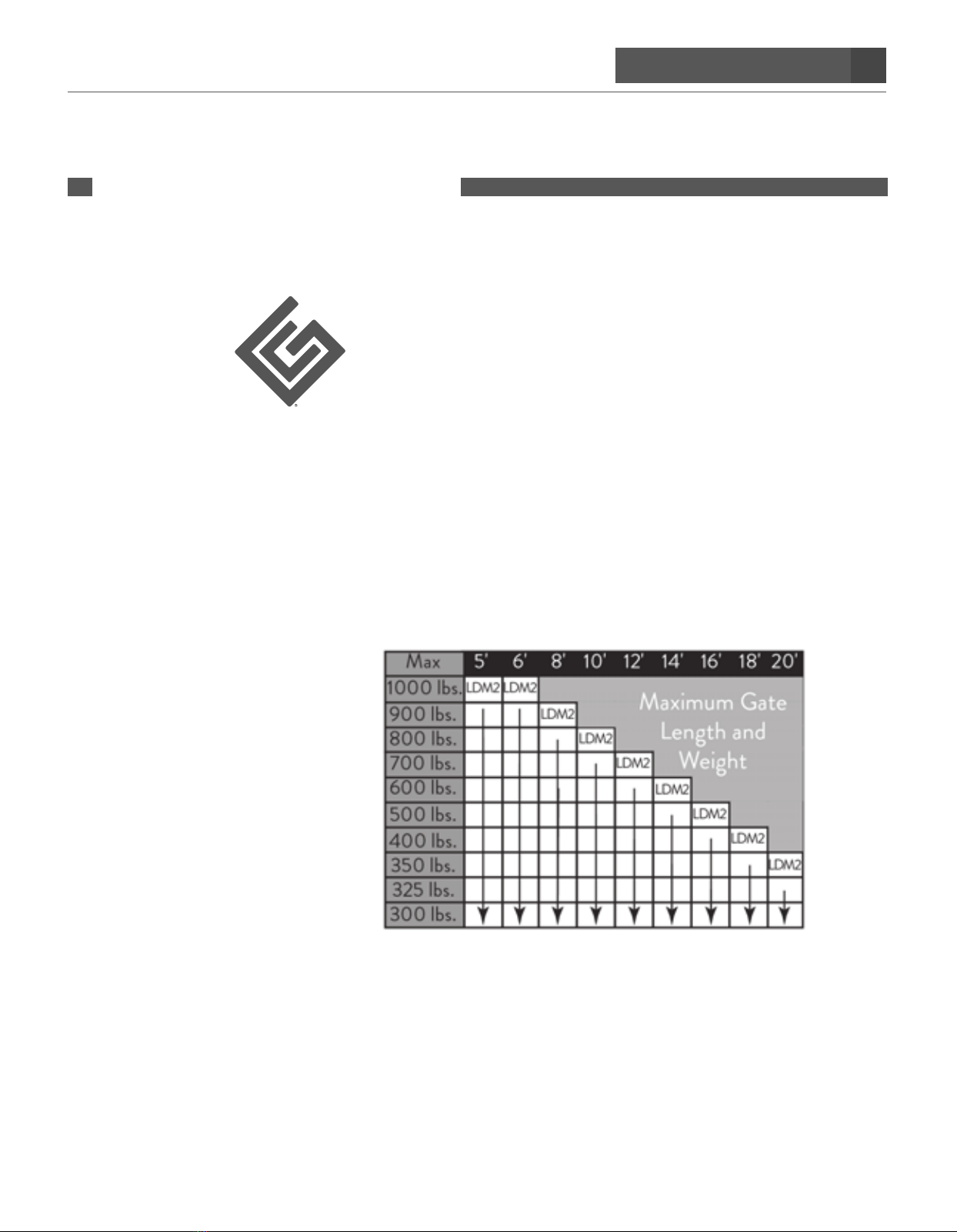
Opens gates up to 20 ft. or 1,000 lbs.
per gate leaf
Wireless
Keypad (AXWK)
used for exit
of property
Safety Placards
LSM1
Operator Arm
5 Button
Transmitter
(AXP1)
3 Button
Transmitter
(AXS1)
Water Resistant
Transmitter
(AXR1)
Wireless Vehicle Sensor
(AXWV)
Low Voltage Wire
(AXLV)
4LDM2 DUAL KIT
©Ghost Controls® 2020

PROTECT YOUR INVESTMENT!
Get an Additional 6 Months Warranty when you register
your product(s) at ghostcontrols.com.
WARRANTY
REGISTER ONLINE WWW.GHOSTCONTROLS.COM
NOTE
If you’re unable to access the internet please fill out the warranty form below and mail in to us at Ghost Controls
3166 Hartsfield Rd, Tallahassee, FL 32303
First Name: __________________________________________ Last Name: _________________________________
Street:___________________________________________________________ Apt. #: ___________________________
City : __________________________________________ State: _________________________ Zip: _______________
Phone Number: ___________________________________ Email Address: _________________________________
Items Purchased:
LSM1
LDM2
Where did you buy your gate opener system? (please include a copy of your receipt)
Type of gate you are using?
Chainlink Ornamental Tube
Approximate Gate Weight:___________________ pounds per leaf
Approximate Gate Length:___________________ feet per leaf
Type of Application:
Farm Home Business
Item Serial Number:___________________ Item Serial Number: ___________________ Manufacturer Date:__________________
Did you purchase any accessories? (Please list below)
5
LDM2 DUAL KIT
©Ghost Controls® 2020

6BLANK PAGE

7
SPECIFICATIONS
©Ghost Controls® 2020
SPECIFICATIONS
■Compliance: The operator is system certified to be in compliance
with UL325 Standard, 7th Edition
■System Operating Voltage: 12 VDC
■System Battery Type: 12V DC Deep Cycle Marine Battery Required
(not included) or Battery Box Kit (ABBT2) (not included)
■System Current: 1-2 Amps is typical when active.
Standby is 20 milliamps
■Operator Arm Maximum Stroke Distance: 23"
■Maximum Gate Length: 20'
■Operator Opening Speed: 90 degrees in approximately 15 seconds
■Maximum Operator Opening Range: 110 degrees
■Linear Actuator Operating Temperature: -5°F to 160°F
SPECIFICATIONS
LDM2 GATE OPERATOR KIT

8SYSTEM SAFETY
©Ghost Controls® 2020
This manual contains important safety precautions and
warnings for both the installer and end users or consumers
of this automatic gate opener system. The following warn-
ings and safety are intended to apply to the most common
applications but may not apply to all possible installation
and applications for these products. To reduce risk of
injury or death:
I. Carefully read and follow all safety precautions,
warnings, installation and operating instructions.
II. DO NOT ALLOW CHILDREN TO OPERATE
GATE CONTROLS. Do not allow children or pets
to play near the gate opener system. Keep all gate
control accessories such as remote transmitters,
keypads, and push buttons out of reach of children
and store in a secure area when not in use.
III. Understand how to disconnect the power and
manually open the gate (beginning on “Manual
Gate Operation” on page 64) BEFORE
you begin using the gate opener system. If you
are unsure of any of these steps, please contact
GHOST CONTROLS® Technical
Support at 850-898-1411 or online at
ghostcontrols.com/pages/technical-support
IV. Disconnect the gate operator from the gate only
when the gate is not in motion and the opener
system is turned o.
V. Moving gates can be dangerous. No one, including
people or animals, should cross the path of a moving
gate. Maintain a safe distance from moving parts
and avoid any areas where hands or fingers could
be pinched.
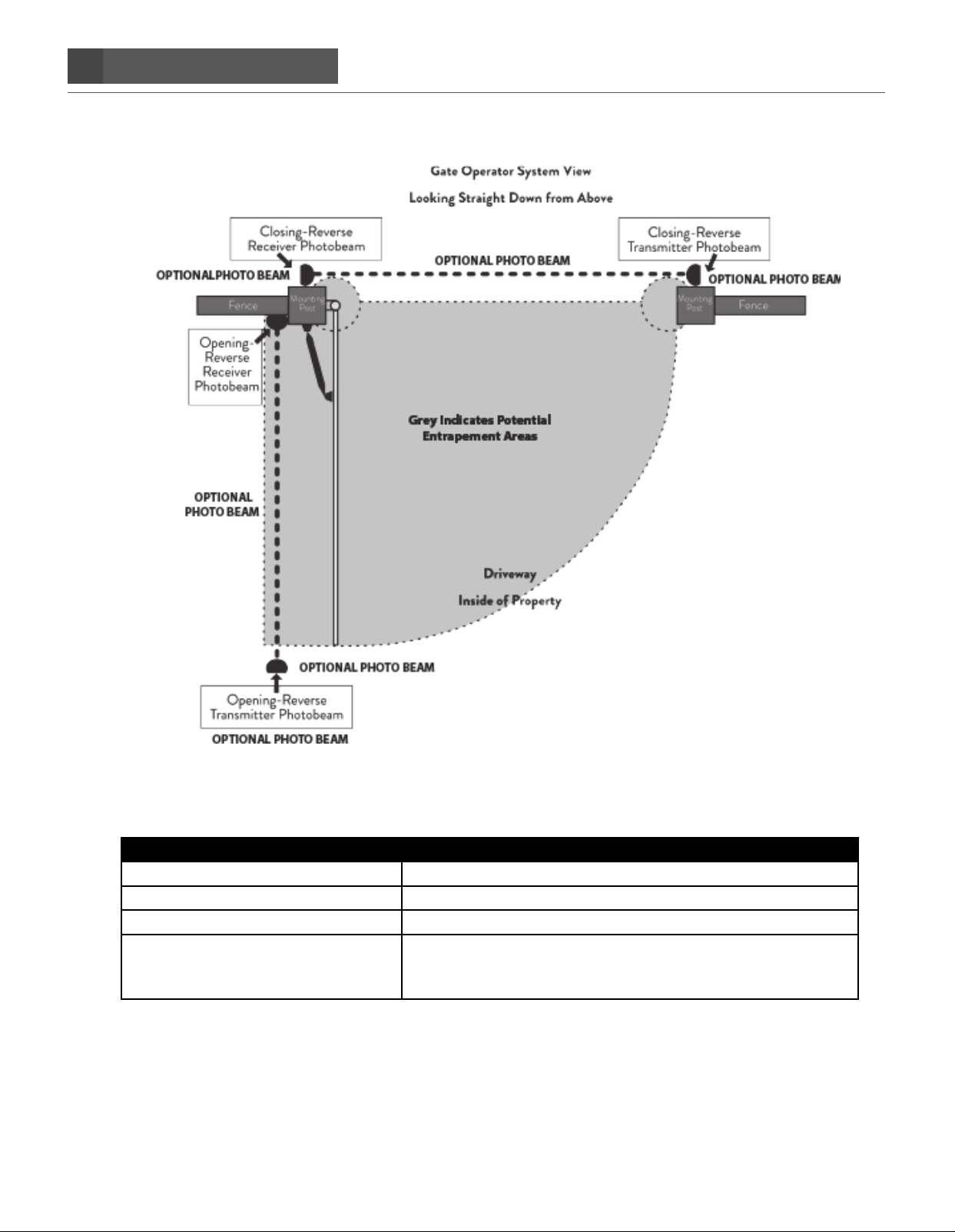
VI. Become familiar with potential entrapment zones as
shown below and avoid these areas when the gate is
turned on.
VII. The gate opener system must be installed only
in applications that it is specifically designed for
including: frequency of use, length, and weight
of the gate.
VIII. Install the gate operator system on the inside of
the property, gate, or fence line to prevent public
access to it. Most applications are installed in a
pull-to-open configuration so that the gate opens
into the property and away from any public roads.
IX. The control board for the gate operator system
should be protected from unauthorized access
inside the control box to prevent tampering or
adjustments to its setting once installed. The
control box is designed so that a padlock can be
attached to keep the box securely closed. An
accessory Clevis Pin (AXLC) is available for
purchase to secure the rear mount of the
operator(s) (only) to the gate with a padlock.
X. Keypads and push-buttons to activate the gate
operator system must be a minimum of 10' away
IN DIRECT LINE OF SIGHT VISIBILITY TO
THE GATE so that the user can verify that any
potential entrapment areas are clear of potential
obstructions.
XI. The included warning signs must be attached to
each side of the gate to alert the public of the
automatic gate operator system. Please contact
GHOST CONTROLS® Technical Support for
replacement signs if yours become damaged.
XII. While the gate is moving do not drive into the gate
area to prevent entrapment and potential damage
to your vehicle, gate, AND the gate opener system.
XIII. Do not attempt to “race the gate” by driving
through the gate while it is opening or closing. This is
extremely dangerous and can cause damage to your
vehicle, gate, AND the gate opener system.
XIV. Maintain the gate and the gate opener system to
make sure that the gate continues to swing freely
and is level and plumb throughout the entire swing
path. The gate hinges should be lubricated regu-
larly, the condition of the battery checked every
few months, and all connections checked no less
than an annual basis.
XV. In the event that you sell the gate opener system
or your property with a system installed, please
provide these instructions to the new owners.
The most recent version of these instructions
can be found on our support website at
ghostcontrols.com/pages/technical-support
SYSTEM SAFETY
GATE OPENER SYSTEMS

9
SYSTEM SAFETY
©Ghost Controls® 2020
VEHICULAR GATE STANDARD
We recommend that all vehicular gates be constructed
and installed in accordance with Active Standard ASTM
F2200, Standard Specification for Automated Vehicular
Gate Construction. For more information on this standard,
contact ASTM directly at http://www.astm.org/Standards/
F2200.htm.
WARNING SIGNS

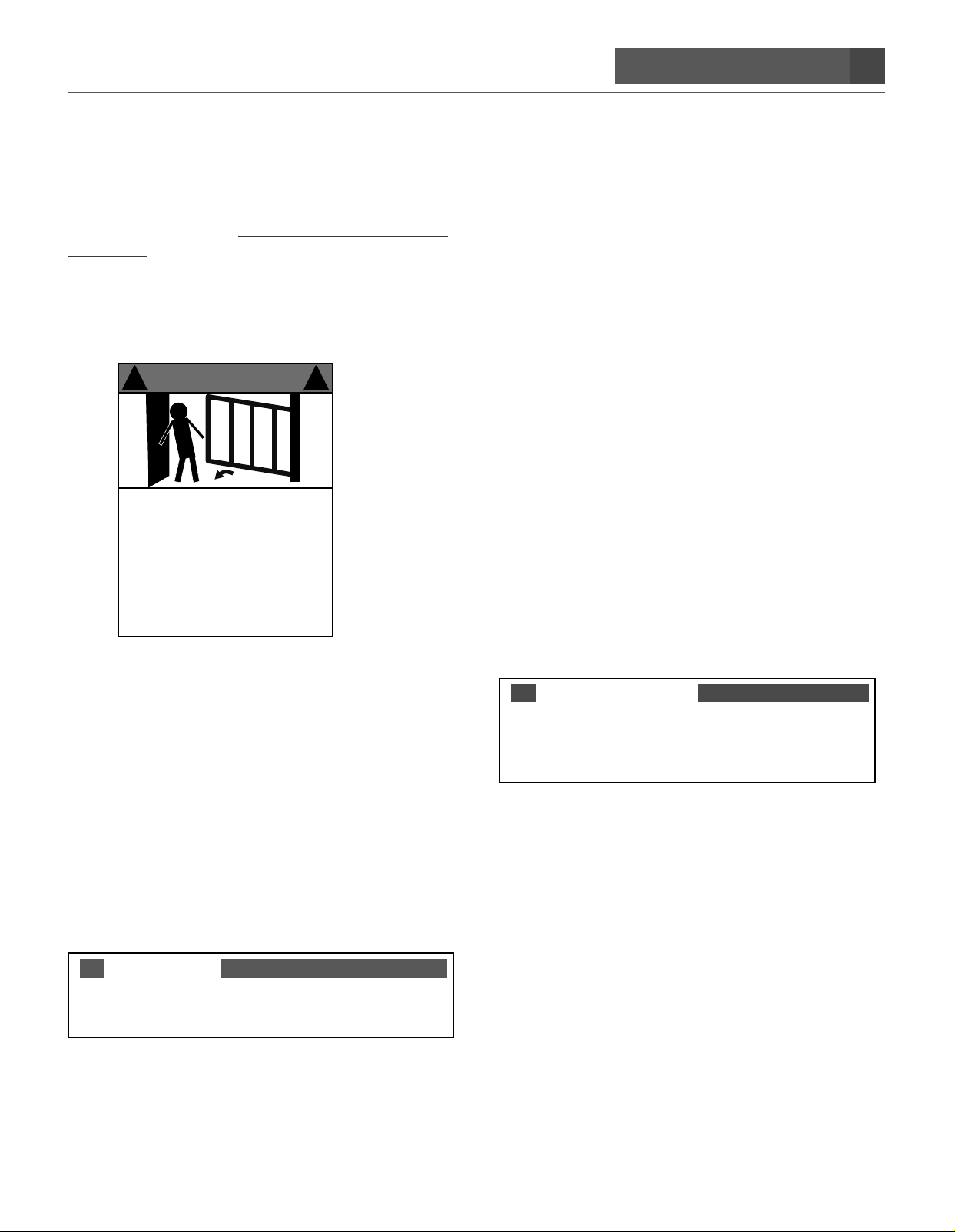
The included warning signs must be installed on both the
inside and outside of the gate.
! !
©GHOST CONTROLS 2016
1. Persons are to keep clear! The gate is able
to be moved without prior warning.
2. DO NOT let children operate the gare or
play in the gate area.
3. Persons are to operate the gate only when
the gate area is in sight and free of people
and obstructions.
4. Persons are to read the user’s manual and
safety instructions.
WARNING
ALARM
Your GHOST CONTROLS® Gate Operator system
includes an audible alarm. This alarm will continue to
sound for 5 minutes when two sequential obstructions
are detected during gate travel per UL325 safety
standards or until one of the following occurs:
■The gate operator receives an intended signal from a
hard wired entry/exit source such as a push button or
a wired keypad. Note that wireless transmitters and
wireless keypads cannot deactivate the alarm.
■The gate operator system is powered o and then on
again at the main power switch in the control box.
NOTE
The alarm may also be used as audio feedback for other
modes of operation under normal operation.
SWING GATE PROTECTION AND
ENTRAPMENT ZONES
As specified in Gate Operator Safety Standard, UL325
(30A 1.1) 7th Edition, all gate operators must include
two independent means of entrapment protection. All
GHOST CONTROLS® Automatic Gate opener systems
meet this standard as indicated on the product packaging
through the following:
1. TYPE A Inherent.
2. Number one above AND either of the following two
options:
A. TYPE C Inherent force limiting.
B. TYPE B1 and B2 monitored contact and non-
contact sensors.
If you have questions about compatibility of third
party safety devices, please contact GHOST
CONTROLS® technical support for assistance
at https://myghostcontrols.force.com/Support/s.
Refer to the monitored photo eye instructions for proper
placement of the sensors. Proper installation of these
sensors is critical to avoid false tripping while gate is in
motion and to reduce potential entrapment.
CAUTION
Extreme caution must be exercised when automatic
gate opener system is in operation, regardless of which
safety systems are installed and in use.

10 SYSTEM SAFETY
©Ghost Controls® 2020
ENTRAPMENT AREA NOTES
Between gate and post Keep hands, feet, and pets away from this area when gate is in motion.
Pinch point between opener and gate Keep hands, feet, and pets away from this area when gate is in motion.
Path of the moving gate All one zone
Leading edge of gate and pinch point
between gates in a dual gate installation
The leading edge of the gate in motion can easily cause injury to
people, pets, or livestock, and will damage property including
vehicles if it comes into contact with them.
Ce manuel convient aux modèles suivants
2
Table des matières
Autres manuels Ghost Controls ouvre-porte

Ghost Controls
Ghost Controls HDP1 Instructions d'installation

Ghost Controls
Ghost Controls Ghost Pro LSM1 Instructions d'installation

Ghost Controls
Ghost Controls DTP1 Manuel utilisateur

Ghost Controls
Ghost Controls DTP1XP Instructions d'installation

Ghost Controls
Ghost Controls TSS1 Instructions d'installation

Ghost Controls
Ghost Controls DEP2 Instructions d'installation

Ghost Controls
Ghost Controls TDS2 Instructions d'installation

Ghost Controls
Ghost Controls TSS1 Manuel utilisateur

Ghost Controls
Ghost Controls DTP1 Instructions d'installation

Ghost Controls
Ghost Controls ZombieLock Manuel utilisateur