
GeoMax Zone80 DG Manuel utilisateur

GeoMax Zone80 DG
User Manual
Version 1.0
English

Introduction
Congratulations on the purchase of a GeoMax Rotating Laser product.
This manual contains important safety directions as well as instructions for setting up the prod-
uct and operating it. Refer to "1 Safety Directions" for further information.
Read carefully through the User Manual before you switch on the product.
The content of this document is subject to change without prior notice. Ensure that the product
is used in accordance with the latest version of this document.
Updated versions are available for download at the following Internet address:
https://partners.geomax-positioning.com/downloads.htm
The model and serial number of your product are indicated on the type plate.
Always refer to this information when you need to contact your agency or GeoMax authorised
service centre.
This manual applies to the Zone80 DG lasers. Differences between the models are marked and
described.
Name Description/Format
Zone80 DG
Quick Guide
Provides an overview of the product together with technical
data and safety directions. Intended as a quick reference
guide.
ü ü
Zone80 DG
User Manual
All instructions required in order to operate the product to a
basic level are contained in the User Manual. Provides an
overview of the product together with technical data and
safety directions.
-ü
Zone80 DG
Basic Applica-
tions
Provides an overview of the basic general construction, level-
ling and slope applications that can be done using the prod-
uct.
ü ü
Purchase
☞
Product identification
Validity of this manual
Available documentation
2

Table of Contents
1 Safety Directions 5
1.1 General 5
1.2 Definition of Use 5
1.3 Limits of Use 6
1.4 Responsibilities 6
1.5 Hazards of Use 6
1.6 Laser Classification 9
1.6.1 General 9
1.6.2 Zone80 DG 9
1.7 Electromagnetic Compatibility EMC 10
1.8 FCC Statement, Applicable in U.S. 11
2 Description of the System 14
2.1 System Components 14
2.2 Zone80 DG Laser Components 15
2.3 Case Components 15
2.4 Setup 15
3 Operation 17
3.1 User Interface 17
3.2 Turning the Zone80 DG on and off 17
3.3 The LCD Display 18
3.4 Grade Entry 18
3.5 Axis Identification 20
3.6 Conversion of Slope Into Percent of Grade 20
3.7 Alignment of the Axes 21
3.8 Precise Alignment of the Axes 21
3.9 Laydown Operation 22
4 ZRC60 Remote Control 23
4.1 Description of the Remote Control 23
4.2 Pairing the Zone80 DG with the ZRC60 Remote Control 24
4.3 Connecting Screens for the Remote Control 25
5 Receivers 26
5.1 Overview 26
5.1.1 ZRP105 Receiver 26
5.1.2 ZRD105, Digital Receiver 27
5.1.3 ZRD105B, Digital RF Receiver 28
5.2 Using the ZRD105B Receiver with the Zone80 DG 28
5.3 Pairing the ZRD105B with the Zone80 DG 28
6 Zone80 DG Menu 30
6.1 Access and Navigation 30
6.2 Menu Set 1 31
6.3 Menu Set 2 34
6.4 Menu Set 3 38
7 ZRC60 Menu 43
8 Applications 44
8.1 Agriculture levelling 44
8.2 Checking Grades 44
8.3 Entering Grades 45
8.4 Beam Catching (Grade Matching) 46
8.5 Beam Lock (Grade Matching and Monitoring) 46
9 Batteries 48
9.1 Operating Principles 48
9.2 Battery for Zone80 DG 48
Table of Contents 3

10 Accuracy Adjustment 50
10.1 Checking the Level Accuracy 50
10.2 Adjusting the Self-Levelling Accuracy 51
10.3 Adjusting the Vertical Accuracy 52
11 Troubleshooting 54
12 Care and Transport 57
12.1 Transport 57
12.2 Storage 57
12.3 Cleaning and Drying 57
13 Technical Data 59
13.1 Conformity to National Regulations 59
13.2 Dangerous Goods Regulations 59
13.3 General Technical Data of the Product 59
13.3.1 ZRC60 Remote Control 61
4 Table of Contents

1 Safety Directions
1.1 General
The following directions enable the person responsible for the product, and the person who
actually uses the equipment, to anticipate and avoid operational hazards.
The person responsible for the product must ensure that all users understand these directions
and adhere to them.
Warning messages are an essential part of the safety concept of the instrument. They appear
wherever hazards or hazardous situations can occur.
Warning messages...
•make the user alert about direct and indirect hazards concerning the use of the product.
•contain general rules of behaviour.
For the users‘ safety, all safety instructions and safety messages shall be strictly observed and
followed! Therefore, the manual must always be available to all persons performing any tasks
described here.
DANGER, WARNING, CAUTION and NOTICE are standardised signal words for identifying lev-
els of hazards and risks related to personal injury and property damage. For your safety, it is
important to read and fully understand the following table with the different signal words and
their definitions! Supplementary safety information symbols may be placed within a warning
message as well as supplementary text.
Type Description
DANGER
Indicates an imminently hazardous situation which, if
not avoided, will result in death or serious injury.
WARNING
Indicates a potentially hazardous situation or an unin-
tended use which, if not avoided, could result in death
or serious injury.
CAUTION
Indicates a potentially hazardous situation or an unin-
tended use which, if not avoided, may result in minor
or moderate injury.
NOTICE Indicates a potentially hazardous situation or an unin-
tended use which, if not avoided, may result in appre-
ciable material, financial and environmental damage.
☞Important paragraphs which must be adhered to in
practice as they enable the product to be used in a
technically correct and efficient manner.
1.2 Definition of Use
•The product casts a horizontal laser plane or a laser beam for the purpose of alignment.
•The laser beam can be detected by means of a laser detector.
•Remote control of product.
•Data communication with external appliances.
Description
About warning messages
Intended use
Safety Directions 5

•Use of the product without instruction.
•Use outside of the intended use and limits.
•Disabling safety systems.
•Removal of hazard notices.
•Opening the product using tools, for example screwdriver, unless this is permitted for cer-
tain functions.
•Modification or conversion of the product.
•Use after misappropriation.
•Use of products with obvious damages or defects.
•Use with accessories from other manufacturers without the prior explicit approval of Geo-
Max.
•Inadequate safeguards at the working site.
•Deliberate dazzling of third parties.
•Controlling of machines, moving objects or similar monitoring application without additional
control and safety installations.
1.3 Limits of Use
Suitable for use in an atmosphere appropriate for permanent human habitation: not suitable for
use in aggressive or explosive environments.
WARNING
Working in hazardous areas, or close to electrical installations or similar situations.
Life Risk.
Precautions:
▶Local safety authorities and safety experts must be contacted by the person responsible for
the product before working in such conditions.
1.4 Responsibilities
GeoMax AG, CH-9443 Widnau, hereinafter referred to as GeoMax, is responsible for supplying
the product, including the user manual and original accessories, in a safe condition.
The person responsible for the product has the following duties:
•To understand the safety instructions on the product and the instructions in the User Man-
ual.
•To ensure that it is used in accordance with the instructions.
•To be familiar with local regulations relating to safety and accident prevention.
•To inform GeoMax immediately if the product and the application becomes unsafe.
•To ensure that the national laws, regulations and conditions for the operation of the product
are respected.
1.5 Hazards of Use
NOTICE
Dropping, misusing, modifying, storing the product for long periods or transporting the
product
Watch out for erroneous measurement results.
Precautions:
▶Periodically carry out test measurements and perform the field adjustments indicated in the
User Manual, particularly after the product has been subjected to abnormal use as well as
before and after important measurements.
Reasonably foreseeable
misuse
Environment
Manufacturer of the prod-
uct
Person responsible for the
product
6 Safety Directions

DANGER
Risk of electrocution
Because of the risk of electrocution, it is dangerous to use poles, levelling staffs and extensions
in the vicinity of electrical installations such as power cables or electrical railways.
Precautions:
▶Keep at a safe distance from electrical installations. If it is essential to work in this environ-
ment, first contact the safety authorities responsible for the electrical installations and fol-
low their instructions.
NOTICE
Remote control of product
With the remote control of products, it is possible that extraneous targets will be picked out and
measured.
Precautions:
▶When measuring in remote control mode, always check your results for plausibility.
WARNING
Lightning strike
If the product is used with accessories, for example masts, staffs, poles, you may increase the
risk of being struck by lightning.
Precautions:
▶Do not use the product in a thunderstorm.
WARNING
Inadequate securing of the working site.
This can lead to dangerous situations, for example in traffic, on building sites and at industrial
installations.
Precautions:
▶Always ensure that the working site is adequately secured.
▶Adhere to the regulations governing safety, accident prevention and road traffic.
CAUTION
Not properly secured accessories.
If the accessories used with the product are not properly secured and the product is subjected to
mechanical shock, for example blows or falling, the product may be damaged or people can sus-
tain injury.
Precautions:
▶When setting up the product, make sure that the accessories are correctly adapted, fitted,
secured, and locked in position.
▶Avoid subjecting the product to mechanical stress.
Safety Directions 7

WARNING
Inappropriate mechanical influences to batteries
During the transport, shipping or disposal of batteries it is possible for inappropriate mechanical
influences to constitute a fire hazard.
Precautions:
▶Before shipping the product or disposing it, discharge the batteries by the product until
they are flat.
▶When transporting or shipping batteries, the person in charge of the product must ensure
that the applicable national and international rules and regulations are observed.
▶Before transportation or shipping, contact your local passenger or freight transport com-
pany.
WARNING
Distraction/loss of attention
During dynamic applications, for example stakeout procedures, there is a danger of accidents
occurring if the user does not pay attention to the environmental conditions around, for example
obstacles, excavations or traffic.
Precautions:
▶The person responsible for the product must make all users fully aware of the existing dan-
gers.
WARNING
Unauthorised opening of the product
Either of the following actions may cause you to receive an electric shock:
•Touching live components
•Using the product after incorrect attempts were made to carry out repairs
Precautions:
▶Do not open the product!
▶Only GeoMax authorised service centres are entitled to repair these products.
WARNING
If the product is improperly disposed of, the following can happen:
•If polymer parts are burnt, poisonous gases are produced which may impair health.
•If batteries are damaged or are heated strongly, they can explode and cause poisoning,
burning, corrosion or environmental contamination.
•By disposing of the product irresponsibly you may enable unauthorised persons to use it in
contravention of the regulations, exposing themselves and third parties to the risk of severe
injury and rendering the environment liable to contamination.
Precautions:
▶
The product must not be disposed with household waste.
Dispose of the product appropriately in accordance with the
national regulations in force in your country.
Always prevent access to the product by unauthorised per-
sonnel.
Product-specific treatment and waste management information can be downloaded from
the GeoMax website at http://www.geomax-positioning.com/treatment or received from
your GeoMax distributor.
8 Safety Directions

WARNING
Improperly repaired equipment
Risk of injuries to users and equipment destruction due to lack of repair knowledge.
Precautions:
▶Only authorised GeoMax Service Centres are entitled to repair these products.
WARNING
Exposure of batteries to high mechanical stress, high ambient temperatures or immer-
sion into fluids
This can cause leakage, fire or explosion of the batteries.
Precautions:
▶Protect the batteries from mechanical influences and high ambient temperatures. Do not
drop or immerse batteries into fluids.
WARNING
Short circuit of battery terminals
If battery terminals are short circuited e.g. by coming in contact with jewellery, keys, metallised
paper or other metals, the battery can overheat and cause injury or fire, for example by storing
or transporting in pockets.
Precautions:
▶Make sure that the battery terminals do not come into contact with metallic objects.
1.6 Laser Classification
1.6.1 General
The following chapters provide instructions and training information about laser safety according
to international standard IEC 60825-1 (2014-05) and technical report IEC TR 60825-14
(2004-02). The information enables the person responsible for the product and the person who
actually uses the equipment, to anticipate and avoid operational hazards.
☞According to IEC TR 60825-14 (2004-02), products classified as laser class 1,
class 2 and class 3R do not require:
•laser safety officer involvement,
•protective clothes and eyewear,
•special warning signs in the laser working area
if used and operated as defined in this User Manual due to the low eye hazard level.
☞National laws and local regulations could impose more stringent instructions for the
safe use of lasers than IEC 60825-1 (2014-05) and IEC TR 60825-14 (2004-02).
1.6.2 Zone80 DG
The rotating laser built into the product produces a visible laser beam which emerges from the
rotating head.
The laser product described in this section is classified as laser class 1 in accordance with:
•IEC 60825-1 (2014-05): “Safety of laser products”
These products are safe for momentary exposures but can be hazardous for deliberate staring
into the beam. The beam may cause dazzle, flash-blindness and after-images, particularly under
low ambient light conditions.
Zone80 DG:
Description Value
Maximum average radiant output power 0.4 mW / 2.2 mW
General
General
Safety Directions 9
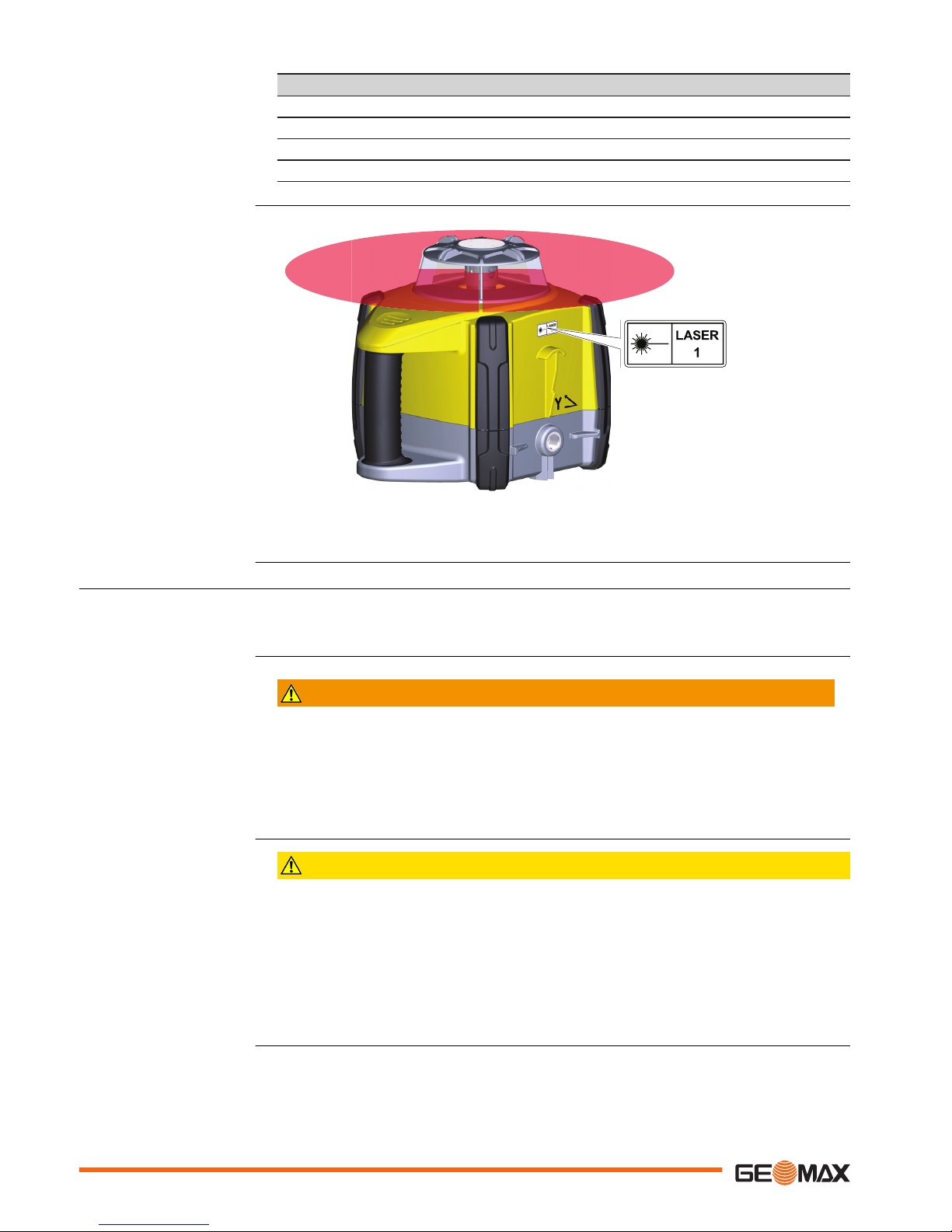
Description Value
Pulse duration (effective) 500 ms / 2.9 ms, 1.4 ms
Pulse repetition frequency 1 Hz / 5 Hz, 10 Hz, 20 Hz
Beam divergence 0.2 mrad
Wavelength 635 nm
011205_001
a
a
a) Laser beam
1.7 Electromagnetic Compatibility EMC
The term Electromagnetic Compatibility is taken to mean the capability of the product to function
smoothly in an environment where electromagnetic radiation and electrostatic discharges are
present, and without causing electromagnetic disturbances to other equipment.
WARNING
Electromagnetic radiation
Electromagnetic radiation can cause disturbances in other equipment.
Precautions:
▶Although the product meets the strict regulations and standards which are in force in
this respect, GeoMax cannot completely exclude the possibility that other equipment
may be disturbed.
CAUTION
Use of the product with accessories from other manufacturers. For example field com-
puters, personal computers or other electronic equipment, non-standard cables or
external batteries
This may cause disturbances in other equipment.
Precautions:
▶Use only the equipment and accessories recommended by GeoMax.
▶When combined with the product, they meet the strict requirements stipulated by the
guidelines and standards.
▶When using computers, two-way radios or other electronic equipment, pay attention to the
information about electromagnetic compatibility provided by the manufacturer.
Labelling
Description
10 Safety Directions
Autres manuels pour Zone80 DG
1
Table des matières
Autres manuels GeoMax Niveau laser

GeoMax
GeoMax Zone70 DG Manuel utilisateur

GeoMax
GeoMax ZAL 120 series Manuel utilisateur

GeoMax
GeoMax Zeta125 Manuel utilisateur

GeoMax
GeoMax Zone70 DG Manuel utilisateur

GeoMax
GeoMax ZONE20 H Manuel utilisateur

GeoMax
GeoMax ZDL700 Series Manuel utilisateur

GeoMax
GeoMax Zoom10 Manuel utilisateur

GeoMax
GeoMax Zone40 H Manuel utilisateur

GeoMax
GeoMax Zone20 HV Manuel utilisateur

GeoMax
GeoMax Zone80 DG Manuel utilisateur


