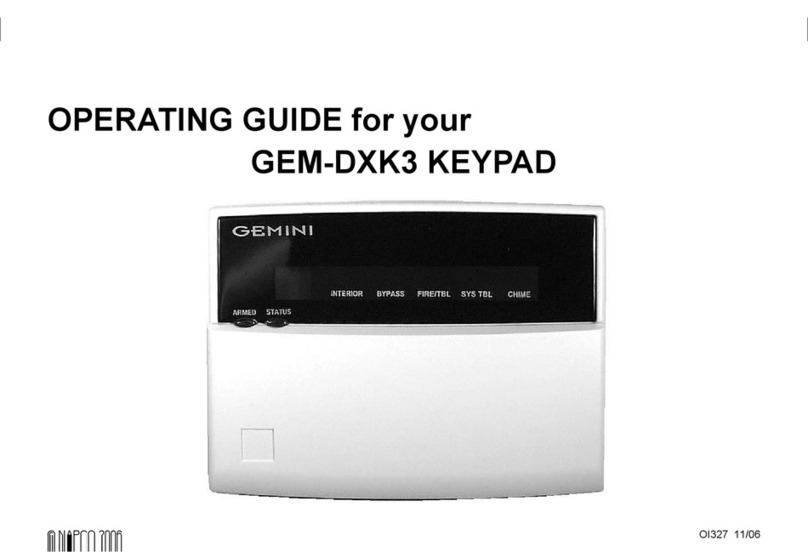
Gemini Gemini GEM-RP3DGTL Manuel utilisateur

1
OPERATING GUIDE for your
GEM-RP3DGTL KEYPAD
© NAPCO 1999 DESIGN PATS. PENDING
R
COMPUTERIZED SECURITY SYSTEM
ARMED
STATUS
SYSTEM ARMEDSYSTEM ARMED
01/01/97 12:00AM01/01/97 12:00AM
1 2
4
3
5 6
7 8 9 0
A
B
C
D
E
F
G
NEXT/YES
PRIOR/NO
AREA
GEMINI
ENT A1ENT A1
INTERIOR BYPASS FIRE/TBL SYS TBL CHIME
96
GEM-RP3DGTL.pub
page 1 Wednesday, August 18, 1999 14:03

2
The GEM-RP3DGTL is a “smart”, in-
teractive, menu-driven keypad de-
signed for your Napco control panel. A
digital display is provided to show the
status of your system.
This booklet contains important infor-
mation about the operation of your sys-
tem with this GEM-RP3DGTL Keypad.
Read it carefully and keep it handy for
future reference. Check the Glossary
for an explanation of terms that may be
unfamiliar to you.
You'll probably find subjects men-
tioned in this booklet that do not
apply to your system. Napco control
panels have such a wide variety of
features that few security systems, if
any, will ever need them all. Your
alarm professional has chosen ap-
propriate features for your particular
needs.
Regardless of how your system has
been configured, rest assured that it
has been carefully designed and en-
gineered to the highest industry stan-
dards. To assure optimum safety and
security, familiarize yourself with this
equipment. Periodically check its con-
dition and state of readiness by testing
it at least once a week in both the
ac/battery and battery-only modes (ask
your alarm professional how to make
these tests).
INTRODUCTION
Test your sounding device telephone line
1. While disarmed, enter your User Code, then press the Abutton.
2. Answer NO (press (F) button) until “3” (Bell Test) appears in the
window.
3. Press YES (press (E) button) to execute the test. The alarm will
sound for about two seconds. If the alarm does not sound or sounds
weak, call for service.
Test your telephone line.
1. Notify your central station of the impending test.
2. While disarmed, enter your User Code then press the Abutton.
3. Answer NO (press (F) button) until “15” (Telephone Test) appears
in the window.
4. Press YES (press (E) button) to send a test code to the central
station.
5. If the test is not successful, “E 03” will display, indicating a communi-
cation failure. Call for service.
Note: Any subsequent successful transmission will clear a “E 03”
system trouble.
IMPORTANT - TEST YOUR SYSTEM WEEKLY
GEM-RP3DGTL.pub
page 2 Wednesday, August 18, 1999 14:03

3
TABLE OF CONTENTS
TABLE OF CONTENTS
Section Page
KEYPAD CONTROLS & INDICATORS..........................................................5
SETTING THE ALARM (ARMING) WHEN LEAVING....................................6
PROTECTING YOURSELF WHILE ON THE PREMISES.............................8
TURNING OFF THE ALARM (DISARMING) WHEN RETURNING...............10
FIRE PROTECTION.......................................................................................12
KEYPAD FUNCTIONS...................................................................................16
CENTRAL-STATION MONITORING .............................................................21
ADVANCED FEATURES................................................................................23
PROGRAMMING............................................................................................24
KEYPAD MESSAGES....................................................................................24
GLOSSARY....................................................................................................26
SYSTEM TROUBLE ERROR CODES...........................................................29
TO SHUT OFF AN ALARM, EN-
TER YOUR CODE, THEN PRESS
THE JBUTTON.
FOR SERVICE, CALL: _________
CENTRAL STATION: ___________
EXIT DELAY: _________________
ENTRY DELAY: _______________
FIRE ALARM SOUND*:
____________________________
BURGLAR ALARM SOUND*:
____________________________
KEYPAD FIRE ENABLED?:
___ YES ___ NO
KEYPAD PANIC ENABLED?:
___ YES ___ NO
KEYPAD AUX. ENABLED?:
___ YES ___ NO
*FIRE HAS PRIORITY OVER BURGLARY.
GEM-RP3DGTL.pub
page 3 Wednesday, August 18, 1999 14:03

4
KEYPAD CONTROLS & INDICATORS
R
COMPUTERIZED SECURITY SYSTEM
ARMED
STATUS
SYSTEM ARMEDSYSTEM ARMED
01/01/97 12:00AM01/01/97 12:00AM
1 2
4
3
5 6
7 8 9 0
A
B
C
D
E
F
G
NEXT/YES
PRIOR/NO
AREA
GEMINI
ENT A1ENT A1
INTERIOR BYPASS FIRE/TBL SYS TBL CHIME
1
2
3
4
5
6
12
7
8
9
10
11
13
96
GEM-RP3DGTL.pub
page 4 Wednesday, August 18, 1999 14:03

5
KEYPAD CONTROLS & INDICATORS
Window. Window. Lights indicate
system status messages; digit display
indicates related zone, function or er-
ror message numbers.
STATUS Light. Lights (green) to indi-
cate that the system is ready for arm-
ing. If a zone is not secured, the light
will be off and the zone will display in
the window. If a zone has been by-
passed, the STATUS light will blink
while armed.
ARMED Light. Lights (red) to indicate
that the system is armed. If an alarm
has occurred, the ARMED LED will be
flashing.
FUNCTION Button. Selects available
system functions as displayed in the
window. The selected function is exe-
cuted by pressing the Jto button or
the YES (E) button.
BYPASS Button. (1) Deactivates se-
lected zones from the system. (2) Un-
bypasses a bypassed zone.
RESET Button. (1) Resets various
system troubles, displays, etc. (See
text.) (2) Resets residential smoke
detectors.
Numerical Keys (1-9, 0). Used to
enter codes, zone numbers, etc.
ON/OFF Button. Entry key. Causes
the entered code or selected function
to be executed.
INTERIOR Button. (1) Bypasses all
Interior Zones simultaneously to allow
free movement within the premises.
(2) Scrolls the window display forward
(NEXT). (3) Answers “YES” to ques-
tions in the window display.
INSTANT Button. (1) Cancels entry
delay on Exit/Entry Zones, causing an
instant alarm upon violation. (2)
Scrolls window display backward
(PRIOR). (3) Answers “NO” to ques-
tions in the window display.
AREA Button (*). Selects other ar-
eas.
Emergency Buttons. Used with the
Gbutton to signal an emergency,
as follows:
• Press the 7and the G
buttons for Fire Emergency.
• Press the 8and the G
buttons for Auxiliary Emergency.
• Press the 9and the G
buttons for Police Emergency.
AC Light. Indicates AC Power is pre-
sent.
1
2
3
4
5
6
7
8
9
10
11
12
13
GEM-RP3DGTL.pub
page 5 Wednesday, August 18, 1999 14:03

6
SETTING THE ALARM (ARMING) WHEN LEAVING
1. Check the keypad. The green STATUS light must be on in order to arm.
• If the green light is off, the number(s) of any unsecured zone(s) will display in the
window. Note each problem zone and secure it by closing a window, door, etc. When
all zones are secure, the green STATUS light will come on.
• Bypass faulted zones. If you cannot locate or repair the problem yourself, call for
assistance. If you cannot get immediate help, bypass the problem zone(s) from the
system by pressing the Bbutton, then the zone number (or vice versa).
Note: Bypassed zones are unprotected. If armed with zones bypassed, be sure to have
the system checked as soon as possible.
2. Arm the system. Enter your code and press the Jbutton. The green STATUS light will
go off, the red ARMED light will come on. Note: If you enter an invalid code, the keypad will
beep 4 times, signifying an error. Re-enter your code immediately.
3. Leave the premises. Leave through the exit door before exit time expires.
Priority Arming. If you attempt to arm a faulted Priority Zone, a 3-second tone will sound at
the keypad and “P” will display in the window, indicating that the trouble(s) must be corrected
before the panel can be armed. A zone selected as Priority Zone with Bypass (check your
Alarm Plan) may be bypassed if in trouble. If the problem cannot be corrected immediately,
press the Cbutton, then arm the panel. A 3-second beep will sound at the panel to
indicate arming with a Priority Zone in trouble. Be sure to have the trouble repaired as soon
as possible.
INTERIOR
BYPASSFIRE/TBL
SYS TBL
CHIME
INTERIOR
BYPASSFIRE/TBL
SYS TBL
CHIME
P
12
GEM-RP3DGTL.pub
page 6 Wednesday, August 18, 1999 14:03

7
SETTING THE ALARM (ARMING) WHEN LEAVING
If you attempt to arm with a system trouble, a 3-second tone will sound at the keypad.
(See SYSTEM TROUBLE ERROR CODES for descriptions of codes.) The window will
display “P”. If you cannot correct the problem immediately, pressing the Cbutton will
enable you to arm in this condition. Be sure to call for service as soon as possible.
Area Arming (Optional)
In a system that has been partitioned into multiple areas, one or more areas may be
armed while others remain disarmed.
Manager's Mode. The Manager's Mode, if enabled, provides quick access to other
areas without the system status display. (This is not a high-security feature.)
To arm any area,
1. Press the numerical key representing the area number.
2. Press the Gbutton then the Jbutton. In effect, you will now be in that area.
3. Enter your code, then press the Jbutton to arm. Note: Your code must be valid in
that area.
To arm all areas simultaneously (including the area you are in), press 9, G, enter
your code and press the Jbutton.
If any zone is not secured, the keypad will display “P”. All problem zones in the
respective area(s) must be secured or bypassed before the area can be armed. Note: If a
system trouble is indicated, the system cannot be armed using this method.
To disarm all areas, press 0, G, enter your code and press the Jbutton.
INTERIOR
BYPASSFIRE/TBL
SYS TBL
CHIME
P
GEM-RP3DGTL.pub
page 7 Wednesday, August 18, 1999 14:03

8
PROTECTING YOURSELF WHILE ON THE PREMISES
Bypassing Interior Zones
Interior Zones, when bypassed, allow free movement within the premises while
the protection of armed perimeter zones is maintained. If the Ebutton is
pressed, all Interior Zones will be bypassed upon arming. Some control panels
have provisions for two groups of Interior Zones.
Enter your code, then press the Jbutton. The red ARMED light will come on
and the green STATUS light will blink, indicating zones bypassed. After the exit
time has elapsed, the BYPASS and INTERIOR arrows will display in the window.
Instant Protection
When retiring for the evening, after everyone is at home, you will probably want
to cancel the entry delay on the Entry Zone(s). Then, if armed, opening the entry
door will cause an instant alarm. (When arming, exit delay will remain in effect.)
To cancel the entry delay while on the premises, merely press the Fbutton.
(it may be pressed either before or after arming.)
Note: While armed, the red ARMED light will flicker rapidly to indicate instant
protection.
INTERIOR
BYPASSFIRE/TBL
SYS TBL
CHIME
GEM-RP3DGTL.pub
page 8 Wednesday, August 18, 1999 14:03

9
PROTECTING YOURSELF WHILE ON THE PREMISES
Emergency Buttons (Only available if programmed)
The Blue Emergency Buttons (F, A and P), if programmed, are
always active, whether the system is armed or disarmed. The emer-
gency signal will only be activated when the respective Emergency
Button and the Gbutton are pressed at the same time.
• Fire Emergency. Simultaneously press the 7and Gbut-
tons to alert the central station of a fire emergency.
• Auxiliary Emergency. Simultaneously press the 8and G
buttons to alert the central station of some other emergency.
• Police Emergency. Simultaneously press the 9and G
buttons to alert the central station of a police emergency.
GEM-RP3DGTL.pub
page 9 Wednesday, August 18, 1999 14:03

10
TURNING OFF THE ALARM (DISARMING) WHEN RETURNING
1. Upon entry, the red ARMED light will be on and the keypad sounder will come on as a reminder to disarm the panel.
During the final 10 seconds, the sounder will pulse a warning signal.
2. Immediately enter your code, then press the Jbutton. The sounder will silence and the red ARMED light will go out.
Note: If you enter an invalid code, the keypad will beep 4 times, signifying an error. Re-enter your code immediately.
Alarm Indication
If the red ARMED light is flashing upon entry, an alarm occurred while you were out. (The display will scroll the
number(s) of the violated zone(s).) Proceed with caution! If you suspect that an intruder may still be on the premises, leave
immediately and call authorities from a neighbor's phone.
To silence an audible alarm,
1. Enter your code and press the Jbutton. After the system is disarmed, the window will continue to display the
number(s) of the zone(s) violated.
2. To reset the display, note the zones violated, then press the Cbutton.
GEM-RP3DGTL.pub
page 10 Wednesday, August 18, 1999 14:03
Table des matières
Autres manuels Gemini Clavier