GEMINI TECHNOLOGY GT-N78 series Manuel utilisateur

Network Video Recorder
User Manual

Network Video Recorder User Manual
I
TABLE OF CONTENTS
Chapter 1 Installation..................................................................................................................1
1.1 NVR Installation................................................................................................................1
1.2 Hard Disk Installation........................................................................................................1
Chapter 2 Getting Started.............................................................................................................3
2.1 Startup and Shutdown........................................................................................................3
2.1.1 Startup........................................................................................................................3
2.1.2 Shutdown................................................................................................................... 3
2.2 Login..................................................................................................................................3
2.3 Using Guide....................................................................................................................... 4
2.4 Menu operation..................................................................................................................5
2.4.1 Begin setup................................................................................................................ 5
2.4.2 Adding IP Cameras.................................................................................................5
Chapter 3 Live View...................................................................................................................... 7
3.1 Introduction of Live View................................................................................................. 7
3.2 Operations in Live View Mode......................................................................................... 7
3.3 Using the Mouse in Live View..........................................................................................8
Chapter 4 Camera Settings...........................................................................................................9
4.1 Configuring OSD Settings.................................................................................................9
4.2 Encoding Type.................................................................................................................10
4.3 Configuring Privacy Mask..............................................................................................11

Network Video Recorder User Manual
II
Chapter 5 PTZ Controls.............................................................................................................12
5.1 Configuring PTZ Settings............................................................................................... 12
5.2 Setting PTZ Preset, Cruise & Pattern............................................................................. 12
5.2.1 Customizing Preset................................................................................................. 13
5.2.2 Customizing Cruise.................................................................................................13
5.2.3 Customizing Pattern................................................................................................13
Chapter 6 Recording...................................................................................................................14
6.1 Configuring Parameters.................................................................................................. 14
Chapter 7 Playback.....................................................................................................................15
7.1 Playback Recording Files............................................................................................... 15
7.1.1 Real-time Playback................................................................................................. 15
7.1.2 Playback by Normal Search....................................................................................15
7.1.3 Playback by Event Search.......................................................................................16
7.1.4 Playback Pictures.................................................................................................... 17
7.1.5 Playback External File............................................................................................ 18
Chapter 8 File Backup................................................................................................................ 19
8.1 Picture Backup................................................................................................................ 19
8.2 Video File Backup...........................................................................................................20
Chapter 9 Network Settings....................................................................................................... 21
9.1 Configuring Basic Settings............................................................................................. 21
9.2 Configuring DDNS......................................................................................................... 21

Network Video Recorder User Manual
II
9.3 Configuring Email...........................................................................................................22
9.4 Configuring NAT............................................................................................................ 22
9.5 Management Platform.....................................................................................................23
Chapter 10 Alarm Settings......................................................................................................... 24
10.1 Setting Alarm Input.......................................................................................................24
10.2 Setting Alarm Output.................................................................................................... 25
10.3 Handling Exception Alarm........................................................................................... 25
10.4 Linkage Setting............................................................................................................. 26
10.5 Setting Motion Detection Alarm...................................................................................26
10.6 Detecting the Video Lost Alarm................................................................................... 28
10.7 Detecting Video Mask Alarm........................................................................................29
Chapter 11 Smart Detection.......................................................................................................30
11.1 Detect Mode.................................................................................................................. 30
11.2 Object Count Detection.................................................................................................30
11.3 Goods Detection............................................................................................................31
11.4 Area Detection...............................................................................................................32
11.5 Virtual Cordon Detection.............................................................................................. 33
Chapter 12 NVR Maintenance...................................................................................................34
12.1 Viewing and Setting Device Parameter........................................................................ 34
12.2 System Information.......................................................................................................34
12.3 Searching Log Information........................................................................................... 35
12.4 Configuration Management.......................................................................................... 36

Network Video Recorder User Manual
III
12.5 System Upgrade............................................................................................................ 37
Chapter 13 Disk Manager.......................................................................................................... 38
13.1 Storage Management.....................................................................................................38
13.2 Disk Grouping...............................................................................................................38

Network Video Recorder User Manual
1
Chapter 1 Installation
1.1 NVR Installation
During installation of the NVR:
Ensure the device is installed in a well-ventilated, dust-free environment.
The device is designed for indoor use only.
Keep all liquids away from the device.
Ensure environmental conditions meet factory specifications.
Power down the device before connecting and disconnecting accessories and peripherals.
1.2 Hard Disk Installation
Before you start:
Disconnect the power from the NVR before installing a hard disk drive(HDD). A factory recommended HDD
should be used for this installation.
Tools Required: Screwdriver.
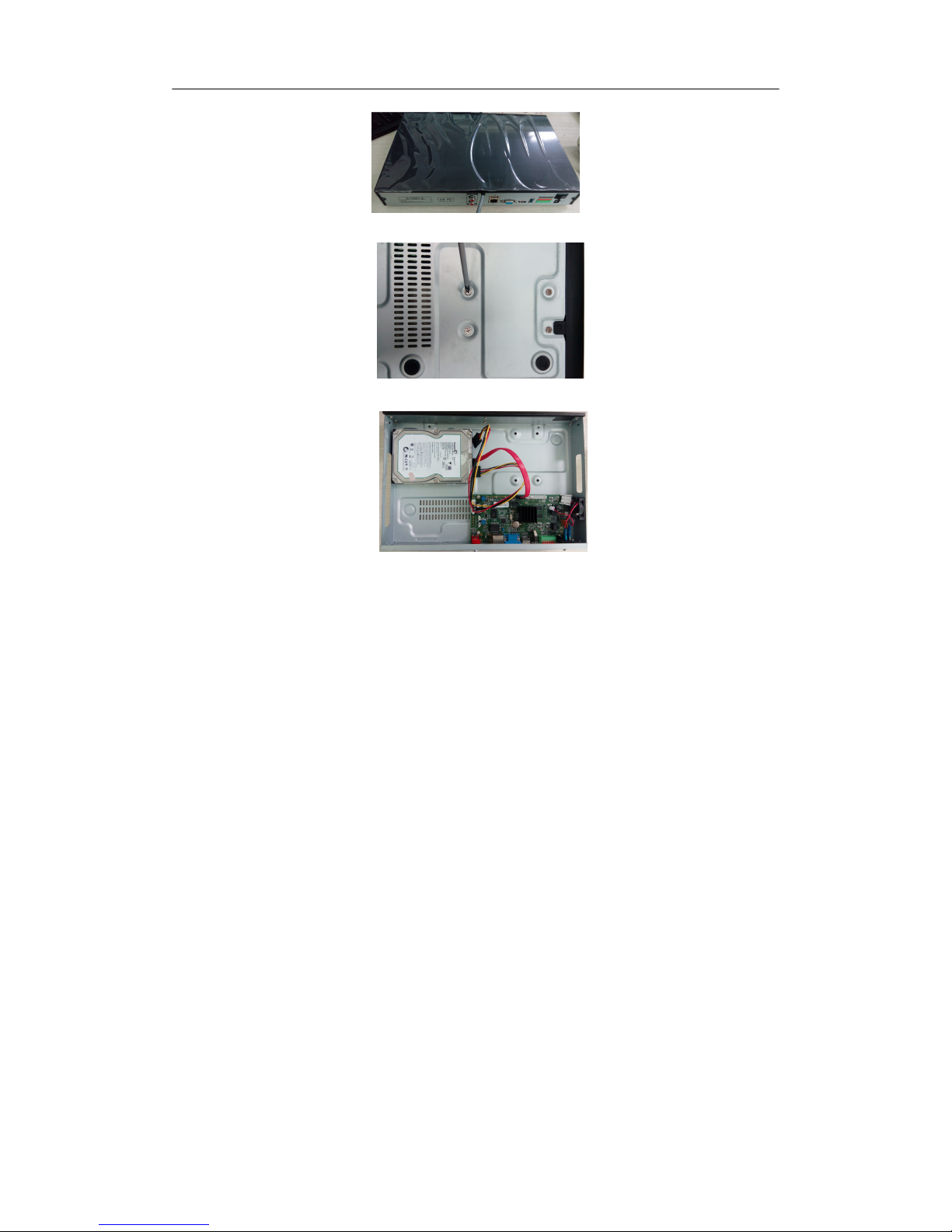
NVR with 4 or 8 HDD
Steps
:
(1) Remove the cover from the NVR by unfastening the screws on the rear panel.
(2) Insert the hard disk along the slot and fasten it.
(3) Connect the power & data cable to the NVR and HDD.
(4) Close the cover and fasten it with the screws.
NVR with 1 or 2 HDD
Steps
:
(1) Remove the cover from the NVR by unfastening the screws on the side and rear panel.

Network Video Recorder User Manual
2
(2) Fasten the HDD withe screws on the bottom.
(3) Connect the power & data cable to the NVR and HDD.
(4) Close the cover and fasten it with the screws.

Network Video Recorder User Manual
3
Chapter 2 Getting Started
2.1 Startup and Shutdown
2.1.1 Startup
Plug in the power cord, press the power switch, the power indicator light should turn bright. The device will begin
to start. After the device starts up, the video output defaults to multiple screen output mode.
2.1.2 Shutdown
Option 1: Press the power key on front panel to shutdown the device(should be supported by the device).
Option 2: Click Start→Shutdown→Confirm (Prompt: It is recommended to use this way, in order to avoid
damage to the device when suddenly powered off.)
Figure 2.1 Shutdown Menu
2.2 Login
If NVR first start-up or has logged out, you must login the device before operating the menu and other functions.
Figure 2.2 Login Interface
Steps:
1. Click Start button on the top of screen.
2. Click Login in the drop-down menu.
3. Input the Password in the pop-up interface(Default password: 888888).
4. Click Login to log in.

Network Video Recorder User Manual
4
2.3 Using Guide
The Guide starts once login, shown as following picture.
Figure 2.3 Language Setting
Operating the Guide
(1) The Guide can walk you through some basic settings of the NVR. If you don’t want to use the Guide at that
moment, click the button. You can also choose to use the Guide next time by leaving the “Next time no
longer display” check-box unchecked.
(2) Click Next button to enter the Display Setting window, as shown in figure 2.4.
Figure 2.4 Resolution Setting
(3) After the display setting, click Next button to enter the Network Setting window, as shown in figure 2.5.
Figure 2.5 Network Setting

Network Video Recorder User Manual
5
(4) After the network setting, click Next button to enter the QR Code interface, as shown in figure 2.6.
Figure 2.6 Qr Code
(5) Click Finish to complete the Guide setup.
2.4 Menu operation
After the user login successfully, according to the interface of the upper toolbar to perform associated settings:
Figure 2.7 Upper Toolbar
2.4.1 Begin setup
Click the icon,it will pop-up the interface as right picture:
Logout: Click Logout button, can exit the current user.
Guide: Click Guide button, it will pop-up boot wizard setting interface, simply configure language,
display resolution, basic network parameters, and mobile phone app to access the QR Code display.
Reboot: Click Reboot button and confirm, the device will automatically reboot.
Shutdown: Click Shutdown button and confirm, the device will automatically shutdown.
2.4.2 Adding IP Cameras
Purpose:
Before you can get live video or record the video files, you should add the network cameras to the connection list
of the device.
Before you start:
Ensure the network connection is valid and correct, and the IP camera to add has already been activated.
Steps:
Click icon, enter into the Channel Connecting interface, shown as in figure 2.8.
Table des matières
Manuels Matériel réseau populaires d'autres marques

Matrix Switch Corporation
Matrix Switch Corporation MSC-HD161DEL Manuel utilisateur

B&B Electronics
B&B Electronics ZXT9-IO-222R2 Manuel utilisateur

Yudor
Yudor YDS-16 Manuel utilisateur

D-Link
D-Link ShareCenter DNS-320L Manuel utilisateur

Samsung
Samsung ES1642dc Instructions d'utilisation

Honeywell Home
Honeywell Home LTEM-PV Instructions de montage