
GeChic On-Lap 2101H Manuel utilisateur

Rev. 2021/9/1

Notices, Cautions & Warranty Exclusions —I
LCD Pixel Statement —II
FCC Statement —II
CE Declaration of Conformity& WEEE Symbol Information —III
Chapter 1 Parts of On Lap Product & Accessories —1
Section 1 Parts Description —1
Section 2 Accessories Description —2
Chapter 2 Installation Instructions —3
Section 1 Set up and Put away On-Lap 2101H Monitor —5
Section 2 Use USB Type-C Port to Connect to MacBook or
Other PCs —5
Section 3 Use USB Type-C Port to Connect to Smartphone —5
Section 4 Connect to Nintendo Switch® —6
Section 5 Use HDMI-A Port to Connect to PC, Game Console,
etc. —6
Section 6 The Function of USB-A—7
Section 7 Install TV Sticks or HDMI Wireless Display Adapter —7
Section 8 Instruction for Connecting to Headphones or
Speakers —8
Chapter 3 Hot Keys, LED and OSD Instructions —8
Section 1 Hot Keys & LED Indications —8
Section 2 OSD Description —8
Chapter 4 Product Specication —10
Section 1 General Specication —10
Section 2 Supported Operating Modes —11
Section 3 Supported Video Modes —11
Chapter 5 Troubleshooting —12
English
Table of Contents

目次
日
本
語
—IV
—V
—V
- —13
—13
—14
—17
- —17
- —19
- —19
—20
- —21
- —22
—22
—23
—23
1. LED OSD —23
2. OSD —23
—25
1. —25
2. —26
3. —27
—27

Notices, Cautions & Warranty Exclusions
Warning: The sign alerts you to potential hazards that can hurt you or dam-
age the product.
1. When moving the monitor, please turn o the power and unplug all the
cables, and then close the stand and the I/O base, as the g. below. To
move the monitor, hold the bezel and the base of it. Do not hold the stand
and the I/O base when moving the monitor, which may make o the stand
or break the screen. Please hold the borders around the display area rather
than press the display area glass strongly.
2. Before carrying out the monitor, the monitor must be placed into the pro-
tective case (21A1) with the screen facing down, and avoid it being pressed
or collided by sharp objects. Before boarding a plane, do not check the
protective case alone to avoid the monitor being damaged from falling or
hitting. If need, please place the protective bag in a sturdy suitcase and
pack it strictly in advance.
3. When using the USB-A or USB Type-C
port on the monitor to power a PC, a
smartphone or Nintendo Switch®, the
temperature of the I/O base will rise.
Please keep the top and bottom of the
base clean. Do not place paper, table
cloth, plastic cloth or other objects over
or beneath the I/O base. If need to use
the monitor to charge PC or other
devices over 1 hour, then DO NOT use
at an environment over 30°C.
4. It is recommended to use the monitor
in a well-ventilated environment at room temperature around 5°C to 35°C
and humidity around 45% to 85%. The monitor should display continuously
changing images rather than displaying the same and a still image for a
long time. If you need to use this monitor in an abnormal environment such
as high temperature, high humidity, conned space, low atmospheric pres-
sure, etc., please contact Gechic customer service center for further advice
on usage environment.
I

5. Cleaning On-Lap Monitor
Unplug the power input before cleaning. Please use soft cloth to clean
touch screen. For stubborn stains, please use lightly-dampened cloth to
wipe again. Do not use benzene, alcohol, thinner, ammonia, abrasive clean-
ers, compressed air or other corrosive solvents. These solvents may cause
permanent damage on the screen or leave unremovable stain.
6. Do not expose the LCD panel to sunlight.
7. Please do not place the monitor on a shaky or unstable table, cupboard or
trolley and do not use the On-Lap Monitor on a moving vehicle. The Product
may be severely damaged from overturning or falling.
8. The product is not waterproof. Do not use this product in or near water.
9. High Volume Warning: High volume can lead to lasting damage to your
hearing. Please check the volume settings before reproducing any sound.
10. Overuse of the monitor may result in vision damage. For every 30 minutes
with the monitor, give your eyes 10 minutes break. Avoid children under age
2 to watch with the monitor; prevent children over age 2 from watching with
the monitor over 1 hour per day.
11. Exclusions from Warranty Service
Please read the warranty terms below carefully, and follow the usage guide
and precautionary notes. Please keep this manual for future reference.
GeChic does not warrant uninterrupted or error-free operation of this Prod-
uct. The warranty only covers failure /malfunction under normal use condi-
tions during warranty period.
The warranty does not apply to the following conditions:
(1)The product has been modied, disassembled, or retted or the bar
code has been removed, worn down or unidentiable.
(2)Please use the included power supply adapter from the monitor pack-
age. Using the wrong adapter may damage the electronic components
inside the monitor.
(3)Display and touch function working normally; only variation in appear-
ance (i.e., ageing, attrition, scratch, color changing, etc.).
(4)Any damage caused by disoperation or failure to follow this manual.
(i.e., Plug or unplug the cable in wrong direction and causing damage
on cable or monitor.)
(5)Any damage caused by hitting or cracking monitor accidentally or
purposely, or collapsing or overturning monitor.
LCD Pixel Statement
There is slightly uneven brightness on the screen when displaying dierent screen
pattern. The LCD screen has 99.99% or more eective pixels. 0.01% of pixels or less
may not light or may light incorrectly. The On-Lap monitor uses a high quality LCD
panel. Nevertheless, pixels on the LCD screen may not light or appear as red or
black dots. All the above are normal with the LCD monitor and will not aect the
normal usage of the product.
Avoid placing the monitor against sun-light, or it may damage the monitor.
An afterimage of the previous screen may remain, when the same image is dis-
played for hours. In this case, the screen is recovered slowly by turning o the
power for a few hours.
Federal Communications Commission (FCC)
Class B Statement
Notice: This equipment has been tested and found to comply with the limits for a
class B digital device, pursuant to part 15B of the FCC Rules. These limits are de-
signed to provide reasonable protection against harmful interference in a residen-
tial installation.
II

III If this equipment does cause harmful interference to radio or television reception,
which can be determined by turning the equipment o and on, the user is encour-
aged to try to correct the interference by one or more of the following measures:
Reorient or relocate the receiving antenna.
Increase the separation between the equipment and receiver.
Connect the equipment into an outlet on a circuit dierent from that to which the
receiver is connected.
Consult the dealer or an experienced radio/TV technician for help.
Caution:
Changes or modications not expressly approved by GeChic Corp. could void the
user's authority to operate the equipment.
Shielded interface cables and AC power cord, if any, must be used in order to
comply with the emission limits.
The manufacturer is not responsible for any radio or TV interference caused by
unauthorized modication to this equipment. It is the responsibilities of the user to
correct such interference.
CE Declaration of Conformity
This product complies with the following standards:
●EN 62368-1:2014+A11:2017 (Safety requirement of Audio/video, information and
communication technology equipment)
●EN 55032:2015 Class B (Radio Disturbance requirement of Information Technol-
ogy Equipment).
●EN55024:2010+A1:2015(Immunity requirement of Information Technology
Equipment).
●EN 61000-3-2:2014 (Harmonic current emissions).
●EN 61000-3-3:2013 (Voltage uctuations & icker) following provisions of direc-
tives applicable.
●AS/NZS CISPR 32: 2015
●2014/35/EU (Low Voltage Directive).
●2004/108/EC (EMC Directive).
●2005/32/EC (EuP Directive, EC No. 1275/2008 implementing Directive for
Standby and O mode power consumption) and is produced by a manufactur-
ing organization on ISO9000 level.
WEEE Symbol Information
This symbol on the product, accessories or literature indicates that this
product and its electronic accessories (e.g., adapter, cables, and Rear
Dock) must not be disposed of with your other household waste. In-
stead, it is your responsibility to dispose of these items by handing it
over to a designated collection point for the recycling of waste electri-
cal and electronic equipment.
For more information about where you can drop o your waste equip-
ment for recycling, please contact your local city oce, your house-
hold waste disposal service or the shop where you purchased the product.
For Disposal in Countries Outside of the European Union
If you wish to discard this product and its accessories in other area and countries,
please contact your local government for applicable laws and regulations gov-
erning the disposal of this product.

Chapter 1 Parts of On Lap Product & Accessories
Section 1 Parts Description
Front
Input& Output Ports Back
1
Section 2 Accessories Description
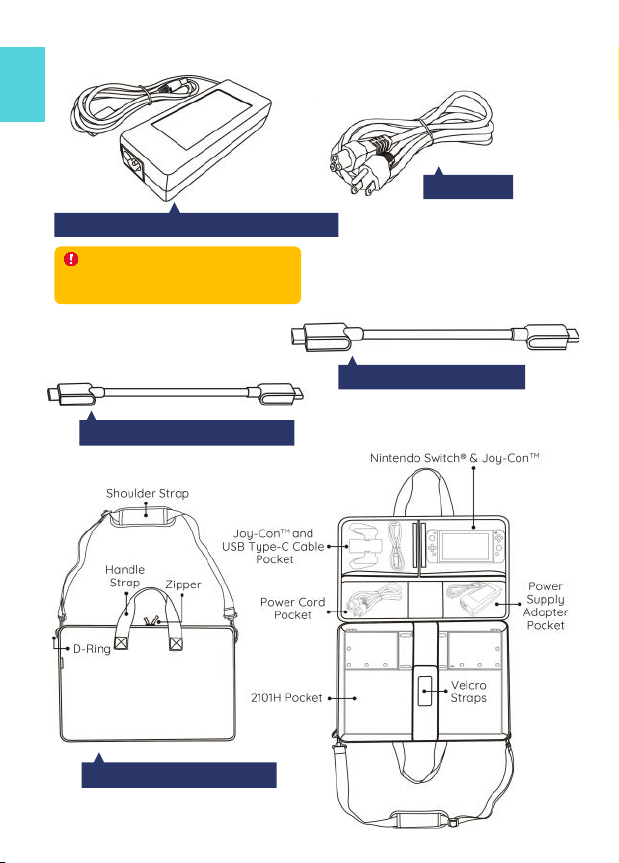
HDMI-A Video Cable (1.5m)
USB Type-C Video Cable (1.0m)
Monitor Carrying Bag (21A1)
AC/DC Power Supply Adapter(19V-4.6A)
Power Cord
2
Warning! This adapter is used
for 2101H monitor only. Please DO
NOT connect it to other products.
Chapter 2 Installation Instructions
Section 1 Set up and Put away On-Lap 2101H
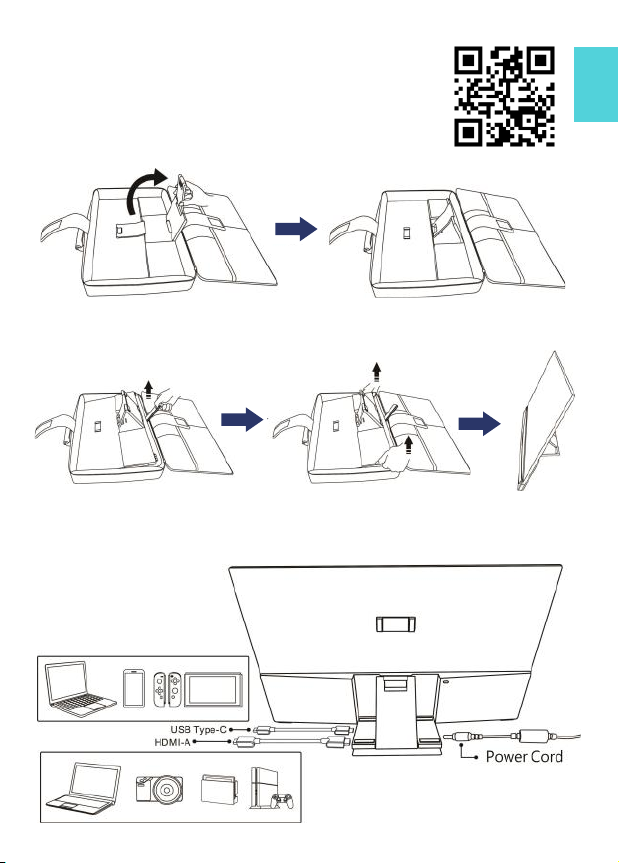
(1)Please follow the steps below to set up the On-Lap2101H
monitor.
◆Step 1 ◆
As shown below, pull out the magnetic buckle, erect the I/O
Base, and fit the tenon on the magnet buckle into the slot.
◆Step 2 ◆
As shown below, gently pull the rope on the inner bag to lift the monitor. Hold two
sides of the bottom of the monitor with both hands and take out the monitor from
the monitor carrying bag. Stand it on the table for using.
◆Step 3 ◆
As shown below, connect the power cord and the power supply adapter, and then
connect the USB Type-C video cable or HDMI video cable.
Watch How to’s
3

4◆Adjust viewing angles
Fit the tenon on the buckle to the red line as
shown above. When attaching to the 1 slot,
the viewing angle is about 67 degrees.
Fit the tenon on the magnet buckle to the red
line as shown above. When attaching to the
○
2 slot, the viewing angle is about 73 degrees.
(2)Please follow the steps below to put the On-Lap 2101H monitor into the
monitor carrying bag (21A1).
◆Step 1 ◆
Turn off the monitor and unplug all the
cables. Then, as shown on the right, hold
two sides of the bottom of the monitor by
both hands. Put the monitor into the mon-
itor carrying bag with the glass side fac-
ing down.
◆Step 2 ◆
Unfasten the tenon on the magnet
Buckle, and then lay flat the I/O base
and the aluminum alloy stand to the
back of the monitor.
◆Step 3 ◆
As shown on the right, fasten the monitor with
the belt. Put the cables and the power supply
adapter into the inner bag, and then zip it up.
Autres manuels pour On-Lap 2101H
1
Table des matières
Autres manuels GeChic Comprimé


