
Gallagher i Series Manuel utilisateur

i-SERIES
ENERGIZER
REMOTE &
FAULT FINDER
Instructions
Installatie instucties
Notice d’installation
Betriebsanleitung
Monteringsvejledning
Instrucciones
Monteringsinstrucktioner
Istruzioni per l’installazione
- ENG
- NED
- FRA
- DEU
- DAN
- ESP
- SVE
- ITA

PUBLISHED BY
Gallagher Group Limited
181 Kahikatea Drive, Private Bag 3026
Hamilton, New Zealand
www.gallagher.com
Copyright© Gallagher Group Limited 2021
All rights reserved. Patents pending.
Gallagher i-Series Energizer Remote &
Fault Finder User Manual
3E2749 - Edion 6 - June 2021
DISCLAIMER: Whilst every effort has
been made to ensure accuracy, neither
Gallagher Group Limited nor any employee
of the company shall be liable on any
ground whatsoever to any party in respect
of decisions or acons they may make as a
result of using this informaon.
In accordance with the Gallagher policy
of connuing development, design and
specificaons are subject to change
without noce.
Developed and manufactured by Gallagher
Group Limited, and ISO 9001 2000
Cerfied Supplier.

Contents
English 5
Remote Readings ........................................................................ 5
Installing the baery................................................................... 6
Features ...................................................................................... 7
Checking your fence and nding faults....................................... 8
Detecng Alarms......................................................................... 9
Turning the Energizer On / O (Standby).................................. 10
Using your Remote with mulple Energizers............................ 10
Adding a channel ...................................................................... 11
Understanding your Electric Fence ........................................... 12
Waste electrical and electronic equipment .............................. 13
Nederlands 14
Waarden aezen met de afstandsbediening............................. 14
De baerij plaatsen................................................................... 15
Funces..................................................................................... 16
Uw afrastering controleren en storingen opsporen.................. 17
Alarmmeldingen detecteren..................................................... 18
Schrikdraadapparaat in-/uitschakelen (stand-by)..................... 19
Uw afstandsbediening met meerdere schrikdraadapparaten
gebruiken............................................................................... 19
Een kanaal toevoegen .............................................................. 20
Hoe werkt uw elektrische Afrastering?..................................... 21
Afgedankte elektrische en elektronische apparatuur ............... 22
Français 23
Achages de la télécommande................................................ 23
Installaon de la pile................................................................. 24
Caractérisques ........................................................................ 25
Véricaon de la clôture et recherche des pertes .................... 26
Détecon des alarmes .............................................................. 27
Acvaon/désacvaon de l’électricateur (mode veille) ....... 28
Ulisaon de la télécommande avec plusieurs électricateurs 28
Ajout d’un canal........................................................................ 29
Comment fonconne votre cloture electrique ......................... 30
Déchets d’équipements électriques et électroniques............... 31
Deutsch 32
Fernabfrage ............................................................................. 32
Installaon der Baerie .......................................................... 33
Eigenschaen .......................................................................... 34
Wie Sie Ihren Zaun überprüfen und Fehler aufspüren ............ 35
Alarme aufspüren.................................................................... 36
Elektrozaungerät auf EIN / AUS (Standby) schalten................ 37
Benutzung des Fernabfragegeräts mit mehreren
Elektrozaungeräten............................................................... 37
Kanal hinzufügen ..................................................................... 38
Verstehen Sie Ihren Elektrozaun?............................................ 39

4
Elektrische und elektronische Abfallprodukte......................... 40
Dansk 41
Udlæsninger på ernbetjening................................................ 41
Isætning af baeriet ................................................................ 42
Funkoner ............................................................................... 43
Kontrol af hegnet og fejlsøgning.............................................. 44
Detektering af alarmer ............................................................ 45
Tænde/slukke spændingsgiveren (standby) ............................ 46
Brug af ernbetjeningen med ere spændingsgivere ............. 46
Sådan lføjes en kanal............................................................. 47
Forstå dit elhegn...................................................................... 48
Aald af elektrisk og elektronisk udstyr .................................. 49
Español 50
Lecturas del control remoto .................................................... 50
Instalación de la batería .......................................................... 51
Caracteríscas.......................................................................... 52
Revisando su cerca y encontrando los fallos ........................... 53
Detectando alarmas ................................................................ 54
Encendiendo/ apagando el Energizador (En espera)............... 55
Ulización de su control remoto con varios Energizadores..... 55
Añadir canales ......................................................................... 56
Comprendiendo su cerca eléctrica .......................................... 57
Eliminación de equipo eléctrico y electrónico......................... 58
Svenska 59
Fjärravläsningar ....................................................................... 59
Montera baeriet.................................................................... 60
Funkoner ............................................................................... 61
Kontrollera stängslet och hia fel............................................ 62
Upptäcka larm ......................................................................... 63
Slå på/stänga av aggregatet (standby)..................................... 64
Använda ärrkontrollen med era aggregat............................ 64
Lägga ll en kanal .................................................................... 65
Förstå di elstängsel................................................................ 66
Avfall - elektrisk och elektronisk utrustning ............................ 67
Italiano 68
Signicato dei simboli.............................................................. 68
Installare la baeria................................................................. 69
Caraerische ......................................................................... 70
Verica della recinzione e ricerca guas.................................. 71
Rilevazione degli allarmi.......................................................... 72
Accendere o spegnere (standby) l’elericatore..................... 73
Uso del telecomando con più elericatori ............................ 73
Aggiunta di un elericatore................................................... 74
Capire la recinzione elerica ................................................... 75
Roamazione arezzature Eleriche od Eleroniche............. 76
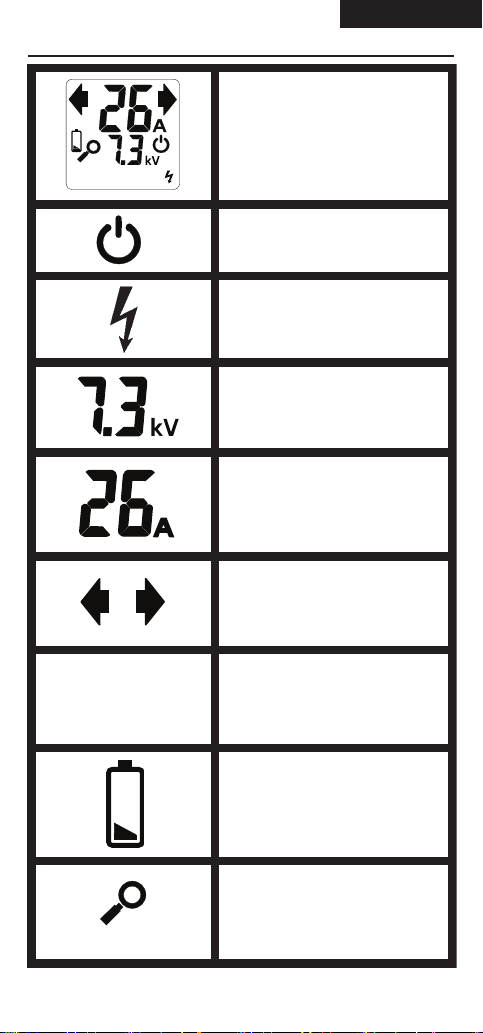
This is the full range of symbols.
The meaning of each symbol is
detailed below.
Liquid Crystal Display
Standby
Indicates the energizer is in
Standby mode.
Energizer status
Current Display
Direction of current ow
Voltage Display
Fence Zone indicators
Displays which fence zones are
operating and if they are in
alarm.
Low battery
Remote readings
123456
OR
123456
New channel
Displayed when Remote is
searching for a new energizer.
4 5
This is the full range of symbols.
The meaning of each symbol is
detailed below.
Liquid Crystal Display
Standby
Indicates the energizer is in
Standby mode.
Energizer status
Current Display
Direction of current ow
Voltage Display
Fence Zone indicators
Displays which fence zones are
operating and if they are in
alarm.
Low battery
Remote readings
123456
OR
123456
New channel
Displayed when Remote is
searching for a new energizer.
REMOTE READINGS English

6
INSTALLING THE BATTERY
Always use 9V alkaline baeries for best performance.
1. Turn the baery compartment screw le 90o.
2. Remove the baery cover.
3. Fit the baery.
4. Replace the cover.
5. Turn the screw right, to x the cover in place.
Note:
The remote baery has a life of approximately 6
months. A at baery may give false measurements
so replace the baery when the icon shows.
Note: Approvals & Standards - FCC
This equipment has been tested and found to comply with
the limits for a Class A digital device, pursuant to part 15
of the FCC Rules. These limits are designed to provide
reasonable protecon against harmful interference when the
equipment is operated in a commercial environment. This
equipment generates, uses and can radiate radio frequency
energy and, if not installed and used in accordance with the
instrucon manual, may cause harmful interference to radio
communicaons. Operaon of this equipment in a residenal
area is likely to cause harmful interference in which case the
user will be required to correct the interference at his own
expense.

6 7
FEATURES
The Gallagher Energizer Remote and Fault Finder enables
you to do the following:
• Measure fence voltage and current
• Detect and nd fence faults
• Check the status of the energizer and fence monitors
/ alarm systems.
• Turn the energizer on or o from any locaon on the
fence.
Liquid Crystal Display
Energizer ON Energizer OFF
Inquire
(Grounding contact plate)
fence pulse

8
CHECKING YOUR FENCE AND
FINDING FAULTS
1. Place the fence wire in the fence connecons slot
while holding the remote as shown below.
2. Hold unl the following informaon appears on the
display.
Handy Hint: For best performance, you must be
standing on the ground, and your ngers must make
good contact with the baery cover.
Gives the current on the fence in Amps
Arrow shows
on the fence and
Gives the Voltage
on the fence in kilo
Volts
The current reading (Amps) will be high when there is a
fault on the fence.
1. Following the direcon of the current, take readings
approximately every 50 - 100m or at juncon points
along your fence line.
IMPORTANT:
Always grip your
i-Series Remote
rmly, with
your ngers in
contact with the
baery cover,
to avoid a mild
fence shock.
!

8 9
2. A fault is indicated by
a drop in current ow
between two check-
points. The fault will be
somewhere between the
two checkpoints.
3. To narrow down locaon of the fault, work back
along the fence checking the current ow at shorter
intervals.
4. Correct the fault.
5. Aer correcng the fault you should see the current
reading drop and the voltage go up. If not, check for
further faults.
Note: Mulwire fences connected in parallel will have
similar current owing in each wire. To get the total
fence current ow, add together the current ow in
each wire.
DETECTING ALARMS
You can communicate with the devices operang on your
fence by pressing the buon.
System status is “OK”
No alarms
Energizer status
Not in alarm
Connected fence zones - None are in alarm
Energizer in alarm
Connected fence zones - 1 and 4 are in alarm
System status is “AL”
Alarm/alarms present

10
The Remote has nine channels that can be “tuned in” to
a specic energizer, enabling the Remote to control up to
nine energizers.
USING YOUR REMOTE WITH
MULTIPLE ENERGIZERS
Note: You do NOT need to register your Remote with
the Energizer if you are only using one Energizer.
TURNING THE ENERGIZER ON /
Wire
Press to turn
Energizer ON
Press to turn
Energizer OFF
Note: Hold the Remote on the fence unl the display
shows the energizer is on or o.
Autres manuels pour i Series
3
Ce manuel convient aux modèles suivants
1
Table des matières
Langues :
Autres manuels Gallagher Accessoires pour appareils photo


