
FourStar Design Concepts Talking 11011211 Manuel utilisateur

DESIGN CONCEPTS
Talking Pedometer
Item Number: 11011211
User s Manual
All brand names and trademarks are the property of their respective owners
* Important Notice: Please read this manual carefully
2
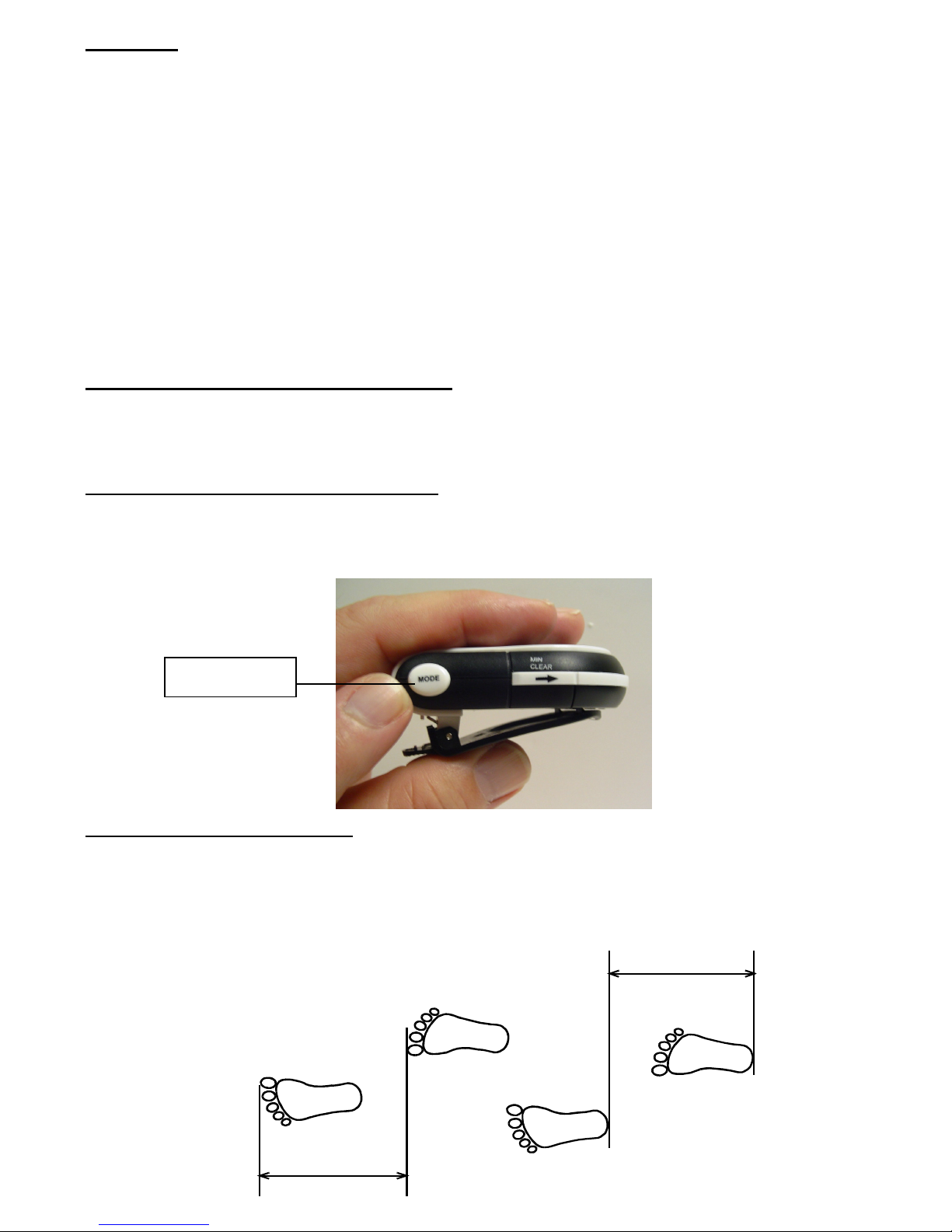
STEP LENGTH
STEP LENGTH
Features;
This talking and calorie counting pedometer is designed for all types of user’s and for all day use. It helps
monitor calories burned, distance traveled, and the time you actually spent on walking and jogging in
daily activities.
It’s features include:
• Voice and visual announcement of calories burned, number of steps taken, distance traveled, total
time you have walked or jogged, and the current time of day.
• Intelligent ounting -- calculates calories, distance, and track time based on actual walking by ignoring
false step counts.
• Voice activated Alarm lock
Scrolling through the DISPLAY MODE
Press the MODE button located on the side of the unit to change the LED display to show you the
following information: TIME, STEPS, DISTAN E, ALORIES, and TOTAL EXER ISE TIME.
Programming the unit for initial use;
While in display mode, press and hold down the MODE button until you hear “Enter your step length” to
enter into the program set up mode. Press the MODE button again to go to next set up mode including
“STEP LENGTH”, “ USER WEIGHT”, “TIME FORMAT”, “TIME”, “ALARM”, and “AUTO REPORT”
Setting up the Step Length;
In order to calculate the distance and calories, the talking pedometer needs your step (stride) length and
body weight.
1. Measure your step length toe-to-toe or heel-to-heel. For a more accurate result, measure the distance
of 10 steps and average them by dividing 10 to get the step length. For your reference, the average
step length is around 22 inches (55.9 cm).
Mode Button
3
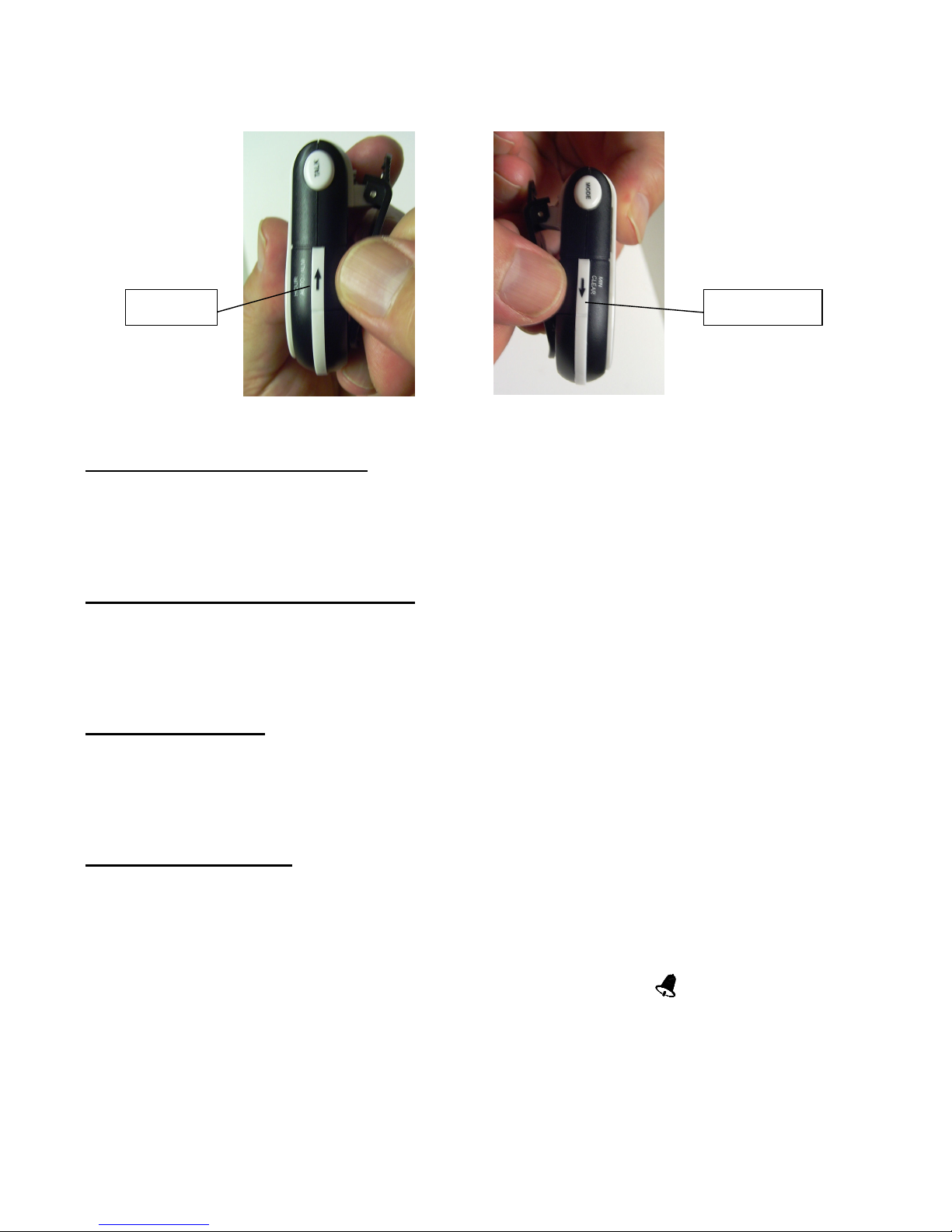
2. To enter the STEP LENGTH, press and hold down the MODE button until you hear “Enter your step
length”. Repeatedly press the arrow UP or DOWN keys located on the sides of the unit to set your
step length between 10 inches and 80 inches.
3. Press MODE button again to set up your body WEIGHT.
Setting up your body weight;
1. When hearing “Enter your weight”, repeatedly press the UP or DOWN arrow keys on the sides of the
unit to set your weight between 40 pounds and 300 pounds.
2. Press MODE again to set up TIME FORMAT.
Entering the correct Time Format;
1. You will see the time format displayed as either 12H or 24H on the LED display.
Press the HOUR button key which is the arrow facing up on the side of the unit.
2. After the time format is selected press the MODE button again to set up the exact TIME of day.
Entering the Time;
1. Upon hearing “Time set”, press the HOUR button (Up arrow) repeatedly to set the hour; press the MIN
button (Down arrow) repeatedly to set the correct minute.
2. Press the MODE button again to set up the ALARM function.
Setting up the Alarm:
1. When hearing “Alarm set”, press the HOUR button repeatedly to set the hour; press MIN repeatedly
to set the minutes.
2. Press MODE again to set up AUTO REPORT.
Note: Under any display mode, press and hold the ALM button located on the side of the unit (up arrow)
to turn on or off the alarm. When you set the alarm to ON, a bell shaped “((( )))” icon will appear on the
display.
Down Key Up Key

4
Setting up the AUTO REPORT feature;
1. You will see either ON or OFF on the screen once you scroll via MODE to the Auto report feature.
Press AUTO located on the side of the unit (up arrow) to switch between auto report ON and OFF.
When you set the auto report to ON, a “(((.)))” icon will appear on the display.
2. Press MODE again to hear “BEEP BEEP” to return to the display mode.
Using the Automatic Voice Reporting Feature:
When the AUTO REPORT feature is enabled, it will announce the “current” recorded information
automatically as you progress in your exercise regimen. See the table of information listed below.
For example, if the unit is displaying alorie on the screen, you will hear the alories announcement
automatically for every 50 alories you have burned.
Function Voice Announcement
Number of Steps
Every 1000 steps
Distance Every 0.5 miles
alories Every 50 alories
Time Every 10 minutes
Talk Feature will announce TIME, STEPS, DISTANCE, CALORIES and TOTAL
EXERCISE TIME
Press the TALK button located on the side of the unit, the pedometer will talk to you and announce the
information as displayed on the screen. To scroll through the talking functions, press the MODE button
repeatedly until you hear the information that you want, then press the TALK button to hear the
announcement. For example, if you want to hear the calories announcement, repeatedly press MODE
until you hear “Calories”, then press TALK.
To hear the entire audio announcement in any mode (except the time mode), press and hold down TALK,
the unit announces the current displayed information followed by the rest. You can release TALK after
the unit has started to announce the next segment of information.
Talk Button
5
Beginning your Exercise Program;
1. Press and hold LEAR until you hear “All clear” to reset all numbers to “0”.
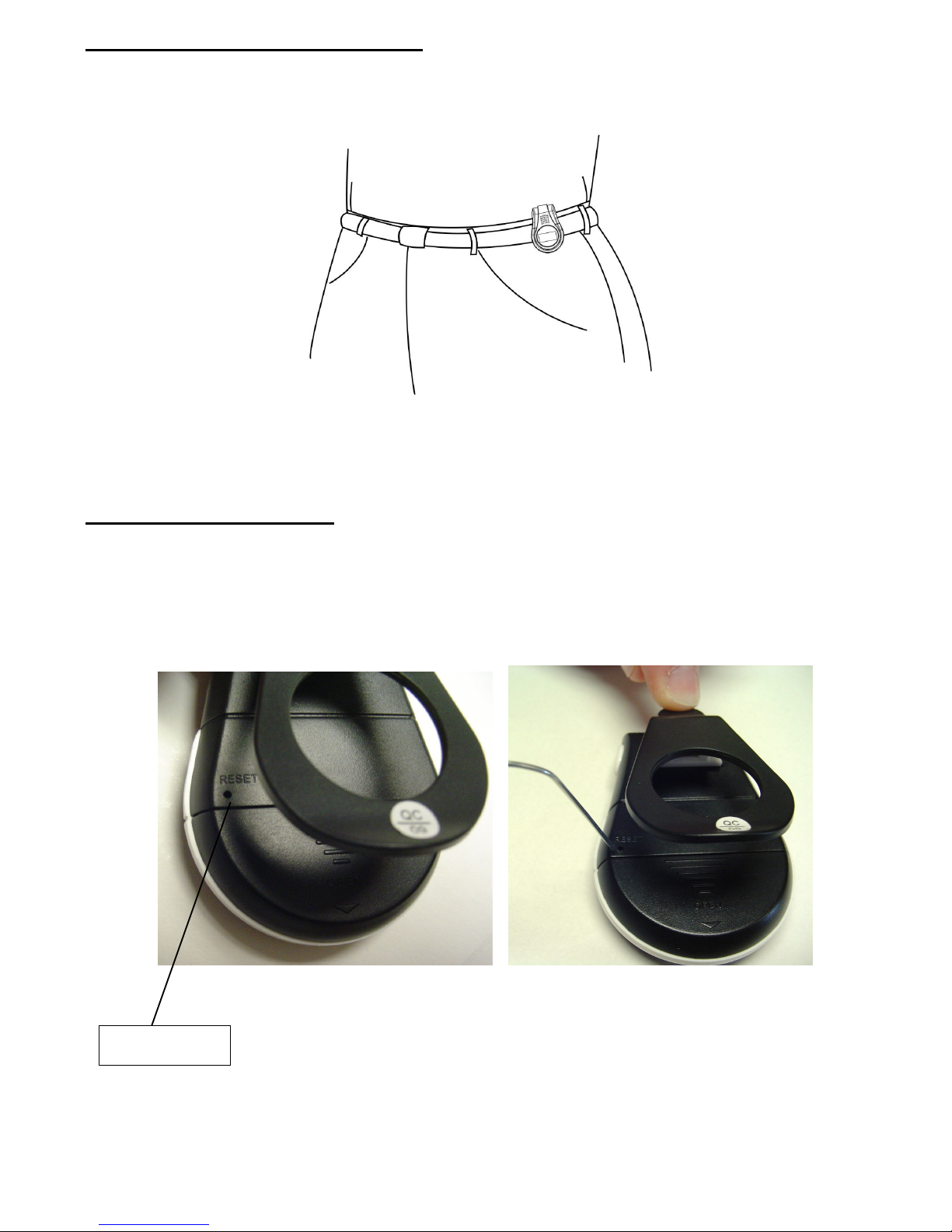
2. lip the pedometer on your belt. The pedometer must be in a vertical position; otherwise, incorrect
readings may be resulted.
3. Start to walk, jog or do you normal things. You can wear it during the entire day. It will accumulate the
time, distance and alories burned that you accumulated during your daily program.
Resetting the Pedometer:
When your pedometer shows abnormal functions, such as a “frozen display”, a “broken display”, or any
“frozen button” etc, you simply need to re-initialize the unit by pressing the RESET key using a sharp
pointed object such as paper clip. The RESET key is located on the back of the unit, above the battery
cover.
Reset Button

6
Replacing the Batteries:
This pedometer uses two AG13 button cell size alkaline batteries. Follow these steps to install batteries:
1. Press down on the back cover and slide the cover down and off the unit.
2. Remove the exhausted cells and insert two fresh AG13 button cells as indicated by the polarity.
4. Replace the back cover.
Note: If the sound weakens, distorts, or the display dims, replace the batteries.
Information Regarding the Displayed Numbers:
This calorie counter/pedometer detects the up-and-down motions made by the user to count and register
the steps. However in addition to walking and jogging, there are other up-and-down motions contributing
to step-count, such as sitting up and down, jumping or simply moving around.
These non-walking/jogging motions may contribute to an erroneous step-count to result in increased
distance, calories and time, which are calculated from the step- count.
+ -

7
Service Procedure
For information regarding the return or exchange of this item within 14 days of purchase, please
visit your Inkstop store location or go to www.inkstop.net to read the instructions regarding
customer service returns procedures. Click on Satisfaction Guaranteed icon on the website.
For technical support after the first 14 days of purchase, please call the toll free number below to obtain
service. A customer service representative will assist you and provide a return authorization number (RA
number) if needed allowing you to ship your product to the service center.
Please have the following information available when you call the service center:
Your Name and Address
Date of Purchase
Model Number
Serial Number
Store Name and Address
Store Location Number
Type of problem with the unit
To contact the technical support facility, please call
508-435-4830 or 800-639-3803
Email Support: techsu[email protected]

8
Warranty
90 Days Limited Warranty
This product is warranted to be free from defects in material and workmanship for a period of 90 days.
Warranty obligations are limited to replacement or repair of defective parts and components, at the option
of the manufacturer. The warranty of this product is null and void if the product is subjected to negligence,
abuse, modification, misuse, accident or if the customer uses the product for a function it was not
intended for. This warranty is only valid for the original purchaser of this product and will not be honored
if the product is resold. This warranty gives you specific legal rights, and you may also have other
rights which vary from state to state.
The manufacturer will not be liable for incidental or consequential damages caused by the use of this
product. The manufacture will not be liable for any costs such as lost profits or revenues, cost of
temporary replacements, loss of data, loss of equipment or use of equipment or any claims by third
parties.
After 14 days from purchasing the product, please call the phone number mentioned below to obtain
service. DO NOT RETURN THIS PRODU T TO THE STORE. A customer representative will give you a
return authorization (RA number) allowing you to ship the product to the service center. The purchaser
must have a copy of the original receipt for proof of purchase within 90 days. The purchaser of this
product is responsible for any shipping charges to the repair facility. The manufacturer service center will
repair or replace the unit in question and send it back to the purchaser within 10 working days of receipt
of the unit.
In order to contact the service facility, please call 508-435-4830 or 800-639-3803.
The address for this facility is:
Four Star Group
26840 Fargo Ave.
Unit
Bedford Heights, OH 44146
E-mail Support: t[email protected]
Table des matières


