4. If motor does not turn in the desired direction: Remove power from
AC Drive and wait at least ten minutes for the capacitor charge to
drain completely. Swap T1 and T2 output leads at the AC Drive.
Repeat steps 1 and 2 to re-check the motor direction.
Default Acceleration and Deceleration times are listed below.
Set (Acceleration Time 1) and (Deceleration Time 1) to
desired times.
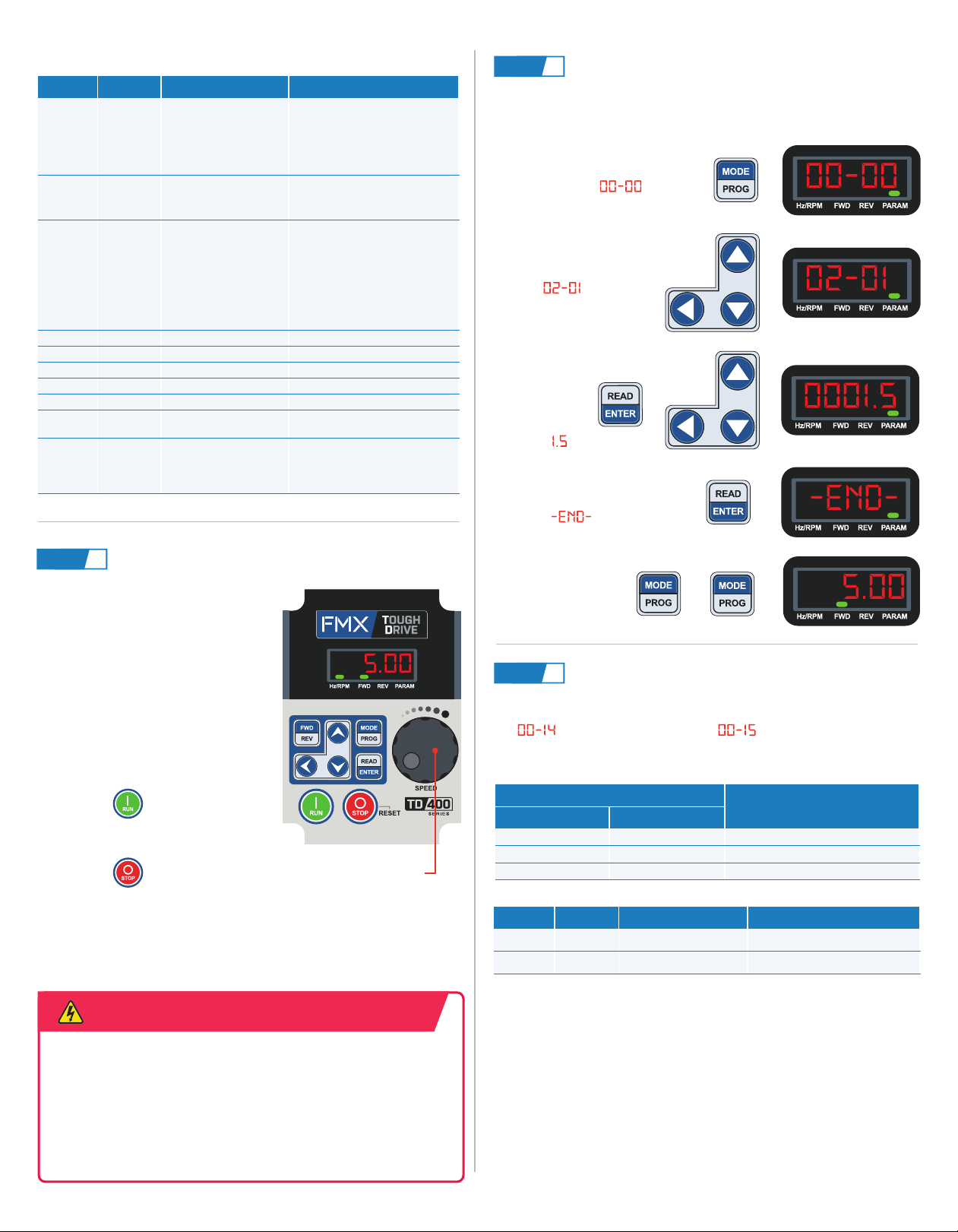
Refer to the motor nameplate for FLA (Amps) when setting up the
drive. For this example we will use a 460V motor rated at 1.5 Full
Load Amps.
1. Press MODE/PROG.
Display shows
+
2. Use navigation keys to
go to .
3. Press READ/
ENTER and
use
navigation
keys to enter
FLA of
4. Press READ/ENTER
to save. Display
shows
+
5. Press
MODE/PROG
twice. Display
shows motor
frequency.
Commonly Used Parameters
AC Drive Size Accel / Decel
Default Value
240V Series 480V Series
1–10HP 1–15HP 10s
15–20HP 20–30HP 15s
30–40HP 40–75HP 20s
I.D. Default Function Setting Range
00-02 0Main Run Command
Source Selection
0: Keypad
1: External Terminal (Control
Circuit)
2: Comm. Control (RS-485)
3: PLC
00-04 0Operation Modes for
External Terminals
0: Forward/Stop-Reverse/Stop
1: Run/Stop- Reverse/Forward
2: 3 Wire Control Mode Run/Stop
00-05 1Main Frequency
Command Source
0: UP/DOWN from Keypad
1: Potentiometer on Keypad
2: External AI1 Analog Input
3: External AI2 Analog Input
4: External Up/Down Frequency
5: Communication Setting Freq.
7: Pulse Input
00-12 60 Frequency Upper Limit 0.01–599.00 Hz
00-13 0Frequency Lower Limit 0.01–598.99 Hz
00-14 –Acceleration Time 1 0.1–6000.0 s
00-15 –Deceleration Time 1 0.1–6000.0 s
01-00 FVolts/Hz Patterns 0-FF
02-01 –
Rated Current of Motor 1
(Amps)
Setting range is dependent on AC
drive model
07-09 0Stop Mode
0: Deceleration to Stop
1: Coast to Stop
2: DC Braking Stop in All Fields
3: Coast to Stop with Timer
I.D. Default Function Setting Range
00-14 –Acceleration Time 1 0.1–6000.0 s
00-15 –Deceleration Time 1 0.1–6000.0 s
Set Accel./Decel. Times (Optional)
STEP 6
Check Motor Direction
STEP 4
Set Motor FLA
STEP 5
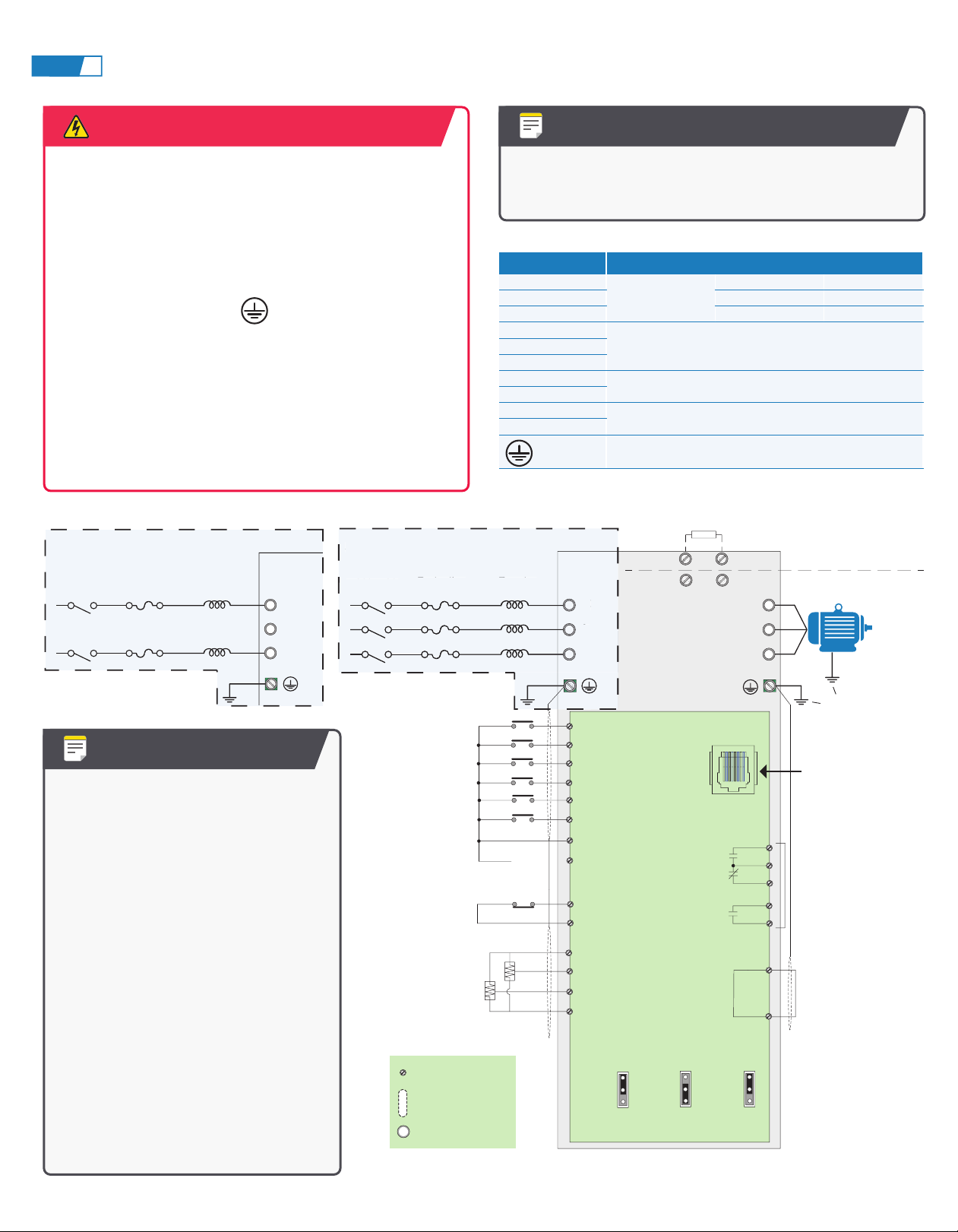
Internal capacitors hold a charge after power supply has been removed.
After disconnecting power, wait at least 10 minutes before touching any
wiring, circuit boards, or components. Check that DC voltage between
terminals B1/P or (+) and (-) does not exceed 25VDC; otherwise, electric
shock may result.
Make sure it is safe to operate the AC Drive and motor before testing
motor direction.
WARNING
This test is to be performed solely
from the AC Drive keypad. Following
procedures assume all AC Drive
parameters are at default values and
all motor and input wiring
has been
completed correctly.
1. Apply input power to the AC Drive.
The display blinks, showing the
current output frequency setting.
(Set using the keypad potentiometer
by default)
2. Press the key. Motor will
operate at the speed set. Frequency
display on the keypad will be solid.
3. Press the key to stop the
motor.
Keypad Potentiometer
(Default Frequency Source)