
FINEQ Zero Point Manuel utilisateur

感谢您购买本公司产品
使用前请仔细阅读使用说明书
RH48
零点净化器说明书

1.产品名称:
2.产品型号:
零点空气净化器
RH48
3.材料:ABS/电镀/线路板
4.输 入:
5.使用电流:30~315mA
6.使用功率:1W
1000mAH
70g
7.风扇工使用流:一档/150 mA;二档/250 mA
8.
9
.负
.
离子浓度:100 *10 PCS/cm³
10
.
产品尺寸:46 * 65MM
11
.
产品重量:
.电池容量 :
12
.
执行标准:GB4706.45-2008
13
14.
检验:合格品
产地:中国·深圳
产品参数
产品部件
挂绳吊环
香薰盖
香薰棉
本体上壳
TYPE-C充电口
控制按钮
出风口支架
指示灯光区域
6
①
②
③
④
⑤
⑥
①
②
③
④
⑤
⑥
⑦
本体下壳
过滤棉
过滤棉盖
78
8
9
10
磁吸铁片
11
12
9
10
12
11
DC 5V 300mA

功能操作
注意事项
产品标配
1. 按键功能:长按按键第一次开机,指示灯光亮起,风扇小档运行,
负离子开启。
开机后,单按一下按键,风扇大档开启;再单按一下按钮,
风扇停止。
风扇停止后,单按一下按键,风扇小档开启;再单按一下按
键,风扇大档开启,以此循环。
开机状态下,长按按键关机,指示灯光灭,设备停止工作。
3.香薰功能 :顶部配置了香薰棉,可以在香薰棉上面滴精油、香精、香
水,产生香薰的功能。可以拆卸更换香薰棉。
4.空气过滤 :底部进风口配置过滤棉,可以有效过滤空气中的一些有害物
质。
2.TYPE-C 输入插口:可以给产品供电。
净化器*1,数据线*1,挂绳*1,合格证*1
过滤棉*1,香薰棉*1
注:负离子开机后就一直保持运行状态,按键只控制风扇的大小档转换
和开关。
. 本产品过滤棉建议三个月更换一次。(可以咨询卖家购买原装进行更换)1
. 本产品应用场景:可以挂脖,车载(磁吸或者放置在可移胶上面)。2
. 请不要把香精、精油,香水等液体喷在过滤棉上面。3
. 香薰棉不宜承载过多液体,以免渗透到电路板造成短路。4
. 本产品不宜放置在高温/潮湿处。5
. 在废弃本产品前,必须将电池从产品中取出(取出电池方法请看图示)。6
. 在取出电池时,产品一定要断电。7
. 电池应安全地处置。8

香薰棉加精油或者更换的方法
逆时针旋转顶部香
注:在此操作之前,请务必要断开电源并关机。
注:加精油或者香水时,一定不能滴到设备里面,
以防造成短路损坏设备
注:在此操作之前,请务必要断开电源并关机。
过滤棉建议三个月左右更换新的过滤棉。(可以咨询卖家购买原装进行更换)
注:在此操作之前,请务必要断开电源并关机。
顺时针旋转香薰盖取出香薰棉,将香水
或者精油滴在上面,
然后装到香薰棉槽里
或者更换新的
香薰棉
薰盖拧开香薰盖 拧紧香薰盖
过滤棉更换的方法
逆时针旋转底部过滤 顺时针旋转过滤棉更换新的过滤棉
棉盖,拧开过滤棉盖 盖,拧紧过滤棉盖
报废产品电池取出方法
手拿住本体上壳,向
上用力拔出本体上壳
电池应安全地处置
以免污染环境
拿出电池,拔掉电
池插座

Thank you for purchasing our product
Please read this manual carefully before use the product
RH48
Zero Point Air Purifier
User Manual

1. Product Description:
2. Model Number:
Zero Point Air Purifier
RH48
3. Material: ABS Casing / Electroplating / PCBA
4. Input:
5. Working Current: 30~315mA
6. Power Consumption: 1W
1000mAH
70g
7. Workig Current: Fan Low Speed
150 mA;Fan High Speed 250 mA
8.
9.
Anion Density:
10.
Product Size: 46 x 65mm
11. Product Weight:
Battery Capcity:
12. Execution Standard: GB4706.45-2008
13.
14.
QA Inspection: Pass
Place of Origin: Shenzhen, China
Specifications
Explosive Illustrations
Lanyard Hole
Top Cover
Aroma Diffuser Sponge
Upper Case
Type-C Charging Port
Function Button
Air Ventilation Holes
LED Indicatior
100 x 10 PCS /cm³
6
①
②
③
④
⑤
⑥
①
②
③
④
⑤
⑥
⑦
Lower Case
Filter
Filter Bottom Cover
78
8
9
10
Metal Plate
11
12
9
10
12
11
DC 5V 300mA

Instructions
Important Notices
Package Content
1. Button Funtion:
Long press the function button for 3 seconds to turn on the device. The
LED indicator will turn on and the fan starts running at low speed. The negative
ion generator starts to work at the same time. Short press the function button
once, the fan will run at high speed. Short press the function button again,
the fan stops. Short press function button to toggle the fan speed to be: low
speed, high speed, and stop.
Long press the function button for 3 seconds to turn off the device.
3. Aroma Diffuser: The device is equipped with a aroma diffuser at the top case.
Users can add their favoirte essential oil or perfume to the sponge.
The sponge can be replaced whenever users want a flavor change.
4. Air Filtration: The device is equipped with a filter at the bottom air ventilation
inlets. This filter can effectively remove those harmful substances
from the air that you breathe.
2. Type-C Charging Port: For device charging.
Air Purifier x 1,Charging Cable x 1,Lanyard x 1,QC Card x 1,
Filter x 1,Aroma Diffuser Sponge x 1,CPE Bag x 1
Note:After the device is turned on, the negrative ion generator will keep working.
The short press on function button will simply control the speed of electric
fan.
It is recommended to replace the filter every three months.
(Users can consult with your local reseller to purchase replacement filters)
1.
Please add essential oil or perfume to the diffuser sponge, but NOT the filter.
Use scenarios: You can bring it to your office, put it in your car, wear around
your neck, carry with you on the travel and more.
2.
Please don't add too much essential oil or perfume to the diffuser sponge,
so as to avoid infiltration into the PCBA and potential short circuit.
3.
This device should not be placed at a location with high temperature.
4.
5.
The battery must be removed from the product before it is discarded.6.
Batteries should be disposed of safely.8.
When removing the battery, the product must be disconnected from the
power supply and turned off.
7.
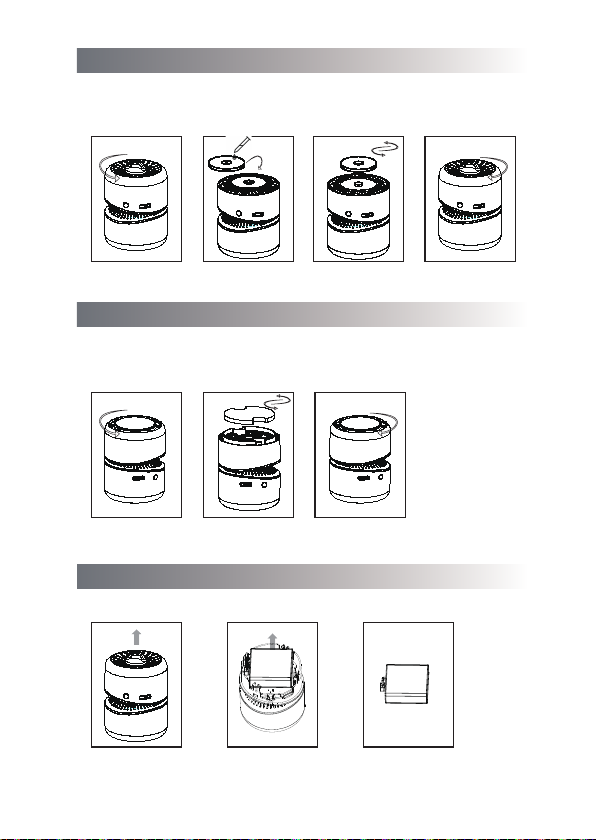
To Add Essential Oil
Turn the top cover
counter clockwise
to open it
Turn the top cover
clockwise and tighten it
Add essential oil or
perfume to the aroma
diffuser sponge
Or replace with a new
aroma diffuser
sponge
To Replace Filter
Turn the filter buttom
cover counter clockwise
to open it
Turn the filter cover
clockwise and tighten it
Take the filter out and
replace with a new
one
Note:* Before you do this, the device must be disconnected from the power supply
and turned off.
* When adding essential oil or perfume, make sure NOT to drip any liquid into
the device, so as to avoid potential damage due to short circuit.
Note:Before you do this, the device must be disconnected from the power supply
and turned off.
Note:Before you do this, the device must be disconnected from the power supply
and turned off.
It is recommended to replace the filter every three months.
(Users can consult with your local reseller to purchase replacement filters)
Disposal of Battery
Hold the upper case
in hand and pull
it out
Battery should be
disposed of safely
to avoid polluting
the environment
Take out the battery
and unbuckle the
battery socket
Ce manuel convient aux modèles suivants
1
Table des matières


