Fastora DAS-315SA Manuel utilisateur

FASTORA DAS-315SA Disk Array
FASTORA
DAS-315SA Disk Array
User Guide
V. 1.02a

FASTORA DAS-315SA Disk Array
2
The information in this guide may be changed without notice. We assume no
responsibility for any errors which may appear in this guide. The FASTORA
DAS-315SA is a trademark of FASTORA. Microsoft, Windows and Windows
logo are trademarks of Microsoft Corporation.
Copyright 2004. All rights reserved. No Part of the contents in this guide may
be transmitted or reproduced in any form or by any means without the written
permission of the manufacturer. Printed in Taiwan.
The revision date for this guide is May 26, 2004
Version 1.02
FCC Statement
This equipment has been tested and found to comply with the limits for a Class
A digital device, pursuant to Part 15 of the FCC Rules. These limits are
designed to provide reasonable protection against harmful interference in a
residential installation.
This equipment generates and can radiate radio frequency energy and, if not
installed and used according to the instructions, may cause harmful
interference to radio communications. However, there is no guarantee that
interference will not occur in a particular installation. If this equipment does
cause harmful interference to radio or television reception, which is found by
turning the equipment off and on, the user is encouraged to try to correct the
interference by one or more of the following measures:
--Reorient or relocate the receiving antenna
--Increase the separation between the equipment and device
--Connect the equipment to an outlet other than the receiver
--Consult a dealer or an experienced radio/TV technician for assistance
CE Mark Warning
This is a Class A product. In a domestic environment, this product may cause
radio interference in which case the user may be required to take adequate
measures.

FASTORA DAS-315SA Disk Array
3
Chapter 1 General Information
This chapter provides general information of the FASTORA DAS-315SA.
The following topics are covered in this chapter:
◆ Introduction
◆ Key Features & Benefits
◆ Unpacking Your DAS-315SA
◆ Components of DAS-315SA
1.1 Introduction
FASTORADAS-315 Series is the leading Ultra320-to-Serial ATA external DAS
subsystem. It supports not only RAID level 0, 1, 3, 5,10, but also RAID level 6
which increases the data reliability dramatically. Acompact 3U design built with
15 drive trays for 3.5" disk drive with 1" height provides a very large capacity or
flexible configuration as users' demand.
The unique and excellent heat dissipation design makes the subsystem more
reliable and available. An easy and user friendly GUI guides users to manage
the subsystem through standard Ethernet quickly.
Throughout this manual, the FASTORA DAS-315SA may be referred to as
DAS-315SA,or simply as DAS.

FASTORA DAS-315SA Disk Array
4
1.2 Key Features and Benefits
Supports 0, 1, 3, 5, 10, and JBOD, ensuring a full data protection.
Provides 15 disk bays, fulfilling your business demand for data
storage.
Hot-swappable design guarantees nonstop operation.
2 Ultra320 SCSI channels provide high-speed data transmission.
15 driver bays for 3.5” disk drive
Up to 1GB cache memory
3U compact tower design for more capacity
Cable-less design for better reliability
Swappable design for faster and easier maintenance
User-friendly configuration via RS-232 port or Ethernet
1.3 Unpacking Your FASTORA DAS-315SA
Before removing your FASTORADAS-315SA from the shipping carton, you
should thoroughly inspect the physical condition of the container. The package
of FASTORADAS-315SA should appear in good condition when you receive it.
If any damaged found, do not remove the components. Contact the place of
purchase for further instructions.
If the shipping container appears to be in good condition, unpack it and verify
that the FASTORADAS-315SA and accessories are all there and in good
condition.

FASTORA DAS-315SA Disk Array
5
Your FASTORADAS-315SA package should contain the following items:
If an item is missing or damaged, please contact the place of purchase for
assistance. Retain the shipping container and packing material for reuse.
Before you begin to use your FASTORADAS-315SA, read
section 1.4 Components of the FASTORA DAS-315SA to learn
more about the major components or your DAS system.
Items Quantity
FASTORA DAS-315SA unit 1
Drive Canister 15
Accessory Box
Ultra 320 SCSI Cable 1
Power Cord 2
RS-232 Cable 1
Spare screws 40
Ultra 320 Terminator 1
User Menu CD 1
Rack-mount Kit (option)
Note

FASTORA DAS-315SA Disk Array
6
1.4 Components of the FASTORA DAS-315SA
This section describes the major components of the FASTORA DAS-315SA,
including its front panel, LED display panel and rear panel. Read this section
before you start to use your RAID DAS Subsystem.
1.4.1 The Front Panel
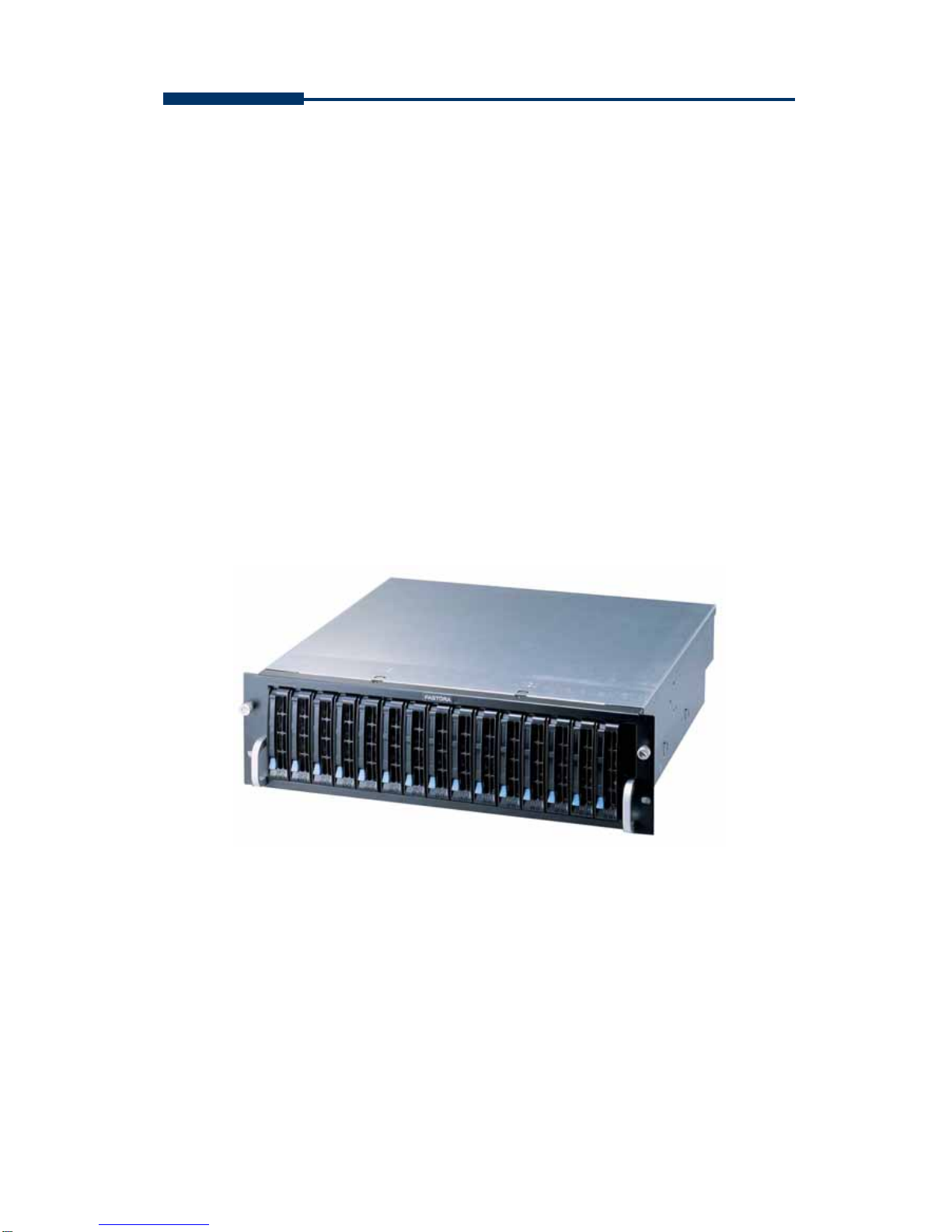
The front panel of FASTORA DAS-315SA is shown below.
Figure 1-1
For the specific detail information on each drive canister, please refer to Figure
1-2, and Table 1-1 for explanation. For LED status, please refer to Table 1-2.
Figure 1-2

FASTORA DAS-315SA Disk Array
7
Table 1-1
Items Descriptions
Drive handle Used to lock and fix the drive canisters
Drive lock Used to lock or release the drive canisters
Drive number Used to indicate the number of each canister.
(1-15)
LED1 (Red) Used to indicate the hard drive status
LED2 (Green) Used to indicate the hard drive status.
Table 1-2
LED Indication Status
LED 1 (Red) continuous flash No hard drive inserted or hard
drive failed
LED 2 (Green) blinking Hard drive access (read/write)
No flashing nor blinking on both
LEDs System standby
Both LED 1 LED 2 continuous flash System rebuilding
Please note that DAS-315SA does not have a power button. When power
cords are unplugged, you need to wait at least 5 seconds so that you can
power on DAS-315SA again. This is designed for safe and better operation
and performance, please note with extra care.

FASTORA DAS-315SA Disk Array
8
1.4.2 The Rear Panel
The rear panel of FASTORADAS-315SA is shown below. Refer to Table 1-3
for detailed description of each part on the rear panel of DAS-315SA.
Figure 1-3
Table 1-3
Part Description
Con 1 port
This is a RS-232 serial port, allowing you to connect to a
terminal or a PC. You may configure this DAS, and upgrade the
firmware and RAID.
Con 2 port
(Debug Model) This is a RS-232 serial port, allowing you to connect to a
terminal or a PC. This port is designed for debug.
LAN Web browser RAID management through standard 10/100
Ethernet port
Host 1
Host 2
FASTORADAS-315SA has two host channels— Host 1 and
Host2 —to allow you to connect to SCSI devices.
System Fans There are 2 fans located at the rear of the system unit. They are
designed to provide good airflow and heat dissipation.
Power
Supplies &
Fans
The DAS comes with 2 hot-swappable power supplies located
at the rear of the subsystem. If the power supplies are in use
and one fails to function, an audible alarm will warn you of the
power failure.

FASTORA DAS-315SA Disk Array
9
Chapter 2 Hardware Installation
This chapter discusses the basic operational installation and the Disk Drive
installation.
The following topics are covered in this chapter:
Preparing for the Installation
Disk Drive Installation
Table and Shelf Installation
Rack-Mount Installation
2.1 Preparing for the Installation
If you want to connect your FASTORADAS-315SA DAS to the computer using
a SCSI adapter, install the adapter(s) in an available slot in the computer prior
to beginning FASTORADAS-315SA installation. See your operating system
manuals for the configuration procedures for the host bus adapter.
2.1.1 Terminating Disk Drive Channels
All SCSI buses must be terminated at each end. Termination absorbs electrical
signals and prevents those signals from bouncing back along the bus and
causing interference.
The SCSI drive channels of FASTORA DAS-315SA have been terminated
inside the chassis on the back plane. There is no need to terminate the disk
drives!

FASTORA DAS-315SA Disk Array
10
2.1.2 Connecting FASTORA DAS-315SA
FASTORADAS-315SA can be connected to the host computer via 2 Ultra 3
SCSI ports.
2.1.3 Host Bus SCSI ID Assignment
You may assign any SCSI ID to the host channel. The range of SCSI IDs on a
Wide SCSI bus starts from 0 to 15. You can use the Web browser RAID
management through standard 10/100 Ethernet port or a terminal to set the
host channel ID. (Refer to Section 3.1 Configuration Methods for more
information.) Be sure to assign an ID that does not conflict with any other
devices on the host bus as well as the host adapter.
2.1.4 Host Bus Termination
The DAS is shipped with host channel buses terminated. If the DAS is the last
device on the host bus, the LVD terminator should be connected. (See Figure
2-1)
Figure 2-1
2.1.5 Back Plane
The back plane of FASTORADAS-315SA is specifically designed to furnish
Table des matières
Autres manuels Fastora Système de disques
Manuels Système de disques populaires d'autres marques

Fujitsu
Fujitsu ETERNUS DX60 S2 Manuel utilisateur

Accom
Accom WSD/2XTREME Manuel utilisateur

HP
HP Compaq Presario,Presario 4400 Instructions d'utilisation

ATTO Technology
ATTO Technology Diamond Storage Array V-Class Manuel utilisateur

National Instruments
National Instruments RMX-8268 Manuel utilisateur

Overland Tandberg
Overland Tandberg SnapServer DX1 Manuel utilisateur