Fahrentec Argus-340 Instructions d'installation

Fahrentec Corporation Limited
Room 1708, Unit 1, 6th Block, Glorious Plaza, No. 305, Keji Road, Yanta District, Xi'an, Shaanxi, China 710000
Ph: +86(0)29 8885 6461
Http://www.fahrentec.com http://www.infra-optics.com
Email: info@fahrentec-corp.com 1
Version 221101
English User Manual
Argus-340 thermal imaging camare
Save Trees Use Recycle Material
The intellectual property rights of all text content and pictures in this
manual belong to Fahrenec Refrigeration Corporation Limited Any form of
distribution and citation must obtain the written permission of Fahrenec
Refrigeration Corporation Limited
COPYRIGHT©2014-2022 FAHRENTEC REFRIGERATION

Fahrentec Corporation Limited
Room 1708, Unit 1, 6th Block, Glorious Plaza, No. 305, Keji Road, Yanta District, Xi'an, Shaanxi, China 710000
Ph: +86(0)29 8885 6461
Http://www.fahrentec.com http://www.infra-optics.com
Email: info@fahrentec-corp.com 2
To Users
Dear users:
Thank you very much for choosing the Argus-340 thermal scope. Please read this
manual carefully before using it for the first time.
After reading, please keep this manual properly, in case of problems during the
process of use for easy reference!
Please comprehend this manual in detail and observe the operation specifications in it,
so as to avoid parts damage caused by improper operation!
If there is any change in this manual due to version upgrade or other reasons, our
company will not inform you otherwise.
Users Guideline
Do not expose the unit to damp or rain.
Do not open the machine case without permission. There are no parts in the machine
that can be repaired by the user.
The maintenance can only be carried out by professionals from our company.
No matter the machine is in the state of startup or shutdown, it is strictly prohibited to
expose the lens of the machine to intense high-temperature radiation source (such as
the sun) to avoid abnormal operation or even damage of the machine.
Please do not violently shake or crash the equipment during use and transportation.
During transportation and storage, the temperature of the main engine shall not be
lower than - 40°C or higher than 60°C.
The original packing box must be used during transportation.
The equipment shall be stored in a cool, dry and ventilated environment without
strong electromagnetic field.
Avoid oil stains and various chemicals from contaminating the lens surface and
damaging the surface.
Warning! Improper operation will cause serious damage to the movement!

Fahrentec Corporation Limited
Room 1708, Unit 1, 6th Block, Glorious Plaza, No. 305, Keji Road, Yanta District, Xi'an, Shaanxi, China 710000
Ph: +86(0)29 8885 6461
Http://www.fahrentec.com http://www.infra-optics.com
Email: info@fahrentec-corp.com 3
Menu
1.Product overview.................................................................................................................... 4
1.1 Introduction.......................................................................................................................... 4
1.2 Features................................................................................................................................ 4
1.3Application............................................................................................................................ 5
1.4Description............................................................................................................................ 5
2. Preparation before use........................................................................................................... 6
2.1 Unpacking............................................................................................................................ 6
2.2 Battery Installation............................................................................................................... 7
2.2.1 Battery Description............................................................................................................ 7
2.2.2 Installation......................................................................................................................... 7
2.3 Focusing............................................................................................................................... 7
3 Page........................................................................................................................................ 8
3.1 The home page..................................................................................................................... 8
4 Functions................................................................................................................................ 9
4.1 Key Function Definition....................................................................................................... 9
4.2.5 Hot Tracking................................................................................................................... 11
4.2.6 PIP................................................................................................................................... 11
4.2.7 Electronic Compass......................................................................................................... 12
4.2.8 Image adjustment ............................................................................................................ 12
4.2.9 Sharpening level adjustment............................................................................................ 13
4.2.10 Blind element compensation.......................................................................................... 13
4.2.11 Factory reset.................................................................................................................. 14
4.2.12 Time settings................................................................................................................. 15
4.3 Crosshair correction........................................................................................................... 15
4.3.1 Gun-shaped memory....................................................................................................... 15
4.3.2 X-axis coordinate adjustment ......................................................................................... 16
4.3.3 Y-axis coordinate adjustment ......................................................................................... 16
4.3.4 Cross-cursor differentiation style adjustment................................................................... 16
4.3.4 Cross-cursor differentiation style adjustment................................................................... 17
4.3.4 Style storage.................................................................................................................... 17
4.3.5 Return to the main interface............................................................................................ 18

Fahrentec Corporation Limited
Room 1708, Unit 1, 6th Block, Glorious Plaza, No. 305, Keji Road, Yanta District, Xi'an, Shaanxi, China 710000
Ph: +86(0)29 8885 6461
Http://www.fahrentec.com http://www.infra-optics.com
Email: info@fahrentec-corp.com 4
1.Product overview
1.1 Introduction
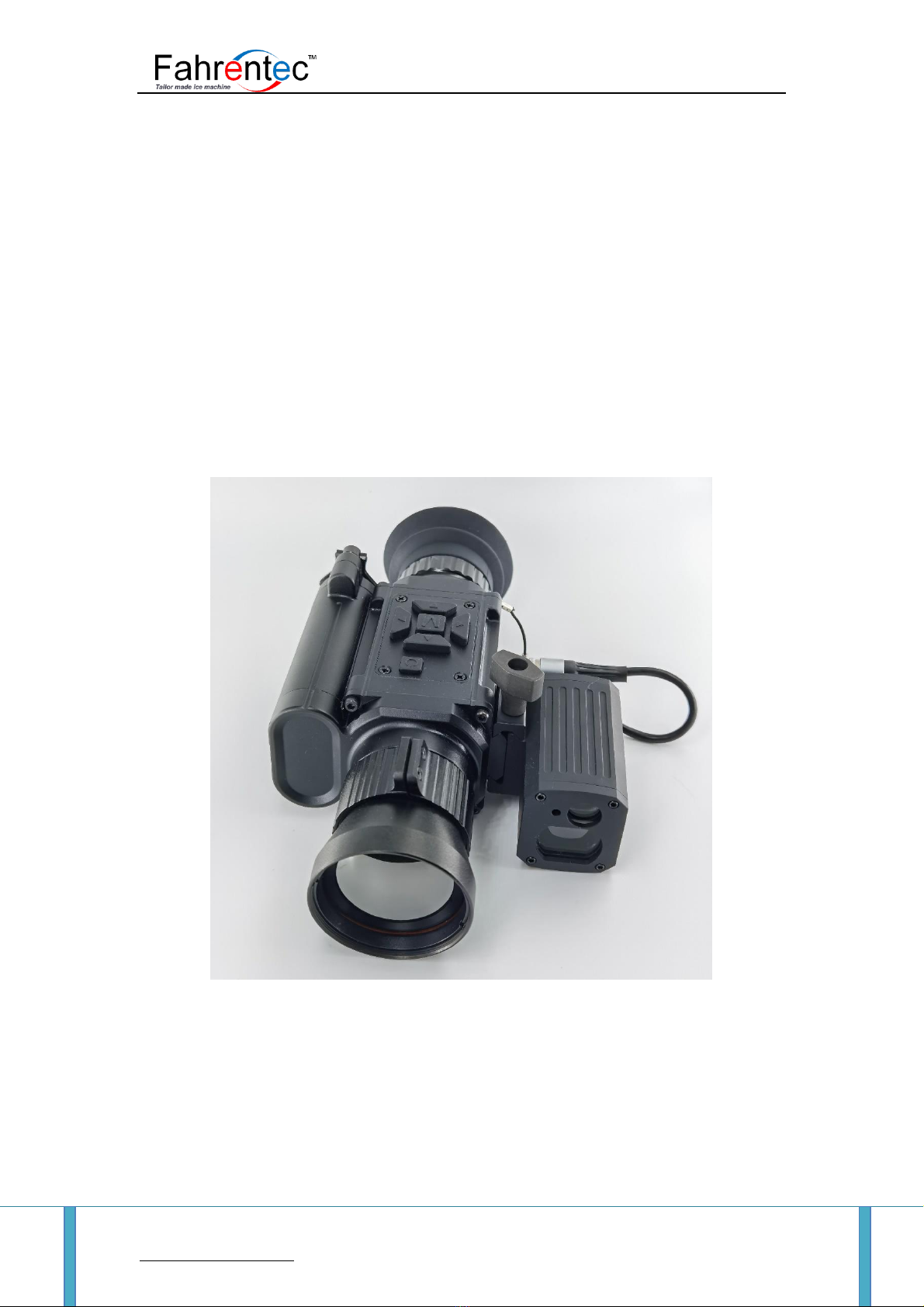
The Argus-340 is a compact and lightweight multi-functional thermal imaging sight.
With advanced non-film technology, it has the features of high sensitivity, high
refresh rate and high stability. It can be used in various scenes for 24-hour full-scene
imaging investigation and observation, such as reconnaissance and observation,
outdoor hunting, outdoor exploration, security and anti-theft, maritime operations,
special tasks and other scene
Figure 1-1 Product photos
1.2 Features
➢High resolution, uncooled infrared detector
➢Imported original high resolution OLED color display(1024*768)

Fahrentec Corporation Limited
Room 1708, Unit 1, 6th Block, Glorious Plaza, No. 305, Keji Road, Yanta District, Xi'an, Shaanxi, China 710000
Ph: +86(0)29 8885 6461
Http://www.fahrentec.com http://www.infra-optics.com
Email: info@fahrentec-corp.com 5
➢Low power consumption design, two 18650 battery can work more than 8hours
continuously
➢The operation is simple and quick, the interface is user friendly and humanized
➢Short start-up time and quick observation ability
➢Electronic amplification function can improve aiming accuracy
➢Anti-leakage eye protector design with good concealment
➢Five differentiation styles and four differentiation colors that are suitable for
different equipment
➢Protection grade: IP67, providing rain proof, high reliability and durable structure
➢Upgradeable laser ranging module
1.3Application
The application range of infrared thermal imaging is exceedingly wide. With the
continuous development and popularization of infrared technology, new applications
are constantly developed. Presently, there are mainly the following categories of
applications, that is, scientific research, electrical equipment, electromechanical
equipment, R&D and quality control, construction testing, hunting, military and
security.
1.4Description
Product name
Multifunctional thermal imaging sight
Detector type
Uncooled infrared detector
Spectrum
8~14μm

Fahrentec Corporation Limited
Room 1708, Unit 1, 6th Block, Glorious Plaza, No. 305, Keji Road, Yanta District, Xi'an, Shaanxi, China 710000
Ph: +86(0)29 8885 6461
Http://www.fahrentec.com http://www.infra-optics.com
Email: info@fahrentec-corp.com 6
Resolution (pixel)
384×288(12um)
Focus Length
40 mm(F1.0)
Eyepiece
0.39 inch HD OLED
Display resolution
1024*768
Differentiation pattern
5 kinds
Image mode
White heat, black heat, red heat, false color, sky, outline
magnification
3X/6X/12X
Battery type
18650, 3.7 V Lithium battery×2 (replaceable)
External video output
PALAnalog video
Continuous working time
≥8hr
Operation temperature
-35°C ~60°C
Weight
≤610g (42mm lens does not include battery, bracket)
brabracket)1111bracket)bracket)bracket)bracket)bracket)
Size
176mm (long )x80mm (wide )x72mm(including height of support)
ssssssssssssupport)
Anti-Shoc
6000J
Ranging module
External and internal display
2. Preparation before use
2.1 Unpacking
Before using the product, the following operations must be carried out first:
➢Open the packing box and take out the equipment and parts.
➢Check to make sure there are no missing accessories.
➢Check whether the interface, machine body, objective lens and operation buttons
➢Ensure that all the objective lenses and eyepieces are clean and can be used normally.

Fahrentec Corporation Limited
Room 1708, Unit 1, 6th Block, Glorious Plaza, No. 305, Keji Road, Yanta District, Xi'an, Shaanxi, China 710000
Ph: +86(0)29 8885 6461
Http://www.fahrentec.com http://www.infra-optics.com
Email: info@fahrentec-corp.com 7
Note: if any spare parts are missing or damaged, please contact after-sales service in time.
2.2 Battery Installation
Figure 2-1
2.2.1 Battery Description.
Product name: 18650 lithium battery
Quantity: 2
Working voltage: 3.7V
2.2.2 Installation
1. Please use a 18650 lithium-ion rechargeable battery with a rated voltage of 3.7V.
2. Unscrew the battery cover anticlockwise, install the positive and negative poles of the battery
into the battery compartment according to the identification, and tighten the battery cover.
Note: it is strictly prohibited to install the battery reversely. The equipment damage caused
by reverse installation shall be borne by the customer.
2.3 Focusing
1. Select the lens suitable for the current environment and rotate the lens to infinity.
2. Aim at the target, rotate the objective lens to adjust the definition of the picture, so as to make
the picture of the target the clearest.

Fahrentec Corporation Limited
Room 1708, Unit 1, 6th Block, Glorious Plaza, No. 305, Keji Road, Yanta District, Xi'an, Shaanxi, China 710000
Ph: +86(0)29 8885 6461
Http://www.fahrentec.com http://www.infra-optics.com
Email: info@fahrentec-corp.com 8
3 Page
3.1 The home page
The first page you see when you open the equipment is the home page. The home page is
composed of cross cursor, status bar and other information.
Figure 3-1
(1)Scale plate
Electronic compass
Cross cursor
(2)The status bars
The status bar shows the current status of the system:
Battery capacity
Model
Time
Magnification times

Fahrentec Corporation Limited
Room 1708, Unit 1, 6th Block, Glorious Plaza, No. 305, Keji Road, Yanta District, Xi'an, Shaanxi, China 710000
Ph: +86(0)29 8885 6461
Http://www.fahrentec.com http://www.infra-optics.com
Email: info@fahrentec-corp.com 9
4 Functions
4.1 Key Function Definition
Figure 4-1
Main menu up / magnification shortcut / Picture-in-picture shortcuts
Menu / menu exit
Main menu down / Mode toggle shortcuts
Press the Laser ranging (Matching)/numerical value decrease
Submenu options toggle/The value is increased
Power on / off / sleep
4.2 Functional specification
4.2.1 Power on / off
Turn on the machine by short press the key , turn off by long press the key , and sleep by
short press the key in the state of power-on.
4.2.2 MENU
Function key: short press the key

Fahrentec Corporation Limited
Room 1708, Unit 1, 6th Block, Glorious Plaza, No. 305, Keji Road, Yanta District, Xi'an, Shaanxi, China 710000
Ph: +86(0)29 8885 6461
Http://www.fahrentec.com http://www.infra-optics.com
Email: info@fahrentec-corp.com 10
Wait for 10 seconds after power on, and press the key in the mode of 1Xto pop up the main
menu. By pressing the up and down keys,the users can move and switch the options in the menu.
As shown in Figure 4-2.
Figure 4-2
4.2.3 language
Short press the key to pop up the menu, press the button down by pressing the button,
select Language, press the key to switch languages, as shown in Figure 4-3:
Figure 4-3
4.2.4 Laser Ranging (optional)
Short press the key to pop up the menu, press the button down by pressing the
Table des matières