
Expert EX-9543 Manuel utilisateur

EX-9543
Enhanced 10/100Base-TX
to
100Base-FX Media Converter
User Manual
COPYRIGHT
All rights reserved. No part of this publication may be reproduced,
stored in a retrieval system, or transmitted in any form or by any
means, whether electronic, mechanical, photo copying, recording or
otherwise, without the prior written permission of the publisher.
FCC WARNING
This equipment has been tested and found to comply
with the limits for class A device, pursuant to part 15 of FCC rules.
These limits are designed to provide reasonable protection against
harmful interference in a commercial installation. This equipment
generates, uses and can radiate radio frequency energy and, if not
installed and used in accordance with the instructions, may cause
harmful interference to radio communication. Operation of this
equipment in a residential area is likely to cause harmful
interference, in which case, the user will be required to correct the
interference at the user’s own expense.
CE
This is a Class A product. In a domestic environment, this product
may cause radio interference in which case the user may be
required to take adequate measures.
Take special note to read and understand all content given in the
warning boxes
Warning

Table of Contents
1 Introduction............................................................1
About This Guide ....................................................1
Welcome.................................................................1
Purpose...................................................................1
Terms/Usage .......................................................... 1
Features..................................................................2
Specifications..........................................................3
Package Contents ..................................................4
2 Hardware Description............................................5
Product Overview ...................................................5
3 Installation..............................................................7
Location ..................................................................7
DIP Switches .......................................................... 8
NWay DIP Switch Setting .......................................9
Link Fault Signaling (LFS) ....................................11
Loopback Test ......................................................12
Local Loopback.....................................................13
Remote Loopback.................................................14
Install the converter ..............................................15
Desktop Installation ..............................................16
Getting Connected................................................17
Connecting Fiber Cable ........................................ 18
Connecting Copper Cable ....................................19
4 LED Indicators......................................................20
Appendix A..............................................................22
Cables...................................................................22
Appendix B..............................................................23

About RJ-45 Cables..............................................23
Appendix C..............................................................24
Mini Converter Chassis.........................................24
Features................................................................24
Affixing Brackets ...................................................24
Installing the Converter.........................................26
Rear view of Chassis and specifications ..............27
Rear View of Chassis with AC Power Supply ..27
Rear View of Chassis with DC Power Supply..27
Appendix D..............................................................28
Application Diagrams............................................28
Application Diagram I............................................28
Application Diagram II...........................................29
Application Diagram III..........................................29

EX-9543 Enhanced 10/100Base-TX to 100Base-FX Converter
- 1 -
1 Introduction
About This Guide
Welcome
Thank you for choosing the Enhanced 10/100Base-TX
to 100Base-FX Media Converter. This device
integrates copper and multi-mode/single mode fiber
networks in one flexible package.
Purpose
This guide discusses how to setup and install your
Enhanced 10/100Base-TX to 100Base-FX Converter.
Terms/Usage
In this guide, the term “Converter” (first letter upper
case) refers to your Enhanced 10/100Base-TX to
100Base-FX Converter, and “converter” (first letter
lower case) refers to other converters.

EX-9543 Enhanced 10/100Base-TX to 100Base-FX Converter
- 2 -
Features
• Automatic MDI/MDI-X selection on RJ-45 port
• Link Fault Signaling (LFS)
• Store-and -forward at full wire speed
• Auto-negotiation, NWay support
• Half/Full duplex mode selection
• Remote and local loopback Test via DIP switch
• When DIP switches are set, the system auto-
reboots to new configurations without powering-off.
• Extends distance of up to 2km (6600 feet) multi-
mode fiber and 60km (198000 feet) long-haul
single mode fiber
• Compatible with other 10Base-T & 100Base-TX
/FX devices
• LEDs for at-a-glance device status
• Suitable as stand-alone or in 19" 4/12-slot rack-
mount converter chassis or the single slot mini
chassis (with internal power supply)
• FCC Class A & CE approved

EX-9543 Enhanced 10/100Base-TX to 100Base-FX Converter
- 3 -
Specifications
Standard: IEEE 802.3 (10BASE-T Ethernet),
IEEE 802.3u (100BASE-TX/FX Fast
Ethernet)
Connector: 1x duplex fiber optic connector:
ST / SC types or
1x simplex fiber optic connector:
WDM single fiber types
1x UTP 100/120ohm; RJ-45 type
Max. Distance:UTP: 100m Cat 3/4/5
Fiber Optic:
2km MM, dual fiber
60km Long-haul SM, dual fiber
20km (66000ft) SM, single fiber
40km Long-haul SM, single fiber
Power: External power supply: 12V DC @ 0.5A
Please see Appendix A for Internal Power Supply
Temperature: Operating: 0 to 50 Celsius
Storage: -20 to 70 Celsius

EX-9543 Enhanced 10/100Base-TX to 100Base-FX Converter
- 4 -
Humidity: Operating: 10% to 80%RH
Storage: 5% to 90%RH
Emissions: FCC Part 15 of Class A & CE
approved
Dimensions: 109.2x 73.8x 23.4 mm (L x W x H)
Switches for: DIP 1 - Auto-negotiation (RJ-45)
DIP 2 - Copper port duplex mode
DIP 3 - Copper port data bit rate
DIP 4 - Fiber port duplex mode
DIP 5 - Link Fault Signaling (LFS)
DIP 6 - Local Loop Back (LLB)
DIP 7 - Remote Loop Back (RLB)
Package Contents
•One converter unit
•One AC adapter (please check connector type)
•Self-adhesive pads (4 pieces)
•User Manual

EX-9543 Enhanced 10/100Base-TX to 100Base-FX Converter
- 5 -
2 Hardware Description
Product Overview
The Converter is enhanced with Link Fault Signaling
(LFS) and Loopback Test (LBK) functions to offer the
most comprehensive network status monitoring and
connection diagnostics. It is designed for large
workgroups who demand higher speed and wider
bandwidth. It allows migration and expansion from a
copper-based Ethernet to a fiber optic Fast Ethernet.
It features automatic MDI detection setting. This
function allows for simple direct connection to a
workstation, switch or hub. Therefore, network
managers no longer need to worry about cable type
configuration when establishing a connection between
RJ-45 ports.
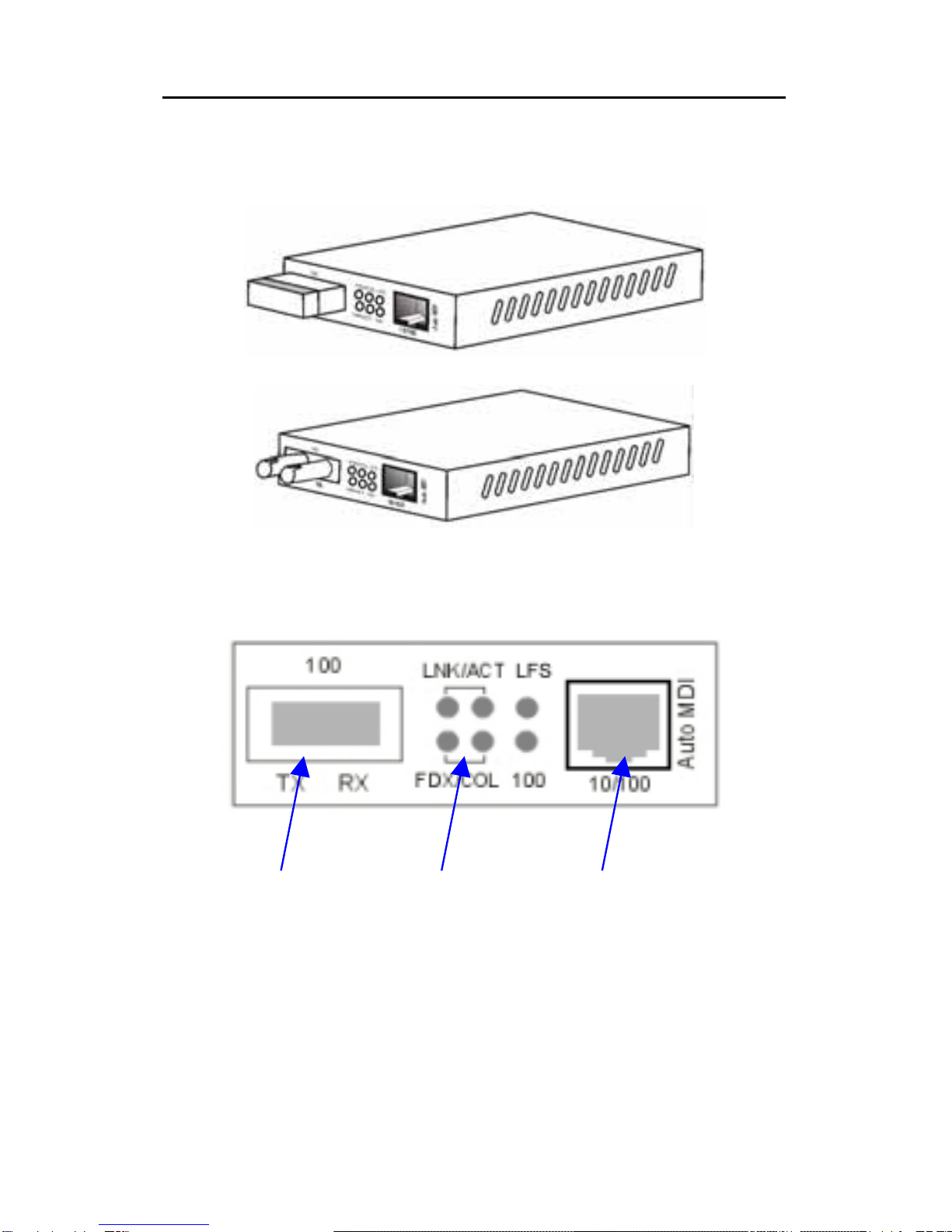
This Converter is equipped with an RJ-45 port and a
fiber optic ST or SC or WDM port. This allows it to
quickly integrate a 10/100Base-TX network into a
100Base-FX (fiber) network.
It features DIP switches for manual half or full duplex
mode configuration on both copper and fiber ports. In
full duplex mode, this Converter has the ability to
support distances of up to 2 kilometers for multi-mode
EX-9543 Enhanced 10/100Base-TX to 100Base-FX Converter
- 6 -
fiber and up to 60 kilometers for long-haul single mode
fiber between a LAN switch, file server or another
networking device.
Converter with SC and RJ-45 Connectors
Converter with ST and RJ-45 Connectors
Front Panel View
Fiber
Port
LED
Indicators
Copper
Port
Table des matières
Autres manuels Expert Convertisseur de média

Expert
Expert EX-9132C-2 Manuel utilisateur

Expert
Expert EX-9132C-2RS485 Manuel utilisateur

Expert
Expert EX952N Series Guide d'installation

Expert
Expert EX-9486C-W Manuel utilisateur

Expert
Expert EX9132C-2-MTCP Manuel utilisateur

Expert
Expert EX9132C-RS485 Manuel utilisateur

Expert
Expert EX-9486C-W Manuel utilisateur


