
EXFO RTU-2 Manuel utilisateur

User Guide
SkyRAN Platform
RTU-2

ii RTU-2
Copyright © 2017–2018 EXFO Inc. All rights reserved. No part of this
publication may be reproduced, stored in a retrieval system or transmitted
in any form, be it electronically, mechanically, or by any other means such
as photocopying, recording or otherwise, without the prior written
permission of EXFO Inc. (EXFO).
Information provided by EXFO is believed to be accurate and reliable.
However, no responsibility is assumed by EXFO for its use nor for any
infringements of patents or other rights of third parties that may result from
its use. No license is granted by implication or otherwise under any patent
rights of EXFO.
EXFO Commerce And Government Entities (CAGE) code under the North
Atlantic Treaty Organization (NATO) is 0L8C3.
The information contained in this publication is subject to change without
notice.
Trademarks
EXFO trademarks have been identified as such. However, the presence or
absence of such identification does not affect the legal status of any
trademark.
Units of Measurement
Units of measurement in this publication conform to SI standards and
practices.
Patents
Feature(s) of this product is/are protected by one or more of: US design
patent D798,171 and equivalent(s) in other countries.
Version number: 2.0.1.1

Contents
SkyRAN Platform iii
Contents
Certification Information ....................................................................................................... vi
1 Introducing the RTU-2 SkyRAN Platform .................................................... 1
Main Features .........................................................................................................................1
LED Indicators Description ......................................................................................................4
Automatic Fan Speed Management ........................................................................................6
Product Registration ...............................................................................................................7
Technical Specifications ...........................................................................................................7
Conventions ............................................................................................................................8
2 Safety Information ....................................................................................... 9
Other Safety Symbols on Your Unit .......................................................................................11
Laser Safety Information .......................................................................................................12
Electrical Safety Information .................................................................................................13
3 Getting Started with Your Unit ................................................................. 17
Preparing for Installation ......................................................................................................17
Installing Your Unit in a Rack ................................................................................................18
Grounding Your Unit ............................................................................................................22
Connecting a Monitoring Device to the Dry Contact Relays ..................................................23
Inserting and Removing Test Modules ..................................................................................27
Connecting RTUe-9110 External Switches to Your Unit .........................................................31
Connecting Your Unit to a Power Source ..............................................................................32
Turning On Your Unit ............................................................................................................40
Turning Off Your Unit ............................................................................................................41
Working With Your Unit for the First Time ............................................................................42
Installing or Upgrading the Applications .............................................................................44
Activating Software Options .................................................................................................46
Installing Third-Party Software on Your Unit .........................................................................48
Protecting your Unit with an Antivirus Software ...................................................................48

Contents
iv RTU-2
4 Setting Up Your Unit ...................................................................................49
Selecting the Startup Applications ........................................................................................49
Setting Date and Time Formats ............................................................................................51
Adjusting the Date, Time and Time Zone ..............................................................................53
Setting Toolbox X Behavior ...................................................................................................58
Configuring the Internet Options .........................................................................................60
Adding Exceptions to the Firewall ........................................................................................63
Connecting to a VPN from Your Unit ....................................................................................67
Reconfiguring the Local Access Ports in LAN/WAN Ports .......................................................73
Setting Other Parameters ......................................................................................................73
5 Working with Your Unit ..............................................................................75
Working with Remote Desktop .............................................................................................77
Working With VNC ...............................................................................................................87
Accessing and Exiting Toolbox X ...........................................................................................88
Starting Module Applications ...............................................................................................89
Understanding Module Statuses ...........................................................................................90
6 Working with Intel Active Management Technology ................................93
Installing the AMT Remote Access Application on a Computer .............................................94
Connecting to Your Unit Remotely With AMT Remote Access ...............................................95
Modifying the IP Address of the Local Access (Management) Ports ....................................101
Changing the AMT Administrator Password .......................................................................103
Managing the AMT User Accounts .....................................................................................105
Turning the Unit On or Off Remotely ..................................................................................110
Performing Other Operations .............................................................................................111
7 Managing Data .........................................................................................113
Viewing Disk Space and Managing Files .............................................................................114
Freeing Up Disk Space with the Disk Cleanup Utility ...........................................................115
8 Maintenance ..............................................................................................117
Connecting Remotely to Your Unit for Maintenance or Troubleshooting ............................117
Managing Windows Updates .............................................................................................118
Recalibrating Your Modules ................................................................................................120
Replacing Fuses ..................................................................................................................120
Recycling and Disposal .......................................................................................................122

Contents
SkyRAN Platform v
9 Troubleshooting ....................................................................................... 123
Solving Common Problems .................................................................................................123
Restoring Your Unit to Normal Operation ...........................................................................126
Accessing the Online Documentation .................................................................................130
Contacting the Technical Support Group ............................................................................132
Viewing System Information ...............................................................................................133
Retrieving the Contact Information ....................................................................................136
Transportation ....................................................................................................................137
10 Warranty ................................................................................................... 139
General Information ...........................................................................................................139
Liability ...............................................................................................................................140
Exclusions ...........................................................................................................................140
Certification ........................................................................................................................140
Service and Repairs .............................................................................................................141
EXFO Service Centers Worldwide ........................................................................................142
Index .............................................................................................................. 143

Certification Information
vi RTU-2
Certification Information
North America Regulatory Statement
This unit was certified by an agency approved in both Canada and the
United States of America. It has been evaluated according to applicable
North American approved standards for product safety for use in Canada
and the United States.
Electronic test and measurement equipment is exempt from FCC part 15,
subpart B compliance in the United States of America and from ICES-003
compliance in Canada. However, EXFO Inc. makes reasonable efforts to
ensure compliance to the applicable standards.
The limits set by these standards are designed to provide reasonable
protection against harmful interference when the equipment is operated in
a commercial environment. This equipment generates, uses, and can
radiate radio frequency energy and, if not installed and used in accordance
with the user guide, may cause harmful interference to radio
communications. Operation of this equipment in a residential area is likely
to cause harmful interference in which case the user will be required to
correct the interference at his own expense.
Modifications not expressly approved by the manufacturer could void the
user's authority to operate the equipment.
European Community Declaration of Conformity
Warning: This is a class A product. In a domestic environment, this product
may cause radio interference in which case the user may be required to
take adequate measures.
The full text of the EU declaration of conformity is available at the following
Internet address: www.exfo.com/library.

SkyRAN Platform 1
1 Introducing the RTU-2 SkyRAN
Platform
Main Features
Your unit, which is part of the SkyRAN solution, offers the following:
Two module slots
Two separated network controllers (one can be used for extended
remote management with Intel Active Management Technology –
AMT)
Six USB 3.0 host ports
Three Ethernet ports (10/100/1000 Base-T)
Installation in 19-inch racks or cabinets (with the provided brackets)
Insertion and removal of the modules without turning off the unit (hot
swap)
Possibility to use with the RTUe-9110 external switch
Windows 10 IoT Enterprise operating system
Multitasking possibilities
Remote access to your unit (via Intel AMT or Remote Desktop)
Direct Web access from your unit
PDF file viewer available from your unit
Easy software updates

Introducing the RTU-2 SkyRAN Platform
2RTU-2
Main Features
USB 3.0 host port
On/Off button (see Turning On Your Unit on page 40
and Turning Off Your Unit on page 41)
LEDs
Front panel
Ethernet (RJ-45) management port for local access
(to connect a portable computer to the unit)
Built-in display (for network /system information)
Module slots

Introducing the RTU-2 SkyRAN Platform
SkyRAN Platform 3
Main Features
Note: You can also connect the unit to AC power with the AC/DC power adapter
sold by EXFO.
DC power inlet (dual feed)
Ethernet (RJ-45) port
(for LAN/WAN connection)
Dry contact relays
(reserved for future use)
Grounding lug
Back panel
Main power switch USB 3.0 host ports
Ethernet (RJ-45) management port
(for local access)
Introducing the RTU-2 SkyRAN Platform
4RTU-2
LED Indicators Description
LED Indicators Description
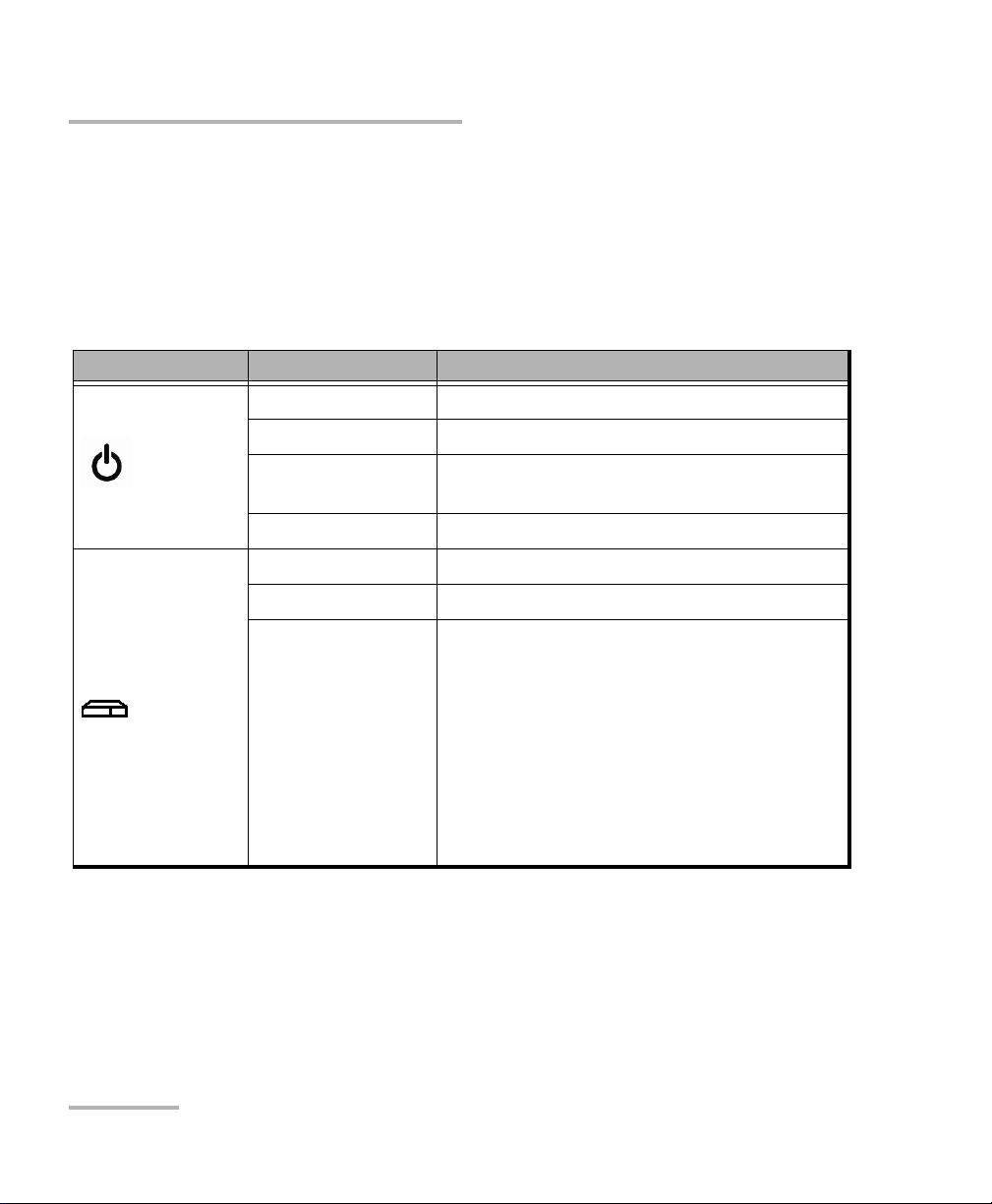
There are LED indicators located on the front panel of your unit, providing
you with information about the power and system statuses.
The table below presents the possible statuses once the initial startup
sequence is complete.
LED Status Meaning
Power
Green Unit is on.
Green, blinking Unit is in Sleep or Hibernation mode.
Yellow One of the unit’s fuses is blown
(see Replacing Fuses on page 120).
Off Unit is off.
Systema
Green The unit is working properly and is ready.
Green, blinking The initialization of the unit is underway.
Yellow Non-critical hardware error detected.
The temperature of the room where the unit
is located could be slightly too low or too
high, or there could be a hardware
malfunction.
Ensure that the temperature falls within the
specified operating temperature range (see
Electrical Safety Information on page 13).
If the problem persists, contact EXFO.
Autres manuels pour RTU-2
3
Table des matières
Autres manuels EXFO Matériel réseau


Manuels Matériel réseau populaires d'autres marques

Matrix Switch Corporation
Matrix Switch Corporation MSC-HD161DEL Manuel utilisateur

B&B Electronics
B&B Electronics ZXT9-IO-222R2 Manuel utilisateur

Yudor
Yudor YDS-16 Manuel utilisateur

D-Link
D-Link ShareCenter DNS-320L Manuel utilisateur

Samsung
Samsung ES1642dc Instructions d'utilisation

Honeywell Home
Honeywell Home LTEM-PV Instructions de montage


