exemys SSE232-LE Manuel utilisateur

SSE232-LE – Serial Server- User’s Manual Exemys
www.exemys.com Rev.11 1

SSE232-LE – Serial Server- User’s Manual Exemys
www.exemys.com Rev.11 2
Exemys Products are in constant evolution to satisfy our customer needs.
For that reason, the specifications and capabilities are subject to change without prior notice.
Updated information can be found at www.exemys.com
Copyright © Exemys, 2007. All Rights Reserved.

SSE232-LE – Serial Server- User’s Manual Exemys
www.exemys.com Rev.11 3
INDEX
INDEX ........................................................................................................................................ 3
1 INTRODUCTION .................................................................................................................. 5
1.1 Purpose of the manual .............................................................................................................. 5
1.2 Product Overview ..................................................................................................................... 5
1.3 Ordering Codes ........................................................................................................................ 6
1.4 Technical Specifications ............................................................................................................. 6
2 INSTALLATION .................................................................................................................... 7
2.1 Connecting the power supply ................................................................................................. 7
2.2 Serial Port Wirings .................................................................................................................... 7
2.2.1 RS-232 serial port Wirings ........................................................................................................................... 7
2.2.2 RS-485 serial port wirings ........................................................................................................................... 8
2.3 Ethernet Connection ................................................................................................................. 9
2.4 LEDs Indicators ........................................................................................................................ 9
3 CONFIGURATION .............................................................................................................. 10
3.1 Network configuration ......................................................................................................... 10
3.2 Configuration Web Page .......................................................................................................... 11
3.3 Operation Modes ................................................................................................................. 11
3.3.1 Server Mode ............................................................................................................................................. 12
3.3.2 Client Mode .............................................................................................................................................. 13
3.4 Common parameters .............................................................................................................. 14
3.4.1 Serial Port Configuration ........................................................................................................................... 14
3.4.2 Packaging .................................................................................................................................................. 15
3.4.3 Inactivity.................................................................................................................................................... 15
4 TYPICAL USES .................................................................................................................... 16
4.1 Connection with Serial Port Redirector ................................................................................. 16
4.2 TCP Point-to-Point Tunnel ........................................................................................................ 16
4.3 UDP Point-to-Point Tunnel ....................................................................................................... 17
4.4 UDP Point-Multipoint Tunnel .................................................................................................... 17
4.5 UDP Multipoint Tunnel ............................................................................................................ 18
5 MONITORING ................................................................................................................... 19
6 ADMINISTRATOR CONFIGURATIONS ................................................................................. 21
6.1 Password ............................................................................................................................. 21
6.2 Restart .................................................................................................................................. 21
6.3 Factory Reset ......................................................................................................................... 21
6.4 Firmware Update .................................................................................................................... 21
7 SNMP ............................................................................................................................... 23
7.1 Configuration ....................................................................................................................... 23
7.2 MIB ...................................................................................................................................... 23

SSE232-LE – Serial Server- User’s Manual Exemys
www.exemys.com Rev.11 4
8 ETHERNET COMMAND CONSOLE ....................................................................................... 24
8.1 Supervision and control ........................................................................................................ 24
8.2 Monitoring ............................................................................................................................ 24
A. EXEMYS DEVICE LOCATOR .................................................................................................... 28
B. PACKAGING RULES ............................................................................................................... 30
B.1 Silence ........................................................................................................................................ 30
B.2 Termination ................................................................................................................................. 30
C. COMMAND CONSOLE ........................................................................................................... 31
D. FACTORY SETTINGS .............................................................................................................. 33

SSE232-LE – Serial Server- User’s Manual Exemys
www.exemys.com Rev.11 5
1 INTRODUCTION
1.1 Purpose of the manual
This manual provides instructions for easy and quick installation and operation of the
SSE232-LE serial server. The manual starts with a general description of the product, and then provides
instructions for the correct hardware installation. Configuration and operation of the device is detailed
below.
Acronym Description
ARP
Address Resolution Protocol
BPS
Bits per second
HTTP
Hypertext Transfer Protocol
IP
Internet Protocol
LAN
Local Area Network
PC
Personal Computer
TCP
Transmission
Control Protocol
DHCP
Dynamic Host Configuration Protocol
GND
Ground (Reference)
1.2 Product Overview
SSE232-LE is a serial interface RS-232 / RS-485 to Ethernet converter and vice versa. It allows the access,
through Ethernet, to devices such as alarm panels, data acquisition, PLCs or any serial interface device.
The device is the interface between the serial communication device and the Ethernet network, acting as
a transparent converter.
SSE232-LE is then, a complete solution for Ethernet connectivity of devices with serial port (RS-232 / RS-
485).

SSE232-LE – Serial Server- User’s Manual Exemys
www.exemys.com Rev.11 6
1.3 Ordering Codes
The complete product ordering code is:
Ordering Code Description
SSE232-1B0-00-LE
(1) serial port RS-232/RS-485
Ethernet port 10/100 Mbps
1.4 Technical Specifications
Technical Specifications
Network Protocols TCP / IP, UDP / IP, DNS, http, DHCP, ICMP, ARP, SNMP.
Network Port Ethernet 10/100 Mbps, RJ45 Connector
Serial Protocols Transparent
Serial Port (1) RS-232 DB9 Male Connector/
(1) RS-485 In Terminal blocks
Devices supported Any serial device with RS-232 / RS-485 port
Flow Control RTS/CTS
Mounting DIN Rail Mounting
Administration HTTP Served password protected
Serial Command Console through RS-232 port
Firmware update Through configuration web page
Indicators Status LED
Data/Link LED
Size / Weight 115mm x 40mm x 95mm (Height x Width x Length) 150gr.
Power Supply 10 a 30 VDC, 120mA max.
Temperatures Operation Temperature: -5°C to 65°C
Storage Temperature: -40°C a 75°C
Warranty 1 year
Technical Support included

SSE232-LE – Serial Server- User’s Manual Exemys
www.exemys.com Rev.11 7
2 INSTALLATION
2.1 Connecting the power supply
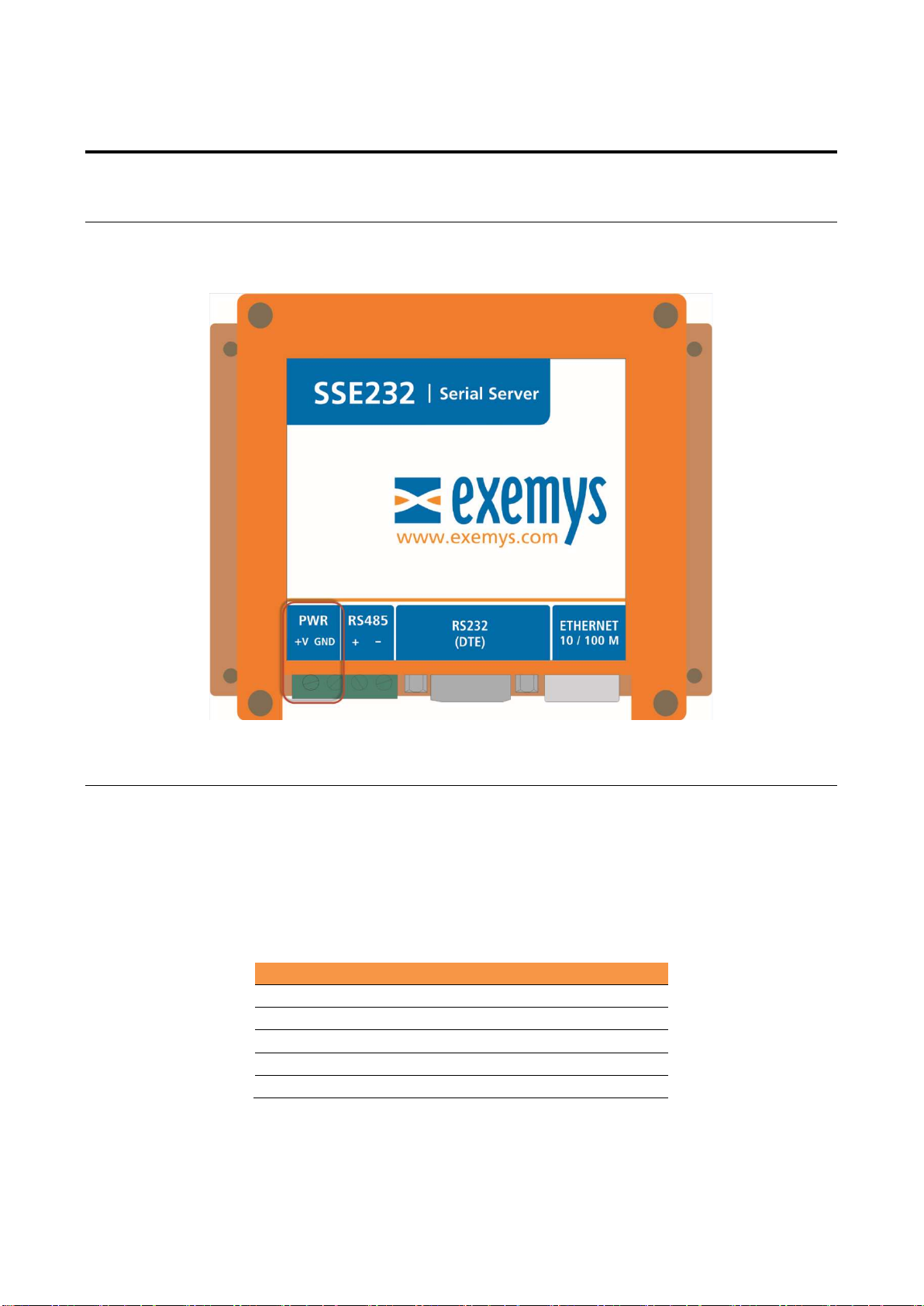
SSE232-LE allows a power supply from +10 to 30 VDC. Positive power supply must be connected to
terminal N° 1 (+ V) and negative power supply to terminal N° 2 (GND) as shown in the following figure:
2.2 Serial Port Wirings
2.2.1 RS-232 serial port Wirings
SSE232-LE has a DB9 Male connector (DTE) and includes hardware flow control (RTS and CTS). To
connect the device RS232 serial port to PC serial port or any other serial device, it must be connected as
can be shown in the following figure. You should consider SSE232-LE is a DTE device, which means it
must cross wire with those of the PC.
Name Description Sense
2 RxD IN
3 TxD OUT
7 RTS OUT
8 CTS IN
5 GND -

SSE232-LE – Serial Server- User’s Manual Exemys
www.exemys.com Rev.11 8
2.2.2 RS-485 serial port wirings
To connect the device RS485 serial port to PC serial port or any other serial device, it must be connected
in the terminals as can be shown in the following figure.

SSE232-LE – Serial Server- User’s Manual Exemys
www.exemys.com Rev.11 9
2.3 Ethernet Connection
RJ45 connector is for the Ethernet network. It is located next to the DB9 connector. The device has a
10/100 Mbps connection.
2.4 LEDs Indicators
SSE232-LE has two LEDs indicators on the Ethernet connector, one green and one yellow. The yellow one
shows the connection to the network, while the green one indicates the status of TCP / UDP connections.
Green Yellow Description
- ½ second on and ½ second off. Waiting for serial console access.
-
90% of a second off and the
remaining time on.
Device
has an IP address and a connection
bearer link. This is the normal operating state
- 10% of a second off and the
remaining time on.
It has no IP address and
cannot
find the DHCP
server. It will search the DHCP server every 60
seconds.
-
flashing
very fast
Ethernet
Cable disconnected
On
-
TCP connection set.
Flashing off
-
Transmission or reception of data
.
Flashing
alternatively with
the Yellow LED
Flashing alternatively with the
Green LED Critical Failure. Contact technical support

SSE232-LE – Serial Server- User’s Manual Exemys
www.exemys.com Rev.11 10
3 CONFIGURATION
3.1 Network configuration
SSE232-LE configuration is done through a configuration web page connecting the device to the Ethernet
network on which it is going to work.
To access to the configuration web page, you must connect SSE232-LE to ethernet network and install
Exemys Device Locator
software.
Download the
Exemys Device Locator
:
http://www.exemys.com/beta/software/edl_setup.exe
Once the device is connected, this will search for a DHCP server to obtain an IP address automatically. We
will search for it using the
Exemys Device Locator
software, which allows us to search, identify and
configure the basic network parameters. The rest of the configuration is done from the configuration web
page of the device.
In case you do not have a DHCP server, the
Exemys Device Locator
will find the device with IP
address 0.0.0.0, as shown in the figure below.
If you do not have a DHCP server, give it an IP address using the
Exemys Device Locator
The
Exemys Device Locator
buttons are:
Query Network: Searches for all connected EXEMYS devices on the same network.
Properties ...: Configuring Network Parameters (IP Address, Network Mask, Gateway)
Configure...: Direct access to the configuration web page.
For more details on the
Exemys Device Locator
operation, see Appendix A.
Autres manuels pour SSE232-LE
2
Table des matières
Autres manuels exemys Serveur