
EverFocus External I/O Box Manuel utilisateur

External I/O Box
*All images presented in this document are for example only. Please visit EverFocus regional
Websites for detailed ordering information.
*Information contained in this document is subject to change without notice.
1. Introduction
The External I/O Box is designed for connecting to the Alarm I/O and
RS-232 devices for mobile DVRs.
2. Packing List
•
External I/O Box x 1
•
Power Cable x 1
•
Screw Pack x 1 (with 4 screws and anchors)
•
Terminal Block x 5 (for Alarm In / Alarm Out / RS-232)
•
Quick Installation Guide x 1
3. Specification
Model No. External I/O Box
Power Connectivity Port 1
LED Box Connectivity Port 1
USB2.0 Port 1
Alarm In / Out 6 / 2
RS-232 3
Dimensions (L x W x H) 123.5 x 73.5 x 19.6mm / 4.9” x 2.9” x 0.8”
Weight 200g / 0.44lb
Working Temperature -40°C~55°C / -40°F~131°F
Relative Humidity < 90%
Certificates CE, FCC
External I/O Box
PN: 46051EMV402001A
4. Mounting
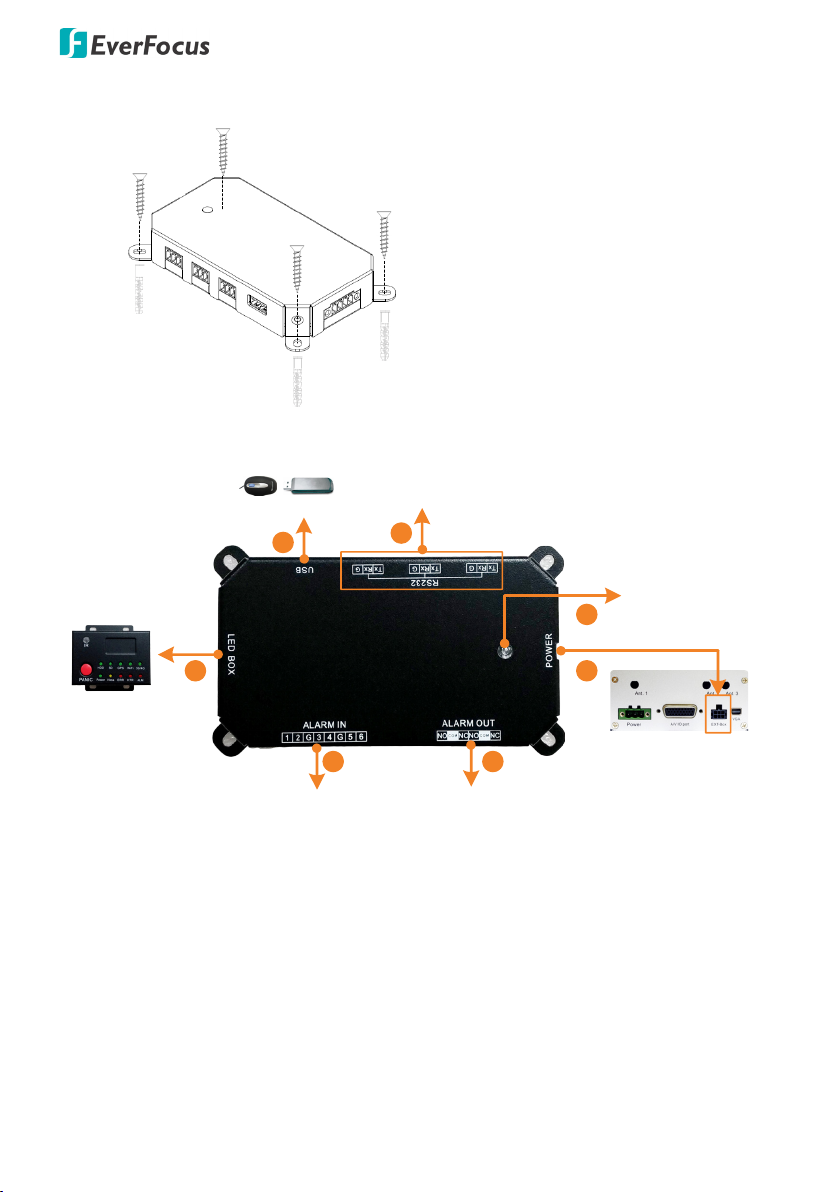
Screw
Anchor
Mount the External I/O Box onto a
surface using the supplied screws.
Use the anchors if necessary.
5. Connection
MDVR
Power LED
LED Indicates Box
1
23
4
56
7
RS-232
Alarm Output (NO / NC)Alarm Input 1~6
Mouse / USB Storage
(Optional)
1. Connect to the EXT-Box port on the MDVR using the supplied Power
Cable. The External I/O Box can be powered by the MDVR.
2. Connect to the Alarm-Out devices using the supplied Terminal Block.
3. Connect to the Alarm-In devices using the supplied Terminal Block.
4. Optionally connect to the LED Indicates Box to monitor MDVR status.
5. Connect to a mouse for operating the OSD menu of MDVR; or connect
to a USB storage device for backing up recording files.
6. Connect to the RS-232 devices using the supplied Terminal Block.
7. When power is supplied, the Power LED will light in red.
Table des matières
Autres manuels EverFocus Système d'E/S


