Engine LanDrive Manuel utilisateur

1
LanDrive
User Manual
And Installation Guide

2

3
Table of Contents
Overview ..................................................................................................................................................................5
A First Glance..................................................................................................................................................... 5
Minimum System Requirements................................................................................................................5
Hardware Installation ....................................................................................................................................6
Connecting the LanDrive to Your Computer .........................................................................................7
Installing the drive on Mac OS X ............................................................................................................ 7
Installing the drive on Windows ME/XP/Vista/7...........................................................................7
Installing the drive on Windows 98 ..................................................................................................... 7
Connecting the drive to your Network................................................................................................7
Configuring the LanDrive..............................................................................................................................8
Configuring the LanDrive (Other Operating Systems)..................................................................9
Configuring your LanDrive via the Web Interface ............................................................................... 10
Status.................................................................................................................................................................. 10
System Information ................................................................................................................................. 10
Network Information.............................................................................................................................. 11
Service Information................................................................................................................................. 11
Disk Information....................................................................................................................................... 11
LanDrive IP Configuration ......................................................................................................................... 12
Maintenance.................................................................................................................................................... 13
SMB Server....................................................................................................................................................... 14
Configuring a Samba Server ................................................................................................................. 14
Enabling Samba for Windows 95/98/ME Computers ............................................................... 16
Configuring Your Windows Network ............................................................................................... 16
Accessing the Samba Server from Windows 95/98.................................................................... 19

4
Accessing the Samba Server from Windows ME.......................................................................... 20
Setting up Windows XP Computers ....................................................................................................... 21
FTP Server........................................................................................................................................................ 26
Configuring an FTP Server.................................................................................................................... 26
Connecting to FTP via Internet Explorer......................................................................................... 28
BitTorrent ........................................................................................................................................................ 29
Downloading Files via BitTorrent...................................................................................................... 29
Configuring BitTorrent........................................................................................................................... 30
Print Server...................................................................................................................................................... 31
Media Server ................................................................................................................................................... 34
Sharing Media with an Xbox 360........................................................................................................ 35
Sharing Media with a Playstation 3................................................................................................... 37
Sharing Media with iTunes ................................................................................................................... 39
Disk Utility ....................................................................................................................................................... 40
Frequently Asked Questions.......................................................................................................................... 41

5
Overview
The LanDrive enclosure adds the convenience of network-attached storage to your home or
small business, providing you with a central storage location for your data and allowing
you to access your data from any computer across your network.
A First Glance
The LanDrive includes the following optional and required components:
LanDrive Unit
LanDrive Vertical Stand
Securing screws
Network cable (optional)
Power Adapter
Minimum System Requirements
Safari/Mozilla/Internet Explorer 5+/Netscape 6+
Windows 98/ME/2K/XP/Vista/7 or MacOS 10+ or Linux
3.5” SATA Hard Drive, FAT32 (required)

6
Hardware Installation
Step 1 –Remove the two screws on the back
of the enclosure.
Step 2 –Loosen the four screws on the
surface of the unit.
Step 3 –The plastic bracket should slide out
effortlessly. Ensure that your hard drive
jumper setting is configured to Master.
Insert your hard drive. Connect the SATA
and power cables.
Step 4 –Secure your hard drive to the
bracket with the four screws included in the
package.
Step 5 –Re-insert the bracket and secure all
the screws that were previously removed.

7
Connecting the LanDrive to Your Computer
The LanDrive is a multifunctional hard drive enclosure. In addition to being a network
storage device, you can also use it as a standalone external hard drive.
Installing the drive on Mac OS X
Driver installation is not required for systems using Mac OS 10.1.2 or higher. Simply
connect the LanDrive using the included USB cable and access the data by clicking the
“Untitled” HDD icon on your Desktop.
Installing the drive on Windows ME/XP/Vista/7
Driver installation is not required for Windows ME or higher. Simply connect the LanDrive
using the included USB cable and access the data via “My Computer” on your Desktop.
Installing the drive on Windows 98
To utilize the drive via USB on Windows 98, you must install the drivers from the included
CD. Be sure to install the device drivers before connecting the drive to your computer. After
completing the driver installation, reboot your computer before connecting the LanDrive.
Note: You can also access the data in the LanDrive by connecting it to
your computer via Ethernet. The LanDrive will have a default IP of
169.254.0.1 when connected directly.
Connecting the drive to your Network
Plug the LanDrive into a wall outlet or power strip. Connect one end of the network cable to
the LAN port on the back of the LanDrive and the other end to a port on your hub, switch,
or router.
Note: The Ethernet port on the LanDrive is Auto-MDI/MDIX, which
means you can connect it using either patch or crossover cable.

8
Configuring the LanDrive
The LanDrive features a web-based control interface to manage your settings. If you are
using an operating system other than Windows, please refer directly to the next section,
entitled “Other Operating Systems.”
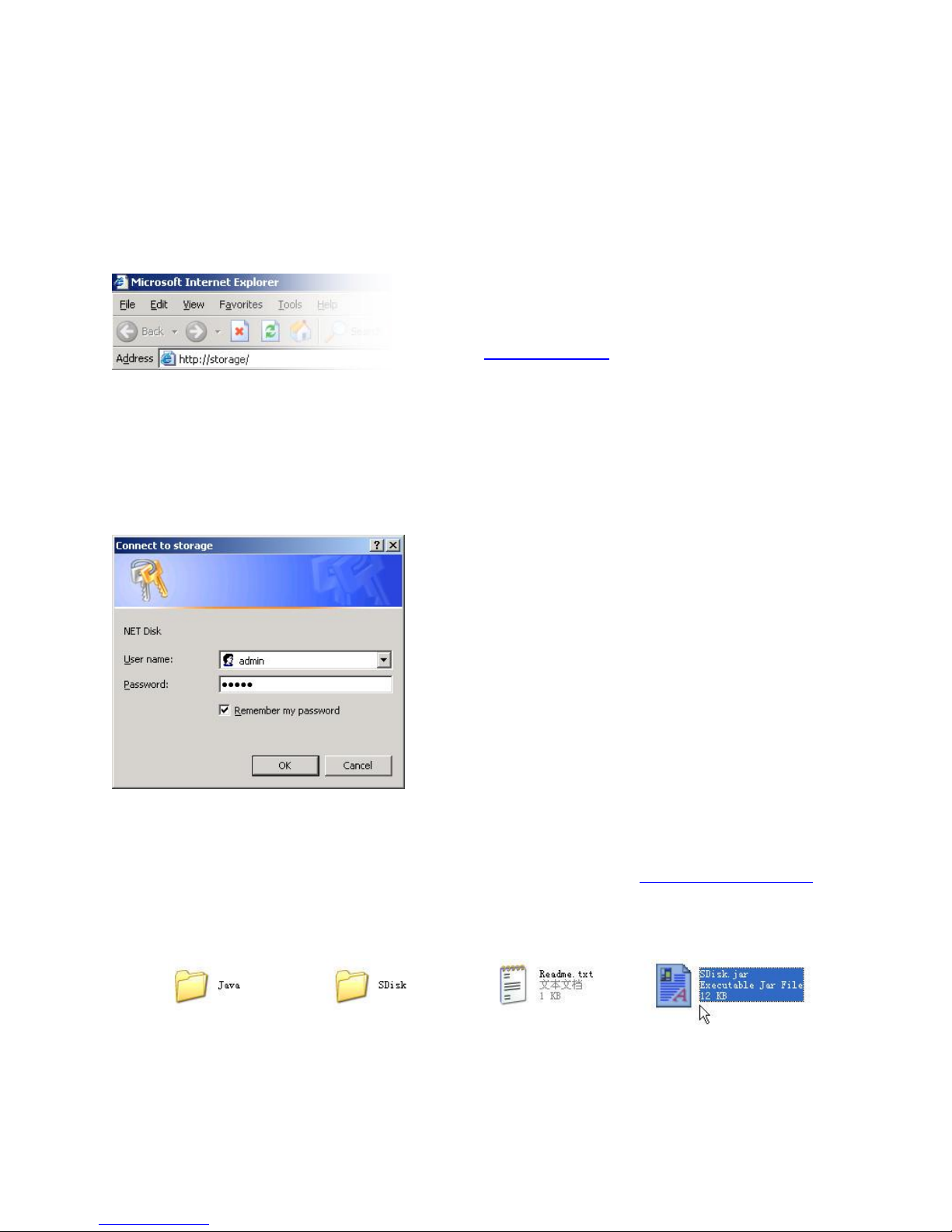
Step 1 –Open your web browser. To
connect to the web interface, visit
http://storage/ (If you have more than once
device, use http://storage-XXXX/). You can
also connect directly to the LanDrive using
its IP address.
Step 2 –Enter the default credentials:
Login: admin / Password: admin
If you are having trouble accessing the LanDrive via the URL or IP address:
1. Install the latest version of the Java Runtime Environment (http://www.java.com).
2. Open the included CD and double-click the file named “Sdisk.jar”

9
3. Connect to your LanDrive at http://10.130.11.229 or http://STORAGE-1010
Configuring the LanDrive (Other Operating Systems)
To access the LanDrive from a non-Windows operating system, input the IP address of the
LanDrive in the browser URL address bar. If you do not know the IP address of the
LanDrive, connect it directly to your computer and then visit the default IP address:
http://169.254.0.1.

10
Configuring Your LanDrive via the Web Interface
Once you have successfully logged into the LanDrive, you will see the following screen:
Status
The status tab provides detailed information about your System, Network, Service, and
Disk.
System Information
Host Name –This is the name of your LanDrive. The default value is STORAGE-XXXX.
Storage devices need unique names so that they can identify and communicate with one
another. It’s best to keep host names short (fifteen characters or less) and easy to
recognize. We recommend using only alphanumeric characters in the Host name. The host
name cannot consist entirely of numbers, nor can it contain spaces or special characters.
Table des matières
Autres manuels Engine Enceinte