
enertexbayern Enertex KNX IP Secure Router Guide rapide


1164-EnertexKNXIPSecureRouter_US-2.odt, 201 -03-25 Seite 2 von 1
Note
The content of this document may not be reproduced, distributed, distributed or stored in any form
whatsoever, in whole or in part, without the prior written consent of Enertex® Bayern GmbH.
Enertex® is a registered trademark of Enertex® Bayern GmbH. Other product and company names
mentioned in this manual may be trademarks or trade names of their respective owners.
This manual is subject to change without notice or announcement and does not claim to be complete or
correct.
Inhalt
Security Notes.............................................................................................................................................. 3
Assembly and connection...........................................................................................................................3
Comissionin ................................................................................................................................................ 3
Boot ......................................................................................................................................................... 3
Displays.................................................................................................................................................... 3
Reset........................................................................................................................................................ 4
Functional Overview.................................................................................................................................... 4
ETS Parameter.............................................................................................................................................. 4
Terms....................................................................................................................................................... 4
ETS 5.6.6 and ETS 5.7.0......................................................................................................................... 5
Version requirements...............................................................................................................................................5
Special behavior ......................................................................................................................................................5
Topology................................................................................................................................................... 5
Device Properties..................................................................................................................................... 7
General.....................................................................................................................................................................7
IP Properties ............................................................................................................................................................7
Device specific parameters...................................................................................................................... 8
General.....................................................................................................................................................................8
Special Functions.....................................................................................................................................................8
Behavior of the KNX side...................................................................................................................................8
Standard tunnel preferred IP.............................................................................................................................
Routing.............................................................................................................................................................11
Physical address filter............................................................................................................................................11
Group address filter................................................................................................................................................11
Standard...........................................................................................................................................................12
Extended Group Address Filter.......................................................................................................................13
Telnet........................................................................................................................................................... 15
Latest documentation and Software........................................................................................................18
Specification............................................................................................................................................... 18
Open Source Software...............................................................................................................................19
LWIP ...................................................................................................................................................... 19
Enertex® Bayern GmbH – Ebermannstädter Straße 8 - 1301 Forchheim - Deutschland - [email protected]e

1164-EnertexKNXIPSecureRouter_US-2.odt, 201 -03-25 Seite 3 von 1
Security Notes
•Installation and assembly of electrical equipment may only be carried out by qualified
electricians.
•When connecting KNX / EIB interfaces, KNX ™ training is required.
•Failure to observe this instruction may result in damage to the unit, fire or other hazards.
•This guide is part of the product and must remain with the end user.
•The manufacturer is not liable for costs or damages caused to the user or third parties
by the use of this device, misuse or interference of the connection, malfunctions of the
device or of the subscriber devices.
•The opening of the housing, other unauthorized modifications and / or conversions to
the device will void the guarantee!
•The manufacturer shall not be liable for any inappropriate use.
Assembly and connection
To operate the Enertex® KNX IP Secure Router, you need:
•A 10/100 Mbit compatible Ethernet connection
•KNX / EIB bus connection
Comissionin
Boot
When powered the display shows the product name. The default for the network is DHCP.
The boot time is about 2 seconds. During this time, the green / red / yellow LEDs operate as
running light for a short time. At the end of the boot process, the IP address of the device is
shown in the display.
If the IP address assignment is done via DHCP server, the boot time is extended accordingly.
As soon as "KNX Ready" appears in the display, the device can be addressed via the bus and,
for example, alternatively be programmed via a USB interface. The green LED flashes every
second with a duty cycle of 1:30.
Displays
After one minute, the display turns off automatically.
To turn this on again, the DISPLAY button on the front panel must be pressed briefly. When the
display is activated, pressing the DISPLAY button will scroll through various pages of
information.
Page 1 shows the firmware version, IP address, physical address, serial number, bus voltage
and used tunnel connections.
Page 2 shows all IP settings, as well as the boot time.
Page 3 gives information about the telegram load.
Page 4 shows the FDSK as long as the device has not been set to the secure state.
There are three LEDs on the front. The green LED flashes every second with a duty cycle of
1:30 and indicates ready for operation. The red LED indicates the programming mode, the
yellow LED indicates bus activity.
In the LAN socket two further LEDs are installed. The green indicates a connection to another IP
Enertex® Bayern GmbH – Ebermannstädter Straße 8 - 1301 Forchheim - Deutschland - [email protected]e

1164-EnertexKNXIPSecureRouter_US-2.odt, 201 -03-25 Seite 4 von 1
device or switch ("Link"), the yellow LED shows the IP data transfer.
Reset
If the device is to be reset to the factory settings, the PROG button on the front panel must be
pressed for 10 seconds. After this time, the red LED starts to flash - then the PROG key can be
released and the device carries out the reset to the delivery condition.
Functional Overview
The device has the following functions:
•KNX IP Secure
◦Eight independent KNXnet / IP tunnel connections
◦Communication via TCP or UDP KNX IP routing for communication between KNX
lines, areas and systems
◦KNX IP routing in encrypted (secure) mode.
◦KNX IP tunneling in encrypted (secure) mode.
◦Telegram forwarding and filtering according to physical address
◦Telegram forwarding and filtering according to group address with up to 62 filter
blocks
•Displays
◦LED displays for KNX communication, Ethernet communication and programming
mode
◦Power indicator
◦OLED display for status messages, parameter displays etc.
•Special functions
◦Configuration via ETS and Telnet
◦SNTP server
◦Measurement of the TP bus voltage (Telnet, OLED display)
◦Maximum TP APDU packet length of the KNX bus (248 bytes)
◦Maximum TP packet length adjustable (Telnet) between 55 and 248 bytes (APDU)
◦Simulation of UDP tunnels for ETS communication (Telnet)
•Performance
◦Specification of a max. TP data rate for writing KNX telegrams
◦Buffering up to 256 telegrams per tunnel (2048 in total) in the device on the IP side
◦Buffering up to 1024 telegrams for telegrams from IP to TP
ETS Parameter
Terms
Encryption, encrypted If devices send data information via the TP bus or IP network, they are
generally readable by third parties. These only require access to the TP bus or IP network for
reading. Encryption of the data in this context means that the contents of the telegrams are no
longer to be interpreted if the encryption parameters (for example passwords) are unknown.
Enertex® Bayern GmbH – Ebermannstädter Straße 8 - 1301 Forchheim - Deutschland - [email protected]e

1164-EnertexKNXIPSecureRouter_US-2.odt, 201 -03-25 Seite 5 von 1
Key, Key Parameter A series of numbers known only to the ETS project. These numbers are
used to transform the data in both directions: encryption and decryption.
FDSK (Factory Default Setup Key) The initial factory key. This key is used when
commissioning the initial programming. A new key is loaded into the device, whereby this
process is encrypted with the FDSK. The FDSK key is then no longer valid. It is reactivated only
when resetting to factory settings.
Backbone For IP routers, this is always the IP network.
Multicast An IP address in the network over which all the routers of a backbone communicate.
Tunnel connections do not need this address. Multicast connections are always established with
the UDP protocol. Unlike TCP communication, an UDP telegram can always be lost. This is e.g.
for WLAN connections very likely. Therefore, the routing backbone should always be realized
with an Ethernet cable connection, as this is almost 100% transmission safe.
Backbonekey The routing protocol communicates in secure mode with encrypted telegrams.
The key for encryption must be the same for all participants and is loaded into the device. The
ETS generates the necessary backbone key on its own.
Tunnellin A KNX point-to-point connection on the TCP / IP network, which is established with
UDP or TCP protocol. Tunneling communication is reliable and has incorporated a link layer for
that purpose. Therefore independent of the ethernet connection, e.g. Cable or WLAN, and
regardless of the TCP / IP protocol (UDP or TCP), no data is lost. With UDP, however, the
restriction is that the data link layer works with a one-second timeout. For Enertex devices, this
timeout can be adjusted in the advanced setup.
Telnet A simple TCP server on port 23 that enables direct text-based communication with the IP
device. Telnet is a de facto standard used at the window level, e.g. with "Putty" is addressed.
Secure Mode If the device is parameterized via the ETS so that the communication is only
encrypted, this is referred to as secure mode.
Plain Mode If the device is parameterized via the ETS so that the communication is only
unencrypted, this is called unsecured mode.
ETS 5.6.6 and ETS 5.7.0
Version requirements
For error-free operation of the devices in secure mode, ETS 5.7.x or higher is required.
In plain mode, the device can basically be programmed as of ETS 5.6.6. Although the secure
mode can be parameterized, it is not fully implemented in this version. If the device is therefore
to be operated secure, we recommend working with version 5.7 or higher.
Special behavior
If you program the individual address in the ETS 5.6.6 with its own nd a tunnel connection, the
ETS will throw an error message at the end. This is to be ignored, the assignment of the address
has nevertheless been made.
If no tunnel addresses are assigned in the application, all tunnels are set by the ETS to
15.15.255. Communication via the tunnel connection can then be considerably disturbed or not
possible.
If the device is integrated in a secure project, the ETS saves the parameterization of this
particular device including secure parameters. If the device is reset to factory settings, the ETS
(5.6 or 5.7) only addresses the device in encrypted form. Therefore, communication with the
ETS can no longer be established. In this case, only deleting the application and restarting the
ETS will help.
If an update of Windows runs in the background, strange phenomenon can occasionally occur
with the communication between the device and the ETS. In this case, wait for the end of the
update and restart Windows.
Topolo y
Enertex® Bayern GmbH – Ebermannstädter Straße 8 - 1301 Forchheim - Deutschland - [email protected]e

1164-EnertexKNXIPSecureRouter_US-2.odt, 201 -03-25 Seite 6 von 1
To insert the router into an ETS project, it must have an IP backbone. Example: the following
ETS topology:
Figure 1: Topology (left) and properties of the backbone
Lines:
1: Backbone Medium IP
1.1: Line Medium TPium TP
In the Properties Diagram of the Backbone (NOTE: For this click on Topology, directly above
"Dynamic Folders", see Figure 1), you will find the settings for the Multicast of the Backbone.
Network latency (see Figure 1) can be changed if the routing is over a large distributed system.
In this case, increase the time constant.
The device is parameterized with the ETS 5.6.6 or higher. The KNX IP Secure Router supports
up to eight KNX (Secure) IP tunnel connections and can be used as a line or area coupler.
Enertex® Bayern GmbH – Ebermannstädter Straße 8 - 1301 Forchheim - Deutschland - [email protected]e

1164-EnertexKNXIPSecureRouter_US-2.odt, 201 -03-25 Seite 7 von 1
Device Properties
General
Figure 2: Properties of the device
Name Any name can be assigned, max. 30 characters
Secure Comissionin If activated, the encryption is active for commissioning: all parameters
are then transmitted in encrypted form, although e.g. Tunnel connections are still unencrypted.
Secure Tunnellin If activated, the tunnel connections can only be established via KNX Secure
Tunneling.
IP Properties
Abbildung 3: IP Einstellungen des Geräts
Obtain an IP address automatically The device requires a DHCP server for IP address
assignment
Enertex® Bayern GmbH – Ebermannstädter Straße 8 - 1301 Forchheim - Deutschland - [email protected]e

1164-EnertexKNXIPSecureRouter_US-2.odt, 201 -03-25 Seite 8 von 1
Use a static address The user specifies the IP settings.
Comissionin Password A password from which the ETS generates a key. This is the key to
secure commissioning (see above).
Authentication Code With the authentication password, the user proves that he has access to
the project.
MAC Address Is a device property
Multicast Address Is given by the backbone configuration (see Figure 1).
Device-specific parameters
General
Figure 4: General settings of the device
Name Options Description
(Text) The ETS has manufacturer-
independent uniform parameter
dialogs for various settings. To
simplify the application, a note text is
displayed here.
Enable Special Functions off/on Enertex® devices offer special
functions to ensure a maximum of
flexibility.
Special Functions
Behavior of the KNX side
Enertex® Bayern GmbH – Ebermannstädter Straße 8 - 1301 Forchheim - Deutschland - [email protected]e

1164-EnertexKNXIPSecureRouter_US-2.odt, 201 -03-25 Seite von 1
Figure 5: Behavior of the KNX side
Name Options Description
ACK for every telegram off/on The router acknowledges each
telegram, even if it does not forward
this telegram (TP only)
ACK for routed telegram only off/on The router only confirms the
telegrams that it forwards (TP only)
Repeat routed telegrams if not
ACKed
off/on The router repeats unconfirmed
individually addressed telegrams
(TP only)
Inhibit programming from TP
side
off/on See parameter dialog
Max. number of telegrams to
KNX TP
5 .. 50 See parameter dialog
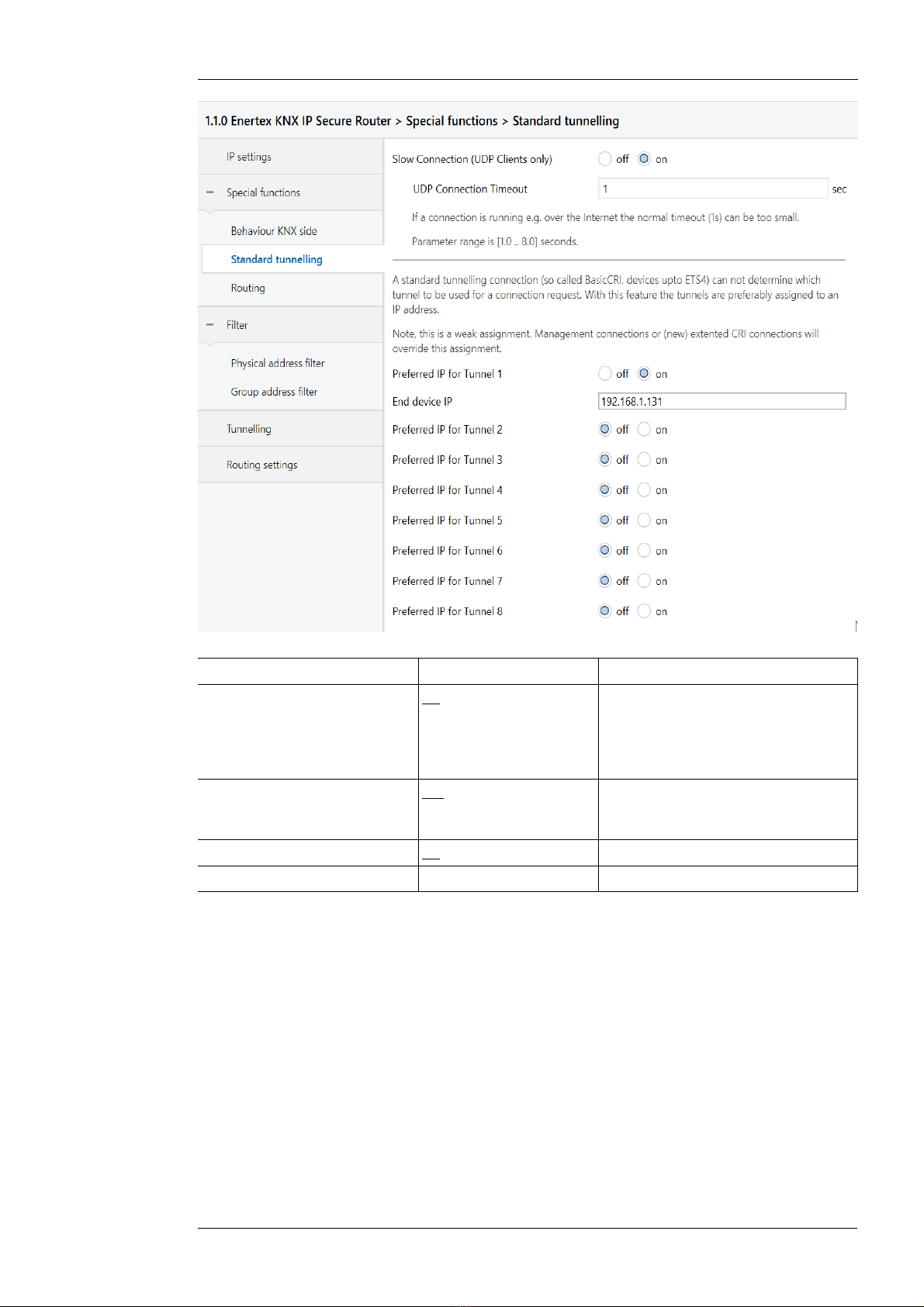
Standard tunnel preferred IP
Enertex® devices offer the possibility for standard tunnel connections (before 201 ) to assign
each of these tunnel connections to an IP address. In the analysis of group telegrams, this
makes it easier to assign the telegrams to the sender which "sits" behind the tunnel, as e.g.
Visualizations or smartphone apps.
Note:
This assignment can be resolved at any time by the ETS or a new so-called extended tunnel
connection (as of 201 ).
Enertex® Bayern GmbH – Ebermannstädter Straße 8 - 1301 Forchheim - Deutschland - [email protected]e
1164-EnertexKNXIPSecureRouter_US-2.odt, 201 -03-25 Seite 10 von 1
Figure 6: Preferred IP for Tunnelling
Name Options Description
Slow Connection off/on The tunnel connections over UDP
are controlled by default with a
connection timeout of 1 second.
This may be too short for
connections over the Internet.
UDP Connection Timeout 1 ,0 ... 8,0 sec Tunnel X should preferably be used
for communication with the
parametrized IP address.
Preferred IP for Tunnel X off/on
End device IP (IP-V4 Address)
Enertex® Bayern GmbH – Ebermannstädter Straße 8 - 1301 Forchheim - Deutschland - [email protected]e
Table des matières
Autres manuels enertexbayern Routeur réseau

Manuels Routeur réseau populaires d'autres marques


NETGEAR
NETGEAR FS526T - Switch Manuel utilisateur

Korenix
Korenix JetNet 5710G Series Manuel utilisateur

Automated Logic
Automated Logic ZN551 Manuel du propriétaire

Cisco
Cisco ASR 1000 Series Manuel de l'opérateur

EnGenius
EnGenius ESR-9710 Manuel utilisateur

Cisco
Cisco 805 Series Instructions d'utilisation et de sécurité