
Energy Local Home Hub Manuel utilisateur

1
Home Hub & Smart Plug Setup Guide
Contents
What’s in the box? 2
Setting up the Home Hub 3
Ethernet Setup (Recommended) 3
WiFi Setup 3
Working with the Home Hub 7
Exploring your Home Hub Dashboard 10
Login with your Energy Local online account 10
Setting up your WiFi Smart Plug 15
Failed Connection 16
Device pairing on the hub 16
Scheduling the Smart Plug 18
Important: If you have configured guest accounts on your router do not use these
to connect your Home Hub or Power Plug as they usually do not provide local
network access. In addition, please ensure the Home Hub and all Smart Plugs are
connected to the same WiFi network.
2
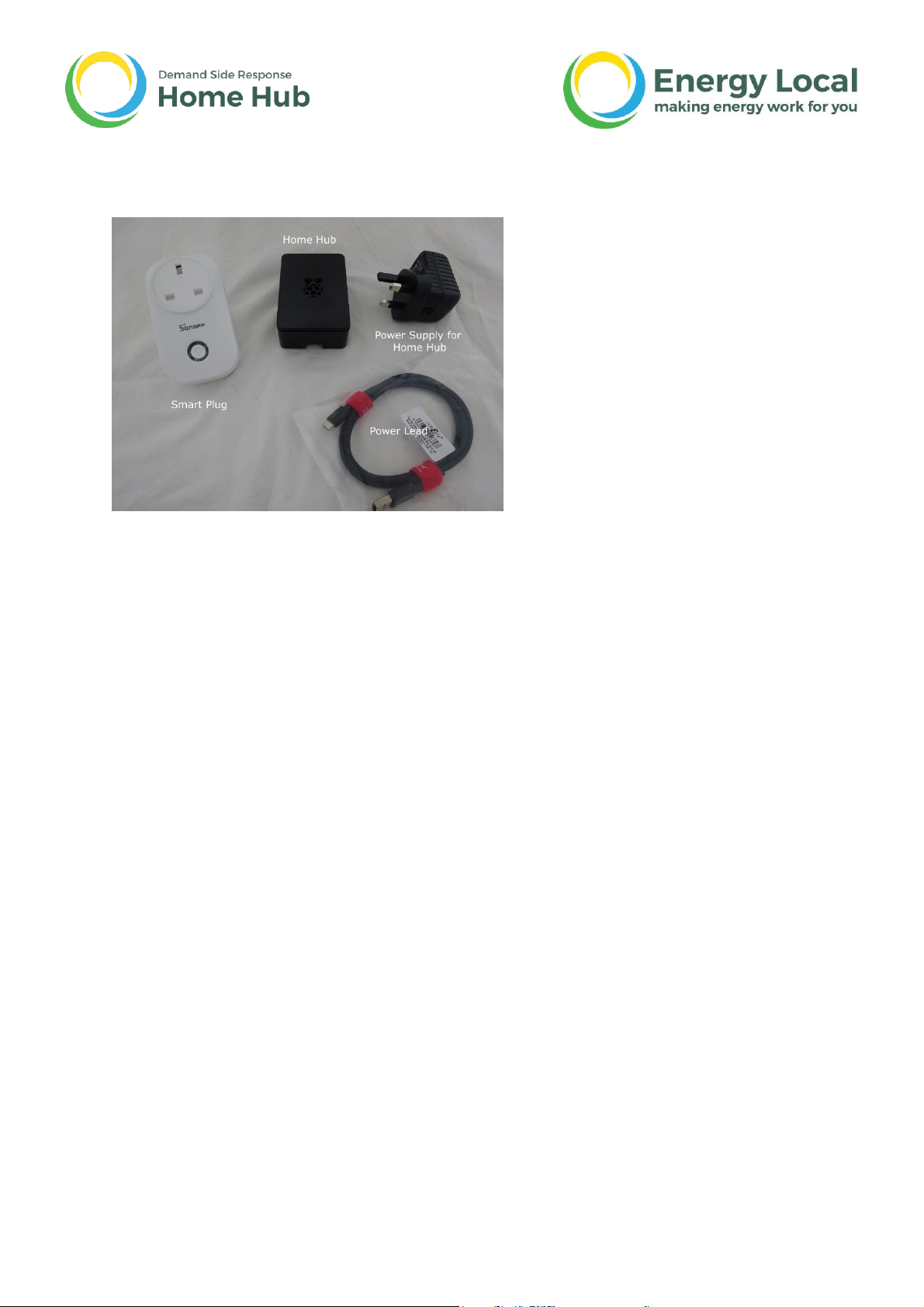
What’s in the box?
1x Energy Local Home Hub
1x UK Power Supply for the Home Hub
1x Power Lead (micro USB)
1x Smart Plug
May also include a Temperature and Humidity Monitor.

3
Setting up the Home Hub
Ethernet Setup (Recommended)
If you have the option to connect your hub directly via Ethernet this is usually
easier and more reliable than using WiFi, alternatively if you wish to setup using
the WiFi hotspot, skip this section and continue to WiFi setup below.
Power up the hub by connecting the micro USB cable and USB power supply. Plug
in an Ethernet cable to link your hub to your internet router.
An Ethernet cable isn’t supplied with the kit but are commonly available through
most computer supplies outlets, or online. You’ll need a cable long enough to reach
from your router to the Home Hub. Please note there is no facility to mount the
Home Hub on a vertical surface.
The white wire is an antenna, please do not cut or remove.
Leave the Home Hub for a minute or two while it boots up and is ready for use.
The unit is now ready for use, please go to Exploring your Home Hub
Dashboard.
WiFi Setup
If you have already set up the Home Hub using an Ethernet cable then please skip
this section.
After a short while a WiFi Access Point should appear called 'EmonPi'.
Connect to this network, open an internet browser and enter the following address:
http://192.168.42.1
Once the page at the address above loads it will give the following options, or if the
hub is connected with an ethernet cable there will also be the option to connect
over ethernet.
Select 'Connect to WiFi network' to connect to your home WiFi network.

4
The hub will now show a list of available WiFi networks, select the WiFi network you
wish to connect to:
Enter the WiFi network passkey if applicable:

5
After clicking “Connect” the following message is shown.

6
Your hub is now rebooting and will then attempt to connect to the network
selected.
This completes the WiFi setup.
Troubleshooting
If you have a problem connecting to the Home Hub using WiFi
try using an Ethernet instead.

7
Working with the Home Hub
Assuming you’ve reached this stage successfully the next task is to get the
Dashboard to recognise that you have a Home Hub installed. Please ensure that the
Home Hub is switched on
Navigate to the 'Find Devices' tool on the Energy Local App:
https://dashboard.energylocal.org.uk/find
Click SCAN to find your hub:

8
Click on the hub (listed as emonbase) to open it in your browser. You will now be
greeted with the Energy Local Hub dashboard page.
If you get this far it means your Dashboard has recognised your Home Hub.

9
Troubleshooting
If the hub does not appear the first time, try refreshing the
page a couple of times. If this does not work, try navigating to
your hub directly with the following links.
http://emonpi.local or http://emonpi
Or alternatively check your routers device list or use a mobile app called
'fing' to scan your network to find the hub.

10
Exploring your Home Hub Dashboard
Login with your Energy Local online account
Click on the “Your Score” tab and enter your energy local online account details.
The login process takes about 5 seconds - during which your hub is linked to your
online account.
The first page that you see when you log in, shows your household electricity
consumption overview.
Ce manuel convient aux modèles suivants
1
Table des matières


