Element PDZ-081E Manuel utilisateur

1

CAUTION: USE OF ANY CONTROLS, ADJUSTMENTS, OR PROCEDURES OTHER
THAN THOSE SPECIFIED HEREIN MAY RESULT IN HAZARDOUS RADIATION
EXPOSURE.
POWER SUPPLY:
Connect the supplied adapter to the side of the DVD player in the slot marked “Power
In”. Plug the two-prong end of the power cord to an AC100-120V outlet. If you have
difficulty inserting the plug, turn it over and reinsert it; if the unit will not be used for a
long time, disconnect the plug from the outlet.
NOTE:
Before plugging the power cord into an AC outlet, make sure that all the connections
have been made.
Important Safety
Instructions
CAUTION: TO REDUCE THE RISK OF ELECTRIC SHOCK, DO NOT
REMOVE COVER (OR BACK). NO USE-SERVICEABLE PARTS
INSIDE. REFER SERVICING TO QUALIFIED SERVICE PERSONNEL.
The lightning flash with arrowhead symbol, within an equilateral triangle, is
intended to alert the user to the presence of uninsulated “dangerous
voltage” within the product’s enclosure that may be of sufficient magnitude
to constitute a risk of electric to
p
ersons.
The exclamation point within an equilateral triangle is intended to alert the
user to the presence of important operating and maintenance (servicing)
instructions in the literature accom
p
an
y
in
g
the a
pp
liance.
WARNING: TO REDUCE THE RISK OF FIRE OR ELECTRIC SHOCK,
DO NOT EXPOSE THIS APPLIANCE TO RAIN OF MOISTURE.
CAUTION: Laser radiation when open. Do not stare into beam.
2

CAUTION: These servicing instructions are for use by qualified service personnel only.
To reduce the risk of electric shock, do not perform any servicing other than that
contained in the operating instructions unless you are qualified to do so.
Refer to service manual for servicing instructions.
1) Read these instructions.
2) Keep these instructions.
3) Heed all warnings.
4) Follow all instructions.
5) Do not use near water.
6) Clean only with dry cloth.
7) Do not block any ventilation openings. Maintain well ventilated conditions around
the product. Do not put product on bed, sofa or anything that blocks ventilation.
Install in accordance with the manufacturer’s instructions.
8) Do not install near any heat sources such as radiators, heat registers, stoves, or
other apparatus (including amplifiers) that produce heat.
9) Do not defeat the safety purpose of the polarized or grounding-type plug. A
polarized plug has two blades with one wider than the other. A grounding type
plug has two blades and a third grounding prong. The wide blade or the third
prong is provided for your safety. If the provided plug does not fit into your outlet,
consult an electrician for replacement of the obsolete outlet.
10) Protect the power cord from being walked on or pinched particularly at plugs,
convenience receptacles, and the point where they exit from the apparatus.
11) Only use attachments/accessories specified by the manufacturer.
12) Use only with the cart, stand, tripod, bracket, or table specified by
the manufacturer, or sold with the apparatus. When a cart is used,
use caution when moving the cart/apparatus combination to avoid
injury from tip-over.
13) Unplug this apparatus during lightning storms or when unused for long periods of
time.
14) Refer all servicing to qualified service personnel. Servicing is required when the
apparatus has been damaged in any way, such as power-supply cord or plug is
damaged, liquid has been spilled or objects have fallen into the apparatus, the
apparatus has been exposed to rain or moisture, does not operate normally, or
has been dropped.
15) Apparatus shall not be exposed to dripping or splashing and no objects filled with
liquids, such as vases, shall be placed on the apparatus.
Note: Do not touch the color TFT LCD screen by hand directly.
Important Safety
Instructions
3

Copyright Protection
This product incorporates copyright protection technology that is protected by U.S.
patents and other intellectual property rights. Use of this copyright protection
technology must be authorized by Macrovision, and is intended for home and other
limited viewing uses only unless otherwise authorized by Macrovision. Reverse
engineering or disassembly is prohibited.
Region code information
DVD players and discs are coded by region. If the region number described on the
DVD disc does not correspond to the region number of this product, this product
cannot play the disc. The region code of this unit is 1.
IMPORTANT FOR LASER PRODUCT
S
1. CLASS 1 LASER PRODUCT
2. DANGER: Visible laser radiation when open and
interlock failed or defeated. Avoid direct exposure to
beam.
3. CAUTION: Do not open the top cover. There are no
user serviceable parts inside the unit. Leave all
servicin
g
to
q
ualified service
p
ersonnel.
Important Safety
Instructions
4

High-quality audio and video
Advanced Playing Functions
Other Special Functions
Excellent sound: Dolby Decoder
delivers great sound.
A
V input: External Audio, Video
input can be connected to most
external AV sources.
AV Output: Analog audio output can
be connected to external amplifier.
On-Screen Display: You can choose
English, French, Spanish, etc. for the
On-Screen Display language.
Compatibility: Compatible DVD, CD
and JPEG discs, etc.
Particular Performance:
Multi-speed, fast forward, fast
backward, slow playback and
repeated playback.
Last Memory Playback: Memorizes
the stopped playback track and
continues playing the disk from this
spot when the power is kept to
supplied. (Only available for DVD
and CD disc
)
.
High Resolution: MPEG-2 decoding
format achieves more than 500 lines
of horizontal resolution.
Power Adapter Switch:
Automatically adapts to voltage
requirements in U.S and other
countries.
Features
5

Accessories List
ITEM NAME QTY
Power Supply Cord with AC Adapter 1
Rechargeable Battery Pack 1
DC Adapter (Car Adapter) 1
Audio/Video Cable 1
Operation Manual 1
NOTE
:
Accessories and their parts numbers are subject to change without prior notice.
Accessories
6

Contents
…………………………………….……….2
………………………………………….….5
………………………………………….….6
………………………………………..…...8
…………………………………….………10
…………………………………………....11
……………………………………..……..12
…………………………………..………..14
………………………………………..…..15
………………………………………..…..18
……………………………………..……..19
…………………………………………....20
…………………………………………....22
…………………………………….…….. 23
…………………………………………... 25
…………………………………………... 31
…………………………………………... 32
………………………………………...… 34
DVD Playback
CD Playback
JPEG Playback
Troubleshooting
Specifications
System Setup
Definition
Important Safety Instructions
Features
Notes on Discs
Playback Operation
Power Supply Preparation
Rechargeable Battery
System Connections
Accessories
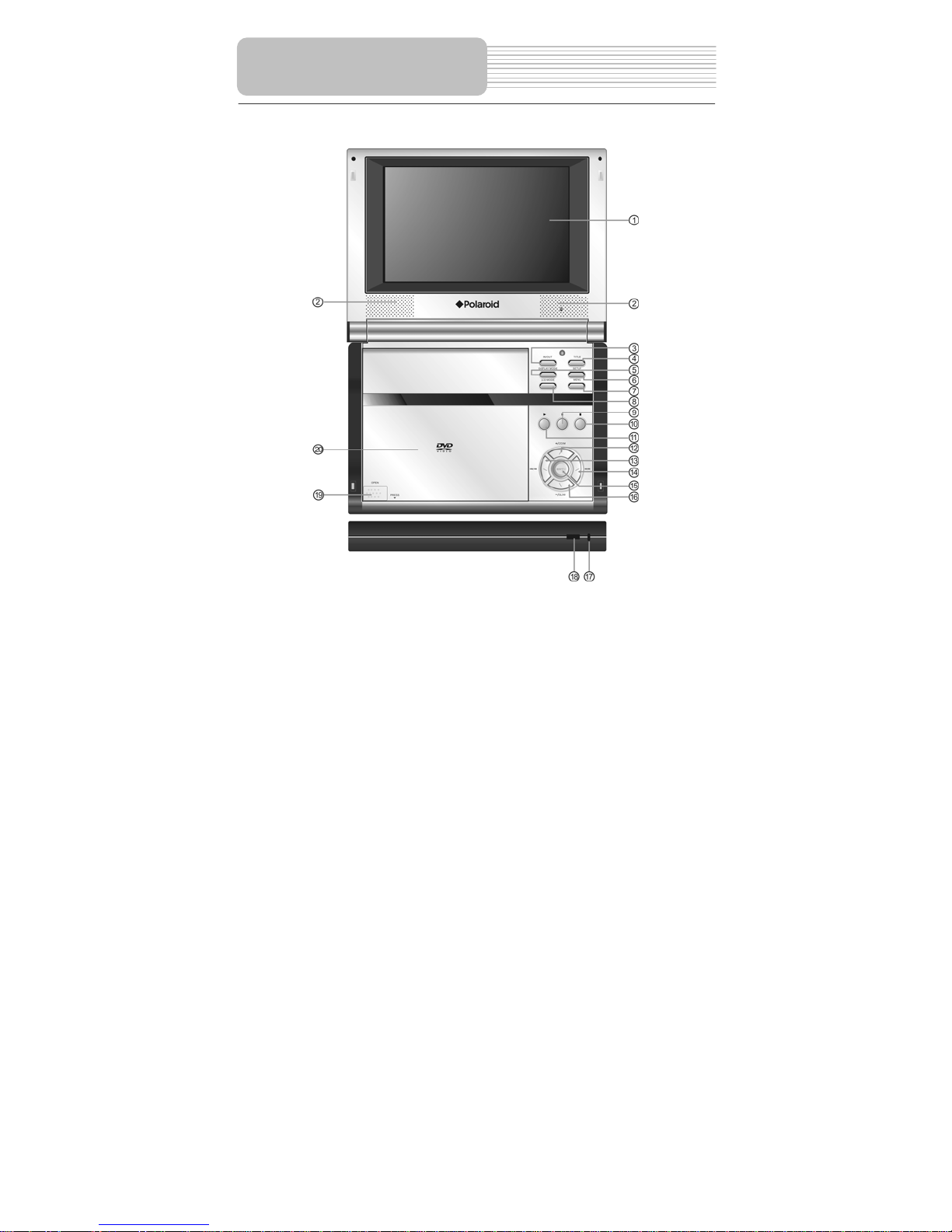
View of Front Panel
View of Side Panels
View of Bottom Panel
7

1. LCD screen
7” TFT LCD screen presents high resolution picture.
2. Speaker
Two speakers output high quality sound.
3. IN / OUT Button
Press to play disc or output AV signal or input external Audio/Video signal.
4. MENU Button
Press to access the DVD menu during playback
5. SUBT button
Press to change the subtitle language or turn subtitles off.
View of Front Panel
8

6. SETUP Button
Press to access or exit the system setup menu.
7. AUDIO Button
Press to select different languages.
8. LCD MODE button
Press to enter the brightness, contrast or color adjusting mode.
9. PLAY/PAUSE Button
:Press to pause the playback. Press(PLAY) button to resume normal
playback.
10. Button
: Press to stop playback. Then press the(PLAY) button to resume playback
from the stopped spot. Press this button twice to stop playback completely.
11. button
: Press to confirm selection.
12. / + /ZOOM Button
:Press to select different items.
+: Press the Mode button and then press this button to increase the level of
brightness, contrast and color.
ZOOM: Press to realize various zoom functions
13. //Button
: Press to select different items.
: Press and hold it for several seconds to search backward fast.
: Press to the previous list/track/chapter.
14. //Button
: Press to select different items.
: Press and hold it for several seconds to search forward fast.
: Press to go to next list/track/chapter.
15. ENT/(PLAY) button
ENT: Press to confirm selection.
(PLAY): Press to start playback.
16. /- / SLOW Button
:Press to select different items.
-: Press the Mode button and then press this button to decrease the level of
brightness, contrast and color.
SLOW: Press to activate slow playback function.
17. Charge Indicator
Light is red when the battery is being charged; green when it is fully charged.
18. Remote Sensor
Receive the signal from the remote control for operation.
19. OPEN/PUSH button
Press to open the disc tray cover.
20. Disc tray cover
When the disc is loaded gently press the cover to close it.
View of Front Panel
9

Right Side View
1. Volume Control knob
Used to adjust the volume of the headphone and speaker.
2. Headphone Jack
Used to connect to headphones for private listening. When headphone is plugged,
the speakers will turn off automatically.
3. Audio Input/Output Jack
Press OUTPUT/INPUT button on the front panel to switch to input status, it is
AUDIO input Jack, while switch to output status, it is AUDIO output Jack.
4. Video Input/Output Jack
Press OUTPUT/INPUT button on the front panel to switch to input status, it is
VIDEO input Jack, while switch to output status, it is VIDEO output Jack.
Left Side View
1. DC 9.5/12V Input Jack
Used to connect the DC 9.5/12V adaptor.
2. Power ON/OFF Switch
Switch the power on or off.
View of Side Panels
10
Table des matières
Autres manuels Element Lecteur DVD portable


