
EKEN ASTRO LITE Manuel utilisateur

V1.0
ASTRO LITE

1. Microphone
2. Wide-angle Lens
3. Indicator Lights
4. Motion Sensor
5. Light Sensor
6. Speaker
Red Indicator Light
Flashing red
Wi-Fi connection
Features

Blue Indicator Light
Blue light
Live view
Flashing blue
Motion detection
In the box
Anchor PacksAstro Lite
Battery Camera Rechargeable
6000mAh
Battery Pack
User ManualScrew Packs

Charge the battery
Charge the included battery.
Fully charge the battery by plugging it into a USB port using
a Micro USB cable.
It takes about 6-8 hours for the battery to fully charge.
When only one blue LED is lit, that indicates the battery is
fully charged.
1. Attach the stand to the camera.
= Charging = Fully Charged
Set up your Astro Lite

2. Secure tightly with the stand screw.
3. Remove the battery cover.
Twist the battery cover counterclockwise to unlock, and
then remove it from your Astro Lite.
4. Insert the battery.
Insert the fully charged battery into the bottom of your Astro
Lite until it clicks into place.

5. Set up your device in the Aiwit app.
Before You Start
1. Download and install Aiwit App.
Scan the QR code below or search for Aiwit on the Apple
App Store or Google Play. Download and install the app.
2. Create an Aiwit account.
Set up your Astro Lite in the Aiwit app.
To pair your Astro Lite, follow the steps below and in-app
instructions.
1. Open Aiwit App and log in to your account.
2. To add your camera, select the +icon.
3. Select Battery Camera 2.
4. Press and hold the Setup Button until the red light is
flashing.

5. Enter your 2.4GHz Wi-Fi network and the Wi-Fi
password, then tap Next (5GHz is not supported).
6. Use your Astro camera to scan the QR Code shown on
the app, then select Confirm once the Wi-Fi setup has
finished.
6. Attach the battery cover.
Find the Open lock symbol located behind your Astro Lite.
Align the symbol with the line on the battery cover. Push the
cover on and turn clockwise until it locks.

7. Give it a try!
After setup, tap the Live View in the Aiwit app to see live
video from your Astro Lite.
Install your Astro Lite
Place the Astro Lite anywhere, inside or outside your home.
It can be mounted on a wall, ceiling, or placed on a tabletop.
Put it in an area where you wish to view.
Choose any location.

Install the Astro Lite on a ceiling:
Using the axis to rotate the stand, position the base above
the camera. Ensure the base is directly positioned above
your Astro Lite.
Install the Astro Lite on a wall:
The base is hinged, so rotate
the base behind the Astro
Lite prior to wall installation.
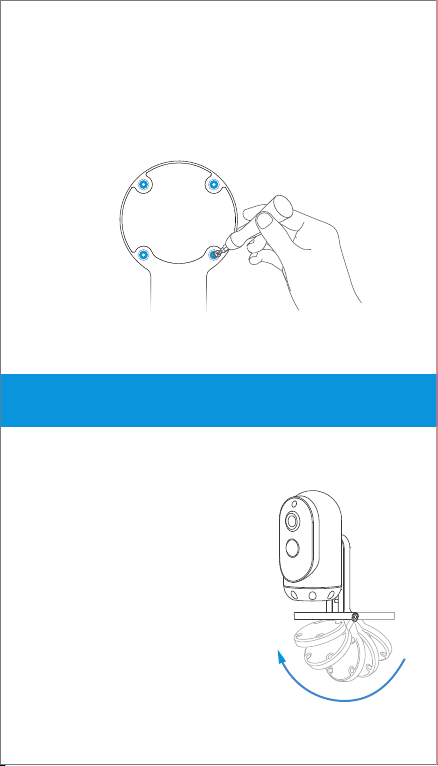
Once you have chosen a wall or a ceiling for your Astro Lite,
Mark drill holes and use a bit to drill holes in your wall or
ceiling. Insert anchors and secure your Astro with mounting
screws.
Place the Astro Lite on a flat surface:
Flip the base under the Astro Lite,
so it can stand upright. Use the
flipped base as a stand for table
or shelf placement. Installation is
complete. Your Astro Lite is now
ready to use!
Table des matières
Autres manuels EKEN Appareil photo numérique


