
Ei Electronics Ei450 Manuel utilisateur

Instruction Manual
Read and retain carefully for as long as the product is being used. It contains vital information on the operation and installation of your Smoke Alarm.
The leaflet should be regarded as part of the product.
If you are just installing the unit, the leaftet must be given to the householder. The leaflet is to be given to any subsequent user.
Model: Ei450
Alarm Controller
Fire and CO

Contents
1. Overview ........................................................................................................
2. Installation ......................................................................................................
3. House Coding ................................................................................................
4. Operation .......................................................................................................
5. System Diagnostics .......................................................................................
6. Five Year Guarantee .....................................................................................
7. Troubleshooting the RF link ..........................................................................
8. Limitations of Radio Communications ...........................................................
9. Technical Specification ..................................................................................
10. Getting your Ei450 Serviced ..........................................................................
3
6
8
13
17
21
22
23
24
25
Page
2

1. Overview
Congratulations on purchasing the Ei450 single button alarm controller for RadioLINK Fire and Carbon
Monoxide (CO) Alarm systems. The Ei450 tests and controls fire, CO and hybrid (Fire + CO) RadioLINK
Alarm systems.
(L֜FRQWUROOHUIXQFWLRQDOLW\
Function Description
Remote Test All the Alarms can be tested from a centralised location
Some older revisions of our RadioLINK modules do not support the Memory ID function. Check this page on our website for a complete and
accurate list of products that support this function.
Remote Locate This will silence all the Alarms in the system except the one sensing Fire or CO
Remote Silence This will silence all the Alarms in the system
Fire Indicator Indicates a that a Fire Alarm has been activated
CO Indicator Indicates a that a CO Alarm has been activated
EOL Indicator Indicates that the battery has reached its end of life (EOL)
Memory Indicates if a Fire or CO Alarm has been previously activated
Memory ID Identifies the Alarm that has previously been activated
3
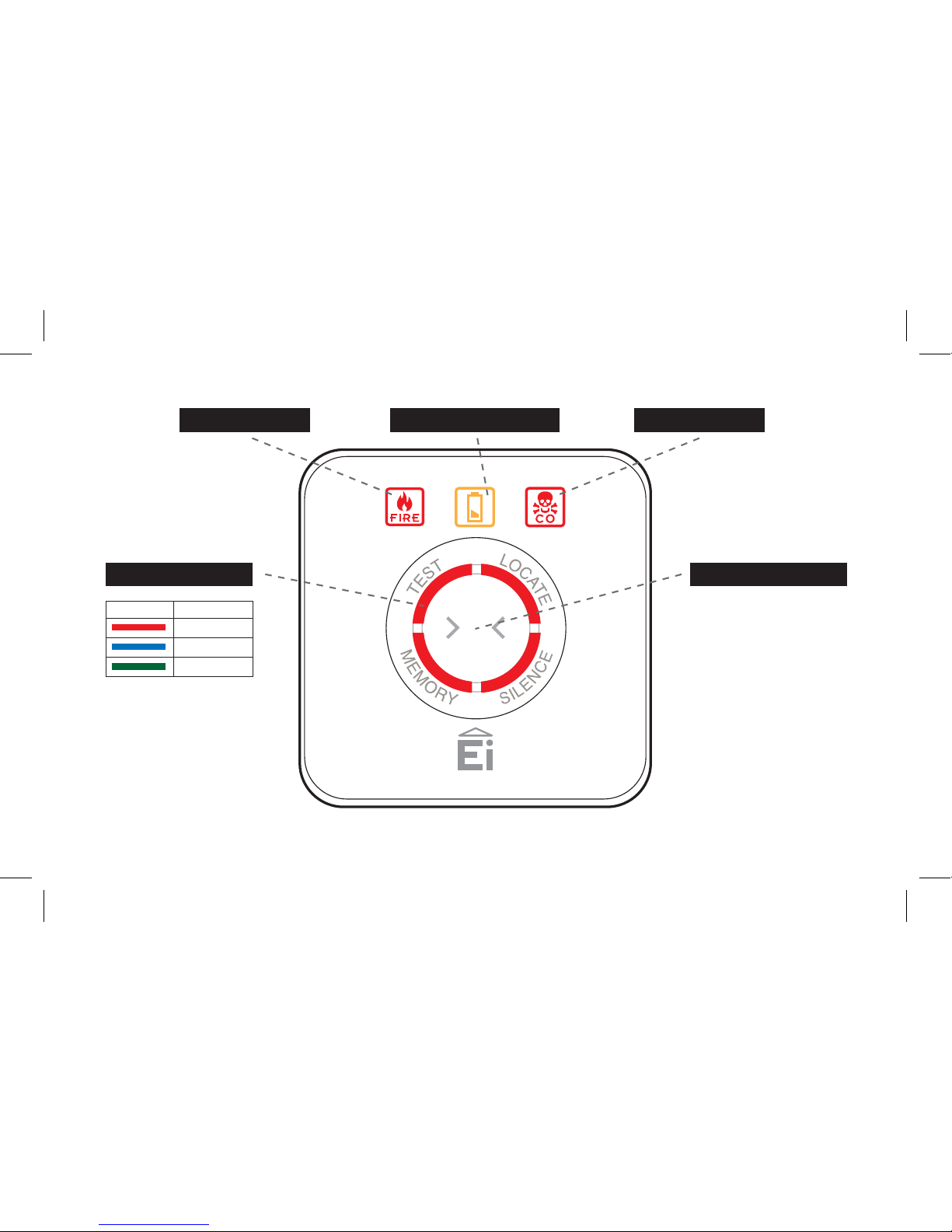
Fire / CO Alarm Controller
Fire Indicator Low Battery Indicator CO Indicator
Light Segments (4)
Segment Colour Activity
Function enabled
Test / Control Button
RF signal activity
Function complete
4
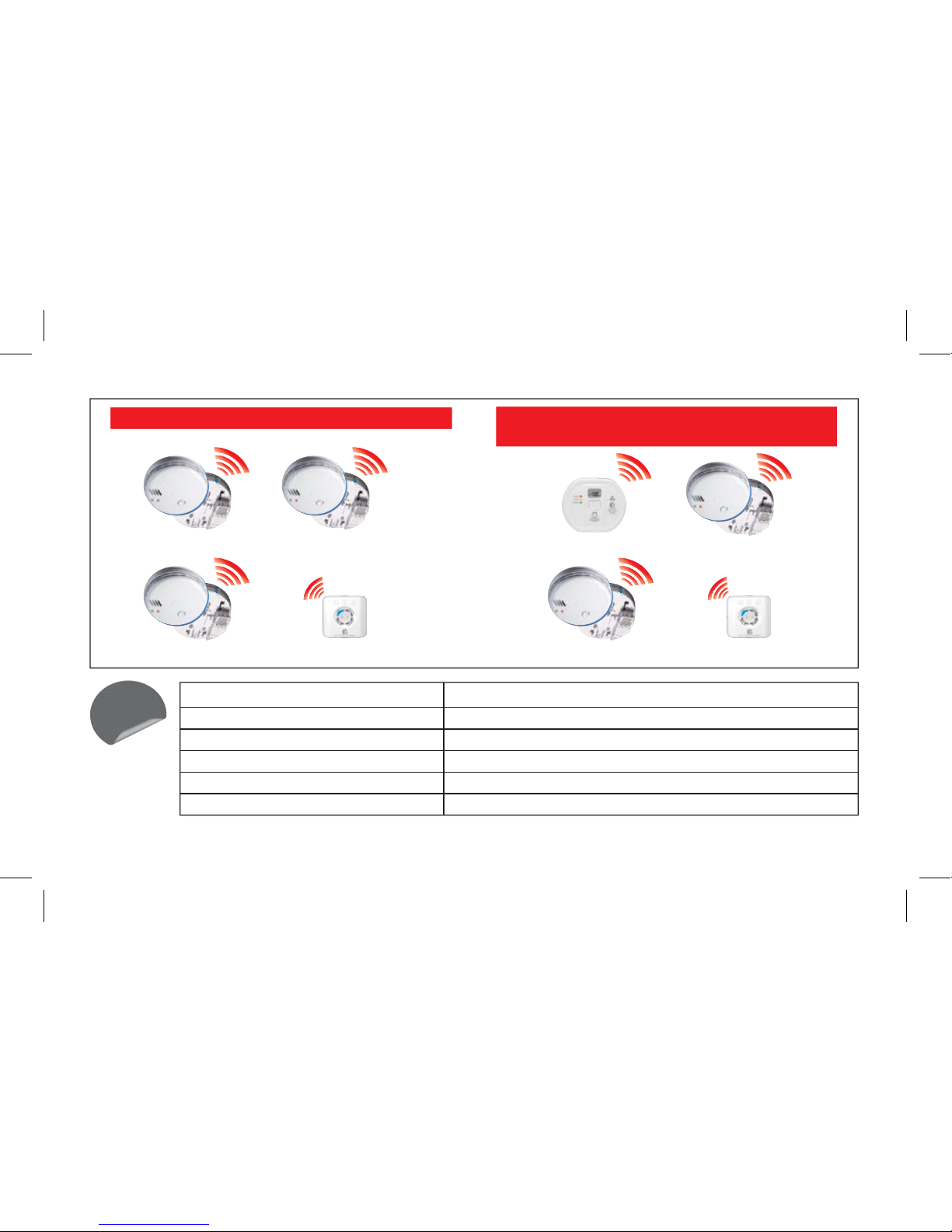
Wireless Smoke Alarm System Wireless Smoke &
Carbon Monoxide Alarm System
RF Smoke Alarm
RF Smoke Alarm
RF Smoke Alarm
Alarm Controller RF Smoke Alarm
RF Smoke Alarm
Alarm Controller
Model No. - Alarms Comment
Ei262 Mains Carbon Monoxide Alarms The Ei262 has built-in RadioLINK technology
Ei160RC & Ei2110 Series Smoke Alarms
For most up to date works with list check webpage www.eielectronics.com/articles/ei450-memory-id-products.html
The Alarms must be fitted on Ei168RC RadioLINK bases
Ei605 & Ei650 Series Smoke Alarms The Alarms must be fitted with the appropriate Ei605 series RadioLINK module
Ei208 Battery Powered Carbon Monoxide Alarms The Alarms must be fitted with Ei200MRF RadioLINK modules
Ei170RF Deaf Alarm Strobe and Vibration Pad
Works
with
RF CO Alarm
5

,QVWDOODWLRQ
Install the Ei450 mounting plate at an accessible point on the wall 1.4M
+/- 200mm from floor level. If it intended for a disabled person to operate
the controller, an alternative mounting location should be considered.
Also consider security and chose a location where it will not be
accidently or otherwise operated.
Turn on the system by sliding the switch to the on position.
6
MODE POWER H.CODE
OFFON
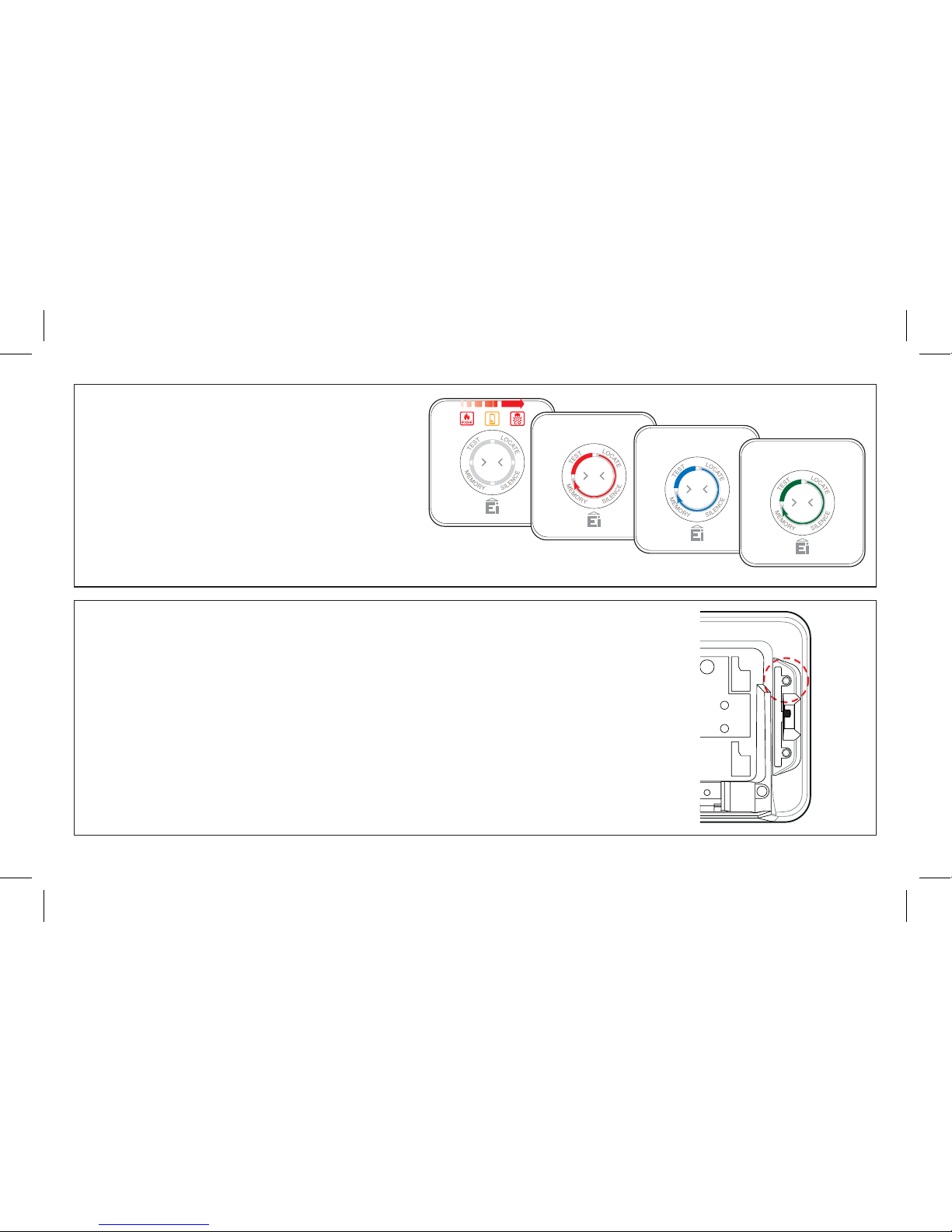
Check the power up sequence
)LUH%DWWHU\&2LFRQVIODVK
(DFKLQGLYLGXDOVHJPHQWOLJKWVXSUHG
(DFKLQGLYLGXDOVHJPHQWOLJKWVEOXH
(DFKLQGLYLGXDOVHJPHQWOLJKWVJUHHQ
$OOOLJKWVDUHRIIWRLQGLFDWHVWDQGE\PRGH
All RadioLINK devices, Smoke Alarms, CO Alarms, control switches,
etc. in the system must be put into house code. For instructions on how
to house code the Ei450 controller, see the “House Code” section of
this manual.
For instructions on house coding the other devices please refer to their
individual manuals.
Repeat this procedure for all Alarms and RadioLINK devices in the
system.
Fire / CO Alarm Controller
Fire / CO Alarm Controller
Fire / CO Alarm Controller
Fire / CO Alarm Controller
7
MODE POWER H.CODE
OFFON

+RXVH&RGLQJ
It is essential to House Code the Ei450 i-controller to all the other
RadioLINK Alarms and devices in the system to ensure they will
not communicate with nearby systems. Failure to house code the
system may also result in a system malfunction.
Press and hold the House Code switch on the back of the
controller until all segments light up blue, then release. The
segments will flash rapidly for a moment on entering house code
(H CODE).
House code all other RadioLINK Alarms and accessories in the
system. Consult the instruction manuals on how to house code
these devices.
:$51,1*
8
Fire / CO Alarm Controller
MODE POWER H.CODE
OFFON

Return to the Ei450 i-controller and check that all 4 segments
(ring) are flashing blue. The number of flashes should
equal the number of RadioLINK devices in the system.
A system with 3 smoke alarms, one CO alarm and the
i-controller will result in five blue flashes.
The flash pattern will repeat every 5 to 10 seconds while the
i-controller remains in house code.
If it fails to flash the correct number of times, then consult the
“TroubleshootingtheRFlink” sectionof thisinstruction manual.
Now, walk around the house to verify that all the other
RadioLINK Alarms and RadioLINK devices are giving the correct
amount of flashes.
If any of these fail to flash the correct number of times,
then consult the “Troubleshooting the RF link” section of this
instruction manual.
To complete the commissioning, the system must exit house
code mode.
9
Fire / CO Alarm Controller Fire / CO Alarm Controller

The units will automatically exit house code after 30 minutes. Once
coded the system will not communicate with any other RadioLINK
devices outside the house coded group.
To manually exit house code press the house code button on the
back of the Ei450 switch. When all the segments light up blue,
release the button. This unit will then send a “Cancel” signal to all
the other RadioLINK devices to exit House code.
After a short period the blue light will turn off and the system will
return to standby mode (normal). Depending on the number of
Alarms and RadioLINK devices in the system this period could vary
from 5 to 20 Seconds.
If you choose to make the switch tamper proof remove the pip
(plastic post) using a pliers or similar tool.
'R QRW GR WKLV XQWLO WKH KRXVH FRGLQJ SURFHGXUH KDV EHHQ
FRPSOHWHG
10
MODE PO
W
ON
Fire / CO Alarm Controller
MODE POWER H.CODE
OFFON
Autres manuels pour Ei450
2
Manuels Routeur réseau populaires d'autres marques


NETGEAR
NETGEAR FS526T - Switch Manuel utilisateur

Korenix
Korenix JetNet 5710G Series Manuel utilisateur

Automated Logic
Automated Logic ZN551 Manuel du propriétaire

Cisco
Cisco ASR 1000 Series Manuel de l'opérateur

EnGenius
EnGenius ESR-9710 Manuel utilisateur

Cisco
Cisco 805 Series Instructions d'utilisation et de sécurité