EFT Z Series Manuel utilisateur

Z SERIES
AGRICULTURAL DRONE SYSTEM
(Model:Z30/Z50)
User Manual
Version1.0 EN

Contents
Disclaimer .............................................................................................................................2
Safety Guidelines................................................................................................................. 3
List of Items..........................................................................................................................5
Introduction...........................................................................................................................6
Pre-flight Preparation............................................................................................................8
Inspection......................................................................................................................8
Smart Battery................................................................................................................ 8
Remote Control Introduction...............................................................................................10
Overview ..................................................................................................................... 10
Function Introduction................................................................................................... 11
Description of Status Indicator.....................................................................................11
Touchscreen Introduction............................................................................................ 12
Charging the Remote.................................................................................................. 12
Power On/Off Remote................................................................................................. 13
Signal Range...............................................................................................................13
Operating the Aircraft.................................................................................................. 13
Connection and Settings.................................................................................................... 14
Link to Aircraft..............................................................................................................14
Remote Control Setup .................................................................................................16
Agri Assistant App.............................................................................................................. 18
Home Screen .............................................................................................................. 18
Account Registration and Activation ............................................................................ 19
Operation View............................................................................................................22
Debugging Before Takeoff.................................................................................................. 23
RC Calibration.............................................................................................................23
Gate Set ...................................................................................................................... 25

Sensor Calibration.......................................................................................................25
Parameter Settings......................................................................................................27
Advanced Setting........................................................................................................ 30
Map Type.................................................................................................................... 30
Pre-flight Test..................................................................................................................... 30
Unlock/Landing............................................................................................................30
Motors Test..................................................................................................................31
Nozzle Test..................................................................................................................31
Spraying Operation Modes .................................................................................................31
Operation Mode Switch ............................................................................................... 31
Manual Operation Mode ..............................................................................................32
Auto Operation Mode.................................................................................................. 33
A-B Route Operation............................................................................................33
Fully Auto Operation ...........................................................................................35
Switch Spreading System............................................................................................39
Spreading System Debugging ..............................................................................39
Spreading Operation............................................................................................ 43
Maintenance.......................................................................................................................44
Cleaning After Operation............................................................................................. 44
Regular Maintenance.................................................................................................. 44
Transportation............................................................................................................. 46
Supplements...................................................................................................................... 47
Automatic Return to Home (RTH)................................................................................47
Log Drownload ............................................................................................................ 48
Alarm...........................................................................................................................49
Appendix............................................................................................................................ 50
Specifications.............................................................................................................. 50

1
Assembly Guide
For installation, please refer to the Z Series Assembly Instruction Manual. If you have not
received it, please contact EFT official customer service to get it.
Videos
For detailed tutorial videos, please follow EFT Official Media Channel.
Website:
https://www.effort-tech.com/en/home
YouTube:
https://www.youtube.com/channel/UC-8quK4ZYq2eFwwpXSx3NrA
Download assistant software and firmware
The latest version information is available on remote control, you can update timely.
Manufacturer :
EFT Electronic Technology Co. Ltd.
Address: Building C2, Intelligent Technology Park, 3963 Susong Road, Shushan District, Hefei ,
Anhui, China.
Tel:0551-65536542
Mail:infor@effort-tech.com
Web:www.effort-tech.com

2
Disclaimer
1. Please read User Manual carefully before using this product, as it has much to do with both
operational safety and your legitimate rights and interests, whether you are a distributor or a user.
You shall be deemed to have read, understood, agreed and acknowledged all terms and
conditions and information stated herein upon activation and use of the product.
2. This aircraft is not a toy, is NOT suitable for those who are under 18 years old, or those who
have no or limited capacity for civil conduct, or those with mobility impairments, or those
restricted by existing laws, regulations and policies. Please keep the product out of reach of
children and be particularly cautious while there are children present.
3. Before using, please make sure that you have fully understood the characteristics and
functions of the product, and ensure that you have the technical ability for the operation or have a
professional team, and can take the failures risk to caused by improper installation and
debugging.
4. To protect your rights, please strictly follow the official EFT tutorials . We do not accept
any return or exchange due to subjective factors, such as subjectively determined that it is
not easy to use, don't know how to use, and the performance does not meet the expected, which
are non-product quality problems. All damages and risks from personal reasons during assembly
and operation shall be borned by the users, we do not assume any related liability
5. You understand that in the use of any products, accidents may occur due to single or
combined factors, including but not limited to improper operation, surroundings and
communication networks. You understand that the aforesaid accidents are reasonable
and acceptable in the use of the product, and that EFT shall not be held accountable for
such accidents.
6. Please do not disassemble, modify, retrofit or use the product for non-specified
purposes. All injuries and losses directly or indirectly caused by the above actions shall be
borne by the users.
7. On any account, you shall comply with the laws and regulations of the country and the region
where the product is used. EFT shall assume no liability arising from your violation of relevant
laws and regulations.
8. To the extent permitted by law, EFT reserves the rights for final explanation and revision of the

3
terms and conditions here in above. EFT also has the right to update, modify or terminate these
terms and conditions via channels including its official website, the User Manual and online App,
without prior notice.
Safety Guidelines
If you are a beginner ,it is recommended to finish the training courses ,or get assistance
from veteran before flying, and supervised by a veteran during the flight.
Do not disassemble any module or disconnect any plug when the power is on.
Please see that all parts and components are intact , and well installed and that
those aging or broken are replaced promptly before each flight. All devices should be
sufficiently charged. When the battery gets low during operation, you should return the
aircraft immediately and replace the battery.
For safety purposes, it is advisable to remove all propellers before each flight or after
firmware update until you have a test, inspect the remote control devices, motors and other
modules and ensure everything is in order.
Please charge the battery of the remote controller or aircraft when it falls to 20% to avoid
damage to the device caused by overdischarge of the battery stored at a low charge state
for a long time. By the same token, please keep the battery at 40%-60% when storing an
idle aircraft. The storage area should be dry, wellventilated and clean.
NEVER install/remove any module or insert/extract any circuit while the power is on.
Please ensure that the aircraft does not carry a load beyond the safe takeoff weight
specified in this User Manual. Overload, a safety hazard, is NEVER allowed.
Never take human bodies or animals, whether still or moving, or other hazardous objects
as obstacles in the obstacle avoidance experiment.
If the radar modules and binocular vision system are unable to work properly in the
operating environment, the aircraft will be unable to avoid obstacles during Return to Home
(RTH). All that can be adjusted is the flight speed and altitude, as long as the remote
controller is still connected.
After landing, stop the motors, power off the aircraft, and turn off the remote controller.
Otherwise, the aircraft may enter failsafe RTH automatically due to remote controller signal
loss.

4
Speed limit≤15m/s, distance limit≤1000m, it is recommended that the flight height be
2.5m~3.5m from the top of the plant, please operate correctly within the safety limit.
MOS smart battery is required.
Keep the product away from heat to prevent damage to the electronic component and
other parts or fire incidents.
For long-term storage or long-distance transportation, please remove the liquid tank from
the aircraft and empty it, and store the aircraft in a cool, dry place.
Recommended storage temperature (when the spray tank, flow meter, pumps, and hoses
are empty): between 10° and 40° C.
Pay attention to environmental protection when preparing and spraying pesticides. It is
prohibited to pollute rivers and drinking water sources.
Fly at locations that are clear of buildings and other obstacles. DO NOT fly above or near
large crowds.
Make sure that your operations do not violate any applicable laws or regulations, and that
you have obtained all appropriate prior authorizations. Consult the relevant government
agency or authority, or your lawyer before flight to ensure you comply with all relevant laws
and regulations.

5
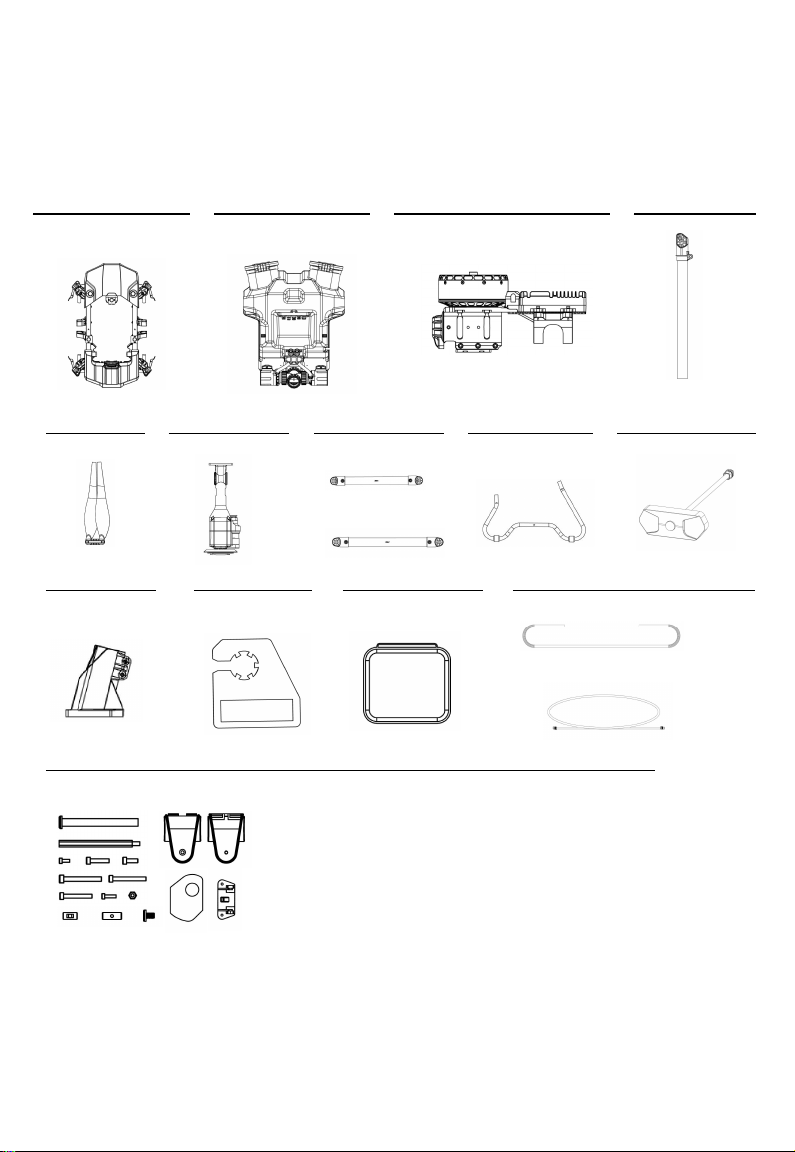
List of Items
Please check that all of the following items are present when unpacking the boxes.
Packaging form:
CKD
Number of packages:
2 cartons
Items as below :
Drone body x1
Spray tank kit x1
CW motor x2
CCW motor x2
Arms x4
Landing gear mount
x4
paddle clip x4
Remote control bag x1
Bellows x2
Nozzle adapter cable x2
Mounting fittings
Lock nut x4
Hex studx4 Tee Fixing Pair x4
M3*8x2 M4*12x4 M4*10x12
M4*35x1 M4*30x4
M4*20x16 M3*16x8 M4Locknut
Short pin x4 Long pin x4 Lock screw x4 Gasket x8 Camera bracketx1
CW Paddle x2
CCW Paddle x2
Centrifugal nozzle x2
Rear crossbar x1
Front crossbar x1
Landing gearx2
Camera x1

6
Three solutions are optional, as follows:
Item
Basic set
Advanced set
Standard set
Drone frame
√
√
√
Motor set*4
√
√
√
Impeller pump*2
√
√
√
Flowmeter
√
√
√
Liquid level gauge
√
√
√
Centrifugal nozzle*2
√
√
√
Switchboard
√
√
√
Piping fittings
√
√
√
Flight control
√
√
√
Receiver
√
√
√
Camera
√
√
√
Remote control
√
√
√
Rear radar
X
√
√
Front radar
X
√
√
Altitude Radar
X
√
√
RTK
X
X
√

7
Introduction
Aircraft Features
The Z series agricultural UAV system solution is a full configuration solution provided by EFT. It
has two load models of 30kg and 50kg and is delivered in a semi-assembled form. It adopts truss
structure and Z-shaped folding arms to minimize the folding volume and facilitate transportation.
Equipped with double impeller pumps and water-cooled centrifugal nozzles , ultra-precision
sensor, ultrasonic flowmeter, integrated spreading system.
IP67 waterproof from inside to outside, sealed waterproof plugs and sealed core modules, which
can be washed directly. All parts can have closed-loop feedback by CAN protocol, early warning
of faults, smart Auto operation, effectively prolonging the lifespan of the drone.
Aircraft Overview
Autres manuels pour Z Series
1
Ce manuel convient aux modèles suivants
2
Table des matières
Autres manuels EFT Drone