
Ecodhome TTDZ2 Manuel utilisateur

1
TTDZ2 Digital Thermostatic Head
Instruction manual

2
Summary
1. INTRODUCTION pag. 3
2. DESCRIPTION AND PRODUCT SPECIFICATIONS pag. 4
3. PACKAGE CONTENTS pag. 8
4. INSTALLATION pag. 8
5. MODE pag. 11
6. DISPOSAL pag. 13
7. WARRANTY pag. 14

3
1. Introduction
SmartDHOME thank you for choosing this TTDZ2 digital
thermostatic head for radiator control. This device is Z-Wave
certified and is compatible with the MyVirtuoso Home
gateway.
4
2. Description and Product
Specifications
The TTDZ2 digital thermostatic head has been designed
to allow the customer to monitor and control the
temperature delivered by their radiators. Activating or
deactivating zones according to actual needs saves
energy.
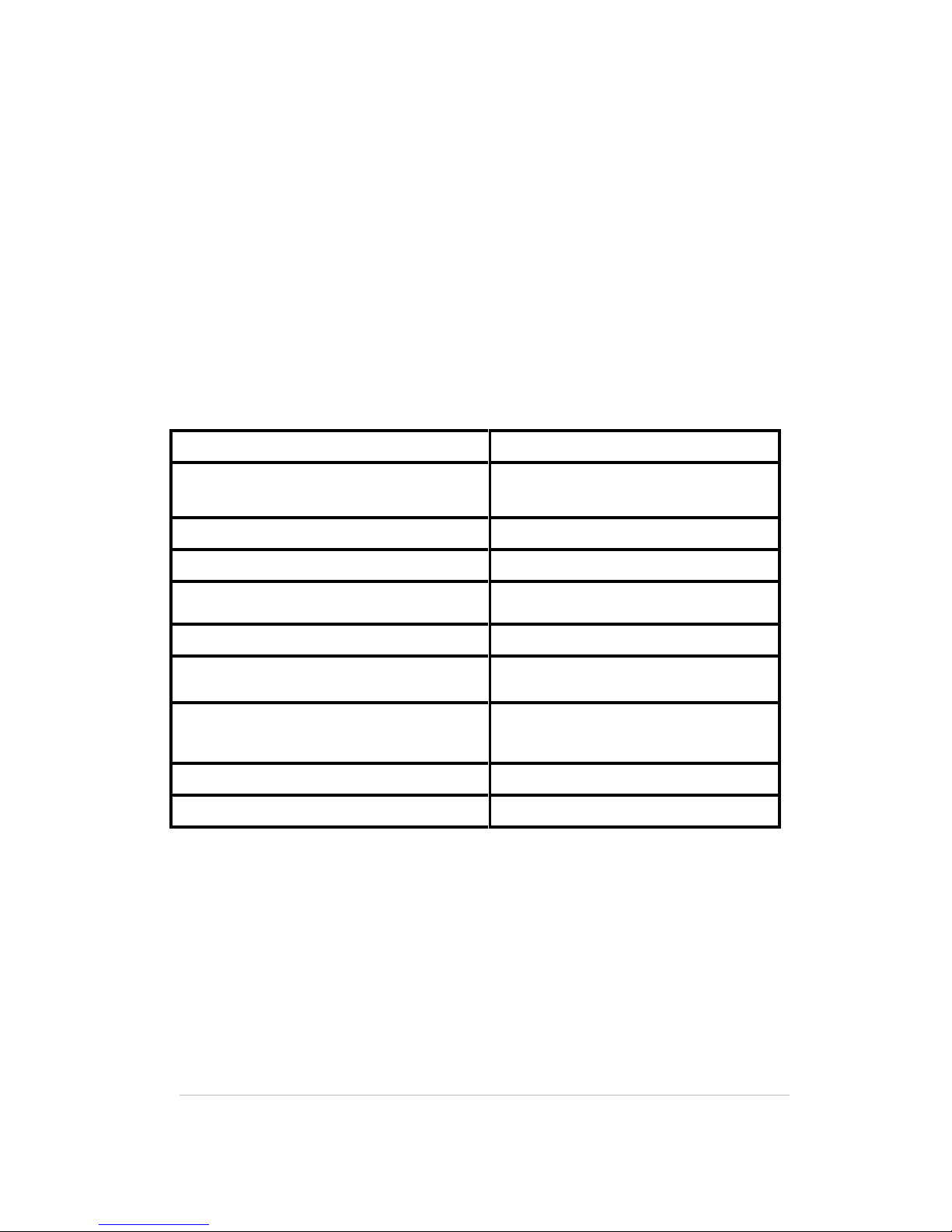
Technical specifications
Batteries:
2x1.5V AA alkaline, class III
Battery life:
Up to 2 years
Display type:
LC backlit display
IP class:
IP20
Operating temperature:
-10 ~ 40 ° C
Protocol:
Z-Wave
Radio frequency:
868.42 MHz
Temperature measurement
unit:
° C / ° F
Temperature range
8 –28° C
Weight (batteries included):
260 g

5
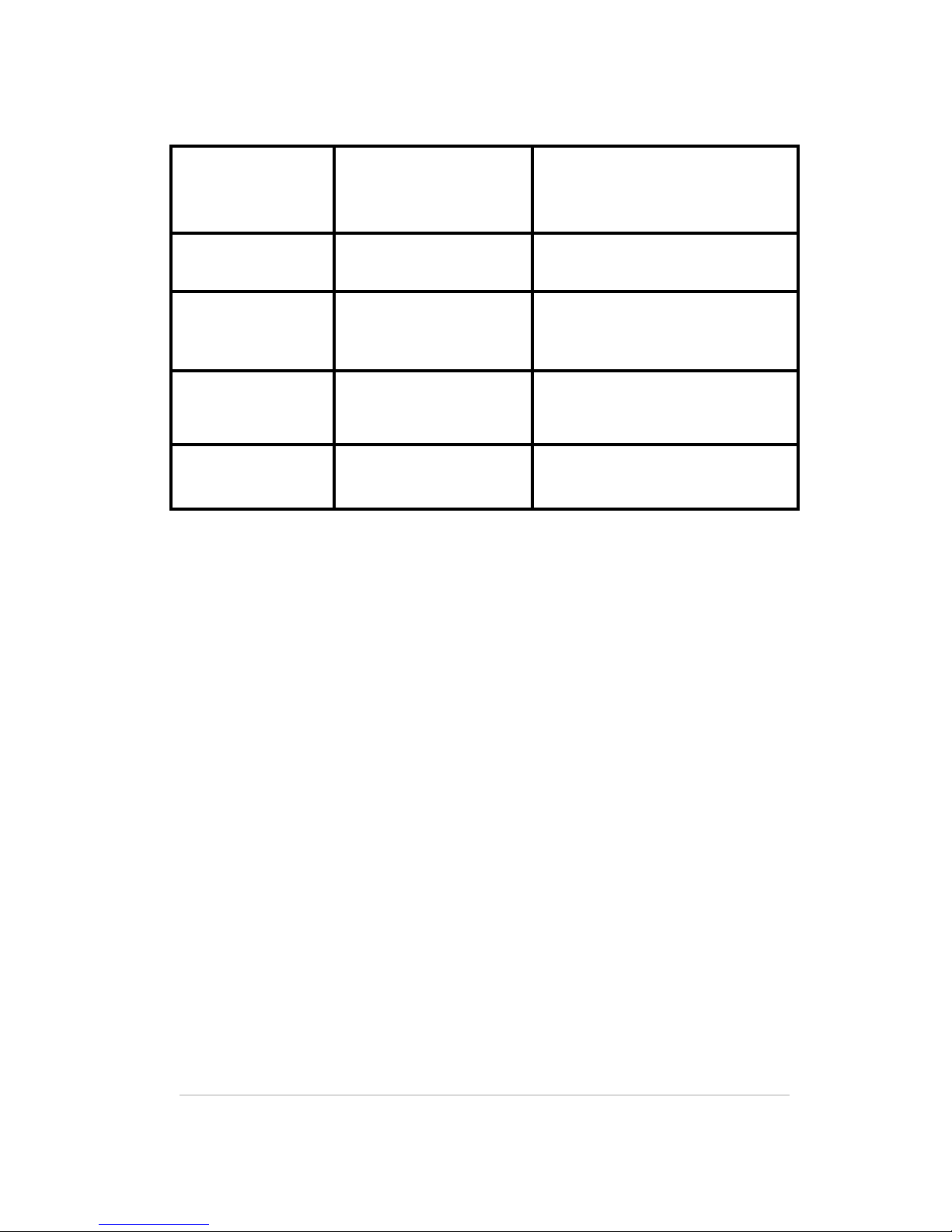
Description Key
Press once
Reduces the temperature
by 0.5 ° C.
Hold down
Decreases the
temperature by 0.5 ° C
increments until required
temperature is reached.
Press once
Increases the temperature
by 0.5 ° C.
Hold down
Increases the temperature
by 0.5 ° C increments until
required temperature is
reached.
and
Press both
simultaneously
for 3 seconds
Enables / disables the
"Child Protection" mode.
Press once
• Action Confirmation
Displayed on the
Display
• Enables / disables
"Fast heating" mode.
Press for 3
seconds
Shows the Z-Wave node
ID.
Press for 5
seconds
Enters "Exclusion" mode.
Press when
TTDZ2 is OFF
Allows you to return to
factory settings.
6
LED Description
Red LED
Blinking
Running software update.
It is not possible to adjust
the temperature during
the update.
Red LED
Stay fixed for 5
seconds
An operation has failed.
Red LED
Stay fixed
An error has occurred.
Refer to the manual to
check the type of error.
Green LED
Blinking
Waiting for confirmation
from the user to start an
operation.
Green LED
Stay fixed for 5
seconds
An operation has been
successfully completed.

7
Screen Description
A mechanical operation is in progress.
Shows the status of the connection: if the
segment is visible, the link works correctly.
Otherwise, the connection was lost.
It lights when the display shows the Z-Wave node ID.
Visible when the battery is below 15% charge.
"Child protection" mode is active.
Visible if a precise temperature has been
entered.
Visible instead of "° C" if TTDZ2 is set to "Direct
Control" mode.

8
3. Package Contents:
1 TTDZ2 Thermostatic Head
3 Adapters (Danfoss RA, RAV, RAVL)
1 Owner's Manual
4. Installation :
Before you can mount the head for the first time, you
will need to include it.
a. Inclusion
1. Set the MyVirtuoso Home gateway to
inclusion mode and turn on the head.
The display will show "INC" and the green LED
will flash while waiting for confirmation from the
user.
2. Once the inclusion is started, the header
display will show a countdown within which the
operation is to be completed.
3. If inclusion is to be successful, the header
display will display the Z-Wave node ID for 5
seconds, then “INS” and the icon will appear:
the head is ready to be mounted.
4. If Inclusion Fails, TTDZ display will show
"ERR" and the LED will remain red. Press the
center key to retry the inclusion process.

9
Once the head is included into MyVirtuoso Home, it can
be mounted onto the radiator valve.
b. Mounting
1.The display will show the "PRP" message until
the mounting position is achieved, after which
"INS" and the icon appear. The LED will blink
green, pending confirmation by the user.
2.If necessary, locate an appropriate adapter
and mount it onto the valve.
3. Place the TTDZ2 on the ring and screw it until
it reaches the correct position. For the duration
of the process, the message "INS" will remain
visible on the display.
4. If the installation is successful, the LED will
remain green for 5 seconds, while the display will
show the default set temperature.
5. If the assembly fails, the display will show
"ER1", the LED will remain red and a notification
will be sent to the APP.

10
c. Exclusion
1.Set the MyVirtuoso Home gateway into
Exclusion mode and hold down the key for 5
seconds. The display will show "LEA".
2.If the exclusion is successful, the display will
show the number 0 as the Z-Wave node ID and
the LED will remain green for 5 seconds.
3. In the exclusion phase, the display will show
the Z-Wave node ID and the LED will remain red
for 5 seconds.
d. Reset to factory settings
1.Remove the batteries from the head and press
the button . Holding it down, reinsert the
batteries: The display will now show "RES".
Release the key: The LED will blink green waiting
for confirmation from the user.
2.Press the button again: the display will
show "DEF" and the LED will remain green for 5
seconds, indicating the success of the reset.
5. Mode
The TTDZ2 digital thermostatic head can be used in several
modes, which can be set up locally and / or through
MyVirtuoso Home APP.
Table des matières
Autres manuels Ecodhome Thermostat


Manuels Thermostat populaires d'autres marques

EWELLY
EWELLY EW-181 Manuel utilisateur

Prolon
Prolon T1100 Instructions d'installation

Computherm
Computherm Q20 Manuel utilisateur

Heatmiser
Heatmiser neoStat Manuel utilisateur

Aube Technologies
Aube Technologies TH111GFCI-NP 240 VCA Manuel utilisateur

Mars
Mars HEAT CONTROLLER IR Wireless Thermostat Manuel utilisateur


