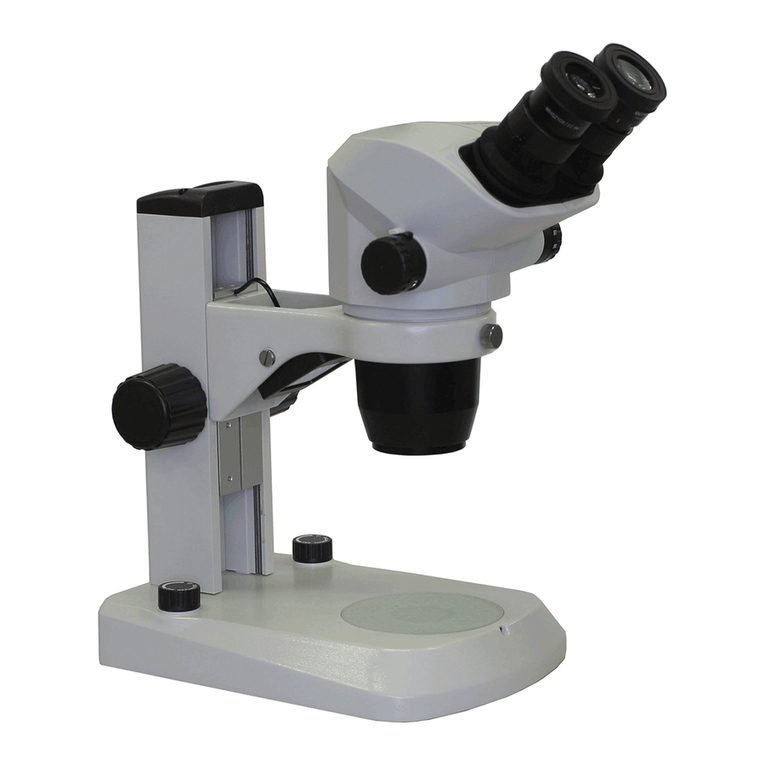
Ecleris MICROSTAR Series Manuel utilisateur

USER MANUAL
MICROSTAR SERIE OM-200
MICROSCOPE
INFORMATION ABOUT THIS MANUAL
Version: 2023.01
Year: 2023
Language: English
All the rights to this manual are reserved, especially reproduction, publication and translation rights. No portion of this manual may be
reproduced by no means (photocopy, microfilm or other methods) without previous written authorization from ECLERIS. Neither can it
be reproduced, multiplied or published through any electronic data processing form.
The information contained in this manual may be modified or broaden without previous notification, without it representing any
responsibility to ECLERIS.
ECLERIS USA
11801 NW 100th Rd
Suite 17
Medley, FL 33178, U.S.A.
Phone: +1 786 483 7490
CMC Medical Devices & Drugs S.L.
C/ Horacio Lengo Nº18, CP29006,
Málaga, Spain
Ph. +34951214054

USER MANUAL / MANUAL DE USUARIO –MICROSTAR
Page 2of 64
INMANUUML019 USER MANUAL - M. USO OM-200 V.2023.01 ENG-ESP US
TABLE OF CONTENT
1. SYMBOLS................................................................................................................................4
2. SAFETY INFORMATION.........................................................................................................5
2.1 WARNINGS..........................................................................................................................5
3. DESCRIPTION.........................................................................................................................6
3.1 INTENDED USE...................................................................................................................6
3.2 INTENDED USER................................................................................................................6
3.3 DESCRIPTION AND COMPONENTS..................................................................................6
3.3.1 FLOOR STAND MICROSCOPE (OM-200F)..................................................................7
3.3.2 OPTICAL HEAD............................................................................................................8
4. INSTALLATION AND OPERATION .........................................................................................9
4.1 BASE INSTALLATION..........................................................................................................9
4.2 COLUMN INSTALLATION..................................................................................................10
4.3 FOREARM-COLUMN INSTALLATION...............................................................................11
4.4 OPTICAL HEAD-ARM INSTALLATION..............................................................................12
4.5 BINOCULAR-SPLITTER INSTALLATION ..........................................................................13
4.6 VIDEO CABLES INSTALLATION.......................................................................................15
5. OPERATION - FUNCTIONS..................................................................................................16
5.1 MICROSCOPE OPERATION.............................................................................................16
5.2 CONNECTIONS.................................................................................................................17
5.2.1 FOREARM ..................................................................................................................17
5.2.2 ARM............................................................................................................................17
5.3 LIGHT SOURCE.................................................................................................................18
5.4 INTERPUPILLARY DISTANCE ADJUSTMENT..................................................................18
5.5 DIOPTRIC CORRECTION ADJUSTMENT.........................................................................18
5.6 MAGNIFICATION VARIATION...........................................................................................19
5.7 COLOR FILTER SELECTOR .............................................................................................19
5.8 DIAPHRAGM SELECTOR..................................................................................................19
6. MOVEMENT AND SHIPPING................................................................................................19
6.1 FOREARM MOVEMENT....................................................................................................20
6.2 PANTOGRAPHIC ARM MOVEMENT.................................................................................20
6.3 ROTATIONAL MOVEMENT OF THE OPTICAL HEAD ......................................................21
6.4 OPTICAL HEAD ROTATION AXIS.....................................................................................22
6.5 OPTICAL HEAD TILT.........................................................................................................22
6.6 MICROSCOPE SHIPMENT................................................................................................23
6.7 MOUNTING THE MONITOR HOLDER...............................................................................23
7. MAINTENANCE.....................................................................................................................26
7.1 CLEANING.........................................................................................................................26

USER MANUAL / MANUAL DE USUARIO –MICROSTAR
Page 3of 64
INMANUUML019 USER MANUAL - M. USO OM-200 V.2023.01 ENG-ESP US
7.1.1 CLEANING THE EXTERNAL SURFACES..................................................................26
7.1.2 DISINFECTION...........................................................................................................26
7.1.3 CLEANING OF OBJECTIVE LENS AND EYEPIECES................................................26
7.2 ELECTRICAL CONNECTIONS..........................................................................................27
7.3 FUSE CHANGE..................................................................................................................27
8. TECHNICAL SPECIFICATIONS............................................................................................28
9. TROUBLESHOOTING...........................................................................................................31
10. TECHNICAL SERVICE.......................................................................................................32
11. WARRANTY.......................................................................................................................32

USER MANUAL / MANUAL DE USUARIO –MICROSTAR
Page 4of 64
INMANUUML019 USER MANUAL - M. USO OM-200 V.2023.01 ENG-ESP US
1. SYMBOLS
Warning
EU Authorized
Representative
Caution
CE Mark
Read the related documentation
This side up
Alternate current
Fuse
Protective earth (Ground)
Video output
Equipotential bonding
Freeze image function
Manufacturer identification
(Name, Address)
Video camera
Serial number
White balance function
Manufacturing date (MM/AAAA)
Lightning
Do not discard with the
household waste
Iris diaphragm
Light intensity
Temperature limits
Optical filter
Pressure limits
Fragile
Humidity limits
On/off integrated light
Keep away from rain
Decrease light intensity
Increase light intensity

USER MANUAL / MANUAL DE USUARIO –MICROSTAR
Page 5of 64
INMANUUML019 USER MANUAL - M. USO OM-200 V.2023.01 ENG-ESP US
2. SAFETY INFORMATION
This manual is intended to explain the installation and functioning of the device.
Warnings: This symbol shall be used in the manual to indicate situations of neglect which
could cause injuries or material considerable damage.
Cautions: This symbol shall be used in the manual to indicate information about
important cautions to prevent undesired consequences.
Read this manual carefully before using the device.
Should you have any doubt regarding the contents of the manual herein, or the operation and
safety of the device, contact your local distributor or the nearest ECLERIS office.
2.1 WARNINGS
It is important to read this manual carefully before using the Microstar Microscope.
ECLERIS will not be held responsible for damage that can occur to the device due to not
following the instructions or not observing the following criteria:
To avoid risk of electric shock, this device must only be connected to an earth-protected
power supply.
Do not install the equipment next to heat sources, such as heaters.
The Microscope must be used in medical facilities with a proper electrical installation,
including a grounding in compliance with the regulations.
The microscope should be connected to the mains through the supplied cord or a
replacement with the same certifications.
The mains should be grounded with no adapter needed.
The sectioning of the electrical network is carried out by disconnecting the power cable, or
by removing the connector from the electrical outlet.
The device is connected to a ground protection through a ground conductor in the power
supply cable. This ground connection is essential for the safe use of the equipment
The device is provided with a connectable power cable that assures proper electrical
isolation. If it needs to be replaced, it should have the same features than the original.
Only connect the device to visualization devices that meet the IEC 60601-1 standard.
Device not appropriate to be used near or around flammable anesthetic gas mixture with air,
oxygen or nitrous oxide.
Do not look directly into the light output; the optical head has a very bright light output.
To move the microscope (during installation and intended use) verify light is off, in order to
avoid bright light on the face.
Do not insert objects into the holes. Do not place any container with liquids on top of the
device.
In case of interference with other electro-medical or electric equipment, it is recommended
increasing the distance between the device and the other equipment to minimize these
effects.

USER MANUAL / MANUAL DE USUARIO –MICROSTAR
Page 6of 64
INMANUUML019 USER MANUAL - M. USO OM-200 V.2023.01 ENG-ESP US
Do not open the device. Maintenance and repairs must be done by ECLERIS or an
authorized company by the fabricant. ECLERIS will not be responsible for the
consequences of repairs or maintenance carried out by unauthorized personnel.
This instruction manual must be kept together with the equipment for future reference. In
case the device is sold or donated, this manual must be enclosed.
If by any of the following:
Inadequate use of the equipment.
Failure to use the instruction manual.
Bad maintenance and care of the equipment.
Repair or manipulation by unauthorized personal.
…personal or material damage is produced to a third party, ECLERIS, the manufacturer and
sales agent of this equipment, will not assume responsibility for said damage.
The device and its accessories should never be discarded with the household
waste. Please check local regulations for electronic components disposal or recycle
of electrical and electronic device.
3. DESCRIPTION
3.1 INTENDED USE
The microscope has been designed to perform observation in diagnostic and surgical procedures.
It is used in different medical specialties, as well as in dentistry, where a magnification of the
working field is necessary to ensure the success of the treatment.
3.2 INTENDED USER
The intended users of this device are physicians or other health professionals, with experience or
training in the use of microscopes.
3.3 DESCRIPTION AND COMPONENTS
The Ecleris Microstar OM-200 Microscope and its accessories allow this equipment to meet all
the necessary characteristics for the different specialties.
This user manual describes the recommended procedures in order to install and use the Ecleris
Microstar OM-200 Microscope. The user manual contains all the information about care and
properly handling of the microscope.
Read the manual thoroughly before operating the equipment.
The accessories of the Ecleris Microstar OM-20 Microscope are the following:
Monitor holder
Splitter
Special cable containing 1 male HDMI plug to connect to the video system, and 2 DC-
PLUG to power the splitter and the integrated light.
The device has different versions:

USER MANUAL / MANUAL DE USUARIO –MICROSTAR
Page 7of 64
INMANUUML019 USER MANUAL - M. USO OM-200 V.2023.01 ENG-ESP US
Code
Description
Binocular rotation
Pantographic arm
length
OM-200F
Floor-stand
Straight
23.03” (585mm)
45º Inclined
32,09” (815mm)
180° Inclinable
3.3.1 FLOOR STAND MICROSCOPE (OM-200F)
Components:
1. Optical Head
2. HD beam Splitter
3. Binocular
4. Tension knob
5. Progressive brake
6. Lock brake
7. Pantographic arm
compensator
8. Switch on/off
9. Forearm

USER MANUAL / MANUAL DE USUARIO –MICROSTAR
Page 8of 64
INMANUUML019 USER MANUAL - M. USO OM-200 V.2023.01 ENG-ESP US
10. Progressive brake
11. Progressive brake 12. Column
13. Microscope Base
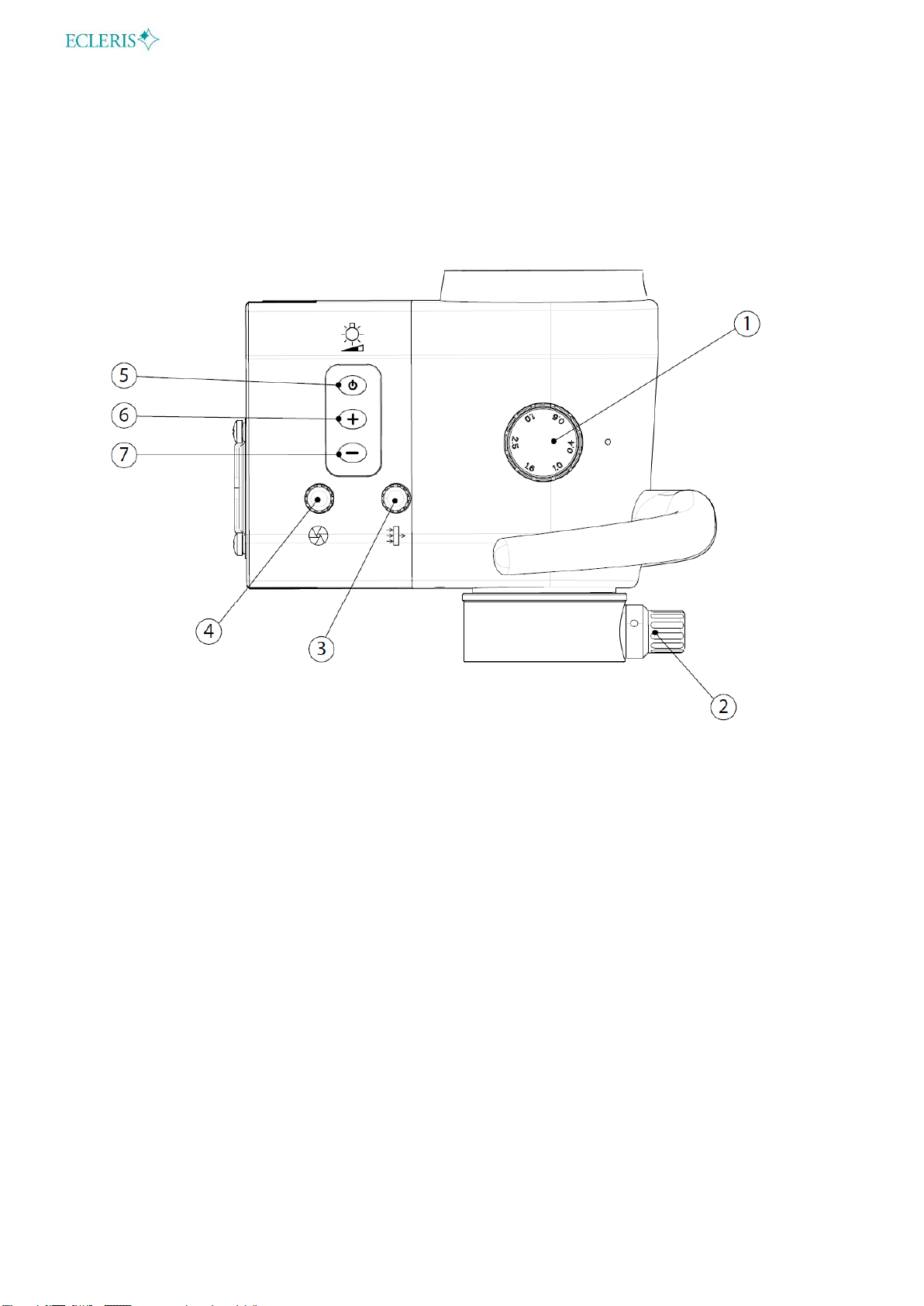
3.3.2 OPTICAL HEAD
1. Magnification selector
2. Micro focus adjustment
3. Light filter selector
4. Diaphragm selector
5. Light on/off
6. Light intensity (increase)
7. Light intensity (decrease)

USER MANUAL / MANUAL DE USUARIO –MICROSTAR
Page 9of 64
INMANUUML019 USER MANUAL - M. USO OM-200 V.2023.01 ENG-ESP US
4. INSTALLATION AND OPERATION
4.1 BASE INSTALLATION
To assemble the microscope base, 4 wheels and 4 counterweights must be fitted.
The wheels are assembled by screwing the bolt into the ends of the base as indicated in the
following figure.
A wrench should be used to tighten the wheel bolts solidly to the base of the microscope.
The base has 4 removable weights that allow the easy handling of the microscope with a reduced
weight of the base.
Once the wheels have been mounted, the 4 removable weights must be placed.
Once the weights have been mounted, the plastic base cover must be placed on the base, as
indicated in the following figure:

USER MANUAL / MANUAL DE USUARIO –MICROSTAR
Page 10 of 64
INMANUUML019 USER MANUAL - M. USO OM-200 V.2023.01 ENG-ESP US
4.2 COLUMN INSTALLATION
Once the wheels and the base cover are placed, the column must be mounted on the base.
Put the column in the central axis of the base as indicated in the following figure:
Tighten the set screw with an Allen wrench.
Ce manuel convient aux modèles suivants
2
Table des matières
Langues :
Autres manuels Ecleris Microscope
Manuels Microscope populaires d'autres marques

VWR
VWR VisiScope 384 Series Manuel utilisateur

Nikon
Nikon ECLIPSE E200 POL Manuel utilisateur

Leica
Leica DI C800 Manuel

ThermoFisher Scientific
ThermoFisher Scientific Continuµm Manuel utilisateur

ThermoFisher Scientific
ThermoFisher Scientific Continuµm Manuel utilisateur

Olympus
Olympus SZ61 Manuel utilisateur