
Ecler essentials eMWR Manuel utilisateur

QUICK GUIDE
eMWR
eMWH
eMWE
Ecler Essentials Wireless Microphone System

QUICK GUIDE
IMPORTANT NOTE
Thank you for having chosen our Ecler Essentials Wireless Microphone System.
In order to get the optimum operation and efficiency from your product, it is VERY
IMPORTANT - before you plug anything - to read this manual very carefully and take seriously
into account all considerations specified within it.
We strongly recommend that its maintenance be carried out by our Authorised
Technical Services.
Compliance with international standards
The Ecler Essentials Wireless Microphone System complies with the following international
standards:
•EN55103-1 Electromagnetic Compatibility.
Product family standard for audio, video, audio-visual and entertainment lighting control
apparatus for professional use
Part 1: Emission
•EN55103-2 Electromagnetic Compatibility.
Product family standard for audio, video, audio-visual and entertainment lighting control
apparatus for professional use
Part 2: Immunity
•EN60065 Audio, video and similar electronic apparatus. Safety requirements
Complying with the requirements of directives 73/23/EC and 2004/108/EC
All numbers subject to variation due to production tolerances. NEEC AUDIO BARCELONA S.L. reserves the right to
make changes or improvements in manufacturing or design which may affect specifications.

QUICK GUIDE
INDEX
1. eMWR: WIRELESS UHF MICROPHONE RECEIVER
2. eMWH: HANDHELD UHF WIRELESS TRANSMITTER
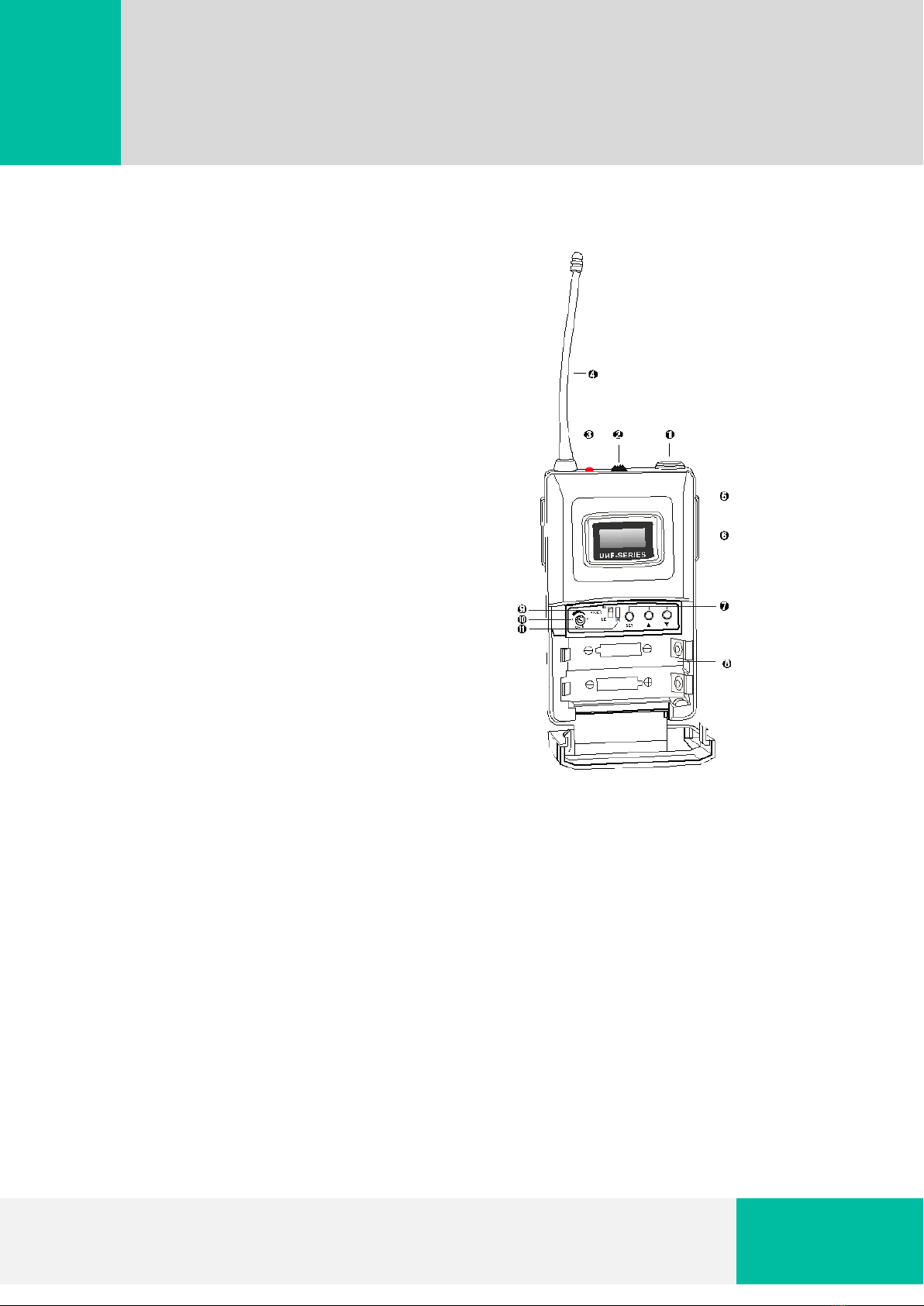
3. eMWE: BELTPACK UHF WIRELESS TRANSMITTER
4. TROUBLESHOOTING
5. TECHNICAL SPECIFICATIONS

QUICK GUIDE
1. eMWR: WIRELESS UHF MICROPHONE RECEIVER
1. Volume control 1. 8-STEP level display (RF signal)
2. LCD display 2. 8-STEP level display (AF signal)
3. Infrared receiver 3. Frequency menu display
4. UP Button 4. Channel menu display
5. SET button 5. 6-character alphanumeric display
6. DOWN Button 6. Diversity display (active antenna)
7. POWER button 7. MUTE display
8. DC POWER socket
9. Antenna B input socket
10. Balanced XLR audio output
11. Unbalanced Jack audio output
12. Output Level selection switch
13. Antenna A input socket

QUICK GUIDE
Operation
1. Adjust the volume to its minimum before turning on the transmitter. Then turn on the
receiver. LCD display will show the channel/frequency of the receiver. Press UP/DOWN button
to select the desired channel/frequency and press SET to confirm changes.
2. If a RF and/or AF strong level appears when the transmitter is off, change the channel in the
receiver to avoid interferences.
3. Turn on the transmitter. RF level meter shows the intensity of the received signal meanwhile
AF meter shows its audio amplitude. Adjust the volume according AF level meter. Check that
transmitter and receiver are in the same channel/frequency.
4. To link receiver and transmitter by means of an infrared signal, between emitter and
receiver, press SET button, the display will show PRG IR and after 2-3 seconds the receiver will
automatically link with the transmitter.
5. Press the POWER button for 2 or 3 seconds to turn off the receiver.
•Keys functions:
oSET: menu selection and settings confirmation.
oUP & DOWN: parameters selection in the current menu. Hold for quick
frequency and channel selection.
•Menus:
oCHANNEL/FREQUENCY: allows selecting the channel/frequency.
oPRG IR: allows linking receiver-transmitter by means of infrared frequency.
oSQUELCH: when the received signal strength falls below this threshold, the
output of the receiver is muted.
oDISPL: channel/frequency display.
oLOCK: LOCK ON mode prevents to accidentally change current work status.
LOCK OFF mode restores usual operation.

QUICK GUIDE
2. eMWH: HANDHELD UHF WIRELESS TRANSMITTER
1. Channel display 1. Grille
2. 6-character alphanumeric display 2. Body
3. Battery status 3. LCD display
4. POWER button
5. LOCK switch
6. Infrared receiver (IR)
7. RF signal
8. Tail cover
9. Battery tray
Operation
1. Click the power on button. LCD display will show current channel.
2. To change the channel, first select the channel/frequency on the receiver. Then, facing IR
receiver of the microphone with IR transmitter on the eMWR, press SET button to link both
devices.
QUICK GUIDE
3. eMWH: HANDHELD UHF WIRELESS TRANSMITTER
1. Microphone/line input
2. Power button
3. Battery indicator
4. Antenna
5. Back splint
6. LCD display
7. SET button
8. Battery tray
9. Volume control
10. Power control
11. Infrared interface
Operation
1. Switch on the power button. LCD display will show current channel.
2. To change the channel, first select the channel/frequency on the receiver. Then, facing IR
receiver of the belt-pack with IR transmitter on the eMWR, press SET button of the receiver to
link both devices. Channel/frequency can be adjusted by means of SET/UP/DOWN buttons.

QUICK GUIDE
4. TROUBLESHOOTING
PROBLEM
POSSIBLE CAUSE
No operation indication
Transmitter’s batteries are exhausted or DC in
is not well connected
No RF signal
Transmitter and receiver are not at the same
channel
Transmitter is out of range
RF signal available, no audio signal, ”MUTE”
appears on the display panel
Transmitter is muted
Receiver’s squelch threshold is adjusted too
high
Transmitter doesn’t transmit a pilot tone
Audio signal has a high level of background
noise
Transmitter sensitivity is adjusted too low
Receiver’s AF output level is adjusted too low
Audio signal is distorted Transmitter sensitivity is adjusted too high
Receiver’s AF output level is adjusted too high
The use of short-distance, Signal instability
Transmitter set at a low-power
Squelch threshold is too high
Receiver antenna set improperly
Surrounded by strong electromagnetic
interference
5. TECHNICAL SPECIFICATIONS
SYSTEM
Frequency range 823 - 832MHz
Modulation Mode Broadband FM
Available Bandwidth 50MHz
Number of channels 100
Channel spacing 250KHz
Frequency stability ±0.005%
Dynamic range 100dB
Peak deviation ±45KHz
Audio response 80Hz-18KHz(±3dB)
Comprehensive SNR >105 dB
Comprehensive Distortion ≤0.5%
Operating Temperature -10°C to +40°C

QUICK GUIDE
RECEIVER
Receive mode Double Conversion Super Heterodyne
Intermediate frequency
The first medium frequency:100MHz
The second medium frequency:10.7MHz
Wireless interface BNC /500Ω
Sensitivity 12dBµV (80 dBS/N )
Spurious rejection ≥75 dB
Sensitivity adjustment range 12-32dBV
Maximum output level + 10 dBV
TRANSMITTER
Output power High:30mW; Low:3mW
Spurious rejection -60dB
Voltage Two AA batteries
Current utility time
High: >10 hours
Low: >15 hours
Number of parallel systems 12
NEEC AUDIO BARCELONA S.L.
Motors 166-168, 08038 Barcelona, Spain
http://www.ecler.com
50.0306.01.00

QUICK GUIDE
eMWR
eMWH
eMWE
Sistema Inalámbrico de Microfonía Ecler Essentials
Ce manuel convient aux modèles suivants
2
Table des matières
Langues :
Manuels Système de microphone populaires d'autres marques


Sennheiser
Sennheiser Evolution Wireless Digital EW-DX EM 2 Manuel utilisateur

Alpha Technologies
Alpha Technologies RBMS Manuel utilisateur

SWIT Electronics Co.,LTD.
SWIT Electronics Co.,LTD. CW-S150 Manuel utilisateur

Shure
Shure UA844 Manuel utilisateur

Panasonic
Panasonic SHFX70 - DVD HOME THEATER WIRELESS SYSTEM Manuel utilisateur

Pyle
Pyle PDWM5000 Manuel utilisateur