EBERBACH EL680.Q Instructions d'installation

USE AND CARE FOR CATALOG NUMBER:
EL680.Q Digital Variable Speed Reciprocating Shaker -
115V - 50/60 Hz
CAUTION!
UNPLUG THE POWER CORD BEFORE DOING ANY
MAINTENANCE ON THIS MACHINE.
FAILURE TO DO SO MAY CAUSE INJURY
!!THE USER OF THIS DEVICE IS RESPONSIBLE FOR OBTAINING THE
PROPER PERSONAL PROTECTIVE EQUIPMENT DEPENDING ON THE
MATERIAL BEING PROCESSED!!
IF THE EQUIPMENT IS USED IN A MANNER NOT SPECIFIED BY THE
MANUFACTURER, THE PROTECTION PROVIDED BY THE EQUIPMENT
MAY BE IMPAIRED.
SERVICE ON THE UNIT SHOULD BE PERFORMED BY QUALIFIED /
TRAINED PERSONELL ONLY.
INITIAL PREPARATION:
Place shaker on a level table or bench.
NOTE: This unit should be operated by trained personnel.
With the power switch on the front panel in the off position ( 0 ), plug the line cord
into a 115 Volt, 50/60 Hz source. Turn shaker on by moving switch to the On
position ( I ).
NOTE: Speed adjustments should be made only when the shaker is operating.
Use slowest speed necessary to produce required shaking action.
NOTE: This unit emits less that 70.0 dB(A).
CAUTION: Extra effort may be needed when lifting machine due to suction
adhesion with table and rubber feet.
IN AN EMERGENCY TURN OFF UNIT OR UNPLUG AC CORD

USE AND CARE FOR CATALOG NUMBER:
EL680.Q Wrist Action Shaker
Variable Speed with Timer and Tachometer
100-600 +/-2 opm, 115V- 50/60 Hz
GENERAL INFORMATION
1) Handle this unit with care. Unpack and check that the contents coincide
with the packing-list. If any part is damaged or missing, please advise the
distributor immediately.
2) Do not install or use this equipment without first reading this manual.
3) This manual should always be attached to the equipment and made
available to all users.
4) If you have any doubts or inquiries, please contact your supplier or
Eberbach Corporation technical service.
5) Do not use the apparatus with liquids which can give off vapors capable
of making explosive mixtures.
PACKING LIST
The standard equipment consists of the following components:
Description Qty
Wrist Action Shaker 1
Arms 2
Clamps 8
Power Cord 1
Allen Wrench 3/16 1
Allen Wrench 3/32 1
Use and Care Manual 1

EQUIPMENT DESCRIPTION
Wrist Action Shaker: Electronic regulation between 100 and 600 oscillations
per minute. Oscillation amplitude is 9mm. Easily detachable arms equipped
with 8 clamps for attaching and processing up to 8 samples at one time.
TECHNICAL FEATURES
Voltage supply 115V, 50/60 Hz
Height 18 in
Length 14 in
Width 36 in
Maximum Capacity 4 kg (8.8 lbs)
Oscillations per minute 100-600 +/-2
Power Consumption 0.7 Amps
INSTALLATION
1) Place the apparatus on a flat, horizontal, level surface with enough
stability to resist its own vibrations.
2) Fit the arms with clamps to the shaker side shaft so that the screws
tighten against the flat surface of the shaft.
CAUTION!!! IMPORTANT FOR YOUR SAFTEY
Be sure that the voltage supply is the same as the one indicated on the serial
tag.
Do not shake products capable of making an explosive mixture.
Do not use the apparatus if it is not grounded properly.


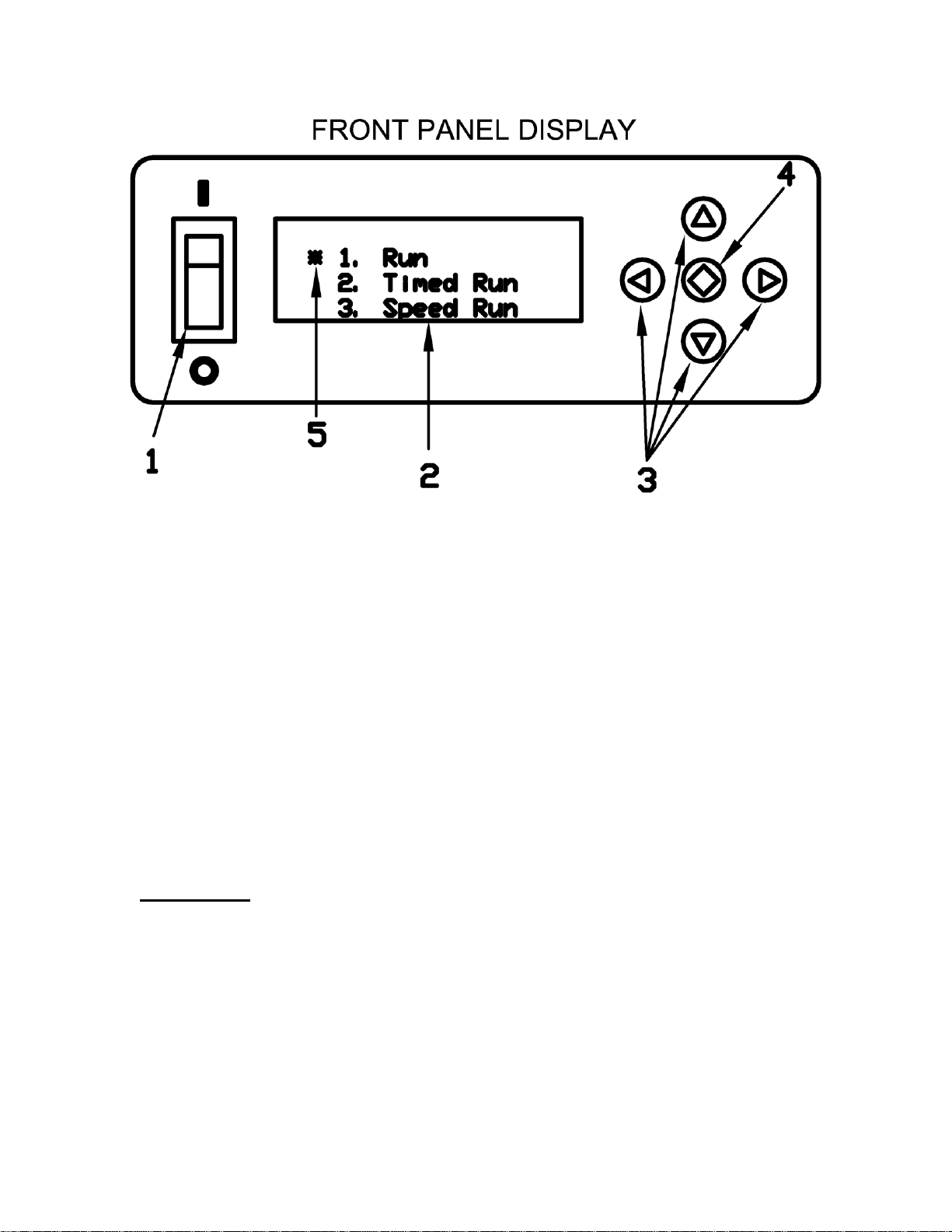
1) Power Switch
2) Liquid Crystal Display (LCD)
3) Directional Pad (D-Pad)
4) Enter Button
5) Cursor
Operation: Press the Power Switch down into the ON position.
The LCD should light up and show the main menu. There are three
different run modes to choose from. Select a run mode by moving
the Cursor (using the D-PAD) and press the Enter Button.

Run Mode: The shaker will begin the run mode at its lowest speed.
The speed shown in parenthesis (xxxx) is the set speed controlled by
the user. The speed listed to the right is the tachometer read out or
the actual speed of the shaker in real time. The speed can be
increased/decreased by pressing and holding the up/down arrows on
the D-PAD. The longer the button is held down the faster the speed
will increase/decrease. Once engaged the timer will begin counting
all the way up to 999 hours before the timer overflows back to zero.
To pause the shaker move the Cursor to the PAUSE item by
pressing the left arrow on the D-PAD and press the Enter Button.
The clock will pause at its current time and the shaker will gradually
come to a complete stop. The clock and shaker can be resumed at
its current time and speed by selecting RESUME and pressing the
Enter Button. To go back to the main menu move the Cursor to the
EXIT item by pressing the right arrow on the D-PAD and then press
the Enter Button.

Timed Run Mode: The timed run mode features a count down timer
that automatically shuts the shaker off when the time runs out. When
selected the user will be taken to the Timed Run Setup Menu and will
need to input the run time in hours, minutes, seconds and select the
speed for the run. The left/right arrows on the D-PAD can be used to
move the cursor between hours, minutes or seconds and the up and
down arrows can be used to set the time. The longest run time
allowed is 999:59:59. Once the time is set move the Cursor down by
pressing the right arrow on the D-PAD until the Cursor is next to the
RPM line item. The speed can be set using the up and down arrows
on the D-PAD. Now that the data is set navigate the Cursor to the
START line item using the left/right arrows on the D-PAD and press
the Enter Button.

After selecting START the shaker will begin at the selected speed
and the timer will begin counting down. The speed can be adjusted
in real time using the up/down arrows on the D-PAD. The speed
shown in parenthesis is the target speed controlled by the user and
the speed listed to the right is the actual speed as read by the
tachometer. The shaker and countdown timer can be paused and
resumed. Move the Cursor to the line item PAUSE by pressing the
left arrow on the D-PAD and then press the Enter Button. Exiting
the Timed Run Menu will bring the user back to the Timed Run Setup
Menu.

Speed Run Mode: The speed run allows the user to program in a
set run speed. Once engaged the timer will begin counting all the
way up to 999 hours before the timer overflows back to zero. Select
the speed run mode from the main menu and press the Enter
Button. The user will be prompted with the speed run setup menu.
Set the desired speed using the up/down arrows on the D-PAD. The
left/right arrows can be used to move the Cursor between START
and EXIT. EXIT will take the user back to the main menu. Keep the
Cursor next to the START line item and press the Enter Button.
The user will now be taken to the speed run menu. The shaker will
begin at the speed selected in the setup menu. The speed run menu
behaves in the same way as the run menu with one exception.
Pressing EXIT will not take the user back to the main menu instead
pressing EXIT will take the user back to the speed run setup menu.
Table des matières
Autres manuels EBERBACH Pistolet à peinture