
Eaton TRIPP LITE Series Manuel utilisateur
1
Owner’s Manual
Español 11
Français 21
Deutsch 31
Italiano 41
Model:
U442-DOCK7D-B
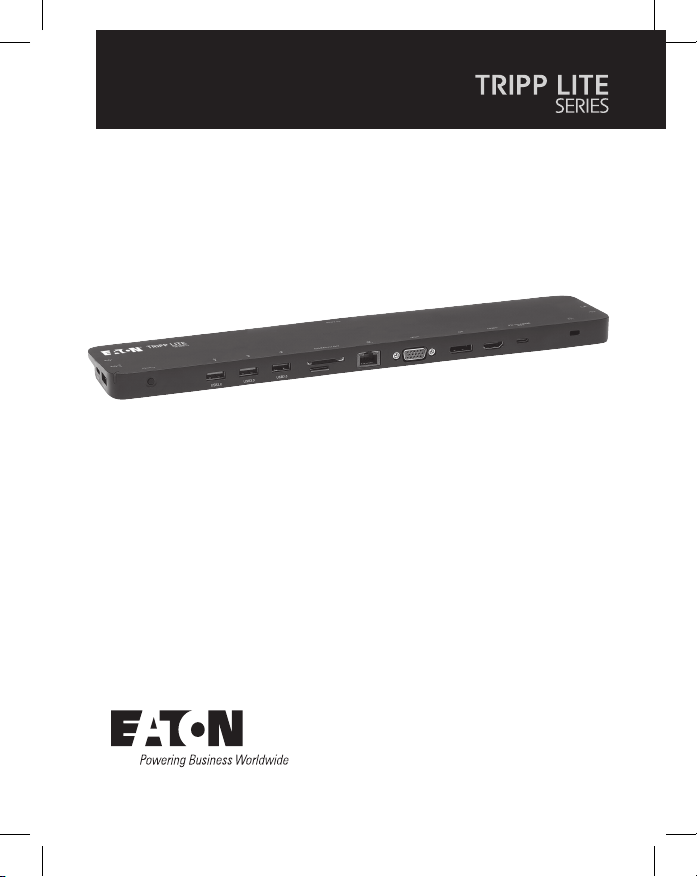
USB-C®Triple Display
Docking Station
Purchased product may differ from image.

2
• All-in-one docking station includes ports for HDMI, DisplayPort, VGA,
Gigabit Ethernet, USB-C (x2), USB-A (x5) and 100W Power Delivery
(PD) charging.
• Connect up to three displays simultaneously and extend across all
displays (up to three).
• Supports HDMI and DisplayPort video resolutions up to 4096 x 2160
@ 30 Hz.
• Supports VGA video resolutions up to 1920 x 1200 @ 60 Hz.
• Ethernet port supports true 10/100/1000 Mbps network speeds.
• PD 3.0 Fast Role Swap maintains data and power connections upon
removal and connection of charging power adapter.
• USB-C PD charging port supports power input up to 20V/5A (100W).
• Supports dynamic current detection and power distribution enabling
your source (host) to be charged at a dynamic power level instead
of a xed power level.
• Dedicated 5V/1.5A USB ports provide fast charging power to
mobile devices.
• Secure Digital v3.0 SD/Micro SD card slots for external memory
may be used simultaneously.
• USB 3.2 and USB 2.0 ports support 5 Gbps and 480 Mbps data
transfer speeds respectively.
• Thunderbolt 3 compatible.
• Plug-and-play design – no software, drivers or external power required.
Product Features

3
• N201-Series Cat6 Gigabit Snagless Patch Cables
• P312-Series 3.5 mm Mini Stereo Audio Cables
• P502-Series High-Resolution VGA Cables
• P569-Series High-Speed HDMI Cables
• P580-Series DisplayPort Cables with Latches
• U322-Series USB 3.2 A/B Device Cables
• U420-Series USB 3.2 Gen 1 C/C Cables
• U428-Series USB 3.2 Gen 1 A/C Cables
• M100-Series USB Sync/Charge Cable – USB-A to Lightning
• U442-DOCK7D-B
• USB 3.2 Type-C Cable – 1 ft. (0.3 m), Black
• Owner’s Manual
Package Contents
Optional Accessories
4
Product Overview
2
2
3
3
4
4
5
5
6
6
7
7
8
8
1
1
9
9
J
J
K
K
K
K
O
O
P
P
N
N
L
L
M
M
J
J

5
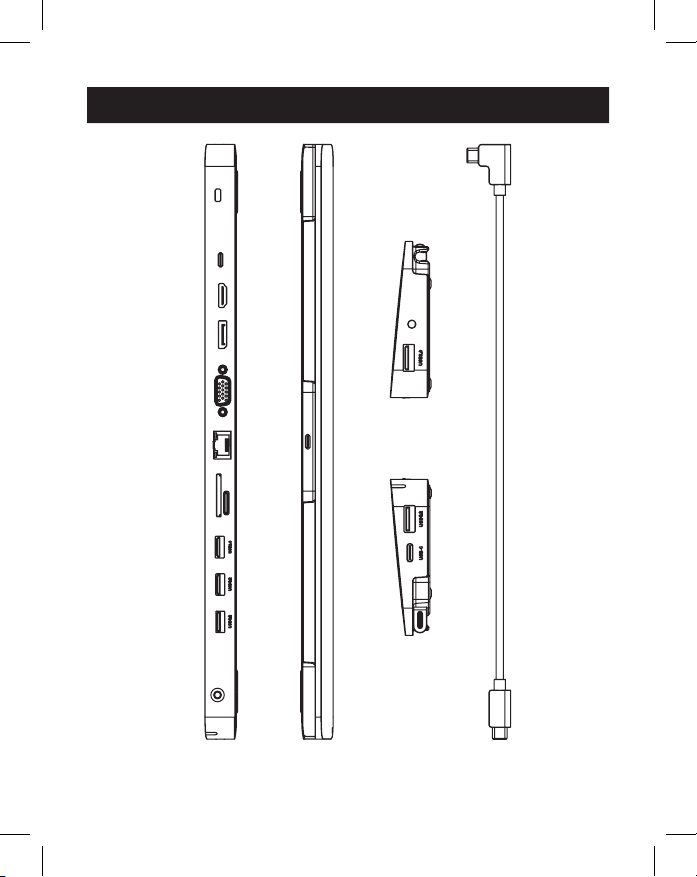
1USB Type-C To Host: Connect this port to the host (source) via the
removable USB-C to USB-C cable.
2 USB Type-C Cable: Detachable USB-C to USB-C cable connects the
host to the docking station.
3Anti-Theft Lock: Connect a user-supplied computer/laptop security
cable lock.
4USB Type-C PD Charging Port:
Connect a device’s PD Power
Adapter.
5HDMI Port: Connect an HDMI monitor.
6DisplayPort Port: Connect a DisplayPort monitor.
7VGA Port: Connect a VGA monitor.
8RJ45 Port: Connect to a 10/100/1000 Mbps network.
9SD/Micro SD Card Slot: Insert SD and Micro SD
memory cards.
JUSB-A 2.0 Ports (x2): Connect up to two USB 2.0 peripherals
or devices.
KUSB-A 3.2 Ports (x2): Connect up to two USB 3.2 peripherals
or devices.
LUSB-A 3.2 Port: Supports 5V 1.5A charging for power-hungry
devices.
MUSB Type-C Data Only Port: Supports the transmission of data up
to 5 Gbps.
N3.5 mm Mini Stereo Port: Connect speaker or microphone.
OPower Button: Turns the unit o and on.
PLED: Green LED illuminates when the unit is on and receiving power.
Product Overview
6
Notes:
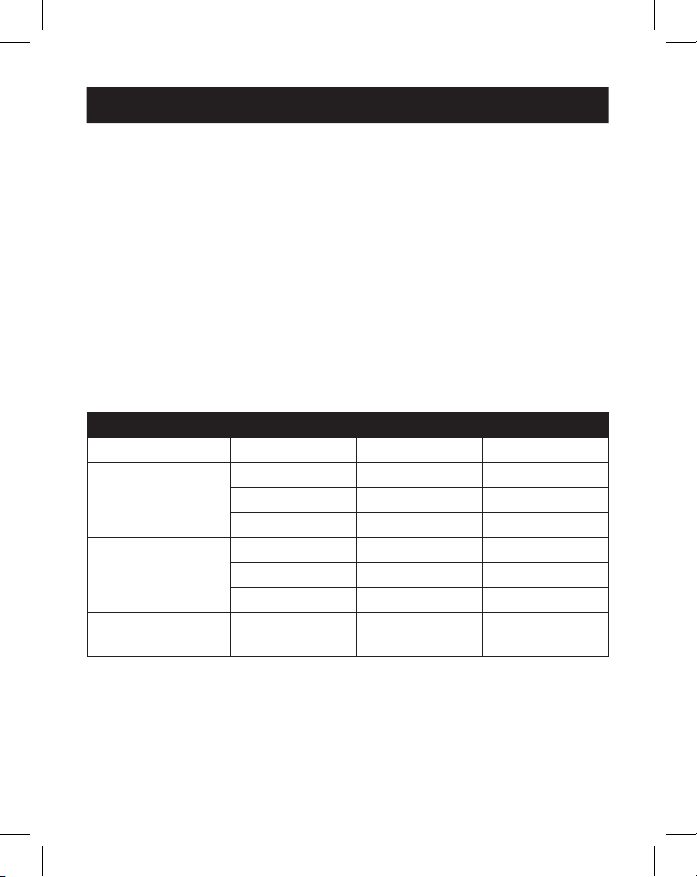
• Maximum resolutions when all three displays are connected are 1920 x 1080 @ 60
Hz in SST (Single Stream Transport) mode and 1280 x 720 @ 60 Hz in MST (Multi
Stream Transport) mode.
• Mac OS laptops or computers will only extend to one monitor. The others will be mirrored.
1. Detach the USB 3.2 Type-C cable from the unit. Plug the right-angled
USB-C connector to the docking station and the straight USB-C
connector to your source (e.g. laptop).
2. Connect up to three monitor(s) using the available HDMI, VGA and
DisplayPort video ports.
Note: Up to three monitor screens can be extended, providing a total of four separate
screens (including your source’s screen). The following table denes the maximum video
resolutions based on specic congurations while in SST and MST modes.
SST Mode (Single Downstream Display)
Ports VGA HDMI DP
Single Display
Connected
1080p/60 Hz N/A N/A
N/A 4K/30 Hz N/A
N/A N/A 4K/30 Hz
Dual Displays
Connected
1080p/60 Hz 1080p/60 Hz N/A
1080p/60 Hz N/A 1080p/60 Hz
N/A 4K/30 Hz 4K/30 Hz
Triple Displays
Connected
1080p/60 Hz 1080p/60 Hz 1080p/60 Hz
Installation
7
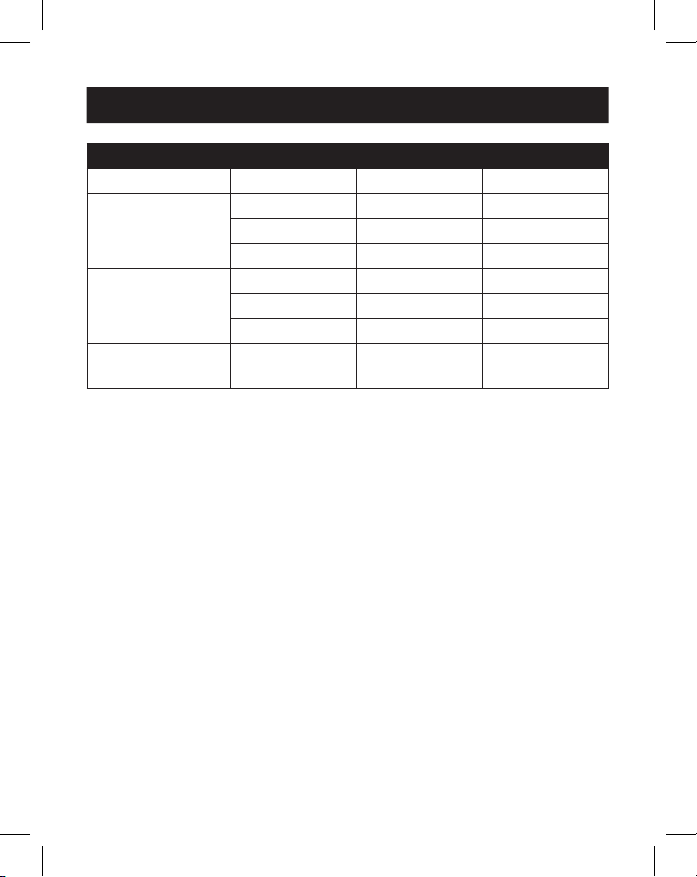
MST Mode (Multiple Downstream Displays)
Ports VGA HDMI DP
Single Display
Connected
1080p/60 Hz N/A N/A
N/A 4K/30 Hz N/A
N/A N/A 4K/30 Hz
Dual Displays
Connected
1080p/60 Hz 1080p/60 Hz N/A
1080p/60 Hz N/A 1080p/60 Hz
N/A 4K/30 Hz 4K/30 Hz
Triple Displays
Connected
720p/60 Hz 720p/60 Hz 720p/60 Hz
3. Connect up to two USB 2.0 peripherals such as a keyboard and mouse.
4. Connect up to three USB 3.2 peripherals.
Note: The USB 3.2 charging port supports up to 7.5W (5V 1.5A) of charging power.
5. Connect to an Ethernet network through the RJ45 port to achieve
speeds up to 10/100/1000 Mbps.
6. Connect the 3.5 mm Mini Stereo port to a microphone or speaker
with a user-supplied 3.5 mm audio cable.
7. Insert an SD or Micro SD card into the corresponding memory card
slots to access external memory.
Note: Both memory card slots may be used simultaneously.
8. Transfer data at speeds up to 5 Gbps using the USB Type-C data port.
9. Charge the source device by connecting its USB-C PD Charger to the
docking station’s USB-C PD Charging port for up to 100W (20V 5A)
of charging power.
10.Connect a security cable lock to the anti-theft lock port (optional).
Installation
8
Input Connector
USB-C USB Type-C, Female
Output Connector(s)
USB-A USB 3.2, Female (x3), USB 2.0, Female (x2)
USB-C USB-C Data Only, Female
USB-C PD Charge Only, Female
Ethernet RJ45, Female
VGA VGA, Female
HDMI HDMI, Female
DisplayPort DisplayPort, Female
Audio 3.5 mm, Female
Memory Cards SD, Micro SD
Environmental
Operating
Temperature
32° to 113°F (0 to 45°C)
Operating Humidity 10% to 85% RH, Non-Condensing
Storage Temperature 14° to 158°F (-10 to 70°C)
Storage Humidity 5% to 90% RH, Non-Condensing
Specifications
9
Mechanical
Unit Dimensions
[H x W x D]
0.71 x 13.76 x 2.91 in. (18.1 x 348 x 74 mm)
Unit Weight 0.55 lb. (0.25 kg)
Specications
HDMI Specication 1.4
HDCP Specication 1.4
DisplayPort
Specication
1.2
Maximum Supported
Video Resolution(s)
HDMI (4096 x 2160 @ 30 Hz),
DisplayPort (4096 x 2160 @ 30 Hz),
VGA (1920 x 1200 @ 60 Hz)
Network Speed 10/100/1000 Mbps or 1 Gbps
Color Depth (HDMI) 36 bit (12 bits per channel)
Chroma Subsampling
(HDMI)
YCbCr: 4:4:4, 4:2:2, 4:2:0 and RGB: 4:4:4
Audio Specications LPCM 7.1 Channel Surround Sound Audio
PD Charging
Specication
PD 3.0 (100W)
Specifications

10
3-Year Limited Warranty
We warrant our products to be free from defects in materials and workmanship for a period of
three (3) years from the date of initial purchase. Our obligation under this warranty is limited to
repairing or replacing (at its sole option) any such defective products. Visit Tripplite.Eaton.com/
support/product-returns before sending any equipment back for repair. This warranty does not
apply to equipment which has been damaged by accident, negligence or misapplication or has
been altered or modied in any way.
EXCEPT AS PROVIDED HEREIN, WE MAKE NO WARRANTIES, EXPRESS OR IMPLIED, INCLUDING
WARRANTIES OF MERCHANTABILITY AND FITNESS FOR A PARTICULAR PURPOSE. Some states do
not permit limitation or exclusion of implied warranties; therefore, the aforesaid limitation(s) or
exclusion(s) may not apply to the purchaser.
EXCEPT AS PROVIDED ABOVE, IN NO EVENT WILL WE BE LIABLE FOR DIRECT, INDIRECT, SPECIAL,
INCIDENTAL OR CONSEQUENTIAL DAMAGES ARISING OUT OF THE USE OF THIS PRODUCT, EVEN
IF ADVISED OF THE POSSIBILITY OF SUCH DAMAGE. Specically, we are not liable for any costs,
such as lost prots or revenue, loss of equipment, loss of use of equipment, loss of software, loss
of data, costs of substitutes, claims by third parties, or otherwise.
WEEE Compliance Information for Customers and Recyclers (European Union)
Under the Waste Electrical and Electronic Equipment (WEEE) Directive and implementing
regulations, when customers buy new electrical and electronic equipment from Eaton
they are entitled to:
• Send old equipment for recycling on a one-for-one, like-for-like basis (this varies
depending on the country)
• Send the new equipment back for recycling when this ultimately becomes waste
WARNING
Use of this equipment in life support applications where failure of this equipment can reasonably
be expected to cause the failure of the life support equipment or to signicantly aect its safety
or eectiveness is not recommended.
Eaton has a policy of continuous improvement. Specications are subject to change without
notice.
Warranty
Eaton
1000 Eaton Boulevard
Cleveland, OH 44122
United States
Eaton.com
© 2023 Eaton
All Rights Reserved
Publication No. 23-07-693 /
93-3B68_RevD
July 2023
Eaton is a registered
trademark.
All trademarks are property
of their respective owners.
Autres manuels pour TRIPP LITE Series
23
Ce manuel convient aux modèles suivants
1
Table des matières
Langues :
Autres manuels Eaton Station d'accueil

Eaton
Eaton TRIPP LITE U442-DOCK11-S Manuel utilisateur

Eaton
Eaton TRIPP LITE Series Manuel utilisateur

Eaton
Eaton TRIPP LITE U442-DOCK4-S Manuel utilisateur

Eaton
Eaton TRIPP LITE Series Manuel utilisateur

Eaton
Eaton TRIPP LITE Series Manuel utilisateur

Eaton
Eaton TRIPP LITE U442-DOCK8-B Manuel utilisateur

Eaton
Eaton TRIPP LITE U442-DOCK8-GG Manuel utilisateur

Eaton
Eaton TRIPP LITE U442-DOCK4-S Manuel utilisateur

Eaton
Eaton TRIPP LITE Series Manuel utilisateur

Eaton
Eaton TRIPP LITE Series Manuel utilisateur


