
EasyIO FG Series Manuel utilisateur

FG Series SMS v1.1
1
EasyIO FG Series and FS Series
SMS User Guide

FG Series SMS v1.1
2
Document Change Log
24th July 2016
Document created.
17th Dec 2018
Updated disclaimer and support channel emails addresses
Updated images to reflex CPT Tools

FG Series SMS v1.1
3
Disclaimer
Confidentiality Notice
The information contained in this document is confidential information of EasyIO Holdings Pte Ltd. Such
information and the software described herein, is furnished under a license agreement and may be used
only in accordance with that agreement.
The information contained in this document is provided solely for use by EasyIO Holdings Pte Ltd employees,
licensees, and system owners; and, except as permitted under the below copyright notice, is not to be released to,
or reproduced for, anyone else.
While every effort has been made to assure the accuracy of this document, EasyIO Holdings Pte Ltd is not
responsible for damages of any kind, including without limitation consequential damages, arising from the
application of the information contained herein. Information and specifications published here are current as of
the date of this publication and are subject to change without notice. The latest product
specifications can be found by contacting our corporate headquarters or support channel.
Trademark Notice
EasyIO logo are registered trademarks of EasyIO Holdings Pte Ltd.
CPT Tool is by Online Tools Inc.
BACnet and ASHRAE are registered trademarks of American Society of Heating, Refrigerating and Air-
Conditioning Engineers. All other product names and services, mentioned in this publication, that are
known to be trademarks, registered trademarks, or service marks are the property of their respective
owners.
Copyright and Patent Notice
This document may not, in whole or in part, be copied, photocopied, reproduced, translated, or reduced
to any electronic medium or machine-readable form without prior written consent from EasyIO Holdings Pte Ltd
Copyright © 2017 EasyIO Holdings Pte Ltd. All rights reserved
Disclaimer
The material in this manual is for information purposes only. The contents and the product it
describes are subject to change without notice. EasyIO Holdings Pte Ltd makes no
representations or warranties with respect to this manual. In no event shall EasyIO Holdings Pte Ltd be liable for
any damages, direct or incidental, arising out of or related to the use of this manual.
EasyIO Holdings Pte Ltd
101, Cecil Street #09-07
Tong Eng Building
Singapore 069533
Worldwide and Asia Pacific Support : support@easyio.com
Americas Support : support@easyio.pro
Europe Support : support@easyio.eu

FG Series SMS v1.1
4
Federal Communication Commission Interference Statement
This equipment has been tested and found to comply with the limits for a Class B digital device, pursuant to Part 15
of the FCC Rules. These limits are designed to provide reasonable protection against harmful interference in a
residential installation. This equipment generates, uses, and can radiate radio frequency energy and, if not
installed and used in accordance with the instructions, may cause harmful interference to radio communications.
However, there is no guarantee that interference will not occur in a particular installation. If this equipment does
cause harmful interference to radio or television reception, which can be determined by turning the equipment off
and on, the user is encouraged to try to correct the interference by one or more of the following measures:
•Reorient or relocate the receiving antenna.
•Increase the separation between the equipment and receiver.
•Connect the equipment into an outlet on a circuit different from that to which the receiver is connected.
•Consult the dealer or an experienced radio/TV technician for help.
Caution: Any changes or modifications not expressly approved by the party responsible for compliance could void
the user's authority to operate this equipment.
FCC Caution
This device complies with Part 15 of the FCC Rules. Operation is subject to the following two conditions: (1) This
device may not cause harmful interference, and (2) this device must accept any interference received, including
interference that may cause undesired operation.
FCC Radiation Exposure Statement
This equipment complies with FCC radiation exposure limits set forth for an uncontrolled environment. This
equipment should be installed and operated with minimum distance 20cm between the radiator & your body.
RF Exposure: A distance of 20 cm shall be maintained between the antenna and users, and the transmitter module
may not be co-located with any other transmitter or antenna.

FG Series SMS v1.1
5
Table of Contents
Introduction ...................................................................................................................................................................6
Prerequisites ..................................................................................................................................................................6
Hardware configuration limitation ................................................................................................................................6
Configuring the SMS Service..........................................................................................................................................7
Configuring SMS object................................................................................................................................................11
Configure the Axeon TCP modem to user preference.................................................................................................14
Technical Support ........................................................................................................................................................16
FG Series SMS v1.1
6
Introduction
EasyIO FG+ series and FS Series has the ability to send Short Messaging System, SMS as an alarm notification to
users.
It utilizes a specific TCP modem from a 3rd party manufacturer and requires a SIM card from mobile Telco operator.
The TCP modem supports most Telco Operators worldwide.
**Feature is only supported in EasyIO FG+ and FS Series series ONLY**
Prerequisites
1. CPT Tool dated 16th Dec 2016 or later.
2. FG Series firmware version v1.5b50 or later (EasyIO FG) and v2.0b50 or later for (EasyIO FG+) is required for
best performance.
3. For FS Series, firmware has to be V3.0b50 or later.
4. Axeon TCP GSM-GPRS Data Terminal (purchase separately from EasyIO)
5. Valid SIM from any GSM mobile operator.
Hardware configuration limitation
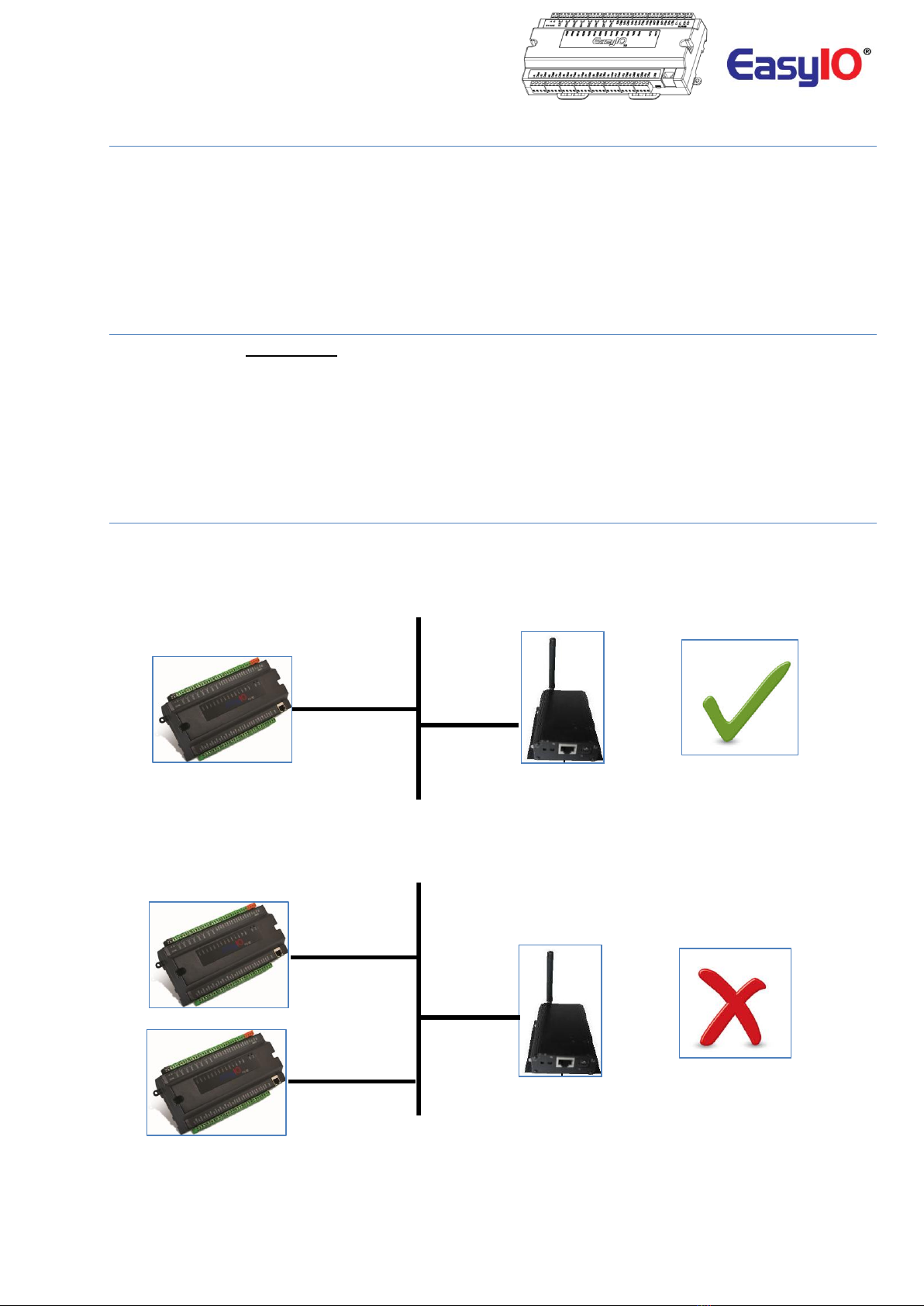
Each TCP GSM modem can only be connected to one FG+ one FS Series controller.
The modem cannot be shared among multiple EasyIO FG controllers even it is a IP modem.
LAN network 10/100/1000
Image shows the diagram of single EasyIO FG32+ connecting to a TCP modem
LAN network 10/100/1000
Image shows the diagram of multiple EasyIO FG32+ connecting to a TCP modem

FG Series SMS v1.1
7
Configuring the SMS Service
The architecture of the SMS service is a tiered, parent/child structure as indicated below. The service object can be
placed anywhere in the Sedona apps. It is recommended to create a separate folder for each service to allow
logical identification of each “parent” service and the associated “child” objects.
Service
SMS recipient
**Note**
In order to configure the SMS driver, easyioFGSms 1.0.45.45.3 kit or higher need to be installed.
Step 1
Connect to the controller with Sedona Workbench or CPT Tool.
Default login credentials are as below;
IP address : 192.168.10.11
Username : admin
Password :<no password>
Add the kits to the controller by navigating to manage kits and install easyioFGSms kit into your controller
Click Apply to proceed with kit installation. The CPT will auto reconnect to the EasyIO FG controller once the kit
installation is complete.
Step 2
Choose easyioFGSms from library.
Drag & drop the SmsService object into your App. The object can be dropped in the EasyIO folder or a new folder
can be created for the SMS service.
In the example below, the object is dropped into a new folder named “SMS”.

FG Series SMS v1.1
8
Step 3
Click at the SMS Service to access the properties at the property side bar.
Enable the SMS service.
Configure the TCP modem IP address. The default IP address for the TCP modem is 192.168.10.154.

FG Series SMS v1.1
9
Step 4
The modem status will display the connection OK and signal strength represents the mobile network signal
coverage.
Step 5
Select and drag a SMSRecipient object from the EasyIOFGSms library.
Drop it under the service object.
The recipient object must be a “child” of the service object. Renaming of the recipient object is possible.
Each recipient object represents a single mobile number. If more than 1 recipient is require, additional recipient
object can be added under the SMS service object.
Recipient object can be renamed for easy management purpose.
FG Series SMS v1.1
10
Step 6
Click at the recipient object to configure the recipient properties.
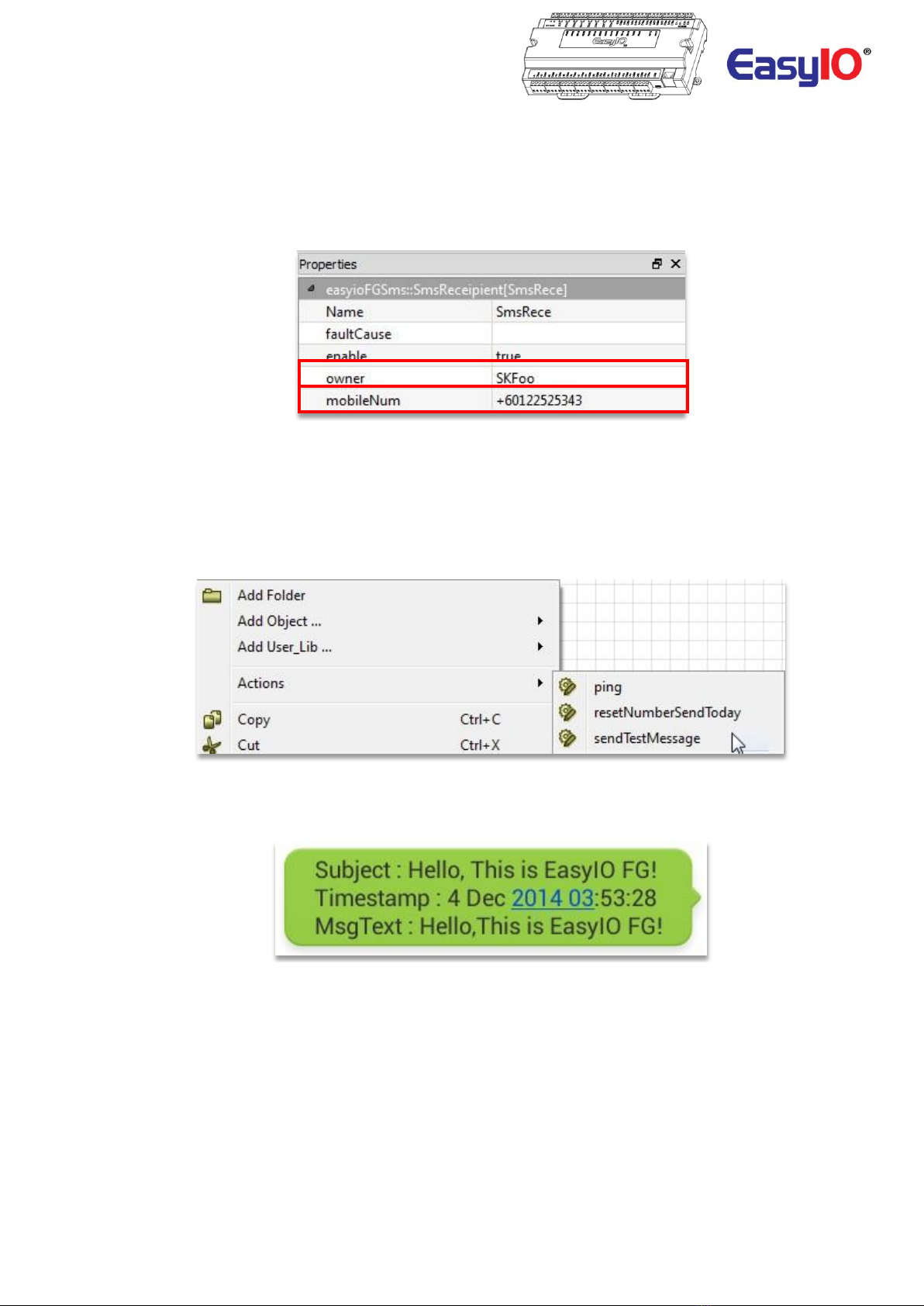
Enter the owner name for reference.
Enter the mobile number including the country dial code.
In the example below the mobile number is Malaysia Mobile number with the prefix +60 as the dialing code and
122525343 as the mobile number.
The mobileNum property supports multiple mobile numbers, each separated by semicolon (;) or a comma (,).
Example of a multiple mobile number entered +60122525343;+60122345678.
Step 7
Trigger a test SMS to test the configurations by right click at the SMS service object.
The test SMS will send to all available recipients under the SMS service.
If the recipient receives the SMS this means that configurations are all good.
Please verify the configurations again if recipient do not receive any SMS.
Example of a test SMS view in the mobile phone.
Autres manuels pour FG Series
2
Ce manuel convient aux modèles suivants
1
Table des matières
Autres manuels EasyIO Matériel réseau


Manuels Matériel réseau populaires d'autres marques

Matrix Switch Corporation
Matrix Switch Corporation MSC-HD161DEL Manuel utilisateur

B&B Electronics
B&B Electronics ZXT9-IO-222R2 Manuel utilisateur

Yudor
Yudor YDS-16 Manuel utilisateur

D-Link
D-Link ShareCenter DNS-320L Manuel utilisateur

Samsung
Samsung ES1642dc Instructions d'utilisation

Honeywell Home
Honeywell Home LTEM-PV Instructions de montage


