EA4TX InterlockV3 Manuel utilisateur

EA4TX InterlockV3
EA4TX Interlock
Users manual
March/2020 Rev 3.1h

Manual Interlock-IP – User guide
Page 2
Introduction
The Interlock is a device intended for use by multioperator contest groups, which
allows monitoring and control of up to 5 radios, and avoiding rule violation in M/S or
M/2 in so far as number of signals on the air refers.
The interlock connects to each radio through two ways:
•PTT: This is an output signal (TX) from the radio which pulls to ground
whenever the radio transmits.
•TX Inhibit: An input signal to the radio which serves to inhibit or
disable transmission of that radio
Note: Not all radios have a TX inhibit input. Rigs such as some Yaesu (FT1000,
1000MP, 2000, etc) or the Elecraft K3 have a connector for TX inhibit
This way, the interlock monitors the TX status of each radio (PTT signal) and after
analyzing priorities and statuses, determines whether it should action the Inhibit in
any of them to block transmission
The interlock has 5 levels of priority and the user assigns a level to each radio, this
level can be changed during a contest. The maximum priority is level 5 and the
minimum priority is level 1. If at a given moment the device detects 2 radios and
determines that one of them should be blocked, it uses the priority level for this. The
radio with the lowest level will be blocked when the Interlock activates the signal
inhibit. In the case of two radios having the same priority level, the last radio to start
transmitting will be the one that is blocked.
It is very important that you read the manual Although the product is
designed to be pure plug & play and is very intuitive, it is worthwhile knowing fully
the different options, both of hardware and software, to be able to get the most
out of it.

Manual Interlock-IP – User guide
Page 3
About this manual
The manual is divided up in 3 sections
At the end, there are 3 annexes which describe the connections with
various different kinds of radios.
Please read the manual carefully before connecting the device. If you
have any doubts of problems, please contact:
Postal address:
Interlanco Comunicaciones
At:. Pablo García - EA4TX
Albasanz 48-50 4º Derecha
28037 Madrid - SPAIN
E-mail:
Web:
http://www.ea4tx.com

Manual Interlock-IP – User guide
Page 4
Section1
EA4TX Interlock V3 Hardware
The interlock has the following connections:
•Power cable for 12-14Vdc.
•Interface with 5 radios using DB9 connectors.
•USB connector for firmware updates
The device has the following connections, seen from the inside:
•X1: USB port to connect to the PC
•CN1:Additional In/Out socket
•CN2:Additional In/Out socket
•J3:Power input (12-14Vdc)
•Radio1 to Radio5: interfaces for each Radio
Inside view of the device:

Manual Interlock-IP – User guide
Page 5
1.1 Sockets R1 – R5: DB9 connection for Radio interface
The interlock supports up to 5 radios, two of which (R4 and R5) can be configured as
Inband.
Each one of these radios has to be connected via the corresponding DB9 socket.
Here is the rear view of the device:
Rear view of the interlock
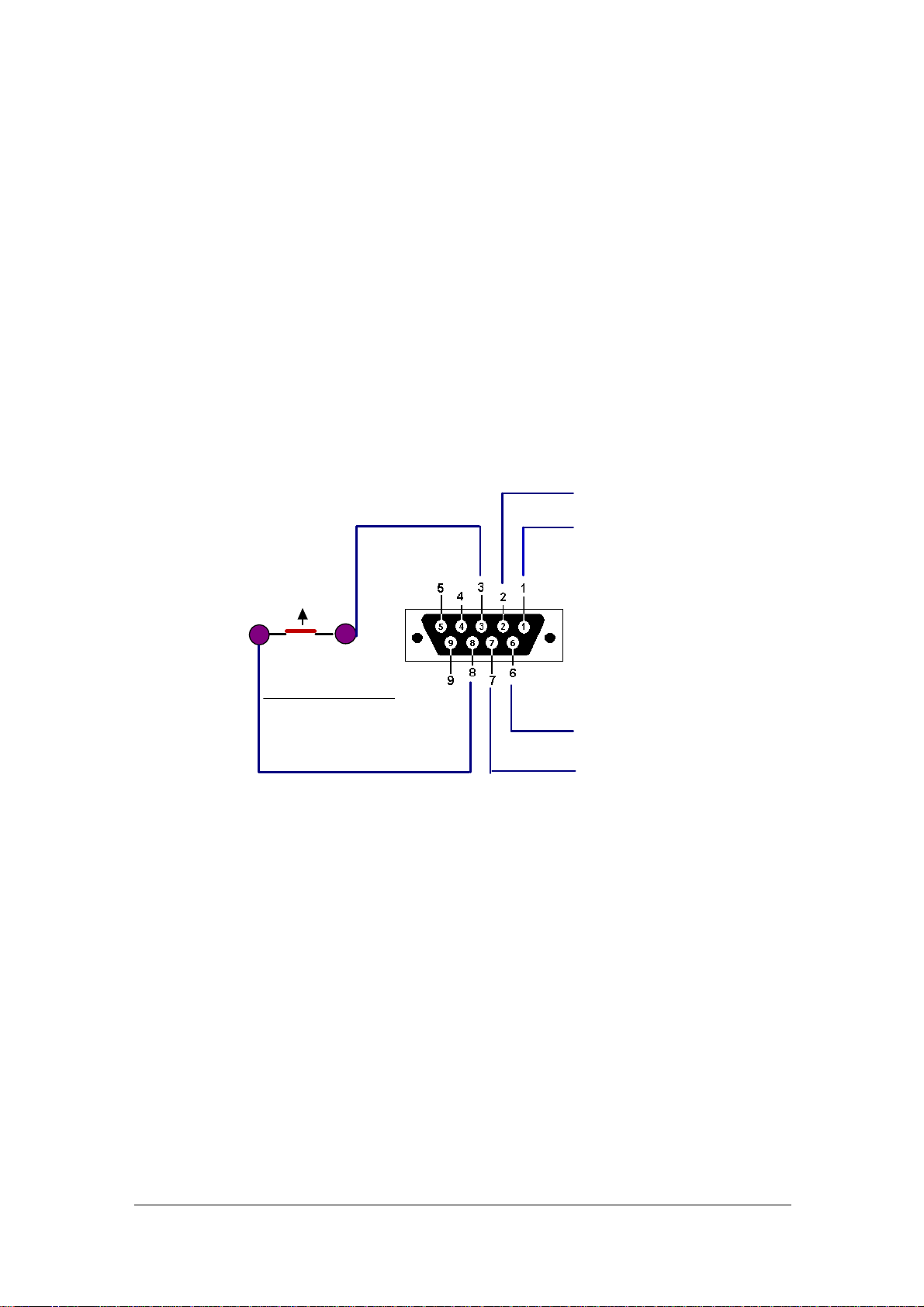
1.2 DB9 pinout
The signals available in this connector are as follows:
•Pin-1: Ground/ Earth
•Pin-2: Signal Inhibit (OUT)
•Pin-3 Connection with Pin 8, idle through a relay
•Pin-4 Not used
•Pin-5 Not used
•Pin-6: Radio PTT entry (IN)
•Pin-7: Auxiliar output signal. Choose between 5 or 12Vdc using JP-A.
•Pin-8: Connected to pin 3, idle through a relay
•Pin-9: Not used
The radios which have a Signal Inhibit (Yaesu, K3) only use 3 signals: Ground,
Inhibit, and PTT.

Manual Interlock-IP – User guide
Page 6
In the radios that don’t have an Inhibit input, the method to stop transmission is:
•SSB: Routing the microphone signal through the relay at pins 3 and 8 of the
DB9. When idle, the pins are connected, but when the block is activated the
relay isolates the pins and the radio cannot send any SSB signals (no input
Mic)
•CW: Routing the CW signal through the relay at pins 3 and 8 on the DB9.
When idle the pins are connected but when the block is activated the pins are
isolated and so no CW signal can be sent.
The auxiliary signal (Pin 7) can be used for radios configured as IN-BAND (R4 or R5)
to activate the switching relay with the Inband station.
Using the JP-A we can select the output level of either 5 or 12V and this level is
common for all radios. The configuration is through a bridge which works as follows:
•1-2: 5V
•2-3: 12V
The DB9 connector schematic is as follows:
GROUND
INHIBIT (Out)
PTT IN (In)
Aux OUT(Out)
Pin3 and Pin8 are:
Joined when Inhibit is OFF Defau t)
Open when Inhibit is ON
Relay
1.3 Jumpers JP-1, JP-2, JP-3, JP-4 and JP-5,
Those jumpers are located close to each of the radio relays. The jumper of the radio
is used (jumper close) when the radio doesn’t include an Inhibit signal so the
Auxiliary PCB is used. In this case, 5V will be present at pin2 when the Inhibit signal
is activated.
So, set the jumper when the Auxiliary Box is going to be used on that radio.
1.4 J1: External power
Power input from 12-14Vdc and 150mA.

Manual Interlock-IP – User guide
Page 7
Section2
Configuration
To enter the Interlock program menu, press the red button or F1. The interlock will
immediately enter the programming mode, showing option screens as follows
•To go to the next menu, press
⇧
(up arrow).
•To return to the previous menu, press
⇩
(down arrow).
•To go on to the next option, press
⇨
(right arrow).
•To go to the previous option, press
⇦
(left arrow).
To save and exit the programming menu, press the red button again.
The device will automatically exit the programming menu if no buttons are
pressed for 9 seconds.
The menus are as follows:
SET1: M/S o M/2
Allows the user to choose between two modes of operation:
•M/S: Maximum 1 signal allowed.
•M/2: Maximum 2 signals allowed.
SET2: Radio 1 - Priority
This defines the priority of Radio 1. Possible values: 1 is the lowest priority and 5 is
the highest.
If the interlock determines that it has to block a radio, it will always block the one with
lower priority. If both radios have the same priority, it will block the last one to start
transmitting.
SET3: Radio 2 - Priority
This defines the priority of Radio 2. Possible values: 1 is the lowest priority and 5 is
the highest.
SET4: Radio 3 - Priority
This defines the priority of Radio 3. Possible values: 1 is the lowest priority and 5 is
the highest.
SET5: Radio 4 – Mode
This defines the mode of operation of radio 4. The possible modes are:

Manual Interlock-IP – User guide
Page 8
•Disabled: There is no radio 4, so its status is not checked
•Normal: Radio 4 is a normal radio (not an Inband)
•Inband->R1: Radio 4 is an Inband radio paired with Radio 1
•Inband->R2: Radio 4 is an Inband radio paired with Radio 2
•Inband->R3: Radio 4 is an Inband radio paired with Radio 3
SET5b: Radio 4 - Priority
This defines the priority of Radio 4. Possible values: 1 is the lowest priority and 5 is
the highest.
SET6: Radio 5 – Mode
This defines the mode of operation of radio 5. The possible modes are:
•Disabled: There is no radio 5, so its status is not checked
•Normal: Radio 5 is a normal radio (not an Inband)
•Inband->R1: Radio 5 is an Inband radio paired with Radio 1
•Inband->R2: Radio 5 is an Inband radio paired with Radio 2
•Inband->R3: Radio 5 is an Inband radio paired with Radio 3
SET6b: Radio 5 - Priority
This defines the priority of Radio 5. Possible values: 1 is the lowest priority and 5 is
the highest.
SET7: USB Port
This determines whether the USB port should be activated or not. The port should
ALWAYS be left deactivated.
Even if the device is in configuration mode, it will continue supervising signals
from the radios and will block whichever one it needs to.

Manual Interlock-IP – User guide
Page 9
Section 3
Operation
The interlock detects and decides in tenths of a microsecond if a radio has activated
the PTT and decides whether it needs to take action on this or any other active radio.
In order to do this it uses an algorithm which prioritizes jobs with respect to others.
So for example it will prioritize when comparing a radio and its Inband partner, since
under no circumstance can both of these radios put a signal on the air at the same
time.
The order in which the jobs are queued is as follows:
1. Radio 4 is analyzed for being Inband or not. If it has the PTT active, and if its
partnered radio (for example R1) is also active.
2. If this is the case, it decides which one should be blocked.
3. The same process is carried out with radio 5: if it’s an Inband radio, if the
PTT is active, and if its partner radio (eg R2) is also active.
4. If this is the case, it decides which one should be blocked.
5. It will now analyze all the rest of the radio that might be active, since in the
previous cases with the Inbands, some of them might be already be blocked.
6. In case it has to block any radio, it will first analyze the priorities of the active
radios and block the one with lower priority.
7. Finally, in the case that the remaining radios have equal priority, the one the
started transmitting first will continue to transmit.
The interlock provides two Operation modes, and this is what determines how many
radios on different bands can be active at the same time:
•M/S: One signal allowed at a time
•M/2: Two signals allowed at a time
IMPORTANT NOTE:
The LCD display only refreshes every 0.5 seconds, therefore it’s possible that a PTT
change may not be showed on the screen although the microprocessor has
monitored it perfectly.

Manual Interlock-IP – User guide
Page 10
3.1: Example Multi-Single 1 RUN and 4 Multis:
This is an example of a Multi/Single station with 1 RUN station and 4 (or less)
multiplier stations
3.2: Example Multi-Single 1 RUN and 1 INBAND and 3Multis:
In this other Multi/Single scenario, there is 1 RUN (R1) and its Inband (R4) plus 3 (or
less) multiplier stations.
Table des matières
Manuels Instrument de mesure populaires d'autres marques

Endress+Hauser
Endress+Hauser Proline Promag 50 Caractéristiques techniques

Siemens
Siemens SITRANS F Coriolis FCT030 Manuel de la liste des pièces

KLINGER
KLINGER CMF V Series Manuel utilisateur

EXFO
EXFO FTB-2 Manuel d'exploitation et d'entretien

Keysight
Keysight M8290A Manuel utilisateur

ADTEK
ADTEK MW-5 Manuel utilisateur