
E-Tool EL-400D Manuel utilisateur

-Tool user's manual
Product Name:E-Tool
Model:EL-400D

Table of Contents
1. -Tool Introduction …………….…………………………………1
2. -Tool keypad Instruction ………….….……………………….. 2
3. Setting ……………………………………. …………….…………... 3
4. Diagnose Sensor Function……………………………………….. 4
5. Auto Duplicate Function …………………………………...…….. 6
6. Manual Duplicate Function …………………..…………………... 7
7. Program Blank Sensor Function…………………………….…... 8
8. Whole Car Learning…………………………………………….….. 9
9. Wireless ID/RL Modify…………………...……………………….. 12
1
1. -Tool Introduction
-Tool is designed to diagnose and interacts with sensor through wireless
(radio frequency). The functions of sensor include:
1. Retrieve data from sensor mounted on the wheels.
2. Verify the identity of sensor mounted on the wheels.
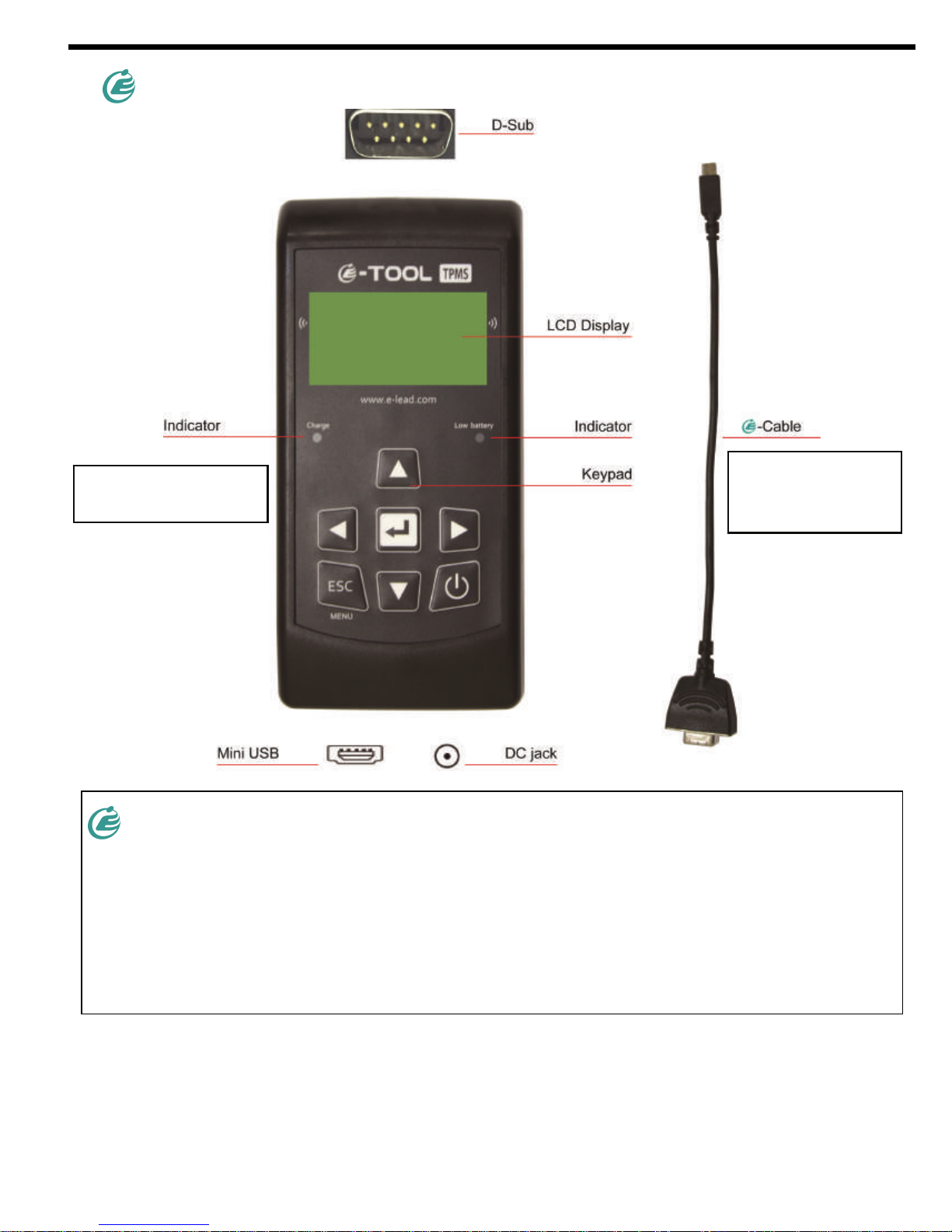
D-Sub is to connect with E-Cable.
DC jack is to connect with adapter for charging.
Mini USB is to connect with PC for software update.
Indicator will turn red
when char
g
in
g
.
Indicator will turn
red when battery
is low.

2
2. -Tool keypad Instruction
Power On/Off.
Enter key, press
enter to select
function or
validate a
parameter.
Navigate through
measured and
parameters.
Esc key, press to
return to the
previous menu
without parameter
validation.

3
3. Setting
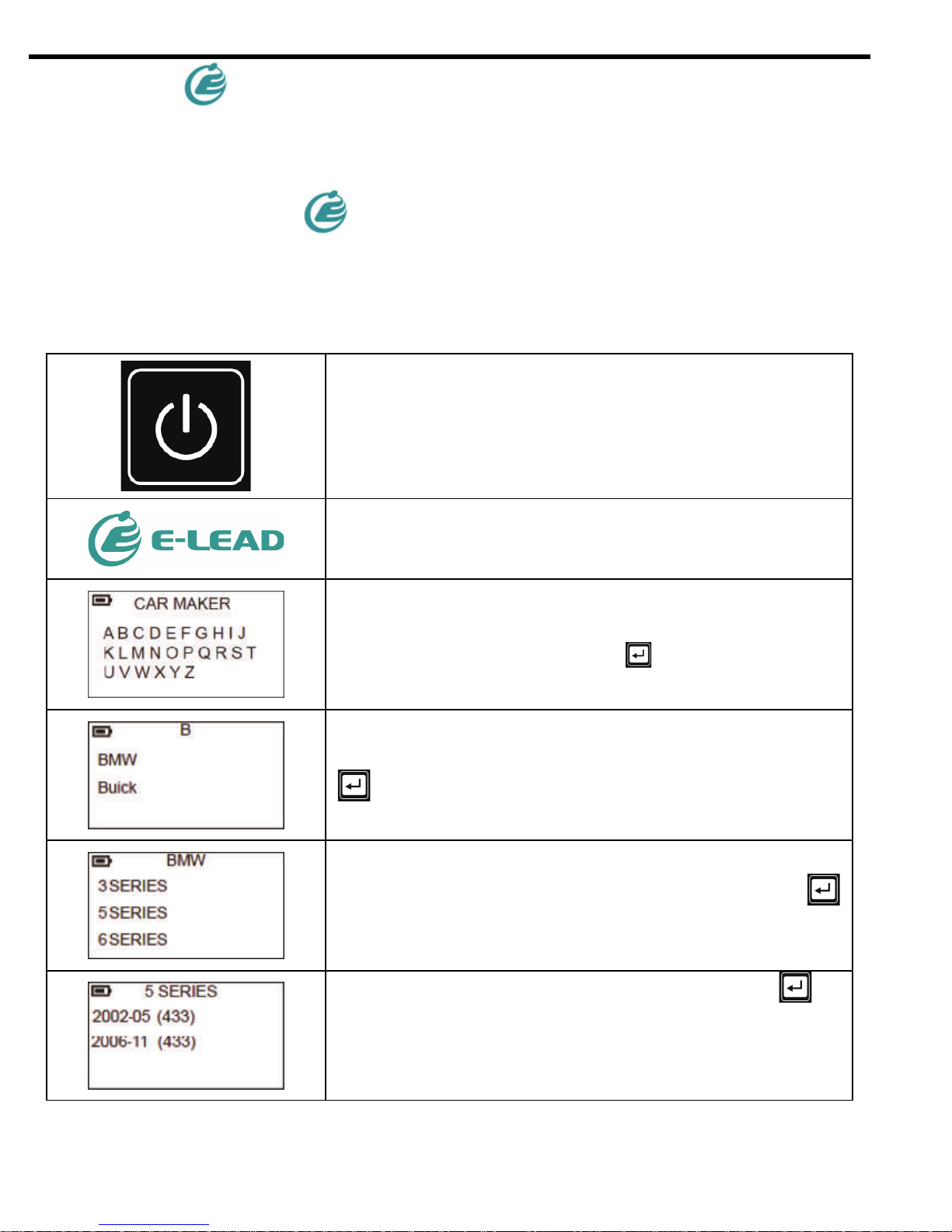
Displays E-LEAD logo.
Press ESC key on CAR MAKER to go to
menu page.
Choose SETUP and enter key to select.
3-1. Language: Use the “Enter” key to choose the language you prefer.
3-2. Temperature: Use the “Enter” key to choose between Fahrenheit and
Celsius.
3-3. Pressure: Use the “Enter” key to choose between PSI, Bar and kPa.
3-4. Format: Use the “Enter” key to choose ID format between decimal and
Hexadecimal.
3-5 .AUTO OFF: -Tool will automatically turn off if you stop using it for a period
of time. You will disable this function by choosing Disable.
3-6. Buzzer: Use the “Enter” key to turn buzz on and off.
3-7. Bluetooth: Use the “Enter” key to turn on and off of Bluetooth.
3-8. Zone: Use the “Enter” key to choose between European version and US
version.
4
3-9. SN: SN is -Tool’s serial number for software update.
3-10 Checksum: It is for engineering check.
3-11 version: VERSION is -Tool’s Firmware version..
4. Diagnose Sensor Function
1. Press and hold the power key to power on the device and the device displays
E-LEAD logo.
Long press to turn on the device.
Displays E-LEAD logo.
Choose car maker by using arrow key to browse
alphabets. Press enter key to select.
Use arrow key to browse automakers. Press enter
key to select.
Use arrow key to browse models. Press enter
key to select.
Use arrow key to browse year. Press enter
key to select.

5
Use arrow key to select DIAGNOSE SENSOR
and press enter key to diagnose.
-Tool will activate the sensor. The sensor
respond time may vary depending on sensor type
and brand.
-Tool will beep after receiving sensor
information.
The picture below is an example of diagnose result:
Notes
Not all sensors transmit every piece of information shown.

6
5. Auto Duplicate Function
This function is designed for you to duplicate an O.E sensor’s ID and program a
new sensor.
Choose car maker by using arrow key to browse
alphabets. Press enter key to select.
Use arrow key to browse automakers. Press
enter key to select.
Use arrow key to browse models. Press enter
key to select.
Use arrow key to browse year. Press enter
key to select.
Use arrow key to select AUTO DUPLICATE and
press enter key to select.
-Tool will display the O.E sensor ID, press the
“Enter”key to program -sensor. -Tool
will beep after receiving sensor information. If
you press ESC, -Tool will delete ID.
Please connect -Tool with -sensor by
E-Cable.

7
-Tool will program the sensor.
You will hear 2 short beeps when programming
successfully.
6. Manual Duplicate Function
This function is designed to duplicate an O.E senor’s ID by keying in its ID. If
-Tool cannot detect sensor, you can put senor’s ID into it.
Choose car maker by using arrow key to browse
alphabets. Press enter key to select.
Use arrow key to browse automakers. Press
enter key to select.
Use arrow key to browse models. Press enter
key to select.
Use arrow key to browse year. Press enter
key to select.
Use arrow key to select MANUAL DUPLICATE
and press enter key to select.
Use the arrow key to browse, Press the “Enter”
key to enter the ID.

8
Please connect -Tool with -sensor by
E-Cable.
-Tool will program the sensor. You will hear 2
short beeps when programming successfully.
7. Program Blank Sensor Function
This design is to program a new ID to a new -sensor, once you cannot get ID
from OE sensor.
Choose car maker by using arrow key to browse
alphabets. Press enter key to select.
Choose car maker by using arrow key to browse
alphabets. Press enter key to select.
Use arrow key to browse models. Press enter
key to select.
Use arrow key to browse year. Press enter
key to select.
Please connect -Tool with -sensor by
E-Cable.
Table des matières


